Aks-engine: AKS engine v0.55.0 Azure Stack Hub - k8s versions 1.16.14 and 1.17.11 disk issues
Describe the bug
When deploying a new k8s cluster version 1.17.11 and 1.16.14 using AKS engine version 0.55.0 we are experiencing an issue where disks are not detaching from node(s) when they are no longer in use.
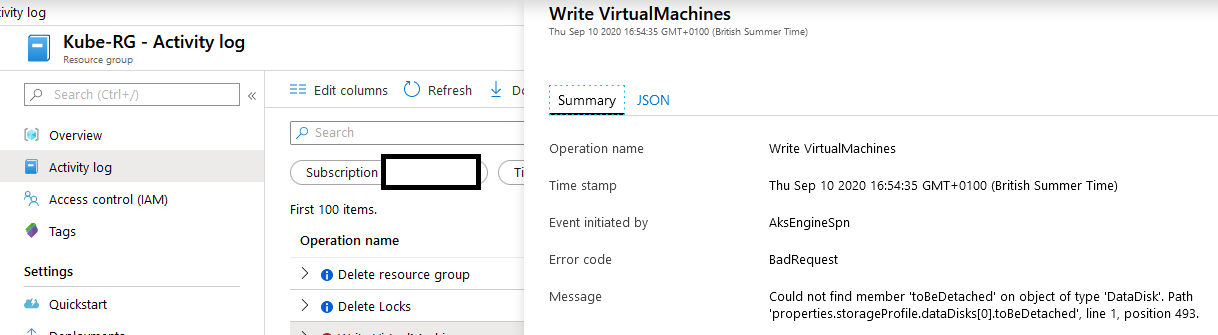
When deleting a k8s deployment the disks in ARM are not detaching. Inspecting the activity logs for the Kubernetes cluster resource group there are Write VirtualMachine errors:
Steps To Reproduce
Deployment command: aks-engine deploy --azure-env AzureStackCloud --location Redacted --resource-group Kube-RG --api-model .\kubernetes-azurestack.json --output-directory cluster-config --client-id Redacted --client-secret Redacted --subscription-id Redacted --debug
API model used:
{
    "apiVersion": "vlabs",
    "location": "",
    "properties": {
        "orchestratorProfile": {
            "orchestratorType": "Kubernetes",
            "orchestratorRelease": "1.17 or 1.16",
            "orchestratorVersion": "1.17.11 or 1.16.14",
            "kubernetesConfig": {
                "cloudProviderBackoff": true,
                "cloudProviderBackoffRetries": 1,
                "cloudProviderBackoffDuration": 30,
                "cloudProviderRateLimit": true,
                "cloudProviderRateLimitQPS": 100,
                "cloudProviderRateLimitBucket": 150,
                "cloudProviderRateLimitQPSWrite": 25,
                "cloudProviderRateLimitBucketWrite": 30,
                "kubernetesImageBase": "mcr.microsoft.com/k8s/azurestack/core/",
                "useInstanceMetadata": false,
                "networkPlugin": "kubenet",
                "kubeletConfig": {
                    "--node-status-update-frequency": "1m"
                },
                "controllerManagerConfig": {
                    "--node-monitor-grace-period": "5m",
                    "--pod-eviction-timeout": "5m",
                    "--route-reconciliation-period": "1m"
                }
            }
        },
        "customCloudProfile": {
            "portalURL": "Redacted",
            "identitySystem": ""
        },
        "featureFlags": {
            "enableTelemetry": true
        },
        "masterProfile": {
            "dnsPrefix": "Redacted",
            "distro": "aks-ubuntu-16.04",
            "count": 3,
            "vmSize": "Standard_D3_v2"
        },
        "agentPoolProfiles": [
            {
                "name": "linuxpool",
                "distro": "aks-ubuntu-16.04",
                "availabilityProfile": "AvailabilitySet",
                "AcceleratedNetworkingEnabled": false,
                "vmSize": "Standard_D3_v2",
                "count": 3
            }
        ],
        "linuxProfile": {
            "adminUsername": "azureuser",
            "ssh": {
                "publicKeys": [
                    {
                        "keyData": "Redacted"
                    }
                ]
            }
        },
        "servicePrincipalProfile": {
            "clientId": "",
            "secret": ""
        }
    }
}
We experienced this issue when deploying the bitnami/kube-prometheus Helm chart at version 1.1.0. Once you delete the release using helm delete kube-prometheus you will begin to see errors in the activity log for the resource group.
Expected behavior
No errors occur and disks detach correctly.
AKS Engine version
0.55.0
Kubernetes version
1.17.11 and 1.16.14
Additional context
We are running Azure Stack Hub at the latest hotfix version 1.2005.12.66.
 dbrennand
All 7 comments
Root Cause:
The API version AKS Engine uses is newer than the version ARM is using on Azure Stack Hub, which does not have the "toBeDetached" property in the disk detach request. As a result, the disk detach operation cannot be fulfilled, which causes Persistent Volume delete failure.
Mitigation:
If one Persistent Volume cannot be deleted, please follow the below steps to manually detach the disk and then delete the Persistent Volume.
- Locate the Persistent Volume that cannot be deleted.
Run following command:
kubectl get pv
You should find the Persistent Volume with status "Failed" like the following. Please remember the Persistent Volume somewhere else.
NAME                                       CAPACITY   ACCESS MODES   RECLAIM POLICY   STATUS   CLAIM                 STORAGECLASS   REASON   AGE
pvc-f24b0cb5-725f-43f7-a735-88924b324c49   5Gi        RWO            Delete           Failed   default/dynamic-pvc   default                 3m28s
- If you are using PowerShell Azure CLI, please run the following commands to detach the disk.
# replace the Persistent Volume name
$pvName = "pvc-f24b0cb5-725f-43f7-a735-88924b324c49"
$pv = kubectl get pv $pvName -o json | ConvertFrom-Json
$disk = az disk show --ids $pv.spec.azureDisk.diskURI | ConvertFrom-Json
$vm = az vm show --ids $disk.managedBy | ConvertFrom-Json
az vm disk detach --name $disk.name --resource-group $disk.resourceGroup --vm-name $vm.name
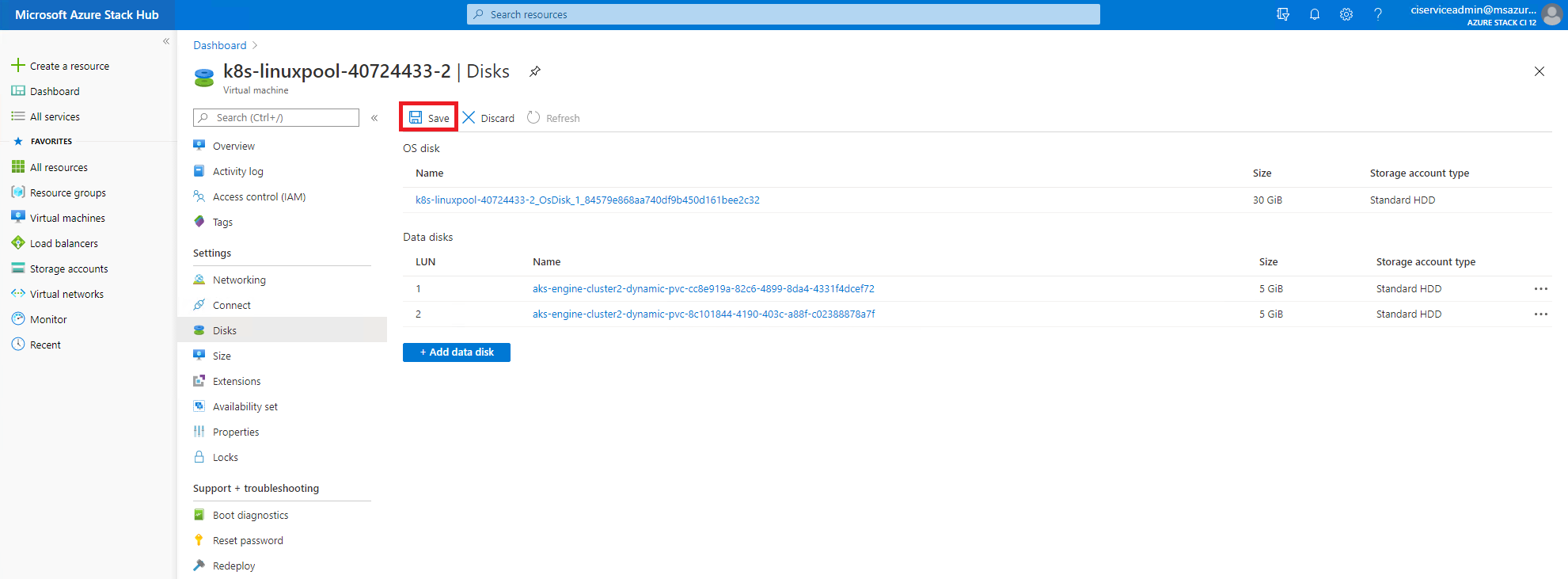
- If you are using Azure Stack Hub Portal, please follow the steps below:
a. Go to the Resource Group where your Kubernetes cluster is living. Find the Disk with the Persistent Volume name as the suffix. Click the Disk name.

b. Click the Owner VM.
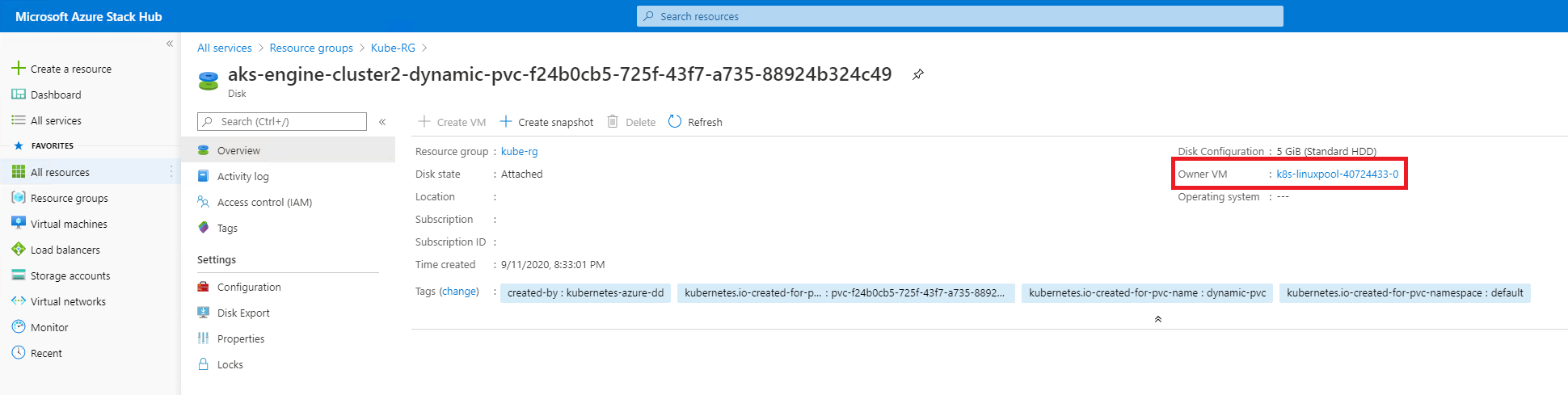
c. Click Edit
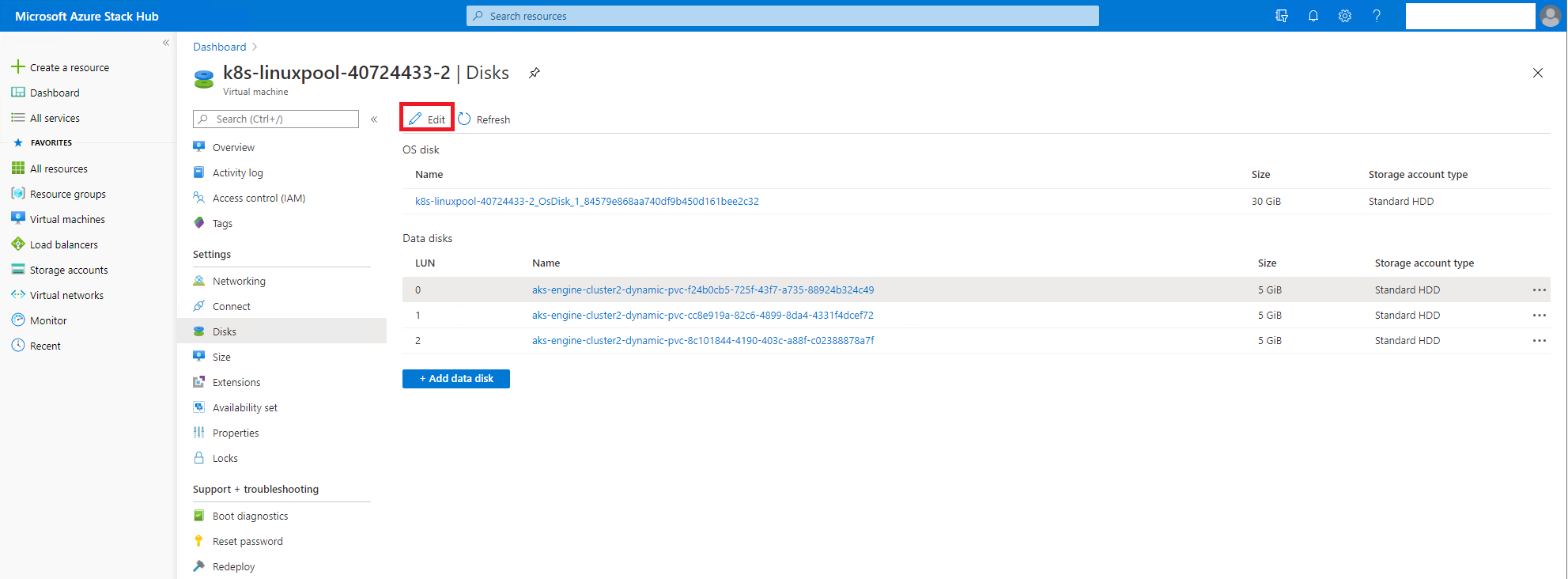
d. Find the disk you want to detach from the VM, click the three dots, and then click Detach. Please make sure the disk name matches what you see in step b.
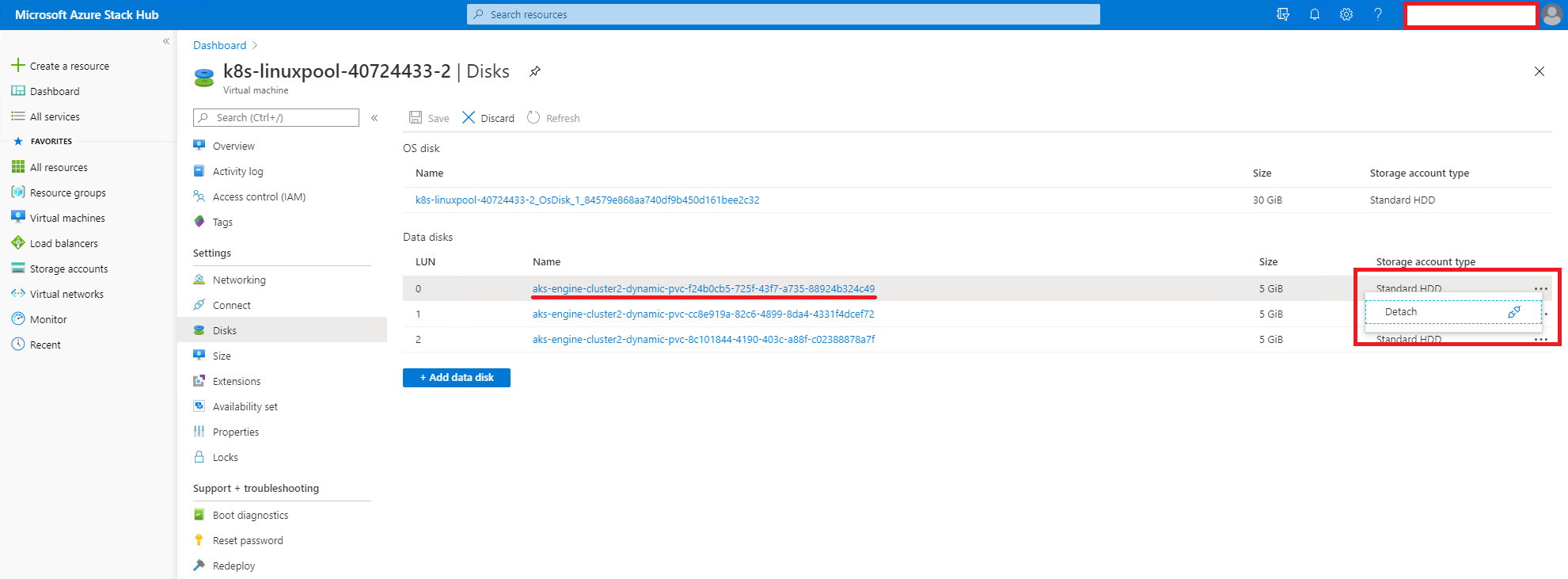
e. Click Save
- Delete the Persistent Volume as you need.
kubectl delete pv <pvName>
 songjiaxun
on 11 Sep 2020
songjiaxun
on 11 Sep 2020
I made this toBeDetached change: https://github.com/kubernetes/kubernetes/pull/91948, so what's the next step to fix this issue permanently, there are a few options:
- Azure stack supports
toBeDetached - not use
toBeDetachedin Azure disk CSI driver if as.cloud.Environment.Name == "AZURESTACKCLOUD", there is a issue to track this:
https://github.com/kubernetes-sigs/azuredisk-csi-driver/pull/445#issuecomment-659947517
Looks like we need to fix it in Azure disk CSI driver
cc @niachary
 andyzhangx
on 18 Sep 2020
andyzhangx
on 18 Sep 2020
Looks like we also need fix this issue on in-tree azure disk driver, it's now broken on Azure Stack too.
We sometimes use new features, while that new feature may break on some regions or cloud.
cc @VybavaRamadoss
andyzhangx
on 18 Sep 2020
would be fixed by https://github.com/kubernetes/kubernetes/pull/94885
andyzhangx
on 18 Sep 2020
Release v0.55.4 patched this issue.
 jadarsie
on 24 Sep 2020
jadarsie
on 24 Sep 2020
Awesome 🚀. Thanks for all the hard work on this guys! 👍 Happy Azure Stacking! 😄
dbrennand
on 25 Sep 2020
Could not agree more! Happy Azure Stacking!
Thanks guys!
 cblackuk
on 25 Sep 2020
cblackuk
on 25 Sep 2020
Related issues
 jackfrancis
·
6Comments
jackfrancis
·
6Comments
 PascalVA
·
4Comments
PascalVA
·
4Comments
 sylus
·
5Comments
sylus
·
5Comments
 sylr
·
4Comments
jackfrancis
·
5Comments
sylr
·
4Comments
jackfrancis
·
5Comments