Aks-engine: Windows nodes don't join cluster if using custom net
Describe the bug
I am creating a custom vnet and two subnets for an AKS mixed-node cluster, with one subnet for the master and another for the workers. When I run "kubectl get nodes", it returns the Linux worker nodes, but not the Windows worker nodes.
I am able to ping the Linux worker node IP addresses from the master node, but not the Windows worker node IP addresses, even though all worker nodes are on the same subnet.
If I deploy without the custom vnet and let aks-engine configure the networking, both the Linux and Windows nodes are returned by the kubectl command, and I am able to deploy workloads to the Linux and Windows nodes.
Steps To Reproduce
{
"apiVersion": "vlabs",
"properties": {
"orchestratorProfile": {
"orchestratorType": "Kubernetes"
},
"masterProfile": {
"count": 1,
"dnsPrefix": "",
"vmSize": "Standard_D2_v3",
"vnetSubnetId": "/subscriptions/SUBSCRIPTION_ID/resourceGroups/RESOURCE_GROUP_NAME/providers/Microsoft.Network/virtualNetworks/CustomVNET/subnets/MasterSubnet",
"firstConsecutiveStaticIP": "10.100.0.5"
},
"agentPoolProfiles": [
{
"name": "linuxpool1",
"count": 2,
"vmSize": "Standard_D2_v3",
"availabilityProfile": "AvailabilitySet",
"vnetSubnetId": "/subscriptions/SUBSCRIPTION_ID/resourceGroups/RESOURCE_GROUP_NAME/providers/Microsoft.Network/virtualNetworks/CustomVNET/subnets/SUBNET"
},
{
"name": "windowspool2",
"count": 2,
"vmSize": "Standard_D2_v3",
"availabilityProfile": "AvailabilitySet",
"osType": "Windows",
"vnetSubnetId": "/subscriptions/SUBSCRIPTION_ID/resourceGroups/RESOURCE_GROUP_NAME/providers/Microsoft.Network/virtualNetworks/CustomVNET/subnets/SUBNET"
}
],
"windowsProfile": {
"adminUsername": "
"adminPassword": "
},
"linuxProfile": {
"adminUsername": "
"ssh": {
"publicKeys": [
{
"keyData": ""
}
]
}
},
"servicePrincipalProfile": {
"clientId": "",
"secret": ""
}
}
}
Below is the JSON for the custom vnet. I have tried creating the VNET in a separate resource group, and in the same resource group as the AKS cluster where I am deploying. I get the same behavior.
{
"$schema": "https://schema.management.azure.com/schemas/2015-01-01/deploymentTemplate.json#",
"contentVersion": "1.0.0.0",
"parameters": {},
"variables": {},
"resources": [
{
"apiVersion": "2018-06-01",
"location": "[resourceGroup().location]",
"name": "CustomVNET",
"properties": {
"addressSpace": {
"addressPrefixes": ["10.0.0.0/8"]
},
"subnets": [
{
"name": "masterSubnet",
"properties": {
"addressPrefix": "10.100.0.0/16"
}
},
{
"name": "agentSubnet",
"properties": {
"addressPrefix": "10.200.0.0/16"
}
},
]
},
"type": "Microsoft.Network/virtualNetworks"
}
]
}
Expected behavior
The Windows worker nodes should join the cluster when deploying with a custom vnet.
AKS Engine version
0.37.2
Kubernetes version
1.14
Additional context
 msbecker
All 22 comments
👋 Thanks for opening your first issue here! If you're reporting a 🐞 bug, please make sure you include steps to reproduce it.
![welcome[bot] picture](https://avatars.githubusercontent.com/in/4141?v=4&s=40) welcome[bot]
on 30 Jun 2019
welcome[bot]
on 30 Jun 2019
Experiencing the same issue, when using custom vnet with azure CNI the windows nodes won't join the cluster.
This is quite urgent as I am working on creating a windows cluster to merge our on-prem stuff to cloud...
Is there any workaround?? I also noticed no logs and when I ran kubelet.exe I got
C:\k>kubelet.exe
F0702 16:11:03.124205 3824 server.go:215] [invalid configuration: CgroupsPerQOS (--cgroups-per-qos) true is not supported on Windows, invalid configuration: EnforceNodeAllocatable (--enforce-node-allocatable) [pods] is not supported on Windows]
 Alwandy
on 2 Jul 2019
Alwandy
on 2 Jul 2019
Seems to be related to https://github.com/Azure/aks-engine/issues/371
Alwandy
on 2 Jul 2019
This scenario seemed to be working when https://github.com/Azure/aks-engine/pull/1314#issuecomment-493212424 merged, which means this is likely a regression. Part of this work should be to enable a regular windows + custom vnet test to ensure that this doesn't regress again. /cc @PatrickLang
 CecileRobertMichon
on 2 Jul 2019
CecileRobertMichon
on 2 Jul 2019
@alwandy - were there errors in c:azuredatacustomdata.log?
 PatrickLang
on 2 Jul 2019
PatrickLang
on 2 Jul 2019
@PatrickLang
I just RDP into the VM and ran kubelete.exe
Alwandy
on 2 Jul 2019
Has anyone been able to do this with previous versions of AKS Engine? @Alwandy did you try the same deployment with AKS Engine v0.36?
CecileRobertMichon
on 2 Jul 2019
Doing it now, will update you
Alwandy
on 2 Jul 2019
Looking at C:AzureDataCustomDataSetupScript.log
it ends with this error
C:\AzureData\CustomDataSetupScript.ps1 : Cannot bind argument to parameter 'MasterSubnet' because it is an empty
string.
At line:1 char:1
+ C:\AzureData\CustomDataSetupScript.ps1 -MasterIP 10.100.0.5 -KubeDnsS ...
+ ~~~~~~~~~~~~~~~~~~~~~~~~~~~~~~~~~~~~~~~~~~~~~~~~~~~~~~~~~~~~~~~~~~~~~
+ CategoryInfo : NotSpecified: (:) [Write-Error], WriteErrorException
+ FullyQualifiedErrorId : Microsoft.PowerShell.Commands.WriteErrorException,CustomDataSetupScript.ps1
Definitely seems related to https://github.com/Azure/aks-engine/pull/1314/files
CecileRobertMichon
on 3 Jul 2019
both MasterSubnet and VNetCIDR are empty in c:\azuredata\CustomDataSetupScript.ps1. That's a problem
$global:VmType = "vmss"
$global:SubnetName = "ExampleMasterSubnet"
$global:MasterSubnet = ""
$global:SecurityGroupName = "k8s-master-31129968-nsg"
$global:VNetName = "ExampleCustomVNET"
$global:RouteTableName = "k8s-master-31129968-routetable"
$global:PrimaryAvailabilitySetName = ""
$global:PrimaryScaleSetName = "k8s-linuxpool1-31129968-vmss"
$global:KubeClusterCIDR = "10.240.0.0/12"
$global:KubeServiceCIDR = "10.0.0.0/16"
$global:VNetCIDR = ""
$global:KubeletNodeLabels = "node-role.kubernetes.io/agent=,kubernetes.io/role=agent,agentpool=agentwin,storageprofile=managed,storagetier=Standard_LRS,kubernetes.azure.com/cluster=custom0702rg"
$global:KubeletConfigArgs = @( "--address=0.0.0.0", "--anonymous-auth=false", "--authorization-mode=Webhook", "--azure-container-registry-config=c:\k\azure.json", "--cgroups-per-qos=false", "--client-ca-file=c:\k\ca.crt", "--cloud-config=c:\k\azure.json", "--cloud-provider=azure", "--cluster-dns=10.0.0.10", "--cluster-domain=cluster.local", "--enforce-node-allocatable=""""", "--event-qps=0", "--eviction-hard=""""", "--feature-gates=PodPriority=true,RotateKubeletServerCertificate=true", "--hairpin-mode=promiscuous-bridge", "--image-gc-high-threshold=85", "--image-gc-low-threshold=80", "--image-pull-progress-deadline=20m", "--keep-terminated-pod-volumes=false", "--kubeconfig=c:\k\config", "--max-pods=30", "--network-plugin=cni", "--node-status-update-frequency=10s", "--non-masquerade-cidr=0.0.0.0/0", "--pod-infra-container-image=kubletwin/pause", "--pod-max-pids=-1", "--resolv-conf=""""", "--rotate-certificates=true", "--streaming-connection-idle-timeout=5m", "--system-reserved=memory=2Gi", "--tls-cipher-suites=TLS_ECDHE_ECDSA_WITH_AES_128_GCM_SHA256,TLS_ECDHE_RSA_WITH_AES_128_GCM_SHA256,TLS_ECDHE_ECDSA_WITH_CHACHA20_POLY1305,TLS_ECDHE_RSA_WITH_AES_256_GCM_SHA384,TLS_ECDHE_RSA_WITH_CHACHA20_POLY1305,TLS_ECDHE_ECDSA_WITH_AES_256_GCM_SHA384,TLS_RSA_WITH_AES_256_GCM_SHA384,TLS_RSA_WITH_AES_128_GCM_SHA256" )
And that's because azuredeploy.parameters.json has:
"vnetCidr": {
"value": ""
},
Just wanted to add in, I tried 0.36 same issue.
@PatrickLang I'll try redeploy again but this time with vnetcidr set to the subnet range.
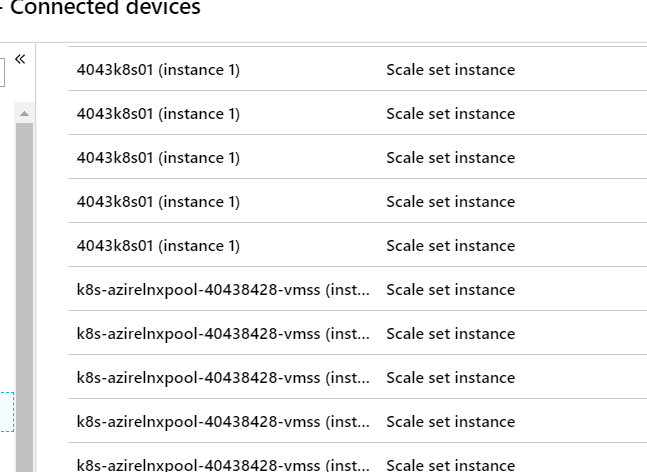
FYI, the VMSS do join the VNET though!
Alwandy
on 3 Jul 2019
vnetCidr should have a default value... https://github.com/Azure/aks-engine/blob/master/pkg/engine/templates_generated.go#L21493
CecileRobertMichon
on 3 Jul 2019
@CecileRobertMichon @PatrickLang
Setting the vnetCIDR resolved it.
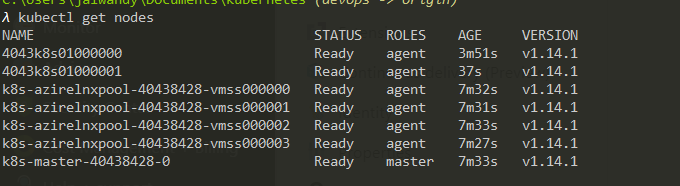
Using 0.36 and k8s 1.14.1, will do 0.37.4 and 1.15.0 now.
Alwandy
on 3 Jul 2019
Great.
IMO we should leave this issue open to address:
1) Lack of E2E signal for Windows + custom vnet
2) Investigate why the default VnetCidr param value isn't applied
3) Add custom vnet doc specific to Windows
CecileRobertMichon
on 3 Jul 2019
Also VNET CIDR do get a default value, it's the parameter who sets it to NIL.
``` "vnetCidr": {
"defaultValue": "10.0.0.0/8",
"metadata": {
"description": "Cluster vnet cidr"
},
"type": "string"
````
// DefaultVNETCIDR is the default CIDR block for the VNET
DefaultVNETCIDR = "10.0.0.0/8"
@CecileRobertMichon
point 1 - agree, let's add a test
point 2 -
azuredeploy.json
    "vnetCidr": {
      "defaultValue": "10.0.0.0/8",
      "metadata": {
        "description": "Cluster vnet cidr"
      },
      "type": "string"
    },
azuredeploy.parameters.json overrides this with the empty string. need to root cause that
for the 3rd point - I don't think we need a new doc. there's nothing different once #2 is fixed
PatrickLang
on 3 Jul 2019
I can confirm both the bug and the fix. Using aks-engine v0.37.4, k8s v1.14.3
aks-engine creates a default value for vnetCidr in azuredeploy.json, but the value is left blank in the parameters file. So the default value gets overwritten and set to null. Windows worker nodes fail to join the cluster; the linux nodes do join.
If I manually add my vnet CIDR value to the parameters file and deploy, the windows nodes join the cluster and I can deploy workloads to them.
msbecker
on 3 Jul 2019
@msbecker can you give 0.38.0 a try? it has this fix https://github.com/Azure/aks-engine/releases/tag/v0.38.0
PatrickLang
on 8 Jul 2019
@PatrickLang That did the trick. Upgraded to v38. Windows nodes now join the cluster without me having to update the parameters file with the vnetCidr value.
msbecker
on 9 Jul 2019
Related issues
 serbrech
·
5Comments
serbrech
·
5Comments
 jackfrancis
·
6Comments
jackfrancis
·
6Comments
 lukasmrtvy
·
6Comments
lukasmrtvy
·
6Comments
 ritazh
·
6Comments
ritazh
·
6Comments
 OldSchooled
·
5Comments
OldSchooled
·
5Comments
Most helpful comment
@CecileRobertMichon
point 1 - agree, let's add a test
point 2 -
azuredeploy.jsonazuredeploy.parameters.json overrides this with the empty string. need to root cause that
for the 3rd point - I don't think we need a new doc. there's nothing different once #2 is fixed