Look forward to using your app once it comes out as i'm currently using balsamiq and pencil for UI designing and would suggest that you package it as an appimage to ensure it easily runnable on any linux distro.
 philipzae
All 74 comments
__Edit 2020: An AppImage for testing is available now at:
https://github.com/probonopd/Akira/releases/tag/continuous__
 probonopd
on 2 Dec 2017
probonopd
on 2 Dec 2017
Thanks guys, I will definitely package it as an AppImage to make it available and usable in every distro.
I'm working on the first pre-alpha draft, and actually, I decided to code it in Vala and Gtk, which I found myself more comfortable than Qt.
I should be able to release something really basic, but usable, before the end of the month. Maybe some of you could contribute with a PR for the travis file to aut trigger the compiling of an appimage. That'd be neet.
Cheers
 Alecaddd
on 2 Dec 2017
Alecaddd
on 2 Dec 2017
Please see https://github.com/probonopd/linuxdeployqt, it has a template that you can literally copy and paste and go from there.
probonopd
on 2 Dec 2017
@probonopd Does this work with Vala and CMake apps as well? I'm not using Qt anymore.
Alecaddd
on 2 Dec 2017
Yes. See the CMake section on https://github.com/probonopd/linuxdeployqt.
probonopd
on 2 Dec 2017
Hi @probonopd, I'm trying to build an AppImage for Akira but it keeps failing.
Here's the file: https://github.com/Alecaddd/Akira/blob/appimage/.travis.yml
Alecaddd
on 23 Dec 2017
By default is installing old versions of the required dependencies.
Is this related to the fact that I need to compile for trusty?
Found gtk+-3.0, version 3.10.8
--   Found granite, version 0.1.4
--   Found glib-2.0, version 2.40.2
--   Found gee-0.8, version 0.20.0
--   Found gobject-2.0, version 2.40.2
--   Found libxml-2.0, version 2.9.1
--   Found gtksourceview-3.0, version 3.10.2
Is there a way to specify an updated or specific version during the apt-get install process?
Alecaddd
on 23 Dec 2017
Yes. We recommend to build for the oldest still-supported LTS (Long Term Support) version which is 14.04 trusty at the moment, so that the resulting AppImage will be compatible with those systems, too. So you need to find versions of those dependencies that are new enough to work with Akira, but for 14.04. Maybe there are PPAs, maybe you need to compile them from source.
probonopd
on 23 Dec 2017
@probonopd I'm adding all the necessary PPAs and travis seems to install everything correctly, but the process exits with this error:
iconToBeUsed: "/home/travis/build/Alecaddd/Akira/appdir/usr/share/icons/hicolor/64x64/apps/com.github.alecaddd.akira.svg"
ERROR: Could not copy "/home/travis/build/Alecaddd/Akira/appdir/usr/share/icons/hicolor/64x64/apps/com.github.alecaddd.akira.svg" to "/home/travis/build/Alecaddd/Akira/appdir/com.github.alecaddd.akira.svg"
The icon is there and I'm copying everything. Do you know how I can troubleshoot this?
Alecaddd
on 23 Dec 2017
@Alecaddd smells like this might be a linuxdeployqt bug. Can you point me to a Travis CI build where I can see this?
probonopd
on 27 Dec 2017
There you go:
https://travis-ci.org/Alecaddd/Akira/builds/320772567
Thanks for taking the time to check this
Alecaddd
on 27 Dec 2017
Triggered a build, let's see how it goes:
https://travis-ci.org/probonopd/Akira/builds
probonopd
on 27 Dec 2017
Thanks for checking, be sure to build off of the appimage branch. I removed methods and features not supported by those packages version
Alecaddd
on 27 Dec 2017
Very strange. It seems like in the second run of linuxdeployqt it does not recognize the pre-existing icon here:
It _should_ recognize the pre-existing icon and not attempt to copy it (again):
https://github.com/probonopd/linuxdeployqt/blob/master/tools/linuxdeployqt/main.cpp#L324-L326
But for some strange reason this is not working as it should...
probonopd
on 27 Dec 2017
https://github.com/Alecaddd/Akira/blob/0d0aa391c4f43eeaa8a998daddb7167af559ae87/.travis.yml#L4
This is much too new. The resulting AppImage would only run on late-2016 and newer distributions, which kinda defeats the point. Please lower the build-time requirements to the oldest still-supported Ubuntu LTS version, which is at this point 14.04 trusty.
I am not even sure whether linuxdeployqt works properly on such new systems.
probonopd
on 27 Dec 2017
Lowered the target to trusty but I get the same error with the missing icon.
Alecaddd
on 27 Dec 2017
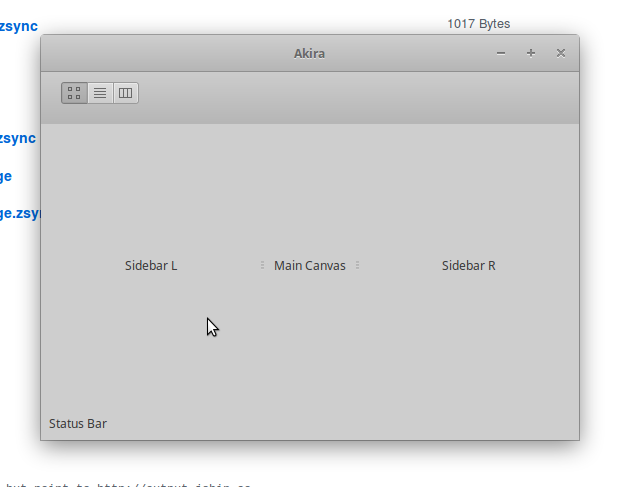
Looks like I am getting somewhere with my builds but the UI looks a bit off, maybe this needs to be tweaked for trusty?
probonopd
on 27 Dec 2017
Oh wow, that's a good sign!
Can you make a PR to the appimage branch with the edits you made to make it work?
With that, I can start tweaking the app to make it compatible with Trusty and test everything locally.
EDIT: I saw you linked the travis file in the comment. I'll use that. Thank you so much! 👍
Alecaddd
on 27 Dec 2017
Ok, I'm getting super excited about this!
The deployment via Travis works, just a couple of things are missing.
I need to use a couple of slightly more updated packages. Considering that I can build from source inside travis, is it ok for AppImage? It won't create any issue if the OS or the Distro doesn't have those packages, right? Is everything embedded into the app?
The AppImage comes without an icon, is there something I'm missing?
Cheers
Alecaddd
on 30 Dec 2017
I need to use a couple of slightly more updated packages. Considering that I can build from source inside travis, is it ok for AppImage?
Yes. As long as it is not one of the blacklisted libs (which we expect to come from the system) you should generally be fine.
The AppImage comes without an icon, is there something I'm missing?
Where exactly is the icon missing? Please use QApplication::setWindowIcon().
probonopd
on 30 Dec 2017
Look at the Bash script that I used to build Ricin when I was developing it. It's Vala/Gtk+3 based so you should have minor tweaks to apply :)
 SkyzohKey
on 26 Jan 2018
SkyzohKey
on 26 Jan 2018
@SkyzohKey this is a very manual way of doing things; in the meantime, using linuxdeployqt may be an easier route - although I haven't tried it on Vala/Gtk+3 apps specifically so far.
probonopd
on 28 Jan 2018
@probonopd Yeah but this project is no longer Qt driven. If I understand correctly it's now 100% GTYK+3/Vala. And the file you made for Ricin should be simple to adapt to Akira' usecase :)
EDIT: nvm, linuxdeployqt looks promising, great work guy!
SkyzohKey
on 30 Jan 2018
Despite its name, linuxdeployqt also works for non-Qt software.
probonopd
on 30 Jan 2018
Hi !
I've been trying to install akira on arch (using meson but also from a repo on yaourt)
But in both cases there is a problem with the interface. I don't get any error message in my terminal, and I don't really know where to look for a log.
I saw that @probonopd had a similar issue, I'm looking for clues :)

 armansansd
on 4 Apr 2018
armansansd
on 4 Apr 2018
That looks like it's supposed to.
Akira is still in early development, and the screenshot in the readme file it's just a mockup.
Still, a long way to go and many hours of coding before it'll be usable.
Cheers
Alecaddd
on 4 Apr 2018
Ho sorry !
well then it's working perfectly.
Good luck with your project, I can't wait to test it :)
armansansd
on 5 Apr 2018
Hello, I can't run the appimage on open suse tumbleweed, it complains about libthai, At the moment the libthai version on open suse tumbleweed is 0.1.27-2.1.
'''
$./Akira-d74196b-x86_64.AppImage
akira: /tmp/.mount_Akira-2YuEj3/usr/lib/libthai.so.0: version `LIBTHAI_0.1.25' not found (required by /usr/lib64/libpango-1.0.so.0)
'''
 ni-code
on 25 Jun 2018
ni-code
on 25 Jun 2018
As per https://github.com/AppImage/AppImages/blob/master/excludelist, libthai should __not__ be bundled inside the AppImage.
probonopd
on 25 Jun 2018
Is there any workaround to run the appimage in suse tumbleweed?
I'm sorry for the off-topic question, I'm not a developer.
ni-code
on 25 Jun 2018
I'd suggest to not stress too much for now 😄
Akira is still in early development and it doesn't work at all.
As soon as a barely usable alpha is ready, I will be sure to build the AppImage by myself and release it globally.
Thank you so much for your interest in Akira, it's a massive project that needs a lot of works, but it will happen soon.
Cheers
Alecaddd
on 25 Jun 2018
:raised_back_of_hand: I'd like to volunteer to take on building an AppImage once we're ready. I have a little bit of experience with it.
 xordspar0
on 25 Jan 2019
xordspar0
on 25 Jan 2019
Hello, I can't run the appimage on open suse tumbleweed, it complains about libthai, At the moment the libthai version on open suse tumbleweed is 0.1.27-2.1.
Hello, same issue here. Most likely, libpango is missing from the AppImage.
 jpcima
on 30 May 2019
jpcima
on 30 May 2019
any update?
I am searching for Appimage release, can't found it in README. thanks.
 azzamsa
on 16 Aug 2020
azzamsa
on 16 Aug 2020
I have started __from scratch__ on working on an AppImage build (using my new go-based appimagetool and GitHub Actions):
https://github.com/probonopd/Akira/blob/patch-2/.github/workflows/build.yml
AppImage for testing is available at:
https://github.com/probonopd/Akira/releases/tag/continuous
(Note that this AppImage bundles _everything_ including glibc and Gtk, so it should run even on older systems than the build system.)
probonopd
on 16 Aug 2020
This is what I currently get.
I suppose it tries to load (some but not all) icons from a wrong (system-wide rather than relative) location, and something with fontconfig is broken.
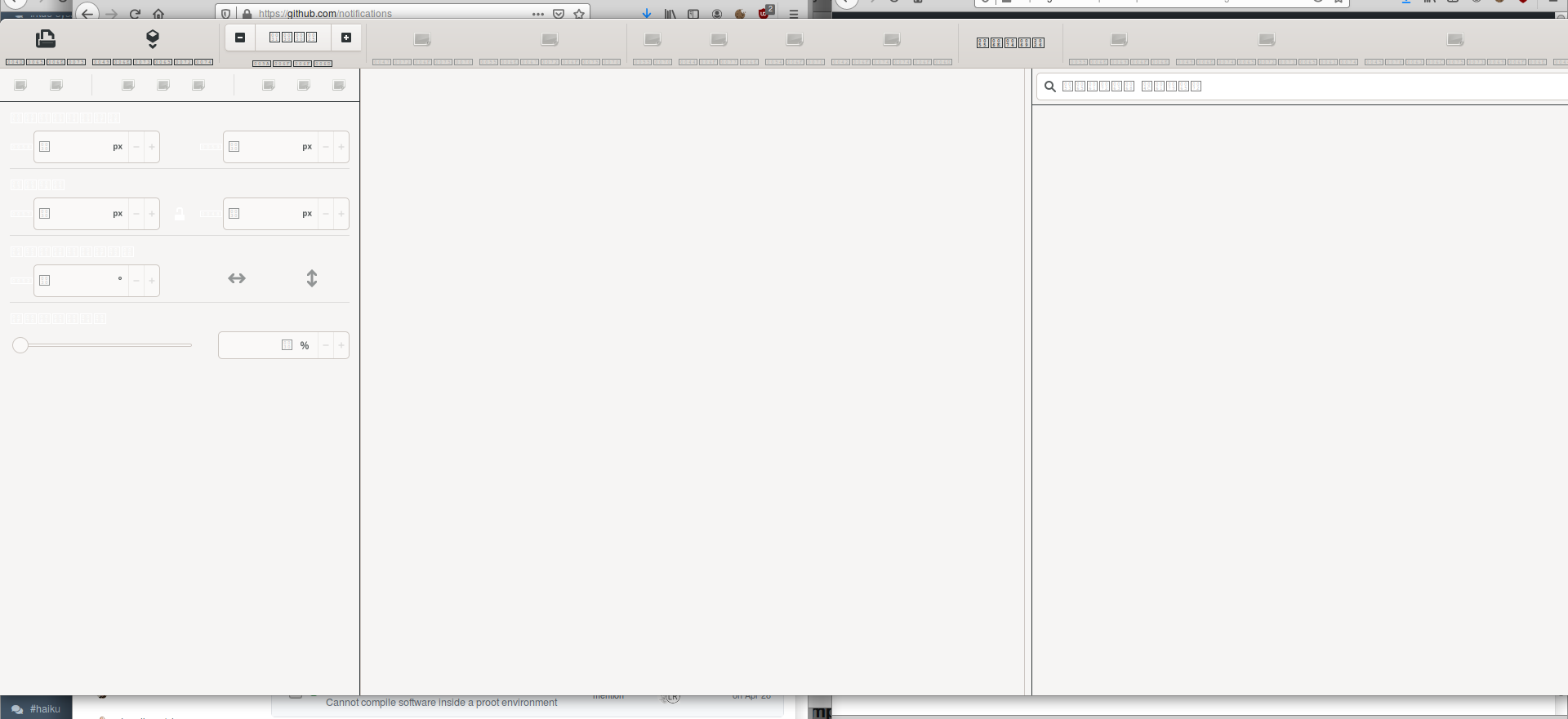
But hey, I have a running application on a Xubuntu 18.04 system... it's a start. Anyone has any ideas?
probonopd
on 16 Aug 2020
Could it be that instead of the Gtk default theme and Adwaita icon theme we need to bundle an Elementary specific theme and icon theme?
probonopd
on 16 Aug 2020
Yes, Akira relies on the elementary OS theme and icons.
Those should be bundled inside the appimage like we're doing for snap and flatpak to guarantee visual consistency
Alecaddd
on 16 Aug 2020
Looking at
it seems like the application prefers the elementary theme and icons if they are _somewhere_. Where on the filesystem is this _somewhere_, can it be a path relative to the main executable? The code seems to suggest they are tried to be loaded from /com/github/akiraux/akira. I don't quite understand what this is - certainly not a path in the filesystem?
probonopd
on 16 Aug 2020
cp: cannot stat '/usr/share/icons/elementary': No such file or directory
Where are the required theme and icon stored in the Docker container, so that I can copy them from there?
probonopd
on 16 Aug 2020
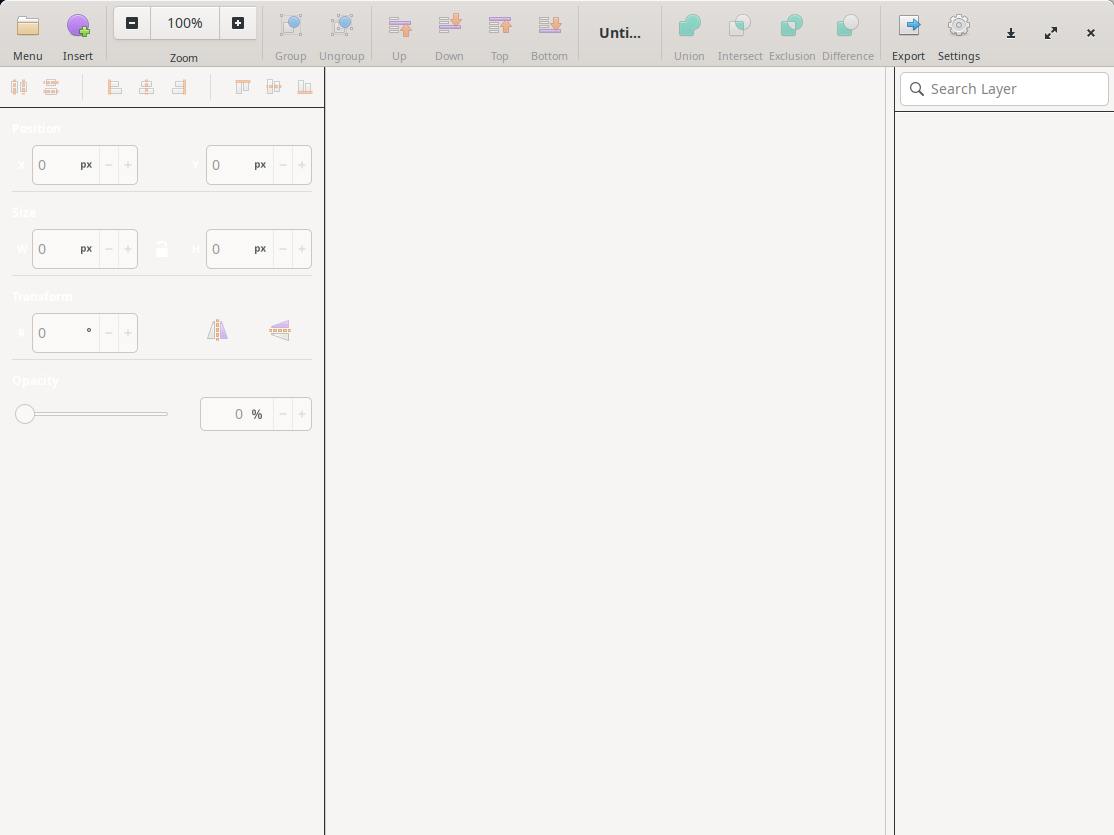
Installing and bundling into the AppImage the packages elementary-theme and elementary-icon-theme made quite a difference...
Here it is running on Deepin Linux 20:
probonopd
on 17 Aug 2020
Now, probably we should default to using the elementary theme for Akira:
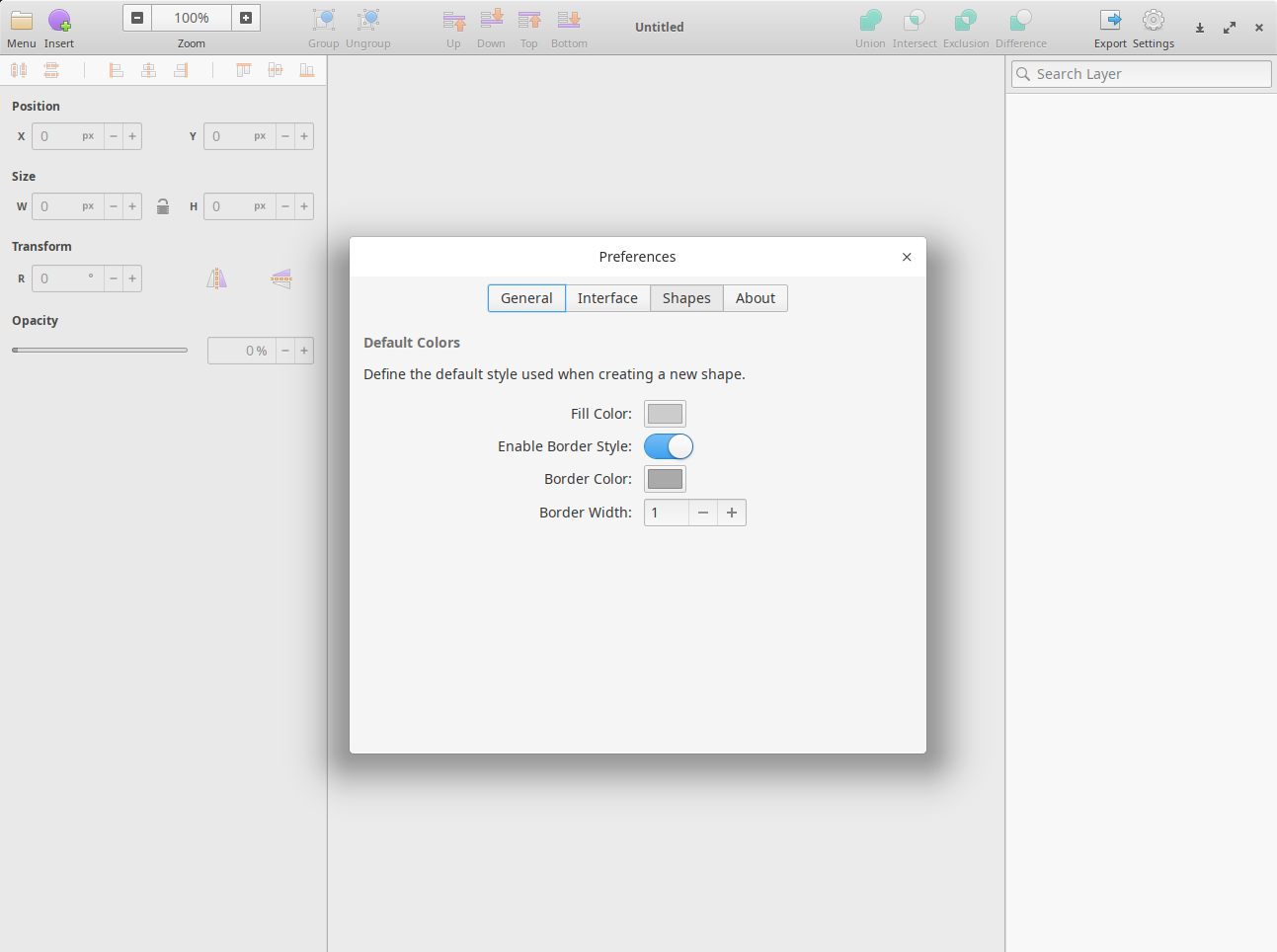
Again, running on Deepin Linux 20.
probonopd
on 17 Aug 2020
We probably also need to bundle (and compile) some schemas.
Currently Insert -> Artboard -> (start drawing) results in:
(Akira:32595): GLib-GIO-ERROR **: 20:07:14.363: Settings schema 'org.gtk.Settings.ColorChooser' is not installed
Trace/breakpoint trap
Fixed. Looks pretty functional to me now, at least on Deepin Linux 20:
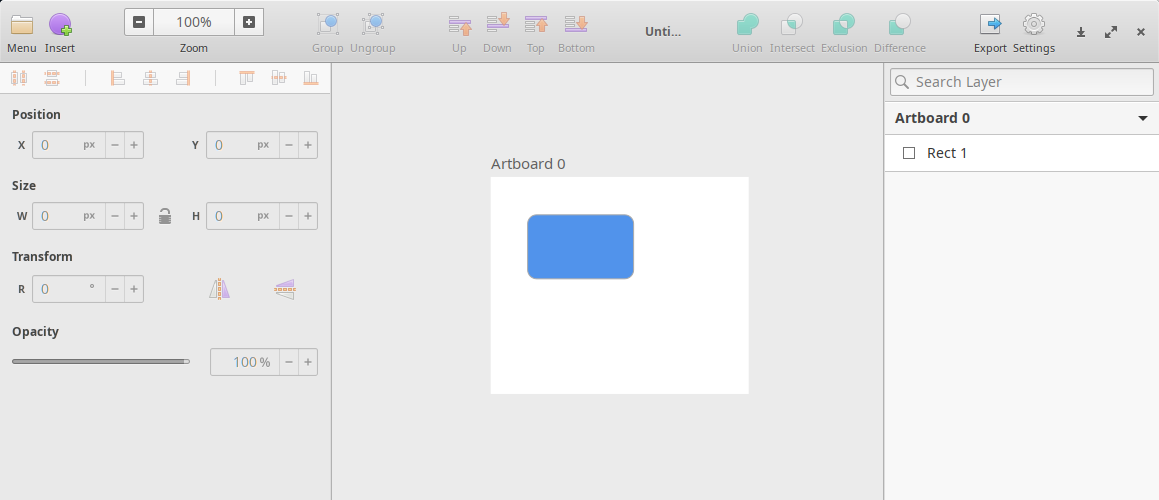
Note that none of the Elementary libraries, themes, or icons ship with Deepin Linux.
probonopd
on 17 Aug 2020
Looks like we are getting somewhere:
This is the Akira AppImage from https://github.com/probonopd/Akira/releases/tag/continuous running on Ubuntu 18.04 LTS.
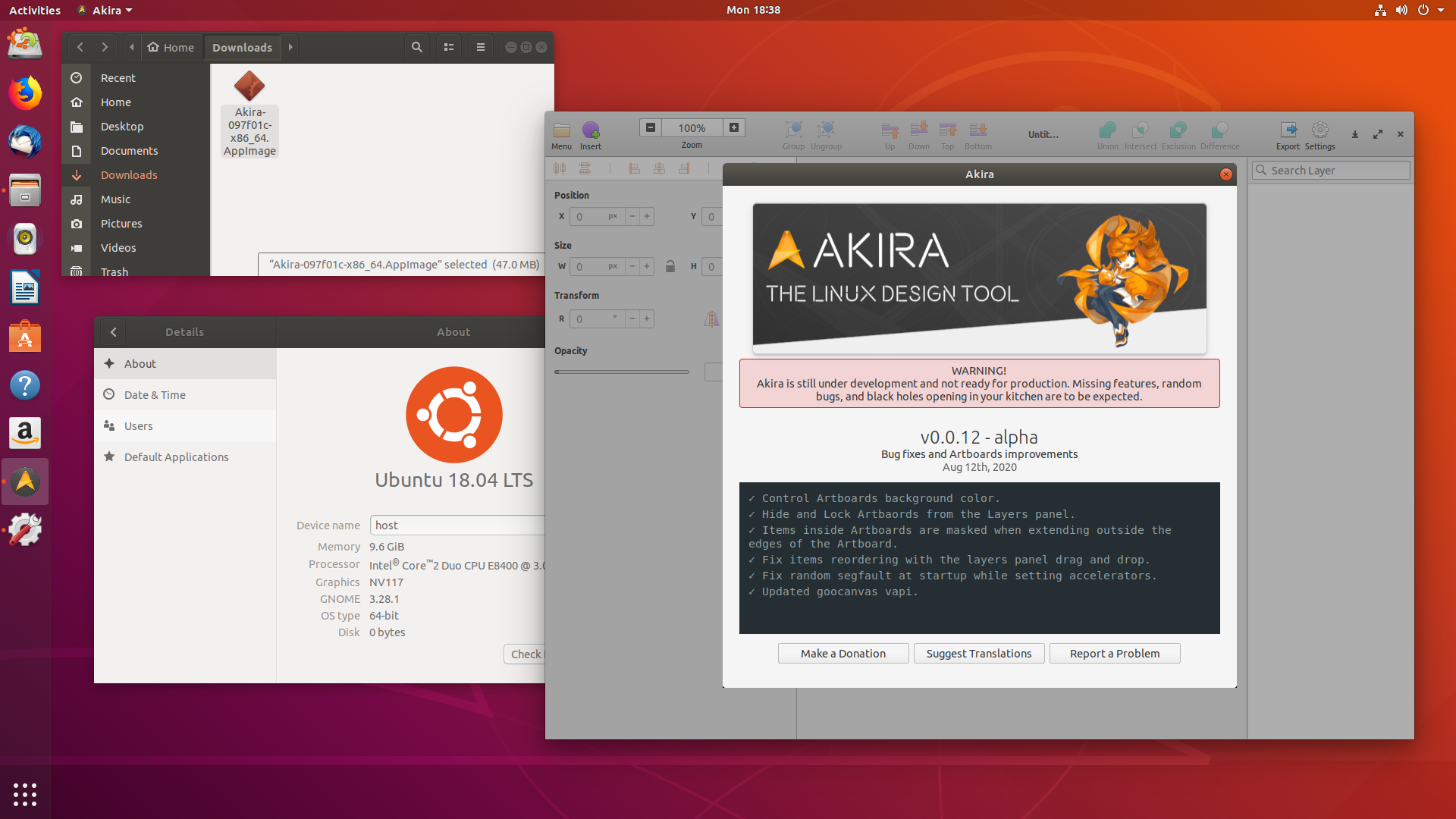
Please go ahead and test the AppImage, I'd appreciate any feedback - especially things that are not working perfectly yet.
probonopd
on 17 Aug 2020
Wonderful, I'll test it later today and let you know if everything works.
Should I do something to automate the build of a new appimage for every release?
Thank you so much for your contribution
Alecaddd
on 17 Aug 2020
As soon as you have tested it and like the result, I can send a pull request for the automatic AppImage generation and uploading.
probonopd
on 17 Aug 2020
fwiw, I just ran the Akira AppImage on KDE neon User Edition 5.6 Live ISO which is based on Ubuntu xenial from 2016. (Of course, no elementary libraries are installed there.)
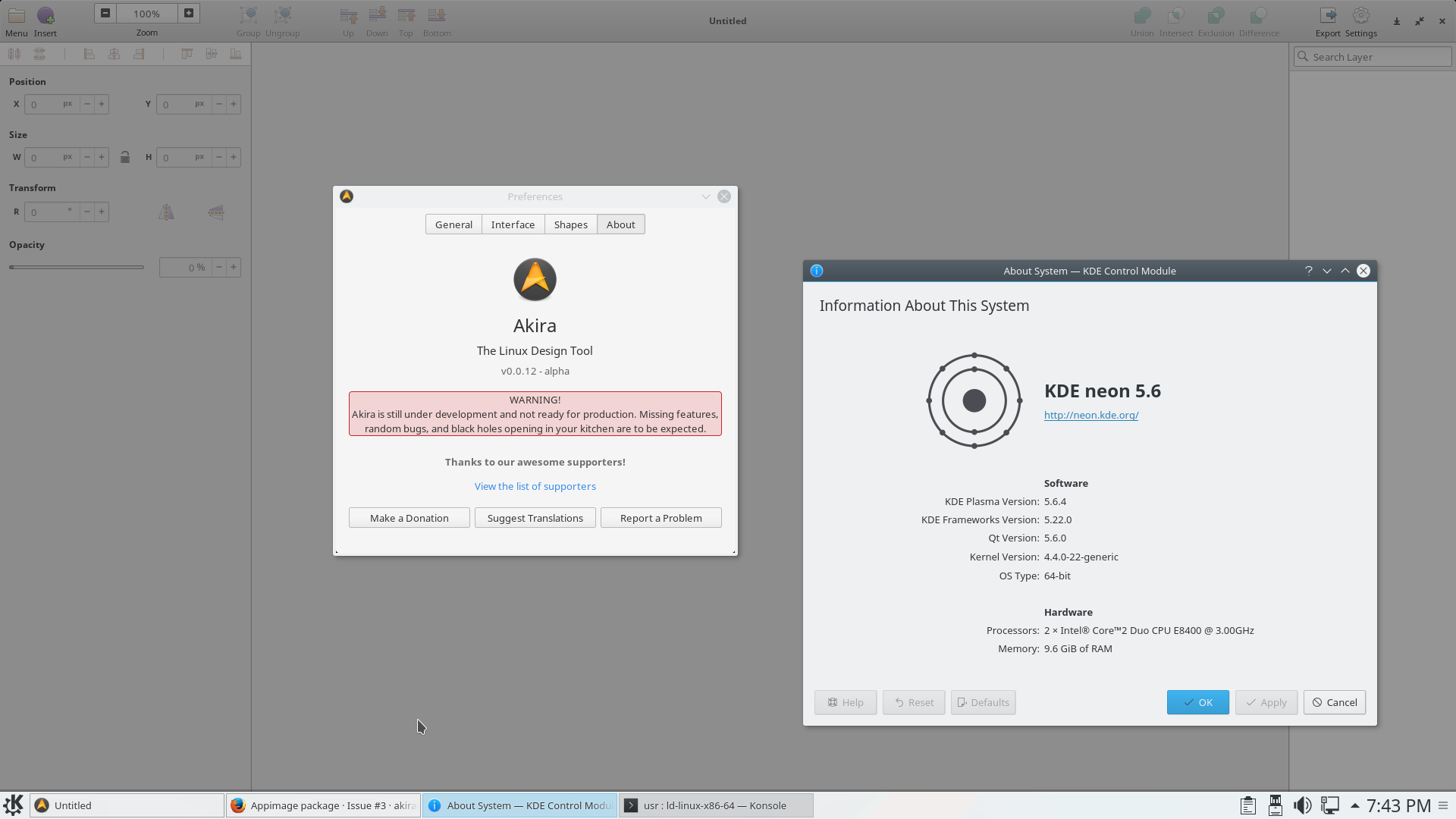
probonopd
on 17 Aug 2020
Lovely!
Alecaddd
on 17 Aug 2020
Manjaro 17.1.1:
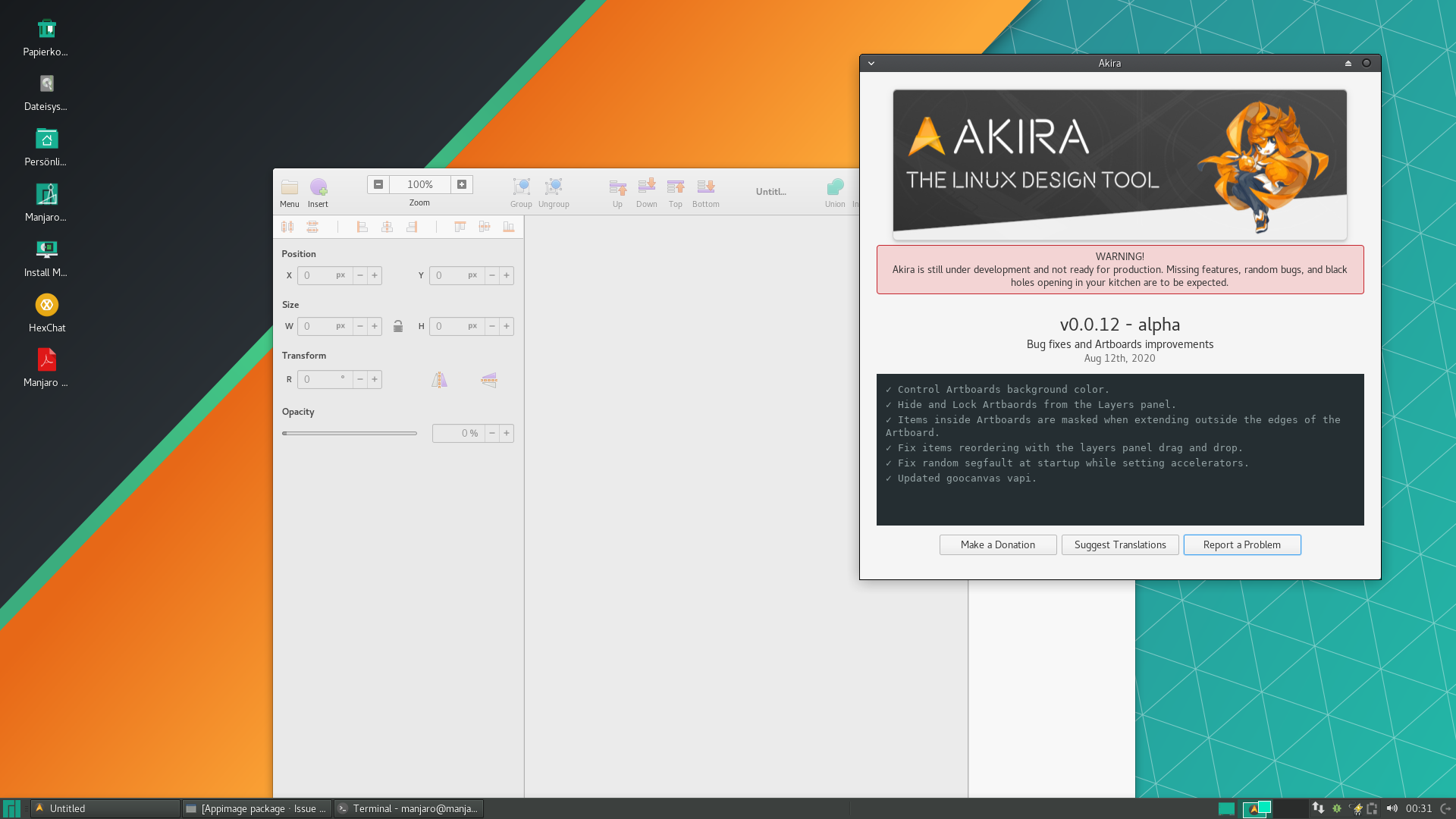
probonopd
on 18 Aug 2020
Tested on Ubuntu 18.04.
Everything works and looks great, save and load files, export, etc.
I stumbled upon a single issue which it doesn't happen with the native elementary app.
- Unzip this file and open it with Akira: single.zip
- Go to Export > Highlight Area to export > draw a rectangle around the free items with the image in the canvas.
- In the Export Dialog, click the transparency toggle, then export the file.
- Without closing the application or the current file, repeat point 2 and 3.
- Upon toggling the transparency toggle, the app crashes.
I don't know if this is related to Appimage or something sketchy going on with my code.
This doesn't happen with the native elementary app, or the flatpak. Didn't test with the snap.
Alecaddd
on 18 Aug 2020
Tried with i3wm.
basic


basic functionality works, but there is a black gap between the window and the app.
single.zip test
failed at 3rd step. App crashed.
$ ./Akira-c12e816-x86_64.AppImage
Run experimental self-contained bundle

(Akira:19057): dbind-WARNING **: 09:41:55.821: AT-SPI: Error retrieving accessibility bus address: org.freedesktop.DBus.Error.ServiceUnknown: The name org.a11y.Bus was not provided by any .service files

(Akira:19057): Gtk-WARNING **: 09:42:22.689: gtk_widget_size_allocate(): attempt to allocate widget with width -636 and height 16

(Akira:19057): Gtk-WARNING **: 09:46:38.409: gtk_widget_size_allocate(): attempt to allocate widget with width -636 and height 16

(Akira:19057): Gtk-WARNING **: 09:46:38.431: gtk_widget_size_allocate(): attempt to allocate widget with width -636 and height 16

(Akira:19057): GLib-CRITICAL **: 09:47:37.021: g_variant_new_string: assertion 'string != NULL' failed

(Akira:19057): GLib-CRITICAL **: 09:47:37.021: g_variant_ref_sink: assertion 'value != NULL' failed

(Akira:19057): GLib-GIO-CRITICAL **: 09:47:37.021: g_settings_schema_key_type_check: assertion 'value != NULL' failed

(Akira:19057): GLib-CRITICAL **: 09:47:37.021: g_variant_get_type_string: assertion 'value != NULL' failed

(Akira:19057): GLib-GIO-CRITICAL **: 09:47:37.021: g_settings_set_value: key 'export-folder' in 'com.github.akiraux.akira' expects type 's', but a GVariant of type '(null)' was given

(Akira:19057): GLib-CRITICAL **: 09:47:37.021: g_variant_unref: assertion 'value != NULL' failed

(Akira:19057): Gtk-CRITICAL **: 09:47:37.078: gtk_widget_set_visible: assertion 'GTK_IS_WIDGET (widget)' failed

(Akira:19057): Gtk-CRITICAL **: 09:47:37.078: gtk_widget_set_visible: assertion 'GTK_IS_WIDGET (widget)' failed

(Akira:19057): Gtk-CRITICAL **: 09:47:37.078: gtk_widget_set_visible: assertion 'GTK_IS_WIDGET (widget)' failed

(Akira:19057): Gtk-CRITICAL **: 09:47:37.078: gtk_widget_set_visible: assertion 'GTK_IS_WIDGET (widget)' failed

(Akira:19057): Gtk-CRITICAL **: 09:47:37.078: gtk_widget_set_visible: assertion 'GTK_IS_WIDGET (widget)' failed

(Akira:19057): Gtk-CRITICAL **: 09:47:37.078: gtk_widget_set_visible: assertion 'GTK_IS_WIDGET (widget)' failed

(Akira:19057): Gtk-CRITICAL **: 09:47:37.078: gtk_widget_set_visible: assertion 'GTK_IS_WIDGET (widget)' failed

(Akira:19057): Gtk-CRITICAL **: 09:47:37.090: gtk_widget_set_visible: assertion 'GTK_IS_WIDGET (widget)' failed

(Akira:19057): Akira-ERROR **: 09:47:56.191: ExportManager.vala:509: Unable to export images: Failed to open “/Untitled.png” for writing: Permission denied
Trace/breakpoint trap
there is a black gap between the window and the app.
This seems to be a known issue which appears when no AppImage is involved as well:
https://github.com/numixproject/numix-gtk-theme/issues/206
We need to see whether there is a way to fix this without having to edit files in the user's $HOME.
I stumbled upon a single issue which it doesn't happen with the native elementary app. (...) Without closing the application or the current file, repeat point 2 and 3.
Not sure at all what is going on there or how this might be related to AppImage, maybe someone with gdb skills can find out?
probonopd
on 20 Aug 2020
I stumbled upon a single issue which it doesn't happen with the native elementary app. (...) Without closing the application or the current file, repeat point 2 and 3.
Not sure at all what is going on there or how this might be related to AppImage, maybe someone with gdb skills can find out?
I might be able to solve this with the next release as I'm removing a bunch of annoying GTK Warnings when opening the export dialog. That might be related to the crash.
Alecaddd
on 21 Aug 2020
there is a black gap between the window and the app.
Maybe we need to export GTK_RC_FILES and ship a private gtkrc file.
probonopd
on 21 Aug 2020
@probonopd I just released v0.0.13 where I fixed all the GTK warnings in the export dialog.
Hopefully that should fix the crash with the AppImage.
Alecaddd
on 3 Sep 2020
Thanks @Alecaddd. New build is up:
https://github.com/probonopd/Akira/releases/tag/continuous
probonopd
on 3 Sep 2020
This works perfectly for me, no more crashes!
Alecaddd
on 3 Sep 2020
You would not believe where I got this running. Actually I was shocked to see this work :100:

Yes, what you are seeing here is the content of the AppImage running on... __FreeBSD__.
Caveats: Some steps are currently needed to be done manually.
- The linux64 compatibility layer for FreeBSD needs to be set up and configured by the user
- The AppImage needs to be extracted with
--appimage-extract; not clear yet whether we can change this, https://github.com/AppImage/AppImageKit/issues/98#issuecomment-683263860 chmod +x squashfs-root/usr/lib64/ld-linux-x86-64.so.2(I think I can remove the need for this)brandelf -t linux squashfs-root/usr/lib64/ld-linux-x86-64.so.2(I think I can remove the need for this)- As root:
sysctl compat.linux.osrelease=4.0.00(possibly I can patch the ELFs and/or patch away a check in the bundled ld-linux in the AppImage to remove the need for this)
probonopd
on 4 Sep 2020
Sadly the gap persists.

azzamsa
on 9 Sep 2020
Yes. Sadly I have not found a good way to fix this. It happens only on some host systems. We need someone who understands what Gtk is doing here and why... this seems to be an issue that also exists outside of the AppImage world.
probonopd
on 10 Sep 2020
Does Akira draw a semi-transparent shadow around the window? Is that what the black area is?
xordspar0
on 11 Sep 2020
This is related with i3wm. I see this error in many other issues in other apps, always related with i3.
https://github.com/EliverLara/Ant/commit/3fc9a80f0d4ffe8370792a72f5de4b44d6603fe3
 albfan
on 12 Sep 2020
albfan
on 12 Sep 2020
I've tried to put the code below in /.config/gtk-3.0/gtk.css, to get rid of window gap problem. But it doesn't work.
.window-frame {box-shadow: none; margin: 0;}
Yes, I have also not found a solution for this yet but it seems to also occur outside of the AppImage world. Maybe we need a Gtk expert here.
probonopd
on 29 Sep 2020
So I downloaded probonopd's appimage and tried to fix the problem with that black box around the window and it seems to be the problem with the elementary theme. I unpacked the appimage and them ran it using some other themes such as Adwaita, Qogir-light and Greybird and not a single one of them had the that black box so it seems like the elementary theme is broken. After that by randomly removing .css files from elementary theme directory I found out that the problem comes from file called gtk-widgets.css, to make sure that that is the case I replaced that file with the gtk-widgets.css from Qogir-light theme and the black box seems to be gone, however this really is not a fix since now it looks like a real frankenstein theme.
Because I dont have any knowledge with making gtk themes I could not really find a solution, however for the time being a temporary fix would be to use some other theme for the appimage like Adwaita or Adelementary theme which actually looks simiplar to the elementary theme
-problem seems to be with the gtk-widgets.css file
 hcsubser
on 3 Oct 2020
hcsubser
on 3 Oct 2020
Thanks for your analysis. Maybe we can nail it further down to something particular inside gtk-widgets.css in the elementary theme. If possible, I'd like to keep using the elementary theme for elementary apps, because that's what they have been designed for. But it would be good to get rid of that black frame.
Maybe @danrabbit knows what might be causing this thick black extra border that appears on _some_ systems?
probonopd
on 3 Oct 2020
I just tried https://github.com/probonopd/Akira/releases/download/continuous/Akira-26-x86_64.AppImage and everything works as expected:

So this is not akira related but i3wm and elementary theme related. I suggest to open an issue on those projects to track that.
In any case, this issue is done (there's an akira appimage package)
Anyone see a reason to keep this issue open here?
albfan
on 4 Oct 2020
Anyone see a reason to keep this issue open here?
Yes, https://github.com/akiraux/Akira/releases/download/continuous/ does not have an AppImage yet. Sending a PR.
probonopd
on 4 Oct 2020
Ok. For the black box I just open https://github.com/elementary/stylesheet/issues/843
About appimage, the issue itself makes then sense, but not to resolve it here. Is there any possibility of generate the appimage externally? Doesn't make much sense to me to keep the appimage setup here, as we are not experts on appimage, so can only blindy accept changes.
As an example this is the repo that keeps the flatpak setup for akira (external): https://github.com/flathub/com.github.akiraux.akira
Again @Alecaddd will know better.
albfan
on 5 Oct 2020
Is there any possibility of generate the appimage externally?
Although it would be possible, it would hardly make any sense to do so. Please see my comments in the pull request.
probonopd
on 6 Oct 2020
25 #47 #131 #3
Maintainers of this project asking "have no idea" "something must be wrong with appimage"
Here is not the place to maintain the appimage. That is out of question.
appimage workflow:
- People trying each master commit
- People complaining about broken or missing features
- People looking for a solution
- Maintainers asking other developers to fix appimage setup here
Why do we plan releases if run from master is ok?
Is master the new stable?
Seriously I tried to explain it several times. This shouldn't be maintained here.
albfan
on 7 Oct 2020
Once AppImage creation works, it is zero-maintenance. An AppImage will get built for each git push without further intervention by anybody. It's called "continuous builds". Those are meant for testers, developers, and advanced users.
For regular users, "normal" releases can still be made.
The point of continuous builds is to be able to see immediately if something was broken in the software by a commit, so that it can be reverted immediately back to a working state.
According to Wikipedia,
"Continuous delivery" makes sure the software checked in on the mainline is always in a state that can be deployed to users and "continuous deployment" makes the deployment process fully automated.
In my own software, I only produce continuous builds and no releases at all anymore. But no one is asking Akira to do the same ;-)
probonopd
on 7 Oct 2020
Once AppImage creation works, it is zero-maintenance. An AppImage will get built for each
git pushwithout further intervention by anybody. It's called "continuous builds". Those are meant for testers, developers, and advanced users.For regular users, "normal" releases can still be made.
The point of continuous builds is to be able to see immediately if something was broken in the software by a commit, so that it can be reverted immediately back to a working state.
According to Wikipedia,
"Continuous delivery" makes sure the software checked in on the mainline is always in a state that can be deployed to users and "continuous deployment" makes the deployment process fully automated.
In my own software, I only produce continuous builds and no releases at all anymore. But no one is asking Akira to do the same ;-)
There's nothing that costs 0 maintenance
 bilelmoussaoui
on 9 Oct 2020
bilelmoussaoui
on 9 Oct 2020
Related issues
 TixieBorg
·
4Comments
Alecaddd
·
3Comments
Alecaddd
·
6Comments
Alecaddd
·
4Comments
Alecaddd
·
5Comments
TixieBorg
·
4Comments
Alecaddd
·
3Comments
Alecaddd
·
6Comments
Alecaddd
·
4Comments
Alecaddd
·
5Comments
Most helpful comment
I'd suggest to not stress too much for now 😄
Akira is still in early development and it doesn't work at all.
As soon as a barely usable alpha is ready, I will be sure to build the AppImage by myself and release it globally.
Thank you so much for your interest in Akira, it's a massive project that needs a lot of works, but it will happen soon.
Cheers