Airsim: Running AirSim in Unreal Engine Doesn't Work On Linux
I want to run AirSim on my own environment. Therefore, I've tried to follow this guide: https://microsoft.github.io/AirSim/unreal_custenv/
It says that this won't work on Linux, because there is no Epic Games Launcher. But there is actually a Linux version of the Epic Games Launcher. (https://docs.unrealengine.com/en-US/Platforms/Linux/BeginnerLinuxDeveloper/SettingUpAnUnrealWorkflow/index.html)
So I've decided to give it a try and I created an Unreal Project, loaded in my assets and added the AirSim plugin as described. (add Plugins folder and edit .uproject file)
However I can't do the step "Generate Visual Studio Project Files", because I am on Linux. So I've tried to restart Unreal Engine, which results in this prompt:

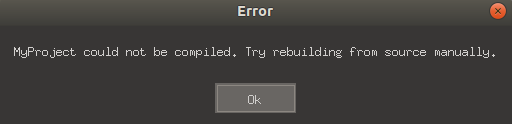
But when I click yes I get this error:
In file included from /home/fludewig/Documents/Unreal Projects/MyProject/Plugins/AirSim/Intermediate/Build/Linux/B4D820EA/UE4Editor/Development/AirSim/Module.AirSim.cpp:2:
In file included from /home/fludewig/Documents/Unreal Projects/MyProject/Plugins/AirSim/Source/AirBlueprintLib.cpp:4:
/home/flud
# Read This First

## If you are reporting a bug
* Make sure to write **all reproduction steps**
* Include full error message in text form
* Search issues for error message before filing issue
* Attach screenshot if applicable
* Include code to run if applicable

## If you have question
* Add clear and concise title
* Add OS, AirSim version, Python version, Unreal version if applicable
* Include context on what you are trying to achieve
* Include details of what you already did to find answers

**What's better than filing issue? Filing a pull request :).**

------------------------------------ (Remove above before filing the issue) ------------------------------------
ewig/Documents/Unreal Projects/MyProject/Plugins/AirSim/Source/AirBlueprintLib.h:24:10: fatal error: 'common/AirSimSettings.hpp' file not found
#include "common/AirSimSettings.hpp"
         ^~~~~~~~~~~~~~~~~~~~~~~~~~~
In file included from /home/fludewig/Documents/Unreal Projects/MyProject/Plugins/AirSim/Intermediate/Build/Linux/B4D820EA/UE4Editor/Development/AirSim/Module.AirSim.gen.cpp:2:
In file included from /home/fludewig/Documents/Unreal Projects/MyProject/Plugins/AirSim/Intermediate/Build/Linux/B4D820EA/UE4Editor/Inc/AirSim/AirBlueprintLib.gen.cpp:8:
/home/fludewig/Documents/Unreal Projects/MyProject/Plugins/AirSim/Source/AirBlueprintLib.h:24:10: fatal error: 'common/AirSimSettings.hpp' file not found
#include "common/AirSimSettings.hpp"
         ^~~~~~~~~~~~~~~~~~~~~~~~~~~
1 error generated.
1 error generated.
LogInit: Warning: Still incompatible or missing module: AirSim
So is there any chance for me to use AirSim with my own environment on Linux?
 flolu
flolu
All 5 comments
Well, it's definitely possible, otherwise the Linux binaries wouldn't be there :)
The page says that there's no Unreal Launcher to access Marketplace and download envs, you can download them in Win and then copy the files to Linux.
It's the same process after that, just skip the Visual Studio step for Linux. I've written about it in ArduPilot's Wiki if you would like to take a look - https://ardupilot.org/dev/docs/sitl-with-airsim.html#custom-environment
As for the compilation error, I think you missed running build.sh first from root directory before copying the Plugins/ folder to the custom env, build.sh copies the compiled AirLib, Mavlinkcom code to the Plugins folder, so that's required for the first time (or every time you make a change there)
 rajat2004
on 17 Aug 2020
rajat2004
on 17 Aug 2020
@rajat2004 Oh wow thank you, I will try that tomorrow and let you know if it worked! :muscle:
flolu
on 17 Aug 2020
Wow, it worked perfectly!
@rajat2004 I am wondering how I can create a "packaged binary" as found in the sample environments?
Because I don't want to start Unreal Engine every time I want to use my environment.
flolu
on 18 Aug 2020
See UE4's documentation - https://docs.unrealengine.com/en-US/Engine/Basics/Projects/Packaging/index.html
Packaging rebuilds a lot of the engine as well so it can take hours to package, especially on a laptop like mine
If you're packaging frequently, then there's an option to disable Full Rebuild, mentioned in the UE4 docs
Probably should add this info to docs
rajat2004
on 18 Aug 2020
@rajat2004 Nice, thank you!
flolu
on 18 Aug 2020
Related issues
 sinanonur
·
3Comments
sinanonur
·
3Comments
 MattChanTK
·
3Comments
MattChanTK
·
3Comments
 HereIsPatrick
·
3Comments
HereIsPatrick
·
3Comments
 Kim-BongSu
·
3Comments
Kim-BongSu
·
3Comments
 git-moeen
·
4Comments
git-moeen
·
4Comments
Most helpful comment
Well, it's definitely possible, otherwise the Linux binaries wouldn't be there :)
The page says that there's no Unreal Launcher to access Marketplace and download envs, you can download them in Win and then copy the files to Linux.
It's the same process after that, just skip the Visual Studio step for Linux. I've written about it in ArduPilot's Wiki if you would like to take a look - https://ardupilot.org/dev/docs/sitl-with-airsim.html#custom-environment
As for the compilation error, I think you missed running
build.shfirst from root directory before copying thePlugins/folder to the custom env,build.shcopies the compiled AirLib, Mavlinkcom code to the Plugins folder, so that's required for the first time (or every time you make a change there)