Airsim: Setting GPS origin (Syncing AirSim with Mapbox)
Windows 10 Pro
VC++ and 8.1 SDK
Unreal 4.18
PX4 release v1.82 SITL running in BashOnWindows
I can't seem to get the GPS position to change to anything other than the default Microsoft location. Settings file looks like this:
{
  "SettingsVersion": 1.2,
  "SeeDocsAt": "https://github.com/Microsoft/AirSim/blob/master/docs/settings.md",
  "SimMode": "Multirotor",
  "Vehicles": {
    "PX4": {
      "VehicleType": "PX4Multirotor",
      "UseSerial": false,
      "SitlPort": 14540,
      "UdpPort": 14560
    },
    "OriginGeopoint": {
      "Latitude": 22.915464,
      "Longitude": -59.975619,
      "Altitude": 20
    }
  }
}
(Note: GPS location changed for privacy.)
Have changed the settings in the PX4 terminal:

But when I play the Blocks environment and then open QGroundControl it always brings me to the Microsoft campus!
Are those default GPS coordinates still hardcoded into the program somewhere and my Settings.json OrginGeopoint being ignored?
 jasonhbartlett
All 8 comments
FYI - Here are some quick videos I made - Combining AirSim Unity with Mapbox Would really like to synchronize the GPS between the two.
Flying drone with controller through cityscape provided by Mapbox
PX4 SITL through cityscape provided by Mapbox. How can I sync GPS between these?
jasonhbartlett
on 17 Dec 2018
You could try setting these PX4 parameters to the GPS location your map expects to start with.
param set LPE_LAT 47.641468
param set LPE_LON -122.140165
 lovettchris
on 18 Dec 2018
lovettchris
on 18 Dec 2018
@lovettchris I think I'm missing something fundamental here. (By "map", do you mean AirSim?) I want my map to "expect to start" somewhere else besides that location. So for example I want the AirSim drone starting location to be at my house so I would A.) Use my GPS coordinates in the Setting.json file and B.) Set PX4 parameters to use my GPS coordinates as well. Then when I fire up QGroundControl I should see a map of my neighborhood. But that's not happening. I still see Microsoft campus location. How do I change that?
jasonhbartlett
on 18 Dec 2018
@lovettchris @sytelus
Poking around some more.. So it seems the only way to cause my setup to start at a different GPS position is to change AirSim/AirLib/include/common/AirSimSettings.hpp L342...
HomeGeoPoint origin_geopoint{ GeoPoint(47.641468, -122.140165, 122) }; //The geo-coordinate assigned to Unreal coordinate 0,0,0
...AND rebuild both the AirSim source and the Unreal source to cause recompile of the .dll plugins.
My understanding was that just by changing the Settings.json file (as I have it above) and the PX4 parameters, then that would allow for changing the GPS origin? Per the docs:
_OriginGeopoint
This setting specifies the latitude, longitude and altitude of the Player Start component placed in the Unreal environment. The vehicle's home point is computed using this transformation. Note that all coordinates exposed via APIs are using NED system in SI units which means each vehicle starts at (0, 0, 0) in NED system. Time of Day settings are computed for geographical coordinates specified in OriginGeopoint._
So is there something wrong with my Settings.json file that is why it's not overwriting the defaults from the build?
jasonhbartlett
on 18 Dec 2018
Oh, perhaps the problem is you have the "OriginGeopoint" inside the section for "Vehicles", try promoting it up a level like this:
{
  "SettingsVersion": 1.2,
  "SeeDocsAt": "https://github.com/Microsoft/AirSim/blob/master/docs/settings.md",
  "SimMode": "Multirotor",
  "Vehicles": {
    "PX4": {
      "VehicleType": "PX4Multirotor",
      "UseSerial": false,
      "SitlPort": 14540,
      "UdpPort": 14560
    },
  }
  "OriginGeopoint": {
    "Latitude": 22.915464,
    "Longitude": -59.975619,
     "Altitude": 20
    }
}
@lovettchris
Ahh... that was it! Simple. Works for Unity & Unreal. Thanks so much for your help!
jasonhbartlett
on 18 Dec 2018
And here's how I double checked using SITL px4 app:
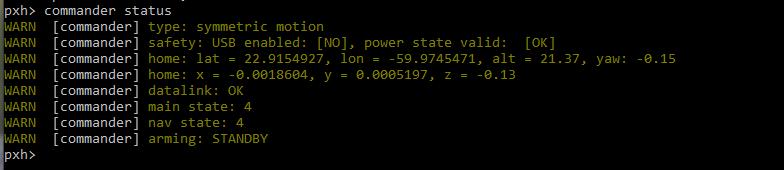
(LPE_LAT and LPE_LON is not the right thing to check).
lovettchris
on 19 Dec 2018
Hi @lovettchris,
Windows 10
Unreal 4.22
My Vehicle is Car
Is there any way to set GPS info to the car and spawn the car at specific GPS position?
I have my custom environment (which is duplicated real test site)
Thank you for the help :)
 thejeshk
on 10 Mar 2020
thejeshk
on 10 Mar 2020
Related issues
 jingleFun
·
3Comments
jingleFun
·
3Comments
 LSBOSS
·
3Comments
LSBOSS
·
3Comments
 zbenic
·
4Comments
zbenic
·
4Comments
 HereIsPatrick
·
3Comments
HereIsPatrick
·
3Comments
 zywOwO
·
3Comments
zywOwO
·
3Comments