If I want to change my car model to another type. I have a mesh, physics, animations etc. What should I keep in mind? I've tried just switching the mesh but that doesn't work.
 Simsalaba
All 15 comments
There are several different files that are needed be linked together including not only the mesh, but there's a master blueprint, physics, animation, and tire data. Unreal has a series of videos for car creation that are really helpful: https://www.youtube.com/playlist?list=PLZlv_N0_O1gaz6eETtIxcmUDnqu5A-8At. Take a look at those for a start. There's another series by a guy named MathB that are also informative. If you're creating your own environment, see this page on Pawn Paths: https://github.com/Microsoft/AirSim/blob/master/docs/settings.md#pawnpaths. Hope this helps a little.
 RVBldr
on 6 Nov 2018
RVBldr
on 6 Nov 2018
@baaaze did you have a chance to take a look at this?
RVBldr
on 7 Dec 2018
Hi, when I try to load a custom car from Unreal Store I receive this message from Unreal when I try to run the simulator.
"There were no compatible vehicles created for current SimMode! Check your settings.json."
Below is my settings.json
{
"SeeDocsAt": "https://github.com/Microsoft/AirSim/blob/master/docs/settings.md",
"SettingsVersion": 1.2,
"SimMode": "Car",
"DefaultCar": {"PawnBP":"Class'/Game/SportsCar/BP_SportsCar.BP_SportsCar_C'"},
"EngineSound": true,
"Vehicles": {
"SkoodsI": {
"VehicleType": "PhysXCar",
"EnableCollisionPassthrough": true,
"X": 0.0,
"Y": 0.0,
"Z": 0.0
}
},
"DefaultSensors": {
"Lidar": {
"SensorType": 6,
"Enabled": false,
"DrawDebugPoints": false
}
}
}
What is a compatible vehicle ?
 GuiBo79
on 6 May 2019
GuiBo79
on 6 May 2019
In order to use different vehicle models, you have to specify the pawn path to the vehicle blueprint. You can see how that is done here. For your settings, I would probably have something like the following:
{
  "SeeDocsAt": "https://github.com/Microsoft/AirSim/blob/master/docs/settings.md",
  "SettingsVersion": 1.2,
  "SimMode": "Car",
  "PawnPaths" : {
    ""PawnBP":{"Class'/Game/SportsCar/BP_SportsCar.BP_SportsCar_C'"}
  },
  "Vehicles" : {
    "SkoodsI": {
        "VehicleType": "PhysXCar",
        "PawnPath" : "PawnBP"
        }
  }
}
 msb336
on 6 May 2019
msb336
on 6 May 2019
@baaaze did you have a chance to take a look at this?
Yes, I could Pawn my custom car but still having some issues. I can communicate with AirSim, get car state, control the car with the keyboard but unfortunately AIrSim API is not controlling the car. I just change for AirSim default car , everything works just fine again.
GuiBo79
on 11 May 2019
Are you using the vehicle name in your API calls, your just calling with default vehicle input (vehicle_name='')? If there is only one vehicle in your scene it shouldn't matter, but if there are more you will need to reference the specific vehicle you want to control.
msb336
on 15 May 2019
Hi Guys,
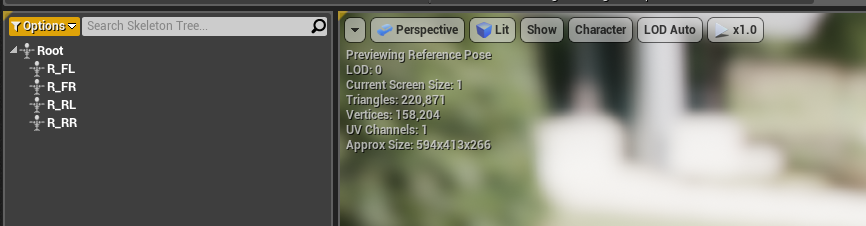
I have my own vehicle model with the following skeleton [see image]. I have created a child blueprint class from AIRSIM carpawn and selected a mesh of my own vehicle. What else I should do in addition to that to use my vehicle ?
 thejeshk
on 23 Feb 2020
thejeshk
on 23 Feb 2020
It’s not clear if you’ve been able to set up and drive the car outside of AirSim, or not, but there are a variety of tutorials on how to set up vehicles. See some of these:
https://www.youtube.com/watch?time_continue=9&v=A79_RN329xA&feature=emb_logo
https://www.youtube.com/watch?v=zGHGSwzhUr4&t=164s
.
Once you can drive a vehicle, tuning can be a very iterative process and take some time. When you have the entire file structure of the vehicle in your project directory, you’ll want to use PawnPath to use that vehicle with AirSim. https://microsoft.github.io/AirSim/docs/settings/#pawnpaths
From: Thejesh Kumar notifications@github.com
Sent: Sunday, February 23, 2020 4:50 AM
To: microsoft/AirSim AirSim@noreply.github.com
Cc: Jim Piavis Jim.Piavis@microsoft.com; Comment comment@noreply.github.com
Subject: Re: [microsoft/AirSim] Change car model (#1506)
Hi Guys,
I have my own vehicle model with the following skeleton [see image]. I have created a child blueprint class from AIRSIM carpawn and selected a mesh of my own vehicle. What else I should do in addition to that to use my vehicle ?
—
You are receiving this because you commented.
Reply to this email directly, view it on GitHubhttps://nam06.safelinks.protection.outlook.com/?url=https%3A%2F%2Fgithub.com%2Fmicrosoft%2FAirSim%2Fissues%2F1506%3Femail_source%3Dnotifications%26email_token%3DAHBAQKVT4CVHVGTQ5NGSQKDREJWIJA5CNFSM4GAJNG5KYY3PNVWWK3TUL52HS4DFVREXG43VMVBW63LNMVXHJKTDN5WW2ZLOORPWSZGOEMV27CA%23issuecomment-590065544&data=02%7C01%7Cjim.piavis%40microsoft.com%7Cacb8c1bcd7344e48dd2f08d7b85eec4e%7C72f988bf86f141af91ab2d7cd011db47%7C1%7C0%7C637180590157477013&sdata=K%2Fn6wYVPK69%2Fu5bo7zZXdJ%2Fp47xriEyVdATzUdoe2fY%3D&reserved=0, or unsubscribehttps://nam06.safelinks.protection.outlook.com/?url=https%3A%2F%2Fgithub.com%2Fnotifications%2Funsubscribe-auth%2FAHBAQKXJXEZ3N75PMRSM7M3REJWIJANCNFSM4GAJNG5A&data=02%7C01%7Cjim.piavis%40microsoft.com%7Cacb8c1bcd7344e48dd2f08d7b85eec4e%7C72f988bf86f141af91ab2d7cd011db47%7C1%7C0%7C637180590157487004&sdata=aNrQnVWlUePPfJBzo304okXRb6XFwTV43b1ym37SPps%3D&reserved=0.
RVBldr
on 23 Feb 2020
Hi @RVBldr
Thank you for the fast response. Driving the vehicle is no problem. I have Created a new Vehicle project -> Imported Fbx mesh with Physics -> Used Vehicle car Blue print -> Created Animation BP accordingly -> Mapped Keyboard inputs and I could able to drive my car in the Level
BuT I could not able to bring my Car into AIRSIM :(
I tried all the above steps.
My Vehicle has slightly different bone names comparatively. Is it because of that or I have my own project. Should I do any modifications with my Project.
I am not sure what I am supposed to do.
thejeshk
on 24 Feb 2020
Is there a way of implementing a custom vehicle different from the PhysX car model. I have a couple of multi-wheeled and tracked actor blueprints with heavily customized physics and animations. I'd like to interface with AirSim's sensors. Any pointers would be much appreciated.
 jvr-nava
on 25 Mar 2020
jvr-nava
on 25 Mar 2020
For some of those, I would search for some of the Unreal Youtube videos. I do know there’s several on tracked vehicles, however, you may need to set those up to use the PhysX physics, but creating your own model.
From: jvr-nava notifications@github.com
Sent: Tuesday, March 24, 2020 4:11 PM
To: microsoft/AirSim AirSim@noreply.github.com
Cc: Jim Piavis Jim.Piavis@microsoft.com; Mention mention@noreply.github.com
Subject: Re: [microsoft/AirSim] Change car model (#1506)
Is there a way of implementing a custom vehicle different from the PhysX car model. I have a couple of multi-wheeled and tracked actor blueprints with heavily customized physics and animations. I'd like to interface with AirSim's sensors. Any pointers would be much appreciated.
—
You are receiving this because you were mentioned.
Reply to this email directly, view it on GitHubhttps://nam06.safelinks.protection.outlook.com/?url=https%3A%2F%2Fgithub.com%2Fmicrosoft%2FAirSim%2Fissues%2F1506%23issuecomment-603551649&data=02%7C01%7Cjim.piavis%40microsoft.com%7C3475f1a01e62488cd19a08d7d048a0e2%7C72f988bf86f141af91ab2d7cd011db47%7C1%7C0%7C637206882661967424&sdata=lohtP5FqSonWnGgM6seZuTacReVG3wZL7Os1YnWX43U%3D&reserved=0, or unsubscribehttps://nam06.safelinks.protection.outlook.com/?url=https%3A%2F%2Fgithub.com%2Fnotifications%2Funsubscribe-auth%2FAHBAQKXQUOMTURZNDQ7GW3LRJE4YRANCNFSM4GAJNG5A&data=02%7C01%7Cjim.piavis%40microsoft.com%7C3475f1a01e62488cd19a08d7d048a0e2%7C72f988bf86f141af91ab2d7cd011db47%7C1%7C0%7C637206882661977423&sdata=H2LvGiD2skxbNKInZ9EX4t9oB01IdOz0yBpHvKgDiGQ%3D&reserved=0.
RVBldr
on 25 Mar 2020
@RVBldr wow, thanks for the fast answer. I think I didn't explain myself, I do have a working vehicle which uses customs c++ physics libraries to define my own track friction forces, as well as the vehicle dynamics and track animations. These are a combination of unreal blueprints and C++ code, and work reasonably well stand-alone. My question is more geared towards knowing if it is possible to integrate this 'custom' tracked vehicle with AirSim. From what I was able to find in this thread and other AirSim threads it seems that it is only possible to replace the standard AirSim car model with other model inheriting the built-in 'VehicleMovement' class (which seems to be a modified 'WheeledVehicleMovementComponent' that I'm not using since it does not provide the capabilites I needed for a tracked vehicle). But if it's possible are there any resources or pointers to where to start? I'd be happy to contribute for expanding the capabilities for a tracked vehicle, but I don't know were to start.
Thanks!
jvr-nava
on 25 Mar 2020
Airsim should work against a car class, however, instead of just replacing the existing SUV, have you tried the PawnPaths? https://microsoft.github.io/AirSim/docs/settings/#pawnpaths We’ve used this method for adding a separate car on Coastline as well as dealing with various forklifts in Warehouse, but they were all based on the same car class.
From: jvr-nava notifications@github.com
Sent: Tuesday, March 24, 2020 7:44 PM
To: microsoft/AirSim AirSim@noreply.github.com
Cc: Jim Piavis Jim.Piavis@microsoft.com; Mention mention@noreply.github.com
Subject: Re: [microsoft/AirSim] Change car model (#1506)
@RVBldrhttps://nam06.safelinks.protection.outlook.com/?url=https%3A%2F%2Fgithub.com%2FRVBldr&data=02%7C01%7Cjim.piavis%40microsoft.com%7C138e6d73b8d541f8410208d7d0665227%7C72f988bf86f141af91ab2d7cd011db47%7C1%7C0%7C637207010196220301&sdata=esAxVFH3yLdjWLl2GgK5VMdbueaCCJKjx6Yu0cYW9oI%3D&reserved=0 wow, thanks for the fast answer. I think I didn't explain myself, I do have a working vehicle which uses customs c++ physics libraries to define my own track friction forces, as well as the vehicle dynamics and track animations. These are a combination of unreal blueprints and C++ code, and work reasonably well stand-alone. My question is more geared towards knowing if it is possible to integrate this 'custom' tracked vehicle with AirSim. From what I was able to find in this thread and other AirSim threads it seems that it is only possible to replace the standard AirSim car model with other model inheriting the built-in 'VehicleMovement' class (which seems to be a modified 'WheeledVehicleMovementComponent' that I'm not using since it does not provide the capabilites I needed for a tracked vehicle). But if it's possible are there any resources or pointers to where to start?
Thanks!
—
You are receiving this because you were mentioned.
Reply to this email directly, view it on GitHubhttps://nam06.safelinks.protection.outlook.com/?url=https%3A%2F%2Fgithub.com%2Fmicrosoft%2FAirSim%2Fissues%2F1506%23issuecomment-603608491&data=02%7C01%7Cjim.piavis%40microsoft.com%7C138e6d73b8d541f8410208d7d0665227%7C72f988bf86f141af91ab2d7cd011db47%7C1%7C0%7C637207010196230255&sdata=4Sup1LCPGBQ79FWzfz%2F0kjHZ%2FuvL6IlS9CeSRCzkuws%3D&reserved=0, or unsubscribehttps://nam06.safelinks.protection.outlook.com/?url=https%3A%2F%2Fgithub.com%2Fnotifications%2Funsubscribe-auth%2FAHBAQKXWQZKQIC6DIENZK6DRJFVVRANCNFSM4GAJNG5A&data=02%7C01%7Cjim.piavis%40microsoft.com%7C138e6d73b8d541f8410208d7d0665227%7C72f988bf86f141af91ab2d7cd011db47%7C1%7C0%7C637207010196230255&sdata=%2B%2BzTi7KngGvnrvZRPZ35uxyjLbNg2d47RKxINrso49k%3D&reserved=0.
RVBldr
on 25 Mar 2020
Hello @RVBldr
I'm doing forklift simulation, can you share how you do it? Thank you very much.
 shaoxiang
on 29 May 2020
shaoxiang
on 29 May 2020
Hello @RVBldr and everyone
I suppose I created vehicle perfectly (-> Imported Fbx mesh with Physics -> Used Vehicle car Blue print -> Created Animation BP accordingly) but when I try to play I face with "Error at startup: invalid map
 tlgkyn06
on 30 May 2020
tlgkyn06
on 30 May 2020
Related issues
 MattChanTK
·
3Comments
MattChanTK
·
3Comments
 git-moeen
·
4Comments
git-moeen
·
4Comments
 Kim-BongSu
·
4Comments
Kim-BongSu
·
4Comments
 sinanonur
·
3Comments
sinanonur
·
3Comments
 HereIsPatrick
·
3Comments
HereIsPatrick
·
3Comments