The depth image (first one) fetched via SimGetImage is not correct, it is a binary image rather than the gray image shows on unreal interface(the last img)
Another problem is that, the DepthPlanner (saved as .pfm image, the second image) is also a binary image, and also upside down does anybody has same problem with me? Any solutions?

DepthVis from SimGetImage
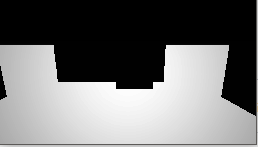
DepthPlanner (.pfm formate)

Gray image shows on unreal environment,
 JohnDing1995
All 5 comments
Did you make sure to call simGetImages with the pixels_as_float option set to true?
client.simGetImages([ImageRequest(0, AirSimImageType.DepthPlanner, pixels_as_float=True)])
 jfkeller
on 2 Apr 2018
jfkeller
on 2 Apr 2018
@jfkeller Yes, the image request as follows:
vector<ImageRequest> requests = { ImageRequest(0, ImageType::DepthPlanner, true), ImageRequest(1, ImageType::DepthVis, false), ImageRequest(1, ImageType::Scene, false) };
JohnDing1995
on 3 Apr 2018
I have been getting depth from the DepthPlanner image, which is your second image. The close block objects are completely black, but it looks likes there is some variation in the color of the background. This is because this is the depth to the sky sphere which is far away compared with the close blocks. Since the black and white color map is being used over such a large range of depths, I think this causes close objects to all be the same color. I would try thresholding to get rid of the large values if you want the image to look correct. I'm not sure why it is upside down. I have been viewing and saving the images using OpenCV's imshow and imwrite, so I haven't used the pfm functions.
Your first image, the DepthVis, should be colored from red to green according to the documentation, image_apis.md, so I think visualizing as black and white is making it look off. It also clips the max depth range at 100m so this is probably why the background appears as solid white instead of the variation as in the DepthPlanner image.
jfkeller
on 3 Apr 2018
I've been using it like this:
# call airsim
responses = self.client.simGetImages([ImageRequest(0, AirSimImageType.DepthVis, True)])
response = responses[0]
# convert to grayscale
depth = np.array(response.image_data_float, dtype=np.float32)
depth = depth.reshape(response.height, response.width)
depth = np.array(depth * 255, dtype=np.uint8)
# save pic
cv2.imwrite('{}/depth{}.png'.format(self.name_folder, self.t), depth)
 viniciusguigo
on 5 Apr 2018
viniciusguigo
on 5 Apr 2018
The doc has been updated because DepthVIs is now black to white. Please see HelloCar.py or HelloDrone.py to see how to get numpy formatted array. When you see image using pfm, pixels might look too black dependending viewer because of high dynamic range.
 sytelus
on 8 May 2018
sytelus
on 8 May 2018
Related issues
 LSBOSS
·
3Comments
LSBOSS
·
3Comments
 r2d2Proton
·
3Comments
r2d2Proton
·
3Comments
 HereIsPatrick
·
3Comments
HereIsPatrick
·
3Comments
 Kim-BongSu
·
3Comments
Kim-BongSu
·
3Comments
 vinbo
·
4Comments
vinbo
·
4Comments
Most helpful comment
I've been using it like this:
# call airsimresponses = self.client.simGetImages([ImageRequest(0, AirSimImageType.DepthVis, True)])response = responses[0]# convert to grayscaledepth = np.array(response.image_data_float, dtype=np.float32)depth = depth.reshape(response.height, response.width)depth = np.array(depth * 255, dtype=np.uint8)# save piccv2.imwrite('{}/depth{}.png'.format(self.name_folder, self.t), depth)