Airsim: Speeding up an Unreal environment
I am looking for a way to speed up the time scale of an Unreal environment in a way without affecting its physics, just so that I am able to get a learning process to converge much faster.
What I have here is a combination of AirSim and OpenAI Gym+Baseline for driving a car in the Downtown environment. The purpose for now is to use reinforcement learning to get the car to learn to drive around for as long as possible, without hitting anything. I can see the car getting better at it over time, but rather slowly since each learning session is performed in real time (i.e. minutes per episode). Being able to speed up an environment will really help.
 kaihuchen
All 21 comments
There are few points I would note.
First, its not possible to generate exact same physics behavior if you change the simulation clock speed. Almost all physics engine operate on discrete time which means you get to update kinematics after each dt interval. If wall time is same as simulation time then dt might be something like 10 ms. If you want to "speed up" the clock then you are still calling physics engine at same wall clock interval but passing dt = 100 ms for 10X "speed". As this dt increases, simulation accuracy decreases relative to real world response, for example, object can go too far before collision is detected. That's price you pay to "speed up" the simulation.
Second, there is fundamental bottleneck on data generation. If you set resolution to 84X84, I think you can push may be 30+ training data points (i.e. kinematics + image) per second. This throughput of data does not change regardless of how fast or slow you set the simulation clock. However, setting simulation clock to say 3X or 5X may still be beneficial because now two frames are more far apart and so your training data becomes bit more richer.
Lastly, if you are using RL algorithms like DQN or A3C, we should observe that success of these algorithms are more or less proven for scenarios such as Atari games where state of the all of the world is encoded in a small image and there is nothing else you need to know outside of it. This also allows for required sample complexity that is large but still manageable. As you transition to real-world 3D environment with several magnitudes higher scene complexity, I would suspect we will need more efficient RL algorithms. The purpose of AirSim is to precisely drive RL research in this direction.
Having said this, I think I have figured out way to to speed up the simulation and it seem to work fairly good at clock speed like 3X or even 5X. I'm planning to check-in this feature in next few days.
 sytelus
on 8 Oct 2017
sytelus
on 8 Oct 2017
Thanks for the detailed explanation!
FYI, indeed I am using DQN for my experiments. My opinion is that while being to learn directly from raw pixels (as with the Atari games) is indeed very very cool, but when it comes to something complicated like the 3D real world then it is more practical to augment it with additional sensors (depth, tilt, g-sensor, etc.).
In fact for my first experiment I am basing only on some depth sensors that I fashioned out of the DepthPerspective map, since I'd like to see how well DQN can do with those alone. Later I plan to put on more sensors, and eventually full depth map and other maps (computing power permitting), at which point a better DQN might be needed.
kaihuchen
on 9 Oct 2017
@sytelus I am happy to report that my experiment with AirSim Car, the Neighborhood environment, and OpenAI Gym/Baselines/deepq has worked out pretty well. With only three simple depth sensors fashioned out of the frontal DepthPerspective map and 10 hours of training (800 episodes), the car is able to roam around like a giant cockroach all over the place for many minutes without hitting anything. It is a lot of fun to see the car exploring driveways, backyards, streets, and parks in the environment by itself.
I got less luck with the Downtown environment, mainly because there are some invisible traps in the environment that got the car into a state that it can't get out of. Examples include walls that the car somehow can go through and then fall onto a vast plaza, or roadside walkway without railing that again causes the car to fall onto a vast plaza.
I got some problem with OpenAI Baselines/deepq (issue here, since it seems to allow me to add only one control, which means that my DQN car can only control steering, with fixed throttle and no braking. Still looking into this.
kaihuchen
on 10 Oct 2017
That sounds awesome, love to see a demo video!
 clovett
on 10 Oct 2017
clovett
on 10 Oct 2017
@sytelus I can't seem to post a video here. Is going through YouTube the best way to do this?
kaihuchen
on 10 Oct 2017
Yes, YouTube is better to post videos, put the link here. It's great that something is working at all in 3D environment :). We are also in process to reconfigure downtown environment for better map and more richness.
sytelus
on 10 Oct 2017
@sytelus Here is a video that demonstrates how the car drives around the Neighborhood environment for more than 5 minutes all by itself https://youtu.be/InrQgdU8rQs
kaihuchen
on 11 Oct 2017
@kaihuchen Great job! Would you might share how you integrated with openAI? I am a bit stuck with how define the action and observation spaces in order to pass, while I did create a step and reset.
 Kjell-K
on 12 Oct 2017
Kjell-K
on 12 Oct 2017
@Kjell-K
I am going to publish my full set of code on Github after some cleanup. There are still a lot of work to be done, and I'd love to turn it into a community effort.
FYI, I defined the DQN action and observation spaces as follows:
        # left depth, center depth, right depth, steering
        self.low = np.array([0.0, 0.0, 0.0, -2.0])
        self.high = np.array([100.0, 100.0, 100.0, 2.0])
        self.observation_space = spaces.Box(self.low, self.high)
        self.action_space = spaces.Discrete(11)
Where the three depth sensors used in the observation_space are fashioned out of a DepthPerspective map. The reason for doing so is due to my desire to start with something simple but works, before moving on to more sensors (G-sensor, tilt-sensor, side/back sensors, GPS, etc.) or raw pixels.
Note also that action_space is defined as a single variable above, which means that the car is able to control only one thing, and I chose to let it control the steering, with other controls (throttle, braking, etc.) being fixed. This is less than ideal, and was entirely because OpenAI's Baselines/deepq seems to allow only one dimensional control (see issue here ). This is not so much of a problem when using a car, but I find it to be problematic when a drone is used. A DQN car with only throttle control can work (as the demo video shows), but I feel that a DQN drone really needs multiple controls in order to work well.
kaihuchen
on 12 Oct 2017
Great! I am facing the same problem with the action_space.
As a workaround you could encode your actions from Discrete to either
throttle, braking or steering with an helper function. 0 - 11 --> steering, 12 - 20 -> throttle, 21 = brake
For now I built action functions like straight, left, right, stop. Which I can map to Discrete(4).
Kjell-K
on 12 Oct 2017
I thought working with an algorithm that can handle continuous action spaces would work better. Are you discretizing the action space?
 cangokalp
on 12 Oct 2017
cangokalp
on 12 Oct 2017
@cangokalp For now I am discretizing, but only to get things running. I want to switch later to continuous action with Roll, Pitch, Yaw as actions.
Kjell-K
on 12 Oct 2017
@Kjell-K
As a workaround you could encode your actions from Discrete to either throttle, braking or steering with an helper function. 0 - 11 --> steering, 12 - 20 -> throttle, 21 = brake
I thought that this probably won't work well, since it messes up the continuity of each control space, and makes it much harder for the learning algorithm to do gradient descent properly. But then I certainly would be happy to be proven wrong.
kaihuchen
on 12 Oct 2017
@kaihuchen True, that is right. In my case with predefined action functions it should be fine though.
Kjell-K
on 12 Oct 2017
@Kjell-K @clovett @cangokalp FYI, I have posted my code in a repository here https://github.com/kaihuchen/DRL-AutonomousVehicles
Have fun with it, and if you have anything to add to it please by all means let me know.
kaihuchen
on 14 Oct 2017
@kaihuchen Great! Thanks a lot. I will adapt it to MultiRotor.
Kjell-K
on 14 Oct 2017
@kaihuchen @sytelus I managed to adapt for Multirotor and I am successfully training with keras-rl DQN lib on avoiding obstacles.
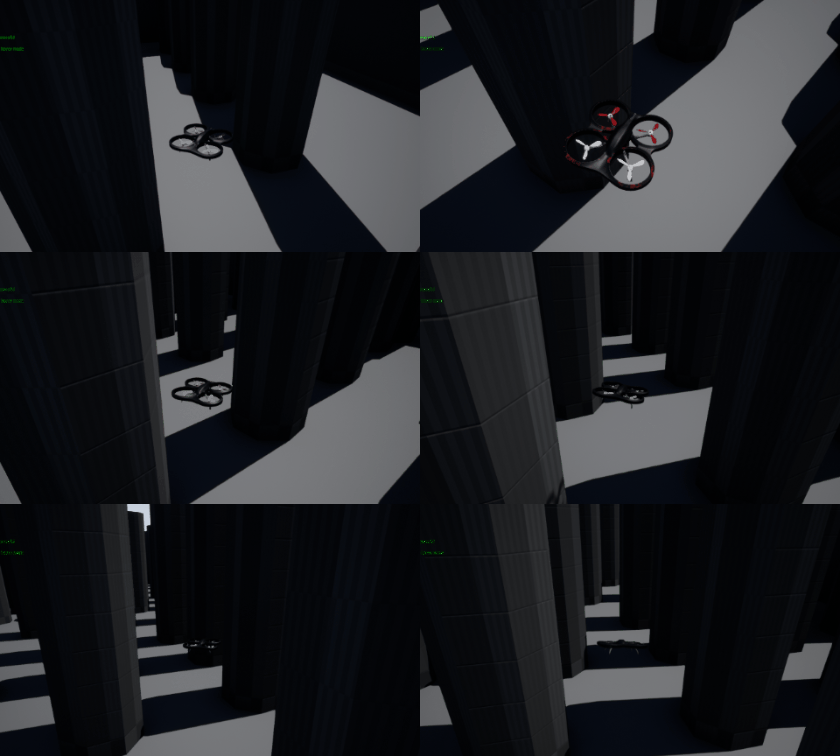
Now I will step by step extend my mission goals: Navigate to coordinates etc.
For now I am training in my test environment where my custom reset works. In order to move to downtown etc. we would need a real reset for RL episodes.
Kjell-K
on 17 Oct 2017
Hi @Kjell-K, would you be willing to share your reset? Do you basically just go way up in the air navigate to home x and y and then land?
cangokalp
on 18 Oct 2017
@Kjell-K That's a nice obstacle course setup you have there! Looking forward to seeing it improves.
BTW, did you do this with a multi-dimensional action space, or a single dimension action space?
kaihuchen
on 19 Oct 2017
@cangokalp Exactly, this is how I do it. I run it in a while to make sure that each position set is performed correctly. I shared it here a couple of times I think. Here again with GIF in @kaihuchen repo. BUT @sytelus just implemented general reset() API for drone mode. It did not work for me when I tried. Check it out as well though.
@kaihuchen Thanks, yes it is great for initial tests. Here a link to download the binaries for win10.
I use Discrete(4) for now for my actions, which are custom functions like Stop, Yaw_left, Yaw_right, Straight. I do not think that I want to go for low level Roll Pitch Yaw actions, but I want to have amount of yaw and speed continuous.
I will hurry up to make my code available as well.
Kjell-K
on 19 Oct 2017
Just FYI - reset() API is now available and working!
sytelus
on 27 Oct 2017
Related issues
 sinanonur
·
3Comments
sinanonur
·
3Comments
 git-moeen
·
4Comments
git-moeen
·
4Comments
 p3jawors
·
3Comments
p3jawors
·
3Comments
 HereIsPatrick
·
3Comments
HereIsPatrick
·
3Comments
 kharyal
·
3Comments
kharyal
·
3Comments
Most helpful comment
@Kjell-K @clovett @cangokalp FYI, I have posted my code in a repository here https://github.com/kaihuchen/DRL-AutonomousVehicles
Have fun with it, and if you have anything to add to it please by all means let me know.