Airsim: Images from simGetImages have low color range
Images obtained using the simGetImages function show much less color range than they do in the Unreal Editor. Here's an example below:
This is how the DepthVis image appears in the Unreal Editor:
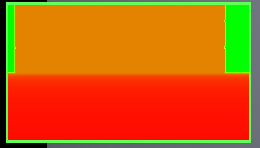
This is how the _same_ image appears when saved with
simGetImages:

I've been trying to find the cause of this effect. It appears that the raw pixel values that AirSim gets from Unreal in the RenderRequest.cpp file show this restricted color range. So this would seem to be an Unreal issue rather than an AirSim issue, but previous versions of AirSim did not have this problem, so I assume that something must have changed on AirSim's end to cause this.
 hngenc
All 18 comments
I think this is because how scene capture parameters are set. I've seen this previously as well when gamma was set to low. You might want to play with capture settings:https://github.com/Microsoft/AirSim/blob/master/docs/settings.md#image-capture-settings
However you are correct that we need to figure out a way to do this automatically.
 sytelus
on 28 Sep 2017
sytelus
on 28 Sep 2017
Concerning this, can anyone tell me why I am just seeing the initial 180°?
 Kjell-K
on 28 Sep 2017
Kjell-K
on 28 Sep 2017
@sytelus Do you know if gamma values affect the DepthMeters images as well?
@Kjell-K I've also noticed the issue you described. Any solution would be hugely appreciated.
hngenc
on 28 Sep 2017
@hngenc I have your issue as well by the way. I use it as gray image decoded but the low range in data is occurring as well.
And no my issue post remains uncommented. As work around I rotated the entire map in Unreal Editor by an angle, so that I have the 180° with DepthVis in the direction of interest. Very unsatisfying though.
Kjell-K
on 28 Sep 2017
I can confirm that this low pixel range also occurs for DepthMeters images. For example, in the image below, both regions marked red show the exact same distance (17m) when they should show slightly different distances because of the angle at which the drone is facing them:
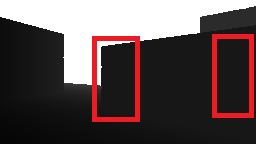
This makes it impossible for me to create point-clouds from depth images whereas I was able to do so in previous versions of AirSim.
Edit:
Also, @sytelus, none of the capture settings, including Target Gamma, seem to have any effect on the color output of DepthVis or DepthMeters.
hngenc
on 28 Sep 2017
@hngenc DepthMeters should not be effected by gamma. Its direct float values (not descretized pixel value). How are you looking at DepthMeters image? If you are converting to RGB first then you won't get accurate result. Generally, you might want to save DepthMeters as just float matrix in binary format and then read out the value of cells.
sytelus
on 29 Sep 2017
@sytelus I get DepthMeters as direct float values. For the post above, I converted the float values to a grayscale image to help visualize the problem. But when creating point clouds, I only use the float values.
However, the float values simply aren't correct. Their range is broken. Let me use the image below to illustrate:
On AirSim's current version, the difference in depth between the two red regions is ~0 m. But when I revert to commit 8820a7fdd811d86aba5f7c9ded3d8eb9f93b6f16, the difference in depth between the two red regions is ~10 meters, as it should be.
hngenc
on 29 Sep 2017
I've found a solution to the problem of depth images not being accurate. Navigate to the HUDAssets folder and replace either DepthVisMaterial.uasset or DepthMetersMaterial.uasset with the following asset file: DepthMapMaterial.zip. Every pixel in your new depth images will be a float representing the depth of the pixel in meters.
@sytelus I can close the issue now, but I think it would be better to wait until the broken material assets in the main branch are replaced before the issue is closed.
hngenc
on 29 Sep 2017
Unreal can't import .uasset file by itself. You will have to zip AirSim folder and attach it. Alternatively, could you please post screenshot of asset? May be short description?
One thing I do want to point out is that the depth in meters is in camera plan. This means that depth you get is same for all points in a plan that is parallel to camera. This is unlike perspective projection (i.e. shoot ray from camera to point and get distance). This is done intentionally because this is what stereo matching algorithms would generate. If you get depth in perspective projection and try to feed it to ROS for reconstruction then you would get distortion.
sytelus
on 29 Sep 2017
@sytelus @hngenc Does this solve #478 as well?
Cause otherwise you yaw and have the extreme issue of zero data range again.
Kjell-K
on 29 Sep 2017
I also thought that the DepthMeters image's color range is too low for lower values (i.e., near), which is important for purposes such as autonomous navigation. For example, the following is what I got as-is, where it is nearly impossible to tell what's right in front of the car:
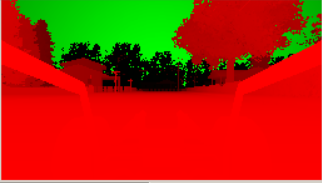
My work-around is to do a log transformation of the depth information received, so as to stretch low-value depths, so that I can get better depth resolution for those that are near. The following shows that I am now able to see much of the frontend of the car.
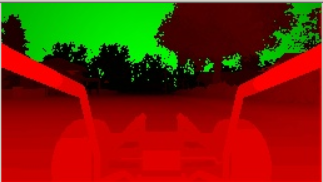
The log transformation does help, but nonetheless it would be nice if the raw depth information could have more range at low values, so that I have more depth resolution to work with for dealing with something like collision avoidance, etc.
 kaihuchen
on 29 Sep 2017
kaihuchen
on 29 Sep 2017
@sytelus Unreal may not be able to explicitly import the assets, but when I manually copied the asset to the HUDAssets folder using Windows File Explorer, the Unreal Editor detected it. In any case, here's a screenshot:
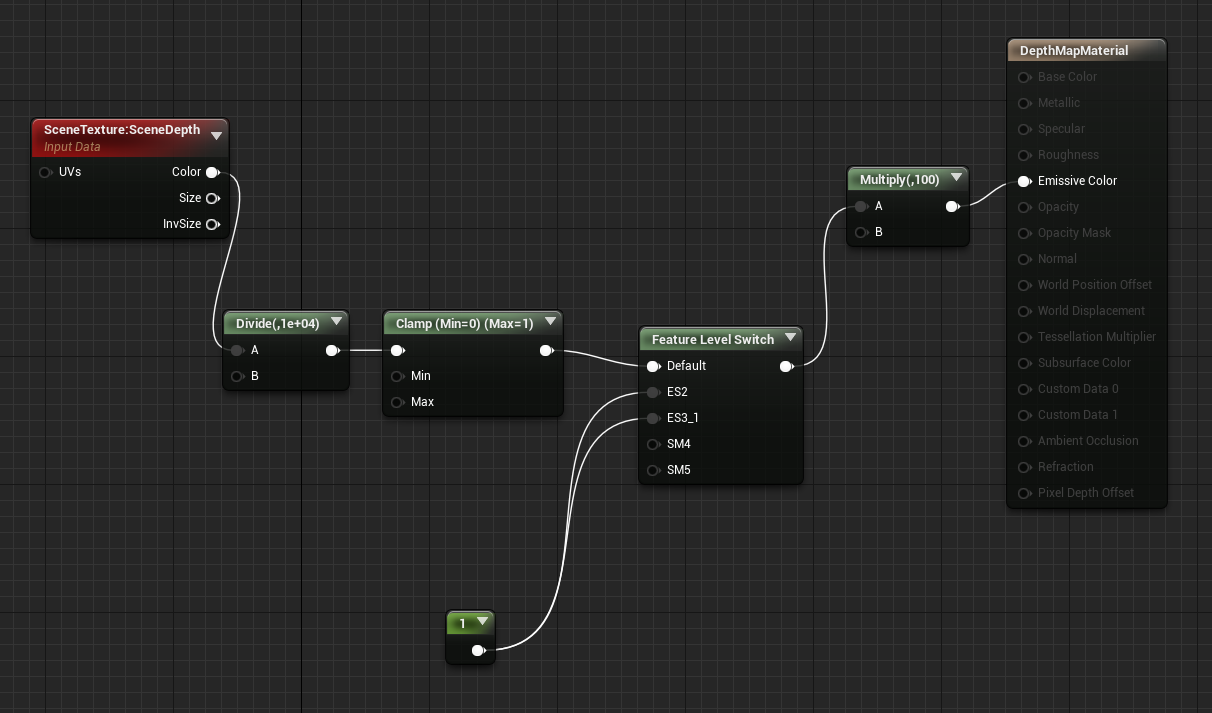
You may notice that the .uasset is nearly identical to the old one in commit 8820a7fdd811d86aba5f7c9ded3d8eb9f93b6f16. The only difference is that I multiply the final value by 100 to obtain the depth in meters. One drawback of the .uasset is that pixel depths are capped at a maximum of 100 m.
I believe the code I posted (or rather copied) does not provide depth in the camera plane. However, I use a ROS package called depth_image_proc to generate point-clouds and they appear perfect as far as I can see. Perhaps depth_image_proc corrects for camera distortions on its own.
@Kjell-K I can confirm that this solves the >180 degree yaw issue. But you shouldn't use the code I posted if you absolutely _require_ planar depth images, as discussed above.
@kaihuchen The log transformation is a great idea! I wish I had thought of it.
hngenc
on 29 Sep 2017
ok... given your feedback I have done some refactoring (code is updated in master branch):
- Rename current DepthMeters to DepthPlanner.
- Add DepthPerspective mode.
- Use black-white gradient in depth visualization.
The DepthPerspective mode is bit different than your above version. The above version uses scene depth which gives depth as a number between 0 to 2^24 but not well documented units. There is another way to get perspective depth that gives depth in meters. So I've used that way for DepthPerspective mode. Here's the asset for this.
One other thing is that you don't need clamp - it actually causes all depth to max out after 100m. If you use image API and get depth as float then clamp is not needed. But if you do depth visualization on screen then clamping is useful.
Anyway, it would be great if you can try out new DepthPerspective mode in new version and see if works as expected in your scenario. I've updated doc here as well.
sytelus
on 30 Sep 2017
@sytelus
Tested DepthPerspective, and it seems to work just fine. I have found another depth problem but it does not seem to be specific to DepthPerspective, so I will report it separately.
kaihuchen
on 30 Sep 2017
With the fix of #500 I am back to the problem of low color range and in this case black and white values.
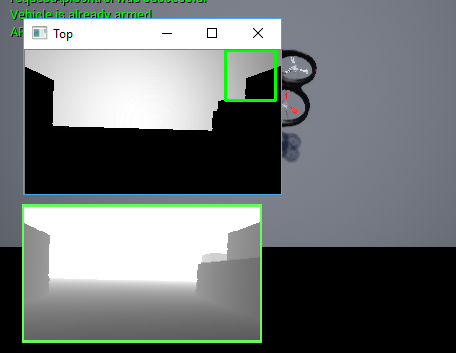
I extract the image by following the example navigate.py
Kjell-K
on 3 Oct 2017
Anyone knows how can I save a depth image with the same result as seen in Unreal?
 raymondchua
on 11 Dec 2017
raymondchua
on 11 Dec 2017
The bug is fixed but you have to increase the intensity. I also invert the range so that dark is near and white is far (As in Unreal window).
With this function, you will get the DepthImage as displayed in the Unreal window (just a bit bitter even).
    def getScreenDepthVis(self):

        responses = self.simGetImages([ImageRequest(0, AirSimImageType.DepthPerspective, True, False)])
        img1d = np.array(responses[0].image_data_float, dtype=np.float)
        img1d = 255/np.maximum(np.ones(img1d.size), img1d)
        img2d = np.reshape(img1d, (responses[0].height, responses[0].width))

        image = np.invert(np.array(Image.fromarray(img2d.astype(np.uint8), mode='L')))

        factor = 10
        maxIntensity = 255.0 # depends on dtype of image data

        # Decrease intensity such that dark pixels become much darker, bright pixels become slightly dark
        newImage1 = (maxIntensity)*(image/maxIntensity)**factor
        newImage1 = array(newImage1,dtype=uint8)

        #cv2.imshow("Test", newImage1)
        #cv2.waitKey(0)

        return newImage1
Thanks. I think this issue is solved and recommend this issue to be closed. :)
raymondchua
on 12 Dec 2017
Related issues
 HereIsPatrick
·
3Comments
HereIsPatrick
·
3Comments
 Kim-BongSu
·
3Comments
Kim-BongSu
·
3Comments
 MattChanTK
·
3Comments
MattChanTK
·
3Comments
 zbenic
·
4Comments
zbenic
·
4Comments
 r2d2Proton
·
3Comments
r2d2Proton
·
3Comments
Most helpful comment
The bug is fixed but you have to increase the intensity. I also invert the range so that dark is near and white is far (As in Unreal window).
With this function, you will get the DepthImage as displayed in the Unreal window (just a bit bitter even).