Aframe: Daydream controller doesnt work and entering VR mode throws a critical error
Description:
Daydream controller doesnt work and entering VR Mode throws a critical error, somehow it works in custom builds and older versions of Aframe.
A-Frame Version:
Tried various ones, first ofc the latest one 0.5.0 (master/f850c2f),
then some of the last 2 days 0.5.0 (master/9266cfd) and so on,
then I bundled an A-frame version with an older VR Polyfill (0. which PlayCanvas uses in their WebVR example because this somehow still works including the Daydream controller,
nothing worked.Platform / Device:
Hardware ZTE Axon 7 + Google Daydream View
OS LineageOS 14.1 running Android 7.1.2 (lineage-14.1-20170612-nightly-axon7-signed) 2017-06-12 10:29:17
UA Mozilla/5.0 (Linux; Android 7.1.2; ZTE A2017U Build/N2G47O) AppleWebKit/537.36 (KHTML, like Gecko) Chrome/59.0.3071.92 Mobile Safari/537.36
Yes its flashed, because ZTE just released a working 7.1 Nougat/Daydream version some days/weeks ago and there was no official version which supported daydream in February. I will also test if the error still occurs with the manufacturer stock version soon, but since it works on PlayCanvas and older A-frame examples i think this _makes no difference_.
Main error:
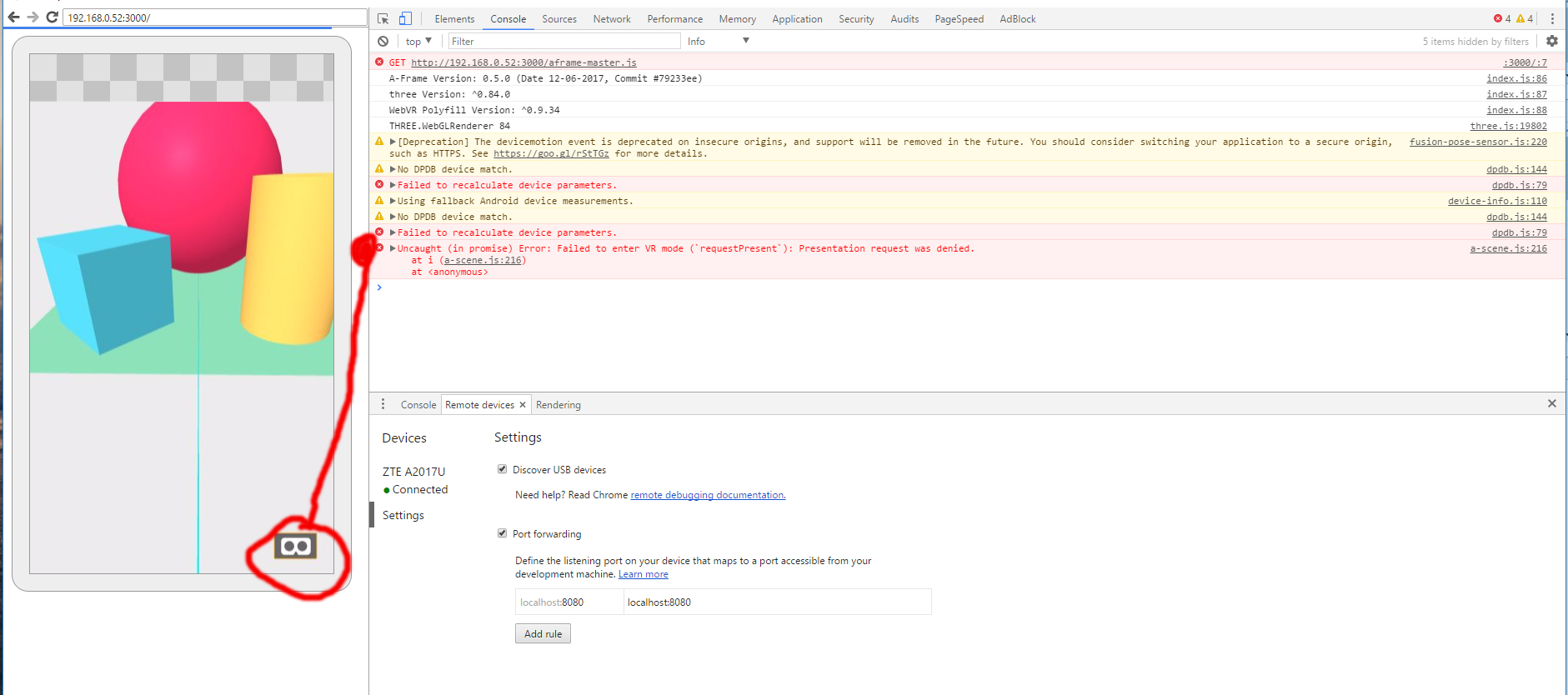
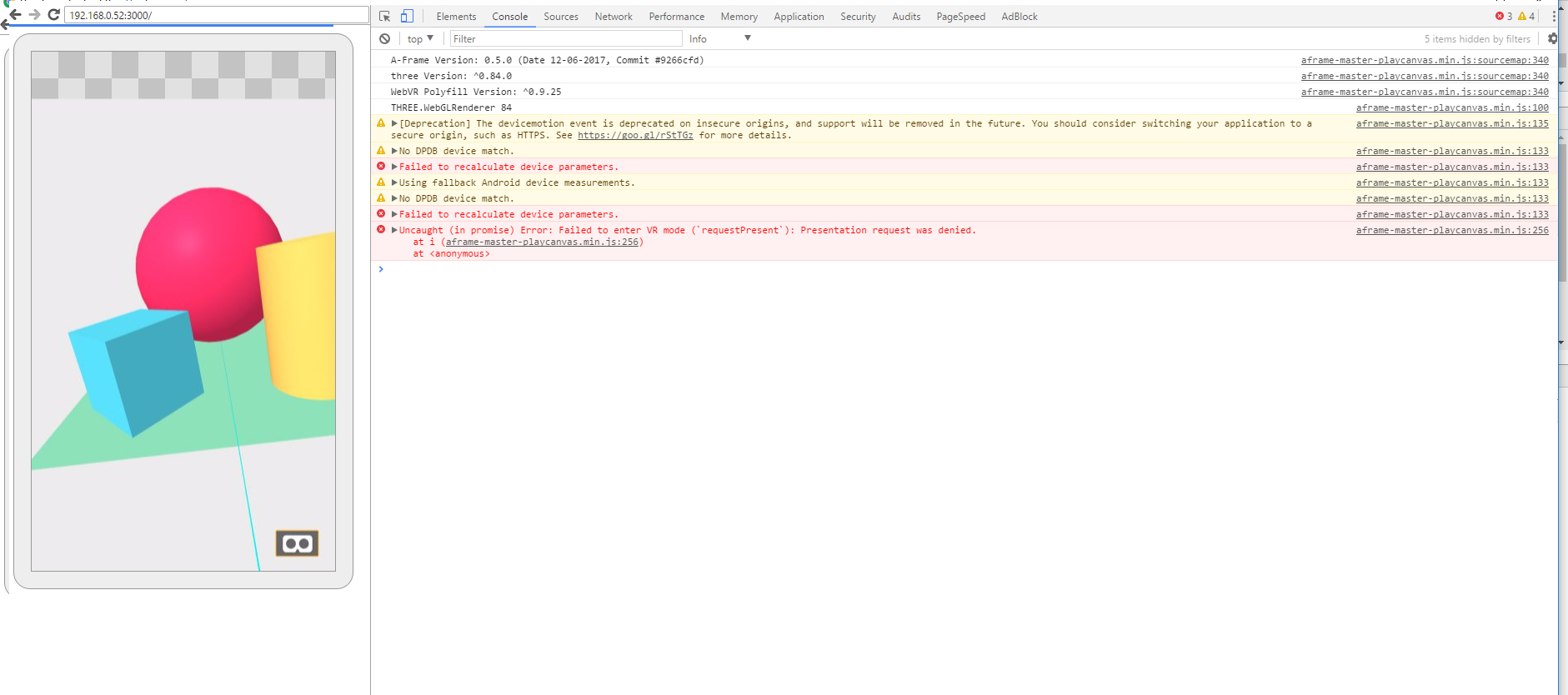
Uncaught (in promise) Error: Failed to enter VR mode ('requestPresent'): Presentation request was denied
-> after triggering the VR mode button and thus the Daydream (Pls insert your device) screen never appears.Reproducible Code Snippet or URL:
Every current example from A-Frame on the mainpage and from private projects using current versions, too i.e. ground control vr.
CodepenWorking examples are:
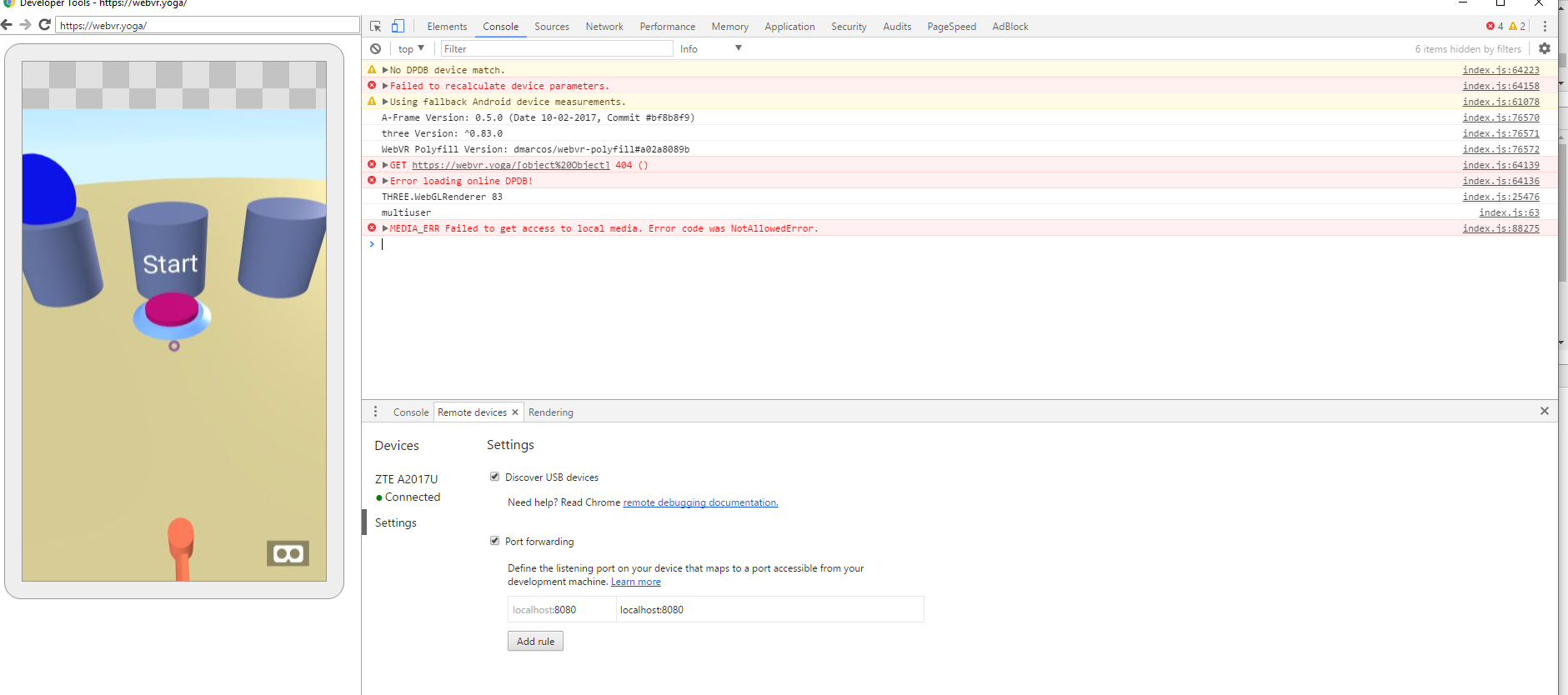
-- webvr.yoga (working daydream controller)
-- webvr.playcanvas.com (even tho it throws other errors and its not completly compareable it still shows the controller works in web with my setup)
-- https://webvr.info/samples/XX-vr-controllers.html?polyfill=1 (this works as intended like in gaze is no controller interaction just by touch you can change the background, then I enter VR mode the daydream window pops up and the controller is able to change the background on click)Screens
-- webvr.yoga which works
-- aframe boilerplate with aframe master branch
-- aframe boilerplate with aframe master branch and old polyfill (9.0.25 -> which is the same playcanvas uses atm)
 intensr
All 33 comments
If you are trying to use the recently added core daydream controller support, the component name is daydream-controls if I recall correctly - not daydream-controller
 machenmusik
on 13 Jun 2017
machenmusik
on 13 Jun 2017
Does using WebVR API in Chrome on Daydream still need either origin trial token or explicit WebVR feature flag enable? If so, and you haven't done either, then I would expect requestPresent to fail due to browser denying permission.
machenmusik
on 13 Jun 2017
Iam so stupid sorry, you're right both times. I didnt find any deeper description about how to implement the controller because daydream component site is not ready yet (I guess?!) so i ripped it from another repo. I updated the pen however, still not sure if thats the _best_ implementation for testing if the controller works or not, but that the default daydream VR mode is not starting is at this point enough I guess.
About the flags: I disabled the following chrome://flags/ (WebVR, WebVR experimental rendering optimizations and Chrome VR). Now Aframe is switching to stereoscopic view but the daydream application is still not starting to enable the controller. Errors ahead:

The PlayCanvas example still works however, the webyoga site is now broken, too (just stereoscopic gaze view without controller) and the webvr xx controller example still works.
intensr
on 13 Jun 2017
So wait, if you turn OFF WebVR support (and then are presumably using polyfill not Daydream mode) then I don't think the controller will work. My understanding is that you have to be in Daydream mode (WebVR enabled) for the controller to do its job.
machenmusik
on 14 Jun 2017
@intensr @caseyyee: this appears to be a dupe of issue #2677. we should close one of the bugs and address this issue.
 cvan
on 14 Jun 2017
cvan
on 14 Jun 2017
A little testing of my own...
After a host of updates to Pixel phone and controller (all now on latest), and using Chrome beta (webvr enabled so no origin trial token dependency) with controller example codepen:
https://codepen.io/machenmusik/pen/YQGrWQ
Once you enter VR and click the track pad, since for security the Gamepad API will not provide controller data until the controller is used, the controller is visible (although it required re-home position) and clicks work.
machenmusik
on 14 Jun 2017
@cvan we probably want to work issues with official phone and controller firmware first, then come back to see if that fixes this one. On Pixel with Chrome beta and latest aframe master, I don't see any issues
machenmusik
on 14 Jun 2017
@cvan Yes its the same problem or at least close to it. I was not sure about it while opening the issue, thanks for the reference.
@machenmusik The thing that confused me with the polyfill is that while the WebVR flag is activated, the polyfill seems to be still active partly. However i tried various chrome browsers (beta, canary, etc.), versions and also Aframe (master) and vrpoly configurations (0.9.24-latest) and nothing seems to "work".
Just for clarification of a "working" daydream component / webvr application with a Daydream mobile device:
- Loading site (your latest example for instance) on mobile device in gaze view (fixed crosshair to view)
- Clicking VR button in lower right corner to enter "VR mode"
- Enter Daydream "Put your Phone into the Daydream View"
- Pair Daydream controller Room
- Come back to site in stereoscopic view including a visible controller
Is this how you experience it on your Pixel phone? @machenmusik
What happens in my case is 1. -> 2. -> 3. -> 4. but then come back to stereoscopic view and the controller does not appear, I just get gaze view with gaze controls without controller events at all. But as I said before this works in several other WebVr applications even with poly or/and webvr flag, it does not matter. Also the controller is theoretically available, same as the daydream view, tested here:

code here (its not clean cause I tried a lot various stuff with a friend this morning)
I completely understand that you want to focus on officially supported devices, but the ZTE Axon 7 which I use is one of the first supported Daydream devices and I think it should therefor be considered. I'm not the best developer but I'm pretty sure its just a minor issue regarding the adjustment of code once the problem is detected.
intensr
on 14 Jun 2017
@intensr the Axon 7 is an official Daydream device, but from original post I understood you were not using the production firmware ("yes its flashed") which I think would be the important Axon variant to support (complicated by the fact that AFAIK no one on current A-Frame team has one). Using my Pixel that just updated itself and controller to 7.1.2, and Chrome beta with the WebVR flag thrown to work around the codepen-has-no-origin-trial-token issue, the Codepen I mentioned worked as expected with Daydream controller.
machenmusik
on 14 Jun 2017
Ok the flashed OS thing is not much of a difference since my brother has the same phone with original OS and its not working there, too (same issues just slighty other UA). But sure you are right if no one can debug it since the lack of the hardware it wont work out. cries deeply
intensr
on 14 Jun 2017
edit: there seems to be other issues here at play.
I'll post testing summary for just controller issue into 2677
@cvan I think we can continue to address the enter VR issues here for this device.
 caseyyee
on 14 Jun 2017
caseyyee
on 14 Jun 2017
@intensr if the page you are using is insecure or lacks origin trial token (which is true for Codepen) I think the WebVR flag must be manually enabled, and you need to touch button on the controller after entering VR for it to appear
machenmusik
on 14 Jun 2017
@machenmusik if the page is insecure it usually shows even in vr mode that the page is "not safe", however I tested everything, including the flag/token and without it I also pressed every button multiple times while in stereoscopic view its strange the controller seems to be there codewise but it simply doesnt work. I can confirm that the regular chrome browser does not work in every case, just canary or beta. The problem is I get no specific error or like no informative error which shows up that is different from playcanvas or the webvr.info examples which still work (like there are warnings and errors regarding dpdb and device size but thats it). In your example on codepen I only have gaze view BUT the webvr mode kicks in after pressing the vr button, otherwise the 3. "Put your Phone into the Daydream View" part from the post above would not start cause of the missing token/flag.
Regarding the flashed OS I will visit my brother tomorrow and try it with his phone (I already did that but I missed the flags I guess). Problem with ZTE is their shipping of updates, so there is only 7.1.1 available for stock builds and I guess that will make a huge difference to the current Pixel Android builds but we will see.
Latest UA btw from the different builds in case its needed somewhere (same phone/hardware both times)
Lineage latest
Mozilla/5.0 (Linux; Android 7.1.2; ZTE A2017U Build/N2G47O) AppleWebKit/537.36 (KHTML, like Gecko) Chrome/61.0.3129.3 Mobile Safari/537.36
Stock ZTE Android
Mozilla/5.0 (Linux; Android 7.1.1; ZTE A2017G Build/NMF26V) AppleWebKit/537.36 (KHTML, like Gecko) Chrome/58.0.3029.83 Mobile Safari/537.36
intensr
on 14 Jun 2017
@intensr sorry if this is obvious but just to make sure w.r.t. the WebVR enable flag you have done https://webvr.rocks/chromium steps 4 and 5 with your Chrome
machenmusik
on 14 Jun 2017
In Chrome release channel one has to enable the GamepadExtensions in chrome://flags (besides WebVR) in order for the Daydream controller to show up. In Canary this is not necessary. In both cases, Chrome + GampeadExtensions and Canary the controller shows up consistently on https://webvr.info/samples/XX-vr-controllers.html, https://threejs.org/examples/#webvr_daydream and also aframe laser-controls from master when run locally on my machine https://github.com/aframevr/aframe/tree/master/examples/test/laser-controls
@intensr Please use Chrome with WebVR and GamepadExtensions enabled on chrome://flags or Canary. The example included in master should work. https://github.com/aframevr/aframe/tree/master/examples/test/laser-controls
Please reopen if it does not.
 dmarcos
on 15 Jun 2017
dmarcos
on 15 Jun 2017
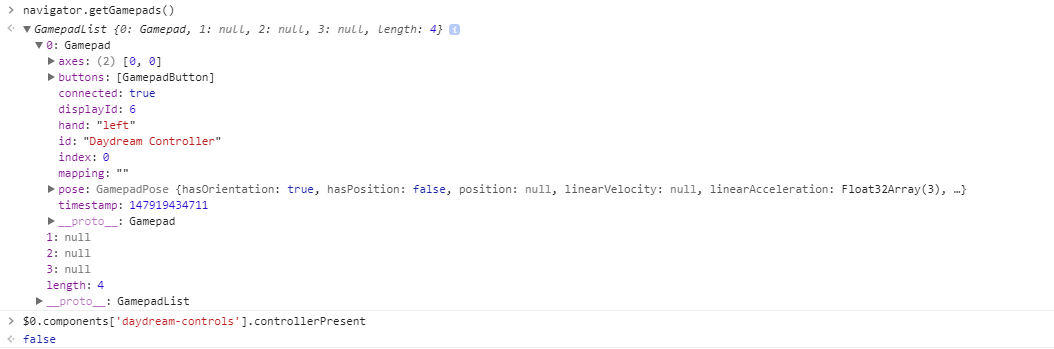
I'm running into the same issue here. Daydream controller works on the webvr.info and threejs.org examples but not on the aframe examples.
Adding the controller to the hello-world example, I got the following state
 fernandojsg
on 22 Oct 2017
fernandojsg
on 22 Oct 2017
It looks like some async problem maybe? As If I'm adding breakpoints that slow down the initialization sometimes it works and the controller appears
fernandojsg
on 22 Oct 2017
Is that master or 0.7.1?
dmarcos
on 22 Oct 2017
Both
fernandojsg
on 22 Oct 2017
Something must have changed on the chrome side
dmarcos
on 22 Oct 2017
@dmarcos could you reproduce it too?
fernandojsg
on 22 Oct 2017
I don’t have a daydream around today
dmarcos
on 22 Oct 2017
Go home get one! Everything is on fire!
fernandojsg
on 22 Oct 2017
Do either of these work?
You'd have to manually enable WebVR and Gamepad Extensions in chrome://flags due to Codepen as per https://github.com/aframevr/aframe/issues/2769#issuecomment-308418328
https://codepen.io/machenmusik/pen/VMNgzg (aframe master)
https://codepen.io/machenmusik/pen/NggmZW (older pre-0.7.0-derived)
machenmusik
on 23 Oct 2017
@machenmusik on the first link doesn't work but on the second one yep
fernandojsg
on 23 Oct 2017
Then it seems like a 0.7.0 regression...
machenmusik
on 23 Oct 2017
Git bisecting it right now... :
fernandojsg
on 23 Oct 2017
It's some kind of async issue, as after getting an absurd bisect commit, I went through your two codepen examples and I reload them several times and I got both of them working and not working.
fernandojsg
on 23 Oct 2017
I spent hours testing daydream for 0.7.0 and the laser controls example was working rock solid. I’m almost certain that something must have changed on the chrome side
dmarcos
on 23 Oct 2017
Testing on Canary: https://aframe.io/aframe/examples/test/laser-controls/ works fine for me
dmarcos
on 23 Oct 2017
FYI hand-controls does not support 3DOF anymore. laser-controls is the recommended responsive input.
dmarcos
on 23 Oct 2017
@dmarcos yep I'm not using hand-controls I'm testing always against laser-controls and I'm still getting random failures : I'll post if I find something
fernandojsg
on 23 Oct 2017
Reproducing the issue: https://www.youtube.com/watch?v=OvODqJ9l_Yc
fernandojsg
on 23 Oct 2017
Related issues
 jonikorpi
·
4Comments
jonikorpi
·
4Comments
 jcarpenter
·
4Comments
jcarpenter
·
4Comments
 donmccurdy
·
5Comments
donmccurdy
·
5Comments
 wlhm1984
·
5Comments
wlhm1984
·
5Comments
 huhsame
·
3Comments
huhsame
·
3Comments
Most helpful comment
In Chrome release channel one has to enable the GamepadExtensions in chrome://flags (besides WebVR) in order for the Daydream controller to show up. In Canary this is not necessary. In both cases, Chrome + GampeadExtensions and Canary the controller shows up consistently on https://webvr.info/samples/XX-vr-controllers.html, https://threejs.org/examples/#webvr_daydream and also aframe laser-controls from master when run locally on my machine https://github.com/aframevr/aframe/tree/master/examples/test/laser-controls
@intensr Please use Chrome with WebVR and GamepadExtensions enabled on chrome://flags or Canary. The example included in master should work. https://github.com/aframevr/aframe/tree/master/examples/test/laser-controls
Please reopen if it does not.