Aframe: Enter VR button disappears after exit VR, in Samsung & Oculus browsers
Can observe it is momentarily shown before being hidden.
- A-Frame Version: 0.5 / master
- Platform / Device: Oculus Browser - Gear VR
- Reproducible Code Snippet or URL:
https://aframe-master.glitch.me
 mkeblx
All 34 comments
@machenmusik, @caseyyee, or @mkeblx (!) – someone who has a functional Oculus Browser device: can you take a looksie?
(I'm waiting on a new Samsung Gear VR viewer)
 cvan
on 6 May 2017
cvan
on 6 May 2017
Will do.
mkeblx
on 9 May 2017
thanks, @mkeblx. I'll debug it once I get my new Samsung Gear VR; if you (or someone else) can get to it before then, sweet!
cvan
on 9 May 2017
How is it possible to debug this ?
Does entering VR work for someone ? For me the Oculus Browser only shows an Window with the Scene.
 cutec-chris
on 25 May 2017
cutec-chris
on 25 May 2017
I tested aframe.io in the new Gear VR 2017 and the VR enter button disappears even before I can click on it to enter VR. The site loads, the button is visible for a brief moment, then it disappears. Mabye it has something to do with the mobile version / css of aframe.io
(Oculus browser)
 weddingdj
on 26 May 2017
weddingdj
on 26 May 2017
I wonder if the old code to auto-enter VR (by necessity) for Carmel Developer Preview is trying and failing with Oculus Browser. But previously for me pages were loading in 2D with enter-VR button visible just fine with Oculus Browser. Did this just change recently?
 machenmusik
on 26 May 2017
machenmusik
on 26 May 2017
Can we test with 0.4.0?
 dmarcos
on 26 May 2017
dmarcos
on 26 May 2017
On the assumption that most will be using Oculus browser now, maybe we should remove auto-enter-vr from default scene components, and those that need can add manually? @dmarcos if you like that approach I can do quick PR
machenmusik
on 26 May 2017
I investigated and it looks like if the exit-vr event is not triggered. I realised that because I listen to the exit-vr event on the scene and remove my grid component and it is never removed when leaving VR in Gear VR with controller. And the camera rotation is not reset after leaving VR. Maybe it has to do with the controller button click? @dmarcos
weddingdj
on 7 Jun 2017
When loading a scene/page:
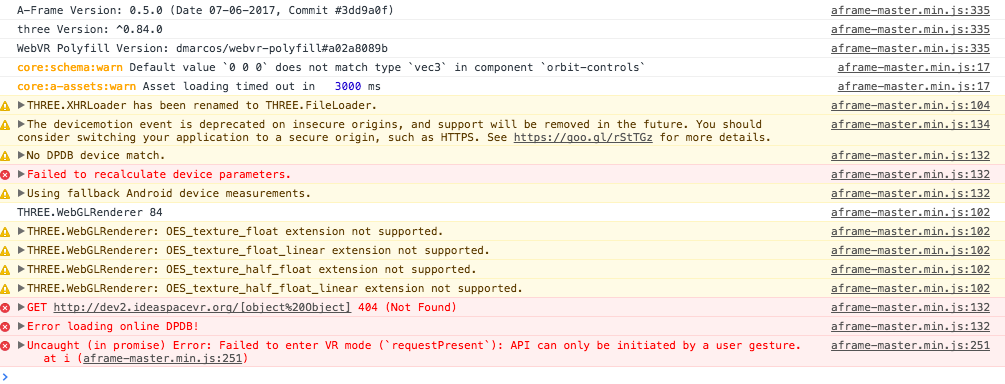
If I touch the touch pad of the controller:

No output when entering or leaving VR mode.
weddingdj
on 8 Jun 2017
@weddingdj thanks for investigating! Is that with current master? auto-enter vr was disabled recently.
dmarcos
on 8 Jun 2017
Yes, it is the current master. I put some debug statements into the exitVR method and it is never called. To me it looks like that the VR controller is exiting VR mode but a-frame still thinks it is in VR. That's why the camera rotation after exiting is the same angle as in VR before, and, of course, no enter VR button is shown.
weddingdj
on 8 Jun 2017
Entering VR itself works fine though right?
 ngokevin
on 8 Jun 2017
ngokevin
on 8 Jun 2017
Yes, entering VR works fine.
weddingdj
on 8 Jun 2017
requestPresent is failing. Is this the Oculus Browser or the Samsung one?
dmarcos
on 8 Jun 2017
The Oculus Browser.
weddingdj
on 8 Jun 2017
requestPresent is clearly failing saying that it requires user gesture. I don't understand how it's entering VR. Is it the polyfill taking over?
dmarcos
on 8 Jun 2017
@dmarcos I don't think you merged #2707, was auto-enter disabled some other way?
machenmusik
on 8 Jun 2017
Perhaps auto enter is attempted and fails in such a way that messes up subsequent exit after manually entering. Try with #2707 included maybe?
machenmusik
on 8 Jun 2017
I tried with #2707 but still no success. Is it possible that the click on the back button of the Gear VR controller is just not taken into account by a-frame? Any hint where I could debug in the code?
weddingdj
on 9 Jun 2017
I would look into the exitVR button of a-scene:
https://github.com/aframevr/aframe/blob/master/src/core/scene/a-scene.js#L229
Is exitVRSuccess ever called?
dmarcos
on 9 Jun 2017
No, it is never called. These were my debug statements (none of them were called):
exitVR: {
      value: function () {
        var self = this;

console.log('0');
        // Don't exit VR if not in VR.
        if (!this.is('vr-mode')) { return Promise.resolve('Not in VR.'); }

console.log('1');
        exitFullscreen();

console.log('2');
        if (this.checkHeadsetConnected() || this.isMobile) {
console.log('3');
          return this.effect.exitPresent().then(exitVRSuccess, exitVRFailure);
        }
console.log('4');
        exitVRSuccess();
        return Promise.resolve();

        function exitVRSuccess () {
console.log('EXIT VR SUCCESS');
@weddingdj just curious. do you use a remote console or something to see the logs on GearVR?
dmarcos
on 9 Jun 2017
Yeah, I use a remote console.
weddingdj
on 9 Jun 2017
@ngokevin should I test your fix? Or do you have a Gear VR at hand?
weddingdj
on 9 Jun 2017
That'd be helpful! I will be around to test it in an hour.
ngokevin
on 10 Jun 2017
I applied your changes but it did not work.
weddingdj
on 10 Jun 2017
Yeah, I just tried myself. I guess it means Oculus Browser may not be firing onvrdisplaydeactivate as the WebVR API says it should. Asking them now in the PR. Or here. Does Oculus Browser implement onvrdisplaydeactivate, or is there another agnostic way to detect exit VR so A-Frame can handle it.
ngokevin
on 10 Jun 2017
Why would we fire onvrdisplaydeactive? We aren't unmounting. The spec seems pretty clear here.
onvrdisplaydeactivate A user agent MAY dispatch this event type to indicate that something has occured which suggests the VRDisplay should exit presentation. For example, if the VRDisplay is capable of detecting when the user has taken it off, this event SHOULD fire when they do so with the reason "unmounted".
We are firing or should be firing onvrdisplaypresentchange
onvrdisplaypresentchange A user agent MUST dispatch this event type to indicate that a VRDisplay has begun or ended VR presentation. This event should not fire on subsequent calls to requestPresent() after the VRDisplay has already begun VR presentation.
 DigiTec
on 10 Jun 2017
DigiTec
on 10 Jun 2017
Thanks, I'll use that.
ngokevin
on 10 Jun 2017
Thx Justin
machenmusik
on 10 Jun 2017
Just tested the example from https://aframe-master.glitch.me and now the enter vr button does not disappear. Tested on Samsung Galaxy S7 with Gear VR 2 in Oculus browser.
 mlaves
on 11 Jun 2017
mlaves
on 11 Jun 2017
It does not work when testing https://aframe-master.glitch.me in Oculus browser, Gear VR with controller, Samsung Galaxy S7, at least for me (I reloaded the site a few times). The button still disappears after leaving VR and the camera rotation is wrong. Has the fix already been commited to the latest master?
weddingdj
on 12 Jun 2017
@weddingdj You are correct. I misread the issue title. When accessing the a-frame examples from https://a-frame.io (with a-frame 0.5.0) there was no enter vr button on Gear VR2 for me in the first place (couldn't enter vr mode at all).
When using a-frame master as in https://aframe-master.glitch.me, the enter vr button is shown, but disappears after exiting vr mode (as this issue title suggests). Sorry for my misunderstanding. The entitled bug still persists.
mlaves
on 12 Jun 2017
Related issues
ngokevin
·
5Comments
 MrBokeh
·
5Comments
MrBokeh
·
5Comments
 donmccurdy
·
5Comments
donmccurdy
·
5Comments
 AdrienPoupa
·
6Comments
ngokevin
·
4Comments
AdrienPoupa
·
6Comments
ngokevin
·
4Comments