Aerial: Location of Video will not showing on Mojave (exist also on latest Beta)
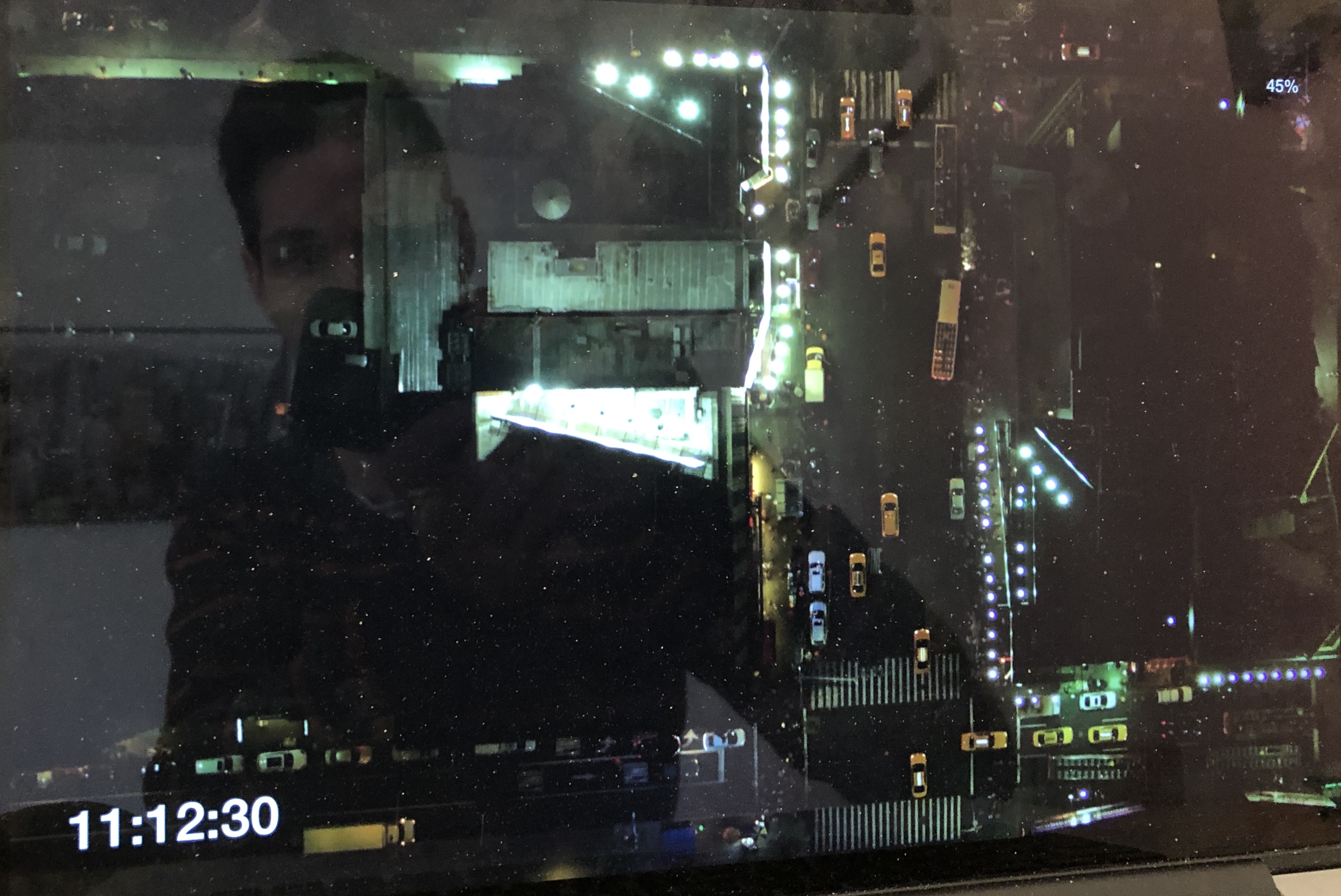
Only Clock and Battery
LOGS if this can help to resolve the issue:
11:05:54 : avInit .saver (571.0, 359.0, 296.0, 184.0) p: true o: true
11:05:54 :
11:05:54 : Time Management initialized
11:05:54 : Display Detection initialized
11:05:54 : Display Detection
11:05:54 : 1 display(s) detected
11:05:54 : 1cm = 43.503937661237615 points
11:05:54 : npass: dict [__C.NSDeviceDescriptionKey(_rawValue: NSDeviceBitsPerSample): 8, __C.NSDeviceDescriptionKey(_rawValue: NSDeviceSize): NSSize: {1440, 900}, __C.NSDeviceDescriptionKey(_rawValue: NSDeviceColorSpaceName): NSCalibratedRGBColorSpace, __C.NSDeviceDescriptionKey(_rawValue: NSDeviceIsScreen): YES, __C.NSDeviceDescriptionKey(_rawValue: NSDeviceResolution): NSSize: {144, 144}, __C.NSDeviceDescriptionKey(_rawValue: NSScreenNumber): 69733248]
11:05:54 : bottomLeftFrame (0.0, 0.0, 1440.0, 900.0)
11:05:54 : src orig : (0.0, 0.0)
11:05:54 : left 0.0 below 0.0
11:05:54 : [id=69733248, width=1440, height=900, bottomLeftFrame=(0.0, 0.0, 1440.0, 900.0), topRightCorner=(1440.0, 900.0), isMain=true, backingScaleFactor=2.0]
11:05:54 : (0.0, 0.0, 1440.0, 900.0)
11:05:54 : Display Detection Done
11:05:54 : Using : nil
11:05:54 :
11:05:54 : Using dot workaround for video driver corruption
11:05:54 : Manifest init
11:05:54 : app support exists
11:05:54 : No customvideos.json at : /Users/philip.heiduck/Library/Application Support/Aerial/customvideos.json
11:05:54 : isManifestCached 10 true
11:05:54 : isManifestCached 11 true
11:05:54 : isManifestCached 12 true
11:05:54 : isManifestCached 13 true
11:05:54 : 2020-04-20
11:05:54 : move
11:05:54 : creating dir /Users/philip.heiduck/Library/Application Support/Aerial/backups/2020-04-20
11:05:54 : moving tvos13.json and TVIdleScreenStrings13.bundle
11:05:54 : Manifests files were not loaded in class
11:05:54 : Files were not already loaded in memory
11:05:54 : Fetching missing manifests online
11:05:54 :
11:05:54 :
11:05:54 : restarting playback
11:05:54 : avInit .saver (571.0, 359.0, 296.0, 184.0) p: true o: true
11:05:54 :
11:05:54 : Using : nil
11:05:54 :
11:05:54 : Using dot workaround for video driver corruption
11:05:54 :
11:05:54 :
11:05:54 :
11:05:54 : restarting playback
11:05:54 : Caching resources-13.tar
11:05:54 : untaring resources-13.tar
11:05:54 : Finished downloading https://sylvan.apple.com/Aerials/resources-13.tar
11:05:54 : Fetching manifests all done
11:05:54 : Poi Strings Provider initialized
11:05:54 : Preferred languages : ["en-DE", "de-DE"]
11:05:54 : Best matched language : en_GB
11:05:54 : Defaulting to bundle
11:05:54 : path : /Library/Screen Savers/Aerial.saver/Contents/Resources/en.json
11:05:54 : Community JSON : 99 entries
11:05:54 : Using exiting customCacheDirectory : /Users/philip.heiduck/Library/Application Support/Aerial
11:05:54 : cache to be used : Optional("/Users/philip.heiduck/Library/Application Support/Aerial")
11:05:54 : Total videos processed : 99 callbacks : 2
11:05:54 :
11:05:54 : initvideocache
11:05:54 :
11:05:54 :
11:05:54 :
11:05:54 :
11:05:54 : initvideocache
11:05:54 :
11:05:54 :
11:05:54 :
11:05:54 : Processsing contentInformationRequest
11:05:54 : expected content length: 103228938 type:com.apple.quicktime-movie
11:05:54 : Processsing contentInformationRequest
11:05:54 : expected content length: 103228938 type:com.apple.quicktime-movie
11:05:55 : Processsing contentInformationRequest
11:05:55 : expected content length: 346185986 type:com.apple.quicktime-movie
11:05:55 : Processsing contentInformationRequest
11:05:55 : expected content length: 346185986 type:com.apple.quicktime-movie
11:05:55 : connectionDidFinishLoading
11:05:55 : connectionDidFinishLoading
11:05:55 :
11:05:55 : start playback: (0.0, 0.0, 296.0, 184.0) (0.0, 0.0, 296.0, 184.0)
11:05:55 :
11:05:55 : start playback: (0.0, 0.0, 296.0, 184.0) (0.0, 0.0, 296.0, 184.0)
11:05:58 :
11:05:58 : pwc init2
11:05:58 : Callback after manifest loading
11:05:58 : Looking for outdated files
11:05:58 : No old files found
11:05:59 : Aerial control panel V1.8.2
11:05:59 : Cache size : 0,01 GB
11:05:59 : Location services may be disabled, Night Shift can't detect Sunrise and Sunset times without them
11:05:59 : cvcinit2
11:05:59 : cvcawake
11:05:59 : wdl
 pheiduck
All 11 comments
Hi @pheiduck
Sorry for the late reply, this is quite peculiar. Can you make a screenshot of your Location settings ? Talking about this screen :
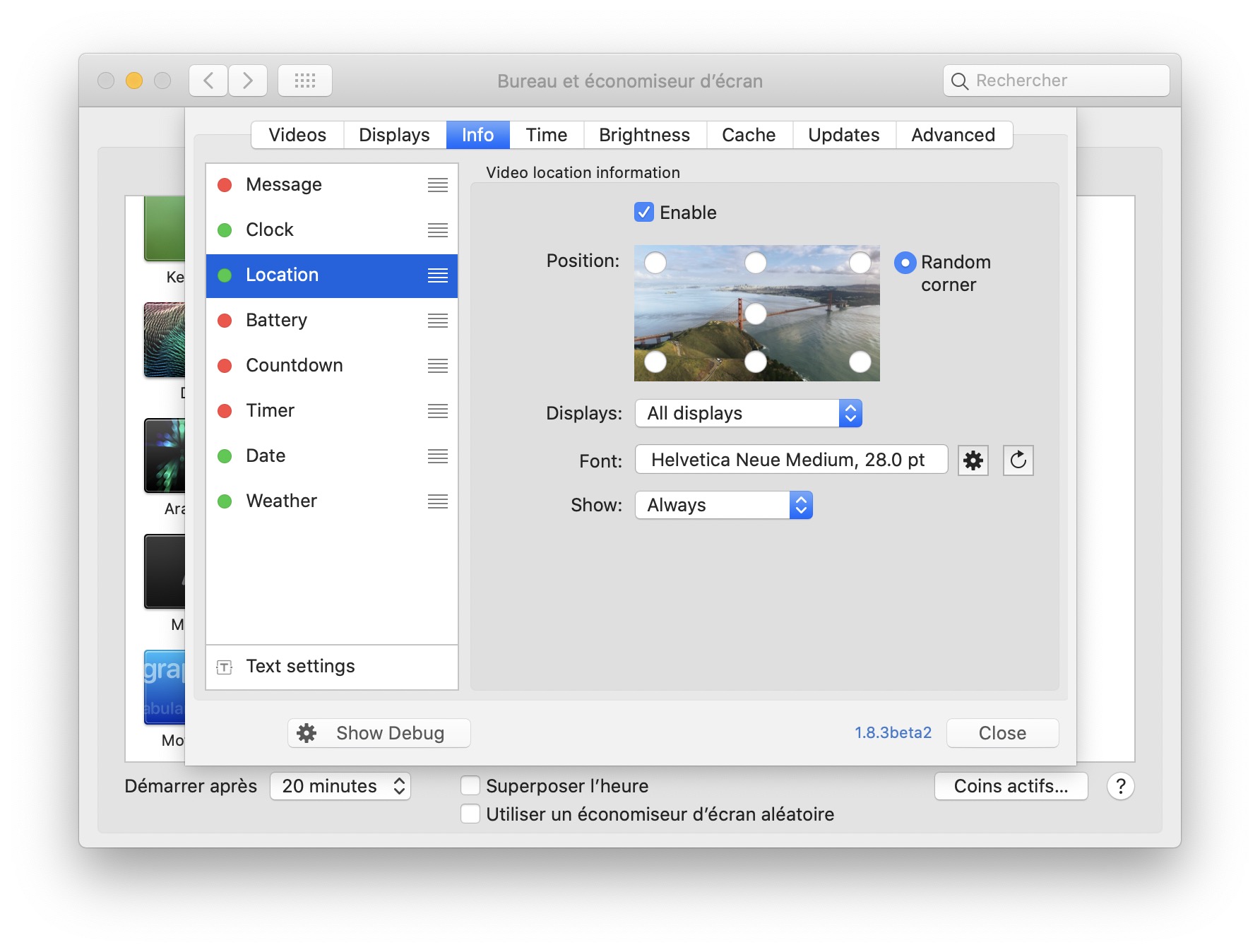
Knowing your settings may give me a clue. Thanks !
 glouel
on 20 Apr 2020
glouel
on 20 Apr 2020
pheiduck
on 21 Apr 2020
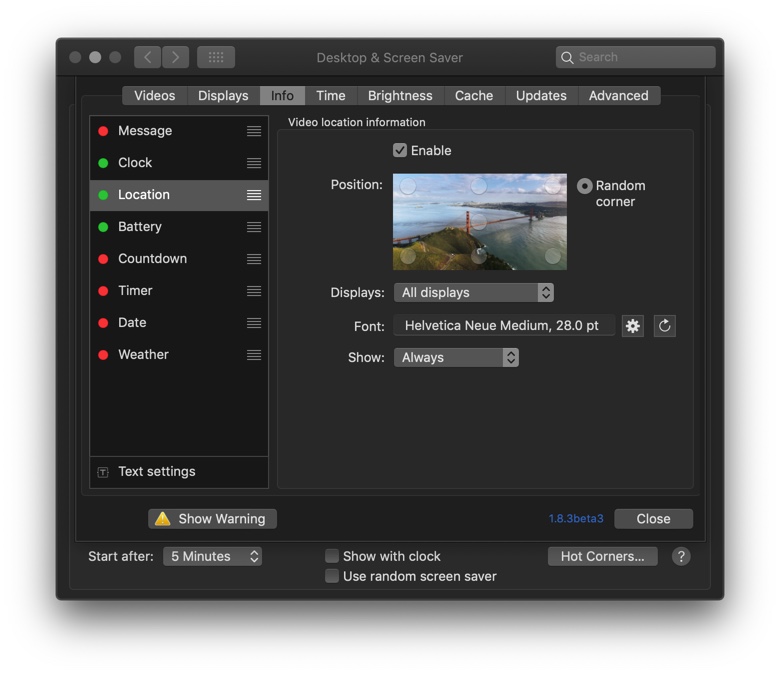
I see.
Could you press the Show Warning button bottom left of that panel, it will pop a window with the log. Look for a line with that yellow sign and tell me what it says ?
Another suggestion, can you try changing the position to say, bottom left ?
According to your log everything looks ok (including loading the location info) and so does your screenshot. Last suggestion, in Advanced, switch language to English just to be sure.
glouel
on 21 Apr 2020
The Language change do noting
pheiduck
on 21 Apr 2020
What about the warning message ? Did you have a look ?
glouel
on 21 Apr 2020
16:32:57 : avInit .saver (571.0, 359.0, 296.0, 184.0) p: true o: true
16:32:57 :
16:32:57 : Time Management initialized
16:32:57 : Display Detection initialized
16:32:57 : Display Detection
16:32:57 : 1 display(s) detected
16:32:57 : 1cm = 43.503937661237615 points
16:32:57 : npass: dict [__C.NSDeviceDescriptionKey(_rawValue: NSDeviceSize): NSSize: {1440, 900}, __C.NSDeviceDescriptionKey(_rawValue: NSDeviceIsScreen): YES, __C.NSDeviceDescriptionKey(_rawValue: NSDeviceResolution): NSSize: {144, 144}, __C.NSDeviceDescriptionKey(_rawValue: NSDeviceColorSpaceName): NSCalibratedRGBColorSpace, __C.NSDeviceDescriptionKey(_rawValue: NSDeviceBitsPerSample): 8, __C.NSDeviceDescriptionKey(_rawValue: NSScreenNumber): 69733248]
16:32:57 : bottomLeftFrame (0.0, 0.0, 1440.0, 900.0)
16:32:57 : src orig : (0.0, 0.0)
16:32:57 : left 0.0 below 0.0
16:32:57 : [id=69733248, width=1440, height=900, bottomLeftFrame=(0.0, 0.0, 1440.0, 900.0), topRightCorner=(1440.0, 900.0), isMain=true, backingScaleFactor=2.0]
16:32:57 : (0.0, 0.0, 1440.0, 900.0)
16:32:57 : Display Detection Done
16:32:57 : Using : nil
16:32:57 :
16:32:57 : Using dot workaround for video driver corruption
16:32:57 : Manifest init
16:32:57 : app support exists
16:32:57 : No customvideos.json at : /Users/philip.heiduck/Library/Application Support/Aerial/customvideos.json
16:32:57 : isManifestCached 10 true
16:32:57 : isManifestCached 11 true
16:32:57 : isManifestCached 12 true
16:32:57 : isManifestCached 13 true
16:32:57 : 2020-04-20
16:32:57 : Interval : Optional(-145977.33315694332)
16:32:57 : No need to check for new videos
16:32:57 : Manifests files were not loaded in class
16:32:57 : Files were not already loaded in memory
16:32:57 : Manifests are cached on disk, loading
16:32:57 : Poi Strings Provider initialized
16:32:57 : Preferred languages : ["en-DE", "de-DE"]
16:32:57 : Best matched language : en_GB
16:32:57 : Defaulting to bundle
16:32:57 : path : /Library/Screen Savers/Aerial.saver/Contents/Resources/en.json
16:32:57 : Community JSON : 99 entries
16:32:57 : Using exiting customCacheDirectory : /Users/philip.heiduck/Library/Application Support/Aerial
16:32:57 : cache to be used : Optional("/Users/philip.heiduck/Library/Application Support/Aerial")
16:32:57 : Total videos processed : 99 callbacks : 0
16:32:57 :
16:32:57 : initvideocache
16:32:57 :
16:32:57 :
16:32:57 :
16:32:57 :
16:32:57 :
16:32:57 : avInit .saver (571.0, 359.0, 296.0, 184.0) p: true o: true
16:32:57 :
16:32:57 : Using : nil
16:32:57 :
16:32:57 : Using dot workaround for video driver corruption
16:32:57 :
16:32:57 : initvideocache
16:32:57 :
16:32:57 :
16:32:57 :
16:32:57 :
16:32:57 :
16:32:57 :
16:32:57 : Processsing contentInformationRequest
16:32:57 : expected content length: 369959205 type:com.apple.quicktime-movie
16:32:57 : Processsing contentInformationRequest
16:32:57 : expected content length: 369959205 type:com.apple.quicktime-movie
16:32:58 : Processsing contentInformationRequest
16:32:58 : expected content length: 308927522 type:com.apple.quicktime-movie
16:32:58 : Processsing contentInformationRequest
16:32:58 : expected content length: 308927522 type:com.apple.quicktime-movie
16:32:58 : connectionDidFinishLoading
16:32:58 : connectionDidFinishLoading
16:32:58 :
16:32:58 : start playback: (0.0, 0.0, 296.0, 184.0) (0.0, 0.0, 296.0, 184.0)
16:32:58 :
16:32:58 : start playback: (0.0, 0.0, 296.0, 184.0) (0.0, 0.0, 296.0, 184.0)
16:32:58 :
16:32:58 : pwc init2
16:32:58 : Callback after manifest loading
16:32:58 : Looking for outdated files
16:32:58 : No old files found
16:32:58 : Aerial control panel V1.8.3beta3
16:32:58 : Cache size : 2,18 GB
16:32:59 : Location services may be disabled, Night Shift can't detect Sunrise and Sunset times without them
16:32:59 : cvcinit2
16:32:59 : cvcawake
16:32:59 : wdl
pheiduck
on 21 Apr 2020
Ok so I installed latest beta here in a Mojave VM and couldn't reproduce your issue. I had broken the auto update feed for the beta though (again), so I fixed that.
According to the log, the warning is for Location services so that's not your issue either.
I'm running out of possible ideas so, as a last resort, could you go to : ~/Library/Preferences/ByHost/and attach your com.JohnCoates.Aerial.UUID.plist here (just drag n drop the file) ? Maybe this way I can reproduce your issue.
glouel
on 21 Apr 2020
pheiduck
on 21 Apr 2020
Thanks ! Can confirm the bug here with your plist, looking at what's going on, will let you know asap.
Edit : Found the bug, I suspect you maybe had an older version of Aerial at some point on your machine and had disabled location at the time, there was a check for the old settings system that was still there and shouldn't have, which disabled location for you. I'll have a new beta with the fix soon.
glouel
on 21 Apr 2020
I just released beta4 with the fix for your issue : https://github.com/JohnCoates/Aerial/releases/download/v1.8.3beta4/Aerial.saver.zip
Github is semi working so if the download link doesn't work give it another try.
glouel
on 21 Apr 2020
Thanks for your great work
pheiduck
on 21 Apr 2020
Related issues
 tempusthales
·
4Comments
tempusthales
·
4Comments
 ryan-madrona
·
8Comments
ryan-madrona
·
8Comments
 inopinatus
·
8Comments
inopinatus
·
8Comments
 jbis9051
·
6Comments
jbis9051
·
6Comments
 adri430
·
7Comments
adri430
·
7Comments
Most helpful comment
I just released beta4 with the fix for your issue : https://github.com/JohnCoates/Aerial/releases/download/v1.8.3beta4/Aerial.saver.zip
Github is semi working so if the download link doesn't work give it another try.