Aerial: After being left to itself for a day, Aerial ends up with a black screen
I'm running Aerial 1.7.1, but I've seen this at least since upgrading to Catalina. I do not have any firewall installed, but I do have Screen Time enabled from 05:00 to 07:15. My setup is MBP 13" 2016, macOS 10.15.3, clamshell mode, external 2560x1440 monitor.
2020-02-17 01:28:31.828 : <AerialView: 0x7f82c841b050> played did reach end
2020-02-17 01:28:31.837 : <AerialView: 0x7f82c841b050> notification: name = AVPlayerItemDidPlayToEndTimeNotification, object = Optional(<AVPlayerItem: 0x600000753d70, asset = <AVURLAsset: 0x60000055daa0, URL = file:///Users/fuzzy76/Library/Containers/com.apple.ScreenSaver.Engine.legacyScreenSaver/Data/Library/Application%20Support/Aerial/comp_C001_C005_PS_v01_SDR_PS_20180925_SDR_2K_AVC.mov>>), userInfo = nil
2020-02-17 01:28:31.838 : <AerialView: 0x7f82c841b050> observeValue Optional("readyForDisplay") false (0.0, 0.0, 2560.0, 1440.0)
2020-02-17 01:28:31.838 : <AerialView: 0x7f82c841b050> Setting player for all player layers in []
2020-02-17 01:28:31.840 : initvideocache
2020-02-17 01:28:31.841 : cached video file with length: 619839252
2020-02-17 01:28:31.841 : <AerialView: 0x7f82c841b050> playing video (OFFLINE MODE) : file:///Users/fuzzy76/Library/Containers/com.apple.ScreenSaver.Engine.legacyScreenSaver/Data/Library/Application%20Support/Aerial/comp_HK_H004_C001_PSNK_DENOISE_v14_SDR_PS_FINAL_20180731_SDR_2K_AVC.mov
2020-02-17 01:28:31.842 : <AerialView: 0x7f82c841b050> observing current item <AVPlayerItem: 0x60000076c2c0, asset = <AVURLAsset: 0x60000056d8e0, URL = file:///Users/fuzzy76/Library/Containers/com.apple.ScreenSaver.Engine.legacyScreenSaver/Data/Library/Application%20Support/Aerial/comp_HK_H004_C001_PSNK_DENOISE_v14_SDR_PS_FINAL_20180731_SDR_2K_AVC.mov>>
2020-02-17 01:28:31.842 : AssetLoaderDelegate deinit
2020-02-17 01:28:31.845 : <AerialView: 0x7f82c841b050> playing next video for player Optional(<AVPlayer: 0x600000765430>)
2020-02-17 01:28:31.878 : <AerialView: 0x7f82c841b050> observeValue Optional("readyForDisplay") true (0.0, 0.0, 2560.0, 1440.0)
2020-02-17 01:28:31.879 : start playback: (0.0, 0.0, 2560.0, 1440.0) (0.0, 0.0, 2560.0, 1440.0)
2020-02-17 01:41:44.010 : <AerialView: 0x7f82c841b050> played did reach end
2020-02-17 01:41:44.011 : <AerialView: 0x7f82c841b050> notification: name = AVPlayerItemDidPlayToEndTimeNotification, object = Optional(<AVPlayerItem: 0x60000076c2c0, asset = <AVURLAsset: 0x60000056d8e0, URL = file:///Users/fuzzy76/Library/Containers/com.apple.ScreenSaver.Engine.legacyScreenSaver/Data/Library/Application%20Support/Aerial/comp_HK_H004_C001_PSNK_DENOISE_v14_SDR_PS_FINAL_20180731_SDR_2K_AVC.mov>>), userInfo = nil
2020-02-17 01:41:44.012 : <AerialView: 0x7f82c841b050> observeValue Optional("readyForDisplay") false (0.0, 0.0, 2560.0, 1440.0)
2020-02-17 01:41:44.013 : <AerialView: 0x7f82c841b050> Setting player for all player layers in []
2020-02-17 01:41:44.014 : initvideocache
2020-02-17 01:41:44.014 : cached video file with length: 203575746
2020-02-17 01:41:44.015 : <AerialView: 0x7f82c841b050> playing video (OFFLINE MODE) : file:///Users/fuzzy76/Library/Containers/com.apple.ScreenSaver.Engine.legacyScreenSaver/Data/Library/Application%20Support/Aerial/comp_A001_C004_1207W5_v23_SDR_FINAL_20180706_SDR_2K_AVC.mov
2020-02-17 01:41:44.015 : <AerialView: 0x7f82c841b050> observing current item <AVPlayerItem: 0x600000753110, asset = <AVURLAsset: 0x600000539f20, URL = file:///Users/fuzzy76/Library/Containers/com.apple.ScreenSaver.Engine.legacyScreenSaver/Data/Library/Application%20Support/Aerial/comp_A001_C004_1207W5_v23_SDR_FINAL_20180706_SDR_2K_AVC.mov>>
2020-02-17 01:41:44.019 : AssetLoaderDelegate deinit
2020-02-17 01:41:44.020 : <AerialView: 0x7f82c841b050> playing next video for player Optional(<AVPlayer: 0x6000007677e0>)
2020-02-17 01:41:44.045 : <AerialView: 0x7f82c841b050> observeValue Optional("readyForDisplay") true (0.0, 0.0, 2560.0, 1440.0)
2020-02-17 01:41:44.046 : start playback: (0.0, 0.0, 2560.0, 1440.0) (0.0, 0.0, 2560.0, 1440.0)
2020-02-18 07:00:27.395 : avInit .saver (0.0, 0.0, 296.0, 184.0) p: true o: true
2020-02-18 07:00:27.396 : <AerialView: 0x7faadd7089f0> AerialView setup init (V1.7.1) preview: true
2020-02-18 07:00:27.397 : Time Management initialized
2020-02-18 07:00:27.397 : Display Detection initialized
2020-02-18 07:00:27.397 : ***Display Detection***
2020-02-18 07:00:27.398 : 1 display(s) detected
2020-02-18 07:00:27.398 : 1cm = 35.43307139829307 points
2020-02-18 07:00:27.399 : npass: dict [__C.NSDeviceDescriptionKey(_rawValue: NSDeviceIsScreen): YES, __C.NSDeviceDescriptionKey(_rawValue: NSDeviceSize): NSSize: {2560, 1440}, __C.NSDeviceDescriptionKey(_rawValue: NSScreenNumber): 2026673846, __C.NSDeviceDescriptionKey(_rawValue: NSDeviceResolution): NSSize: {72, 72}, __C.NSDeviceDescriptionKey(_rawValue: NSDeviceBitsPerSample): 8, __C.NSDeviceDescriptionKey(_rawValue: NSDeviceColorSpaceName): NSCalibratedRGBColorSpace]
2020-02-18 07:00:27.399 :        bottomLeftFrame (0.0, 0.0, 2560.0, 1440.0)
2020-02-18 07:00:27.400 : src orig : (0.0, 0.0)
2020-02-18 07:00:27.400 : left 0.0 below 0.0
2020-02-18 07:00:27.400 : [id=2026673846, width=2560, height=1440, bottomLeftFrame=(0.0, 0.0, 2560.0, 1440.0), topRightCorner=(2560.0, 1440.0), isMain=true, backingScaleFactor=1.0]
2020-02-18 07:00:27.401 : (0.0, 0.0, 2560.0, 1440.0)
2020-02-18 07:00:27.401 : ***Display Detection Done***
2020-02-18 07:00:27.402 : Using : nil
2020-02-18 07:00:27.402 : <AerialView: 0x7faadd7089f0> setting up player layer with bounds/frame: (0.0, 0.0, 296.0, 184.0) / (0.0, 0.0, 296.0, 184.0)
2020-02-18 07:00:27.403 : Using dot workaround for video driver corruption
2020-02-18 07:00:27.404 : Manifest init
2020-02-18 07:00:27.404 : app support exists
2020-02-18 07:00:27.405 : No customvideos.json at : /Users/fuzzy76/Library/Containers/com.apple.ScreenSaver.Engine.legacyScreenSaver/Data/Library/Application Support/Aerial/customvideos.json
2020-02-18 07:00:27.405 : isManifestCached 10 true
2020-02-18 07:00:27.406 : isManifestCached 11 true
2020-02-18 07:00:27.406 : isManifestCached 12 true
2020-02-18 07:00:27.406 : isManifestCached 13 true
2020-02-18 07:00:27.407 : 2020-02-13
2020-02-18 07:00:27.407 : Interval : Optional(-457225.59947896004)
2020-02-18 07:00:27.407 : No need to check for new videos
2020-02-18 07:00:27.408 : Manifests files were not loaded in class
2020-02-18 07:00:27.408 : Files were not already loaded in memory
2020-02-18 07:00:27.408 : Manifests are cached on disk, loading
2020-02-18 07:00:27.409 : Poi Strings Provider initialized
2020-02-18 07:00:27.409 : Defaulting to bundle
2020-02-18 07:00:27.410 : path : /Users/fuzzy76/Library/Screen Savers/Aerial.saver/Contents/Resources/en.json
2020-02-18 07:00:27.410 : Community JSON : 73 entries
2020-02-18 07:00:27.411 : No local or user cache exists, using ~/Library/Application Support/Aerial
2020-02-18 07:00:27.411 : cache to be used : Optional("/Users/fuzzy76/Library/Containers/com.apple.ScreenSaver.Engine.legacyScreenSaver/Data/Library/Application Support/Aerial")
2020-02-18 07:00:27.412 : Total videos processed : 99 callbacks : 0
2020-02-18 07:00:27.412 : <AerialView: 0x7faadd7089f0> Setting player for all player layers in []
2020-02-18 07:00:27.413 : initvideocache
2020-02-18 07:00:27.413 : cached video file with length: 163557267
2020-02-18 07:00:27.414 : <AerialView: 0x7faadd7089f0> playing video (OFFLINE MODE) : file:///Users/fuzzy76/Library/Containers/com.apple.ScreenSaver.Engine.legacyScreenSaver/Data/Library/Application%20Support/Aerial/comp_A105_C003_0212CT_FLARE_v10_SDR_PS_FINAL_20180711_SDR_2K_AVC.mov
2020-02-18 07:00:27.414 : <AerialView: 0x7faadd7089f0> observing current item <AVPlayerItem: 0x600002c418b0, asset = <AVURLAsset: 0x600002e05260, URL = file:///Users/fuzzy76/Library/Containers/com.apple.ScreenSaver.Engine.legacyScreenSaver/Data/Library/Application%20Support/Aerial/comp_A105_C003_0212CT_FLARE_v10_SDR_PS_FINAL_20180711_SDR_2K_AVC.mov>>
2020-02-18 07:00:27.415 : <AerialView: 0x7faadd7089f0> observeValue Optional("readyForDisplay") false (0.0, 0.0, 296.0, 184.0)
2020-02-18 07:00:27.415 : AssetLoaderDelegate deinit
2020-02-18 07:00:27.415 : <AerialView: 0x7faadd7089f0> backing change 1.0 isDisabled: false frame: (0.0, 0.0, 296.0, 184.0) preview: true
2020-02-18 07:00:27.754 : <AerialView: 0x7faadd7089f0> observeValue Optional("readyForDisplay") true (0.0, 0.0, 296.0, 184.0)
2020-02-18 07:00:27.755 : start playback: (0.0, 0.0, 296.0, 184.0) (0.0, 0.0, 296.0, 184.0)
2020-02-18 07:00:27.896 : <AerialView: 0x7faadd7089f0> startAnimation frame (0.0, 0.0, 296.0, 184.0) bounds (0.0, 0.0, 296.0, 184.0)
2020-02-18 07:00:27.897 : restarting playback
2020-02-18 07:00:32.329 : <AerialView: 0x7faadd7089f0> stopAnimation
2020-02-18 07:00:35.276 : pwc init2
2020-02-18 07:00:35.281 : Callback after manifest loading
2020-02-18 07:00:35.382 : Looking for outdated files
2020-02-18 07:00:35.382 : No old files found
2020-02-18 07:00:35.383 : Aerial control panel V1.7.1
2020-02-18 07:00:35.387 : Cache size : 57,11 GB
2020-02-18 07:00:35.390 : cvcinit2
2020-02-18 07:00:35.391 : cvcawake
2020-02-18 07:00:35.394 : wdl
Left to itself, Aerial will end up in a black screen with a mouse cursor on top. Any notifications that have arrived will also be visible. I've mostly noticed this happening during the night, but I can't be 100% sure.
 fuzzy76
All 14 comments
Hi @fuzzy76
I'm running Aerial 1.7.1, but I've seen this at least since upgrading to Catalina. I do not have any firewall installed, but I do have Screen Time enabled from 05:00 to 07:15. My setup is MBP 13" 2016, macOS 10.15.3, clamshell mode, external 2560x1440 monitor.
Sounds good.
Left to itself, Aerial will end up in a black screen with a mouse cursor on top. Any notifications that have arrived will also be visible. I've mostly noticed this happening during the night, but I can't be 100% sure.
Just to be sure, when you mean notifications you mean like mail, imessage, etc that show on top right corner ? What about Aerial's infos, such as the clock if you hadn't disable it, was it still ticking ? And video descriptions ?
These lines :
2020-02-17 01:41:44.046 : start playback: (0.0, 0.0, 2560.0, 1440.0) (0.0, 0.0, 2560.0, 1440.0)
2020-02-18 07:00:27.395 : avInit .saver (0.0, 0.0, 296.0, 184.0) p: true o: true
suggest that playback started, but nothing else happened after that, as if the screensaver was interrupted (or somehow crashed). I'll try to think a bit about this one and get back to you, please try to answer my questions above if you can.
In any case, sorry about that bug, I'll try to track it down.
 glouel
on 18 Feb 2020
glouel
on 18 Feb 2020
I mean the regular macOS notifications like Mail, Reminders, etc.
The Aerial info is not there. Just a black screen with a mouse pointer and any notifications that have arrived.
Just let me know if there is anything more I can provide. :)
fuzzy76
on 18 Feb 2020
I mean the regular macOS notifications like Mail, Reminders, etc.
The Aerial info is not there. Just a black screen with a mouse pointer and any notifications that have arrived.
Just let me know if there is anything more I can provide. :)
Thanks @fuzzy76 ! So it sounds more like a full blown crash/interruption. May I ask you to go into Console.app, look into crash reports (that's the one with the exclamation point in a triangle, in the list on the left), and tell me if you see anything that sounds like a screensaver, possibly : ScreenSaverEngine, legacyScreenSaver, or Aerial. If you have any crash here, I'd love to see a log !
Hopefully something crashes and I can find what !
glouel
on 18 Feb 2020
It happened again this night (screensaver was last started 23:56 according to the logs).
No crash report. But I did find this in system.log.0:
Feb 19 00:00:03 PeAr-MBP com.apple.xpc.launchd[1] (com.apple.ScreenSaver.Engine.legacyScreenSaver[32092]): Service did not exit 5 seconds after SIGTERM. Sending SIGKILL.
@fuzzy76
So that's 4-5 minutes of running, not that much, hmm !
But here's the thing, that message is actually what you get when macOS "correctly" stops the screensaver in Catalina (I know...).
Bit of context, and apologies if you already were familiar with all of this, there are two settings that control how long a screensaver runs, the first is in the main Screen Saver panel, where you decide after how long an inactivity should the system launch the screensaver :
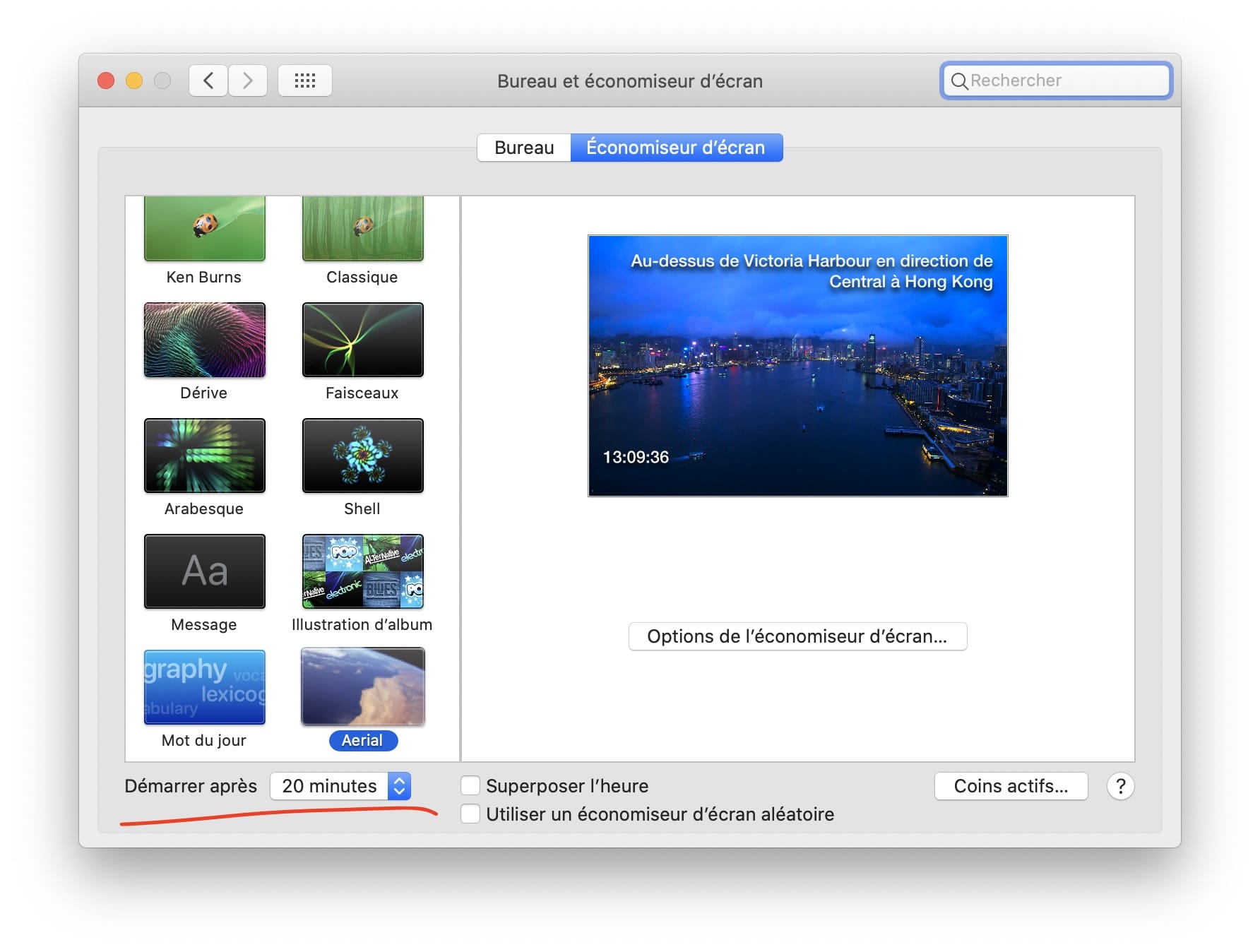
(you can obviously use hot corners and such)
The second one is in the power options (the lightbulb at the bottom) :
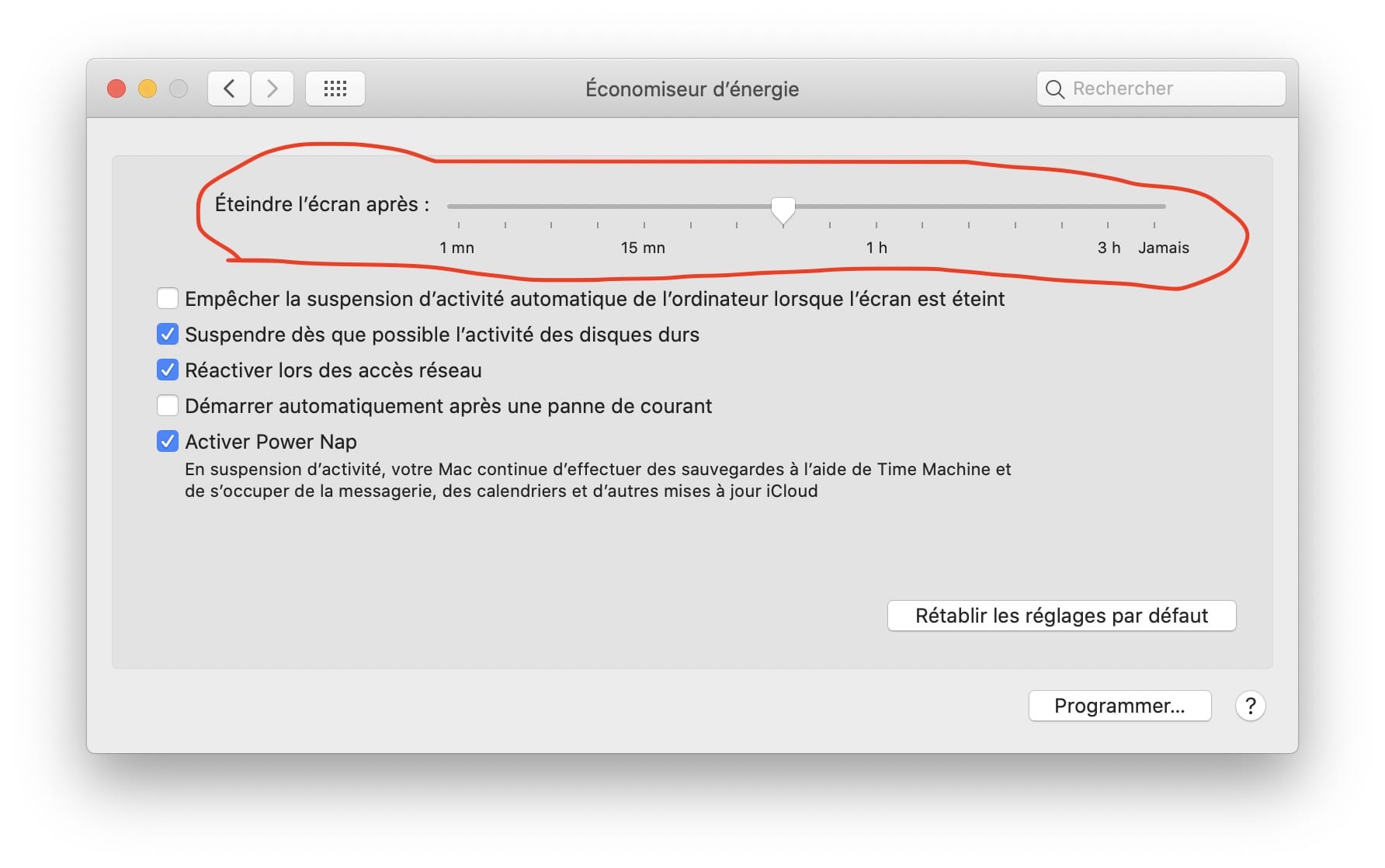
Now this one is tricky, it decides after how long an inactivity should the system power off the screen. Those two settings are not additive, so if you say, 20 minutes in first, and 20 minutes here, Aerial will never launch.
If you set 20 mins in the first one, and 30 mins in the seconds... Aerial will run for 10 mins.
Here's a concrete example from today here. From Aerial's log :
2020-02-19 12:33:06.167 : avInit .saver (0.0, 0.0, 2560.0, 1440.0) p: true o: false
2020-02-19 12:33:06.167 : <AerialView: 0x7f8610608c50> AerialView setup init (V1.7.2beta0) preview: false
From system.log :
Feb 19 12:43:23 iMac-de-Guillaume-2 com.apple.xpc.launchd[1] (com.apple.ScreenSaver.Engine.legacyScreenSaver[59944]): Service did not exit 5 seconds after SIGTERM. Sending SIGKILL.
(you'll see there's a bit of a grace period on the screen off thing, macOS will first strongly dim your screen for a few secs then shutdown the screen).
So as you can see, same "error" message you get. Which I have to say doesn't sound good, it makes it sound legacyScreenSaver.appex was hanging, which it was not really, I literally saw the screen go off and Aerial was still running correctly at that point. It pains me to say this as I would never willingly defend that horrible thing which is behind every single issue with Catalina for Aerial 😭
To be clear : when the screen goes off, macOS kills the screensaver. So at that point, when I woke up my mac, I saw my desktop background, blurred, notifications on top right, and a password prompt. That's how it's supposed to work, as far as I know, now.
So I'm wondering about which settings you have in both. Is it possible you are shutting down the screen, and thus Aerial (and maybe have a black desktop picture?) ? It's also possible that some of the other sleep options could cause macOS to shutdown the screensaver.
Please tell me more about your settings and we'll go from there (also you should get 1.8.0 here : https://github.com/JohnCoates/Aerial/releases/tag/v1.8.0 )
glouel
on 19 Feb 2020
My screen saver is set to launch after 10 minutes, and my power save options is set to turn of the screen after 3 hours. So this _could_ be happening when the screen is supposed to power of.
Yesterday I rebooted my Mac (which I seldom do) and logged in before going to bed. And when I looked at it this morning, the screen was off (completely off, like the power options are supposed to do).
But I don't think it's my desktop wallpaper. I have the Catalina dynamic wallpaper set. And there was not password prompt. I actually don't remember how I returned to my desktop. It could be that the blurred login screen came when I clicked the mouse or something.
But since I've seen this bug for atleast half a year, I know it's not gone. I also updated to 1.8.0 yesterday.
fuzzy76
on 20 Feb 2020
Sorry I didn't get to answer you earlier.
My screen saver is set to launch after 10 minutes, and my power save options is set to turn of the screen after 3 hours. So this _could_ be happening when the screen is supposed to power of.
Intriguing.
Yesterday I rebooted my Mac (which I seldom do) and logged in before going to bed. And when I looked at it this morning, the screen was off (completely off, like the power options are supposed to do).
I see. So, just to try and clarify, sorry if I didn't get this correctly, but what exactly happens when it crashes, regarding to your screen ? Are you telling me your screen is NOT in sleep mode after 3 hours, and that in the morning your screen is awake, showing a black screen with a pointer ?
If I got this right, what does happen when you move the mouse, when it's in this state ?
But I don't think it's my desktop wallpaper. I have the Catalina dynamic wallpaper set. And there was not password prompt. I actually don't remember how I returned to my desktop. It could be that the blurred login screen came when I clicked the mouse or something.
Ok that would make sense, and at that point your blurred background probably comes with the login screen.
But since I've seen this bug for atleast half a year, I know it's not gone. I also updated to 1.8.0 yesterday.
I see. Well, next time you catch it, please try and check what happens at wake up. I'd love to get both an Aerial.log and a system.log from a night where it crashes to see if I can pinpoint the sequence of events.
The premature shutdown of Aerial is one thing, assuming we can reproduce that, but your screen never going to sleep is a whole other thing, this may be a weird Catalina bug. As far as I understand the screensaver subsystem, it's not linked to the power saving stuff and it should kick in independently anyway.
I'm wondering if you're not experiencing one of those weird clamshell bug, do you keep your mbp always in this mode, or do you sometimes unplug it ? It's truly peculiar hopefully we can track it down.
glouel
on 21 Feb 2020
Are you telling me your screen is NOT in sleep mode after 3 hours, and that in the morning your screen is awake, showing a black screen with a pointer ?
Correct.
If I got this right, what does happen when you move the mouse, when it's in this state ?
I _think_ the mouse moves and I'm thrown to the unlock screen (username / password). I need to pay better attention next time it happens. But I'm positive it's pretty straightforward to get back to the desktop.
I'm wondering if you're not experiencing one of those weird clamshell bug, do you keep your mbp always in this mode, or do you sometimes unplug it ?
It's always in clamshell, atleast when this bug happens. It's only open when not plugged in (on the move). And in those circumstances I always close it before the screensaver kicks in (Aerial is set to disable when on battery any way).
I'll keep you posted when it happens again. It's not like it crashes my Mac, so it's not a showstopper. :)
fuzzy76
on 21 Feb 2020
Are you telling me your screen is NOT in sleep mode after 3 hours, and that in the morning your screen is awake, showing a black screen with a pointer ?
Correct.
If I got this right, what does happen when you move the mouse, when it's in this state ?
I _think_ the mouse moves and I'm thrown to the unlock screen (username / password). I need to pay better attention next time it happens. But I'm positive it's pretty straightforward to get back to the desktop.
Ok thanks for this, I think I'm starting to get a better understanding of what you are experiencing. Here's my (possibly wrong) understanding of how it's supposed to work (with your 10min/3hr, assuming you didn't hot corner):
1) T+10min, macOS starts ScreenSaverEngine, with legacyScreenSaver.appex loading Aerial.saver. At that point Aerial starts running.
2) T+3hrs, macOS starts winding down background activity and will dim the internal screen to warn it will go to sleep soon.
3a) T+3hrs and a few seconds, macOS kills ScreenSaverEngine. Aerial stops running. Screen goes black.
3b) T+3hrs and a few seconds, macOS sends to sleep the monitors (but fails)
4) You come back a few hours later, monitor shows just a black screen with pointer, ScreenSaverEngine is not running, system is just waiting to be woken up thinking the display is asleep.
5) You press a key or something and logind comes back in, thinking it's waking up, throws in your wallpaper/login screen and you wake it up "normally".
I'm not 100% sure of the order in which 3a/3b happens, gut feeling would be that a SIGTERM is sent first, then goes to sleep, for some reason the SIGTERM doesn't work and 5s later a SIGKILL just ends it. It sounds inelegant and dirty, and that sounds perfectly aligned with my feelings towards legacyScreenSaver 😁
Could explain lines like this : Feb 21 03:10:27 iMac-de-Guillaume-2 com.apple.xpc.launchd[1] (com.apple.ScreenSaver.Engine.legacyScreenSaver[7763]): Service did not exit 5 seconds after SIGTERM. Sending SIGKILL.
I'm wondering if you're not experiencing one of those weird clamshell bug, do you keep your mbp always in this mode, or do you sometimes unplug it ?
It's always in clamshell, atleast when this bug happens. It's only open when not plugged in (on the move). And in those circumstances I always close it before the screensaver kicks in (Aerial is set to disable when on battery any way).
I see. I'm not 100% sure your issue is specific to Aerial, or to screensavers at all, this is likely "just" an issue with Catalina not sending to sleep your monitor.
I'll keep you posted when it happens again. It's not like it crashes my Mac, so it's not a showstopper. :)
Please do with the logs, there might be some message regarding sending your monitor to sleep. I would suggest a few things.
- Since you mention that you rarely reboot, make sure to see if it doesn't just start happening after a while post reboot, after working fine for a few days
- Looks like you have a USB-C mac, what's the connection situation with your monitor, do you use a USB-C->HDMI dongle ? A hub ?
- Do you happen to have any utility that interacts with the screen/video drivers (f.lux or some tool to set resolution etc) ?
One thing you could try also, is from terminal, run pmset -g assertions
I would look for these three lines (this is probably reset at boot time, so if you haven't experienced the bug yet, might not help) :
   PreventUserIdleDisplaySleep    0
   PreventSystemSleep             0
   PreventUserIdleSystemSleep     0
Especially the first one. If you see a number higher than 0 then below the list, you'll see a list of which process prevented you to go to sleep. You may just find what's blocking here.
I'm not 100% convinced that your issue is directly tied to Aerial (might happen with other screensavers, could be worth a check although not all 1st party screensavers run in the same context as 3rd party does with the sandboxing thing) but nevertheless I'd start digging around the not going to sleep angle, this seems more likely to me.
Please let me know what you find !
glouel
on 21 Feb 2020
Here's my (possibly wrong) understanding of how it's supposed to work (with your 10min/3hr, assuming you didn't hot corner)
I often hot corner, but that should probably only affect the timing, right?
Looks like you have a USB-C mac, what's the connection situation with your monitor, do you use a USB-C->HDMI dongle ? A hub ?
I do have a Belkin Thunderbolt 3 dock. Like this: https://www.belkin.com/us/p/p-F4U095/
Do you happen to have any utility that interacts with the screen/video drivers (f.lux or some tool to set resolution etc) ?
Not that I can think of.
fuzzy76
on 21 Feb 2020
Here's my (possibly wrong) understanding of how it's supposed to work (with your 10min/3hr, assuming you didn't hot corner)
I often hot corner, but that should probably only affect the timing, right?
Yep, it should just changes the delay in step 1) in my example. If you hot corner the 3hrs should start from that moment, from my understanding.
Looks like you have a USB-C mac, what's the connection situation with your monitor, do you use a USB-C->HDMI dongle ? A hub ?
I do have a Belkin Thunderbolt 3 dock. Like this: https://www.belkin.com/us/p/p-F4U095/
Found a few complaints like this that are somewhat related : https://community.belkin.com/s/question/0D53400003tsHQyCAM/thunderbolt-3-express-dock-hd-sleep-issue
Could also be a driver being flaky in Catalina ?
Do you happen to have any utility that interacts with the screen/video drivers (f.lux or some tool to set resolution etc) ?
Not that I can think of.
Ok, give the pmset thing a shot when you have a sec, next time you trigger the bug, and let me know ! If it's a driver issue, maybe pmset will register it with any luck.
glouel
on 21 Feb 2020
[fuzzy76@PeAr-MBP:~] pmset -g assertions | grep Sleep
   PreventUserIdleDisplaySleep    0
   PreventSystemSleep             0
   PreventUserIdleSystemSleep     1
   pid 518(sharingd): [0x0002660500018821] 00:01:11 PreventUserIdleSystemSleep named: "Handoff"
Come to think of it, it _could_ be my dock. I can't remember experiencing anything like this on my work Mac which has a pretty identical setup (only difference is the dock and that it's a 2017 model instead of 2016.
fuzzy76
on 21 Feb 2020
So crossing the logs, I get in Aerial :
2020-02-21 00:18:08.235 : start playback: (0.0, 0.0, 2560.0, 1440.0) (0.0, 0.0, 2560.0, 1440.0)
About a minute later, in system.log, Aerial gets killed :
Feb 21 00:19:25 PeAr-MBP com.apple.xpc.launchd[1] (com.apple.ScreenSaver.Engine.legacyScreenSaver[4506]): Service did not exit 5 seconds after SIGTERM. Sending SIGKILL.
So far that's consistent.
Your pmset entry isn't timed (I think it's a cputime ? definitely not a timestamp as I have a pid 151(powerd): [0x0000002200088000] 48:44:40 ExternalMedia named: "com.apple.powermanagement.externalmediamounted" entry here) so we can't 100% pinpoint it.
I have no idea how handoff should/could block going to sleep, that seems really weird. Were you using an iPad around that time maybe ?
Now, there's a LOT of entries about AMPDeviceDiscoveryAgent in your syslog around that time. A very quick check lead me to this :
https://georgegarside.com/blog/macos/stop-finder-opening-when-connecting-iphone/
So now I'm wondering, could it be iPhone/iPad syncing failing and keeping your computer up ? Pretty wild if that's that, have a look at the link and let me know.
Edit: And you probably had the same idea but if you can, maybe try swapping docks to see if that solves it ?
glouel
on 21 Feb 2020
Closing this, please reopen if you want to look into it further.
glouel
on 25 May 2020
Related issues
 BerryJerry
·
8Comments
BerryJerry
·
8Comments
 SeanMSmith
·
6Comments
SeanMSmith
·
6Comments
 tempusthales
·
4Comments
tempusthales
·
4Comments
 mzdhr
·
3Comments
mzdhr
·
3Comments
 WebVeteran
·
6Comments
WebVeteran
·
6Comments