Aerial: Localization of Aerial's UI (On hold pending next macOS release)
Edit : Just a heads up for everyone, I'm putting the UI stuff on hold until the next macOS release is announced. Currently Catalina has broken localization for screensavers and I can't workaround that bug ! We still translate video names though so if you like to help with that for another language, let us know !
Hi everyone,
With version 1.4.8, we already started a pretty important translation effort, thanks to @aitor. As of 1.5.0, we have translations for all video names, and all our custom descriptions in:
- English (original text) by @SeanMSmith
- Spanish by @aitor
- French by @glouel
- Polish by @Soruk
- German by @moeffju
- Hebrew by @kaaspad
- Arabic by @kachikulu
- Simplified Chinese by @LinkeyLeo
Following the release of 1.5.0, I'll be working on making Aerial's UI translatable. This should be fairly straightforward, using a Localizable.strings that we can import in Lokalise so everyone can work on their language.
This will probably take a few days for me to setup so if you are interested to give a hand with the translation in a language (you don't need to know anything about programming), keep an eye on this issue (I'll keep it pinned) or let us know in comments below which language you want to help with (I'll do french ;)) !
The same goes if you would like to help translate video names and descriptions in a language not mentionned above, let us know in this issue and @aitor or I will get you setup for this.
Thanks all!
 glouel
All 80 comments
Wanna join the translation team to make one for Russian, but dunno how to contact with @glouel & @aitor except here. So writing about it here
 sibwyl-batrep
on 10 Jun 2019
sibwyl-batrep
on 10 Jun 2019
Hi @SetKam,
We had a person working on the russian translation but the work seems to have stalled so it would be great if you can work us there. Please send me your email and name (mine is my public profile @aitor) and I'll add you to the translation service.
Thank you and have a great week!
 aitor
on 10 Jun 2019
aitor
on 10 Jun 2019
I added Dutch translations yesterday. Let's integrate them! 🎉
 sebastiaanspeck
on 25 Jun 2019
sebastiaanspeck
on 25 Jun 2019
@aitor can you do the PR so I can integrate them ?
@sebastiaanspeck awesome, many thanks ! They will be in next beta !
glouel
on 25 Jun 2019
Yep, no prob. I'll send the PR today.
On Tue, 25 Jun 2019 at 10:24, Guillaume Louel notifications@github.com
wrote:
@aitor https://github.com/aitor can you do the PR so I can integrate
them ?@sebastiaanspeck https://github.com/sebastiaanspeck awesome, many
thanks ! They will be in next beta !—
You are receiving this because you were mentioned.
Reply to this email directly, view it on GitHub
https://github.com/JohnCoates/Aerial/issues/792?email_source=notifications&email_token=AAABBR3GX54VMTX46XV5X7LP4HI3RA5CNFSM4HRXP7G2YY3PNVWWK3TUL52HS4DFVREXG43VMVBW63LNMVXHJKTDN5WW2ZLOORPWSZGODYPOOEA#issuecomment-505341712,
or mute the thread
https://github.com/notifications/unsubscribe-auth/AAABBR24WTE637XR6UK2RMLP4HI3RANCNFSM4HRXP7GQ
.
--
Kind Regards,
Aitor Garcia
http://aitor.is
aitor
on 25 Jun 2019
Yep, no prob. I'll send the PR today.
…
Any update?
sebastiaanspeck
on 5 Jul 2019
Yeah sorry about that, @aitor any luck in making the PR ?
glouel
on 6 Jul 2019
If you explain the steps to me, I could make the PR as well 😉
Op 6 jul. 2019 om 10:46 heeft Guillaume Louel notifications@github.com het volgende geschreven:
Yeah sorry about that, @aitor any luck in making the PR ?
—
You are receiving this because you were mentioned.
Reply to this email directly, view it on GitHub, or mute the thread.
sebastiaanspeck
on 6 Jul 2019
I think you need specific rights. I'll have a look this afternoon.
Again sorry about that, we're usually pretty quick about this 😅
glouel
on 6 Jul 2019
Sorry for the delay! Busy days first and then I totally forgot about it ¯_(ツ)_/¯. Here it's #825
PS: Sorry @glouel for including a small Arabic space fixing commit. Rushes are not good.
aitor
on 6 Jul 2019
@sebastiaanspeck And thanks again for your translations!
aitor
on 6 Jul 2019
@aitor thanks and no worries, life happens !
Will have beta out shortly.
glouel
on 6 Jul 2019
@sebastiaanspeck here it is, finally : https://github.com/JohnCoates/Aerial/releases/tag/v1.5.1beta8
Sorry again for the delay and thanks for your translation !
glouel
on 6 Jul 2019
Great! Thanks!!
Op 6 jul. 2019 om 12:51 heeft Guillaume Louel notifications@github.com het volgende geschreven:
@sebastiaanspeck here it is, finally : https://github.com/JohnCoates/Aerial/releases/tag/v1.5.1beta8
Sorry again for the delay and thanks for your translation !
—
You are receiving this because you were mentioned.
Reply to this email directly, view it on GitHub, or mute the thread.
sebastiaanspeck
on 6 Jul 2019
I've installed 1.5.1beta8 and I checked "Use community information: Dutch" and unchecked "Display in preferred language if available" (because my Mac itself is set to English). Unfortunately I still get the English descriptions. This problem also exists if I change the community information to any other language.
sebastiaanspeck
on 6 Jul 2019
Can you check "Display in preferred language if available" too ? It's a bit counter intuitive but you need both checked. I really need to rethink those settings 😱
If it makes you feel any better, I got bitten by this while making the PR too so it's definitely not even obvious to me! I made a change for some reason I don't remember when we allowed to manually pick the language, but probably should make this independant.
glouel
on 6 Jul 2019
Hmm.. Don't seem to have any effect. Lets hope you can fix it ASAP
sebastiaanspeck
on 6 Jul 2019
Make sure both are set, but you need to close the control panel, then close system preferences for them to get picked up:

When you reopen you should see your list:

Note that some videos don't have custom translations (like space).
glouel
on 6 Jul 2019
Yes! That made it work! Don’t know what happened but I got the Dutch list now. Many thanks!
Op 6 jul. 2019 om 14:04 heeft Guillaume Louel notifications@github.com het volgende geschreven:
Make sure both are set, but you need to close the control panel, then close system preferences for them to get picked up:
When you reopen you should see your list:
Note that some videos don't have custom translations (like space).
—
You are receiving this because you were mentioned.
Reply to this email directly, view it on GitHub, or mute the thread.
sebastiaanspeck
on 6 Jul 2019
@glouel Maybe a simple "Show info in [LANGUAGE COMBO]" with system language selected by default if it's one of the 10 languages we support and English of it's not.
This will merge both checks while retaining the same options and giving better defaults to users.
aitor
on 6 Jul 2019
@aitor Yeah I was thinking about something like that, there's really no need to have a separate custom settings. Will fix that in next beta !
glouel
on 6 Jul 2019
Yes. That sounds great. Because right now, I see the list in Dutch but the location information stays in English. In the logs I see a line with "locale.languageCode en" after the video started playing but the setting is set to Dutch
Op 6 jul. 2019 om 14:14 heeft Aitor García Rey notifications@github.com het volgende geschreven:
@glouel Maybe a simple "Show info in [LANGUAGE COMBO]" with system language selected by default if it's one of the 10 languages we support and English of it's not.
This will merge both checks while retaining the same options and giving better defaults to users.
—
You are receiving this because you were mentioned.
Reply to this email directly, view it on GitHub, or mute the thread.
sebastiaanspeck
on 6 Jul 2019
@sebastiaanspeck try to unselect all videos and only pick Buckingham palace. You should see it in Dutch. Since not all videos are translated that may be the issue. You should see your descriptions then in videos.
glouel
on 6 Jul 2019
Yes! If you want, I can translate the remaining videos as well
Op 6 jul. 2019 om 14:48 heeft Guillaume Louel notifications@github.com het volgende geschreven:
@sebastiaanspeck try to unselect all videos and only pick Buckingham palace. You should see it in Dutch. Since not all videos are translated that may be the issue. You should see your descriptions then in videos.
—
You are receiving this because you were mentioned.
Reply to this email directly, view it on GitHub, or mute the thread.
sebastiaanspeck
on 6 Jul 2019
Yes! If you want, I can translate the remaining videos as well
…
What does "Prefered language:" says next to it in your case ?
In theory if you had dutch there [nl], you should get the default Apple translations for Dutch for the other videos. Unless you changed your preferred language settings to something else.
It's also quite possible that this is broken in betas with the new Catalina stuff. I'll have a look tomorrow.
glouel
on 6 Jul 2019
I set my MacBook in English, but want Aerial in Durch
Op 6 jul. 2019 om 15:33 heeft Guillaume Louel notifications@github.com het volgende geschreven:
Yes! If you want, I can translate the remaining videos as well
…What does "Prefered language:" says next to it in your case ?
In theory if you had dutch there [nl], you should get the default Apple translations for Dutch for the other videos. Unless you changed your preferred language settings to something else.
It's also quite possible that this is broken in betas with the new Catalina stuff. I'll have a look tomorrow.
—
You are receiving this because you were mentioned.
Reply to this email directly, view it on GitHub, or mute the thread.
sebastiaanspeck
on 6 Jul 2019
I set my MacBook in English, but want Aerial in Durch
…
Ok that makes sense. So what you have right now is a mix of your translation and english because of your macbook settings. I'll unify all of that in next beta it should make a lot more sense :)
glouel
on 6 Jul 2019
Thanks. Looking forward!
Op 6 jul. 2019 om 16:14 heeft Guillaume Louel notifications@github.com het volgende geschreven:
I set my MacBook in English, but want Aerial in Durch
…Ok that makes sense. So what you have right now is a mix of your translation and english because of your macbook settings. I'll unify all of that in next beta it should make a lot more sense :)
—
You are receiving this because you were mentioned.
Reply to this email directly, view it on GitHub, or mute the thread.
sebastiaanspeck
on 6 Jul 2019
@sebastiaanspeck give a shot to beta 9, I massively simplified everything:

No unreadable setting, just pick from the list, either keep preferred or pick a language. If you do, it will use our translation and mix it with the default ones in same language.
https://github.com/JohnCoates/Aerial/releases/download/v1.5.1beta9/Aerial.saver.zip
glouel
on 8 Jul 2019
Has French been localized yet? I can help with that.
 aidenmitchell
on 15 Oct 2019
aidenmitchell
on 15 Oct 2019
@ilovecats516 the descriptions, yep ! The ui however not yet, I had to put that project on hold because of the mess that is Catalina.
I’m French though so should that work resume, that language will be covered ! But thanks for the offer ;)
glouel
on 15 Oct 2019
it seems that the translation is not covered all ui text part, I want to contribute in Chinese translation. How
 KyleBing
on 27 Oct 2019
KyleBing
on 27 Oct 2019
it seems that the translation is not covered all ui text part, I want to contribute in Chinese translation. How
Hi @KyleBing
I haven't started working on the UI translation yet (because fixing Catalina was my priority). I'll let you know when I do, hopefully soon !
glouel
on 29 Oct 2019
Hi! I wonder if you're planning to localise to British English? There are a few descriptions which are grammatically acceptable in American English but somewhat jarring on this side of the pond; the 'worst' offender being 'off of'. Perhaps 'near' could be used instead, if you simply wanted to keep a single English localisation? Otherwise, I'd be happy to go through and update the descriptions for Brits :-)
 domdtyler
on 17 Feb 2020
domdtyler
on 17 Feb 2020
Hi! I wonder if you're planning to localise to British English? There are a few descriptions which are grammatically acceptable in American English but somewhat jarring on this side of the pond; the 'worst' offender being 'off of'. Perhaps 'near' could be used instead
Hi @domdtyler !
Since you are mentioning "off of", I assume you are thinking of this one, right ?

If you are, this is a bit more complicated. Here's the thing, Aerial uses two sources for translations, the first one is the strings bundle coming from Apple with the list of videos. The second one is a translation effort that you see mentioned here. In here, we translate the video titles (and sometimes create them when there are duplicates, I still haven't done that for the tvOS 13 videos yet !) and have translations for some of the older videos in multiple languages.
Because of copyright issues (and a general headache avoidance on my part), we never directly modify translations from Apple (such as the substitution you suggested).
If you are curious about how this work, you can find the TVIdleScreenStrings13.bundlein Aerial's cache directory. Copy it somewhere, change its extension to .zip, and you'll see all the translations provided by Apple (you have to rename the .strings to .plist).
Now here's the thing, there's a en_GB locale already, and it's different to the common english one (en) ! And I just checked, for the one I mentioned, it's literally different for your locale :
en_GB
Spinner Dolphins in the waters off
Costa Rica
en
Spinner Dolphins in the waters off
of Costa Rica
Another one :
en_GB
Over central China travelling towards Shanghai
en
Over central China traveling toward Shanghai
So at this point, I'm wondering if you have set your locale correctly in macOS, of if there's a bug in the locale loading here. Can you check the "Costa Rica Dolphins" video in your machine and let me know if you're seeing "off" or "off of" (there's a line split in both).
Aerial should load the best locale available according to your regional settings, it's a priority system, here's what I have FYI :

So in my case, it should try French, US english, UK english, then "common" english, etc... If you have the "common" one first, then it will load the en I mentioned above. If you have English U.K first, it should load en_GB.
Now this is assuming you left the default settings in Aerial, which is, in advanced, "Preferred".
Next to it, you should see what's on top of your list, so in my case :

The other languages options are for our own translations (which is mostly about providing translated titles for non english languages, which aren't provided at all by Apple, and the effort regarding the older videos), and we only have a common english one. Should you set that to english, I can't recall what happen off the top of my head.
Loading common english, en, seems correct to me here, if it does.
So please check your settings first and get back to me, and we'll see what's happening here.
, if you simply wanted to keep a single English localisation? Otherwise, I'd be happy to go through and update the descriptions for Brits :-)
If you want to check our english translation effort (with all the caveats mentioned above), you can find the file here : https://github.com/JohnCoates/Aerial/blob/master/Resources/Community/en.json
If you truly strongly feel a need to have separate British English entry for those, I could consider adding that extra locale on top of the "common" english one (en), but I'm not sure these ones are as offending as the one you mentioned. As for using "British" English for "Common" English, that's not how Apple's localization system work, nor what's culturally expected nowadays, but I'm sure you are already well aware of that ;)
So check your settings that I mentioned above and get back to me so I can check if there's a locale loading issue. Thanks !
(and to everyone else reading this in this thread, I know I'm really late with getting the UI translatable, once the current UI rework is done, which should be soon, I'll get right to it. My apologies again on the delay but Catalina and auto updates have messed my schedule !).
glouel
on 17 Feb 2020
Hi @glouel! Thanks for your detailed response!
I am still seeing the en localisation, rather than en_GB, despite having what I believe are the correct settings:


I therefore wonder whether this might be a bug? Is there anything you'd like me to try with regards to resolving it?
As for the American English being the default, I am fully resigned to it at this point :wink:
domdtyler
on 17 Feb 2020
Hi @glouel! Thanks for your detailed response!
I am still seeing the en localisation, rather than en_GB, despite having what I believe are the correct settings:
So that looks good !
That... a bit less so. I would have expected to see en_GB between the brackets, not en. The way Apple handles locales is a bit mystical though, a lot is automated (more details here about the finer points of separating english versions : https://developer.apple.com/library/archive/technotes/tn2418/_index.html#//apple_ref/doc/uid/DTS40016588 ) and I may have something wrong in my code.
I therefore wonder whether this might be a bug? Is there anything you'd like me to try with regards to resolving it?
I think that's on my end. I'll have a look tomorrow and get back to you !
As for the American English being the default, I am fully resigned to it at this point 😉
As we say here, "c'est la vie" ;) I'll get back to you tomorrow, hopefully this should be a quick fix !
glouel
on 17 Feb 2020
Perfect, thanks @glouel!
domdtyler
on 18 Feb 2020
@domdtyler this is worse than I thought, it looks like the "automatic" language detection I was relying on no longer works in Catalina. I just double checked and here, with preferred selected, I get common english (en) too returned by macOS localized loading thing (with french locale!) with 2 separate macs on Catalina. No such issue with my VM in Mojave that loads the correct thing.
I did a quick check with UK locale and it works as intended in Mojave :

So I guess it's one more thing Catalina broke for screensavers ! I have no idea how/why, possibly a side effect of the sandboxing that restricts us whatever languages are available in our "parent" .appex which probably isn't localized in all languages (unlike System Preferences, which we would run under previously).
I'm looking at how to fix that, might take me a while to workaround that one. Just when I thought that I had workarounds for all the Catalina bugs... This is starting to annoy me !
glouel
on 18 Feb 2020
@aitor @Soruk @moeffju @kaaspad @kachikulu @LinkeyLeo
I've just added the keys for the names of the new tvOS 13 videos, if you have a second, could you connect to lokalise and translate them in your language ? No hurry, I should have done a while ago so no pressure ! Many thanks !
@domdtyler I can confirm that it was as I thought, it's a byproduct of the new sandboxing. I found a workaround so I'll put up a new version tonight. Stay tuned !
glouel
on 18 Feb 2020
Hi @glouel! I know Catalina has been somewhat problematic, so my apologies for finding yet another problem with it! I'll get updated to the new version and let you know how it goes. Thanks again!
domdtyler
on 18 Feb 2020
@domdtyler definitely not your fault ! Here's 1.8.0 which should fix your issue : https://github.com/JohnCoates/Aerial/releases/download/v1.8.0/Aerial.saver.zip
glouel
on 18 Feb 2020
@glouel Hi there… I'll be able to translate the language I maintain this weekend. I'll signup a few folks that have been offering us help with new languages too. Sorry for the delay!
aitor
on 18 Feb 2020
@aitor no worries, take your time ! Thanks a whole lot !
glouel
on 18 Feb 2020
Hi @glouel, I'm still having the same issue. The preferred language still says en. I can provide any further information you might need :smile:
domdtyler
on 18 Feb 2020
@domdtyler preferred language should still say "en" yes, it's independent, but otherwise it should be fixed. Can you check the Costa Rica video ? It should be fixed. If not please enable debug log/log to disk, and paste your log.
Edit : It shows up like this in your log:
2020-02-18 18:05:42.995 : Preferred languages : ["fr-FR", "en-US", "en-GB", "en-FR", "ja-FR", "es-FR", "pl-FR", "he-FR"]
2020-02-18 18:05:42.995 : Best matched language : fr
Hi @glouel Polish version is translated (with some help from the French translation because English wasn't enough 😉)
 Soruk
on 18 Feb 2020
Soruk
on 18 Feb 2020
Hi @glouel Polish version is translated (with some help from the French translation because English wasn't enough 😉)
Awesome, thanks a lot ! It will be in the next build !
glouel
on 18 Feb 2020
@glouel it works! Thank you very much for your help!
domdtyler
on 19 Feb 2020
@domdtyler glad to hear it 🎉
glouel
on 19 Feb 2020
Ok, just a heads up to everyone, I wanted to start working (finally) on making Aerial's UI translatable.
Good news is, it's super easy as I expected.
Bad news is, for the same reason that the preferred language defaulted to english in Catalina up to 1.8.0... Catalina will always load the english version of the UI, independant of the settings (unlike earlier macOS which load the correct UI).
And unlike the video information strings that I loaded manually, I can't seem to override the language to load the UI in the correct language (multiple variations of this trick didn't work : https://stackoverflow.com/questions/23977816/how-to-force-an-ios-app-to-use-a-certain-localization). I did fill a radar with Apple (...), hopefully this one won't get ignored.
So sorry about that all, I know I've delayed this for a while and... well, Catalina 😭
glouel
on 19 Feb 2020
I know it’s probably not the most robust plan, but would it be difficult to produce separate versions in each language? I believe there are only a dozen or so, and then users could just download the relevant one?
Obviously if that’s not particularly ‘automatable’ then the plan falls apart pretty quickly...
On 19 Feb 2020, 16:46 +0000, Guillaume Louel notifications@github.com, wrote:
Ok, just a heads up to everyone, I wanted to start working (finally) on making Aerial's UI translatable.
Good news is, it's super easy as I expected.
Bad news is, for the same reason that the preferred language defaulted to english in Catalina up to 1.8.0... Catalina will always load the english version of the UI, independant of the settings (unlike earlier macOS which load the correct UI).
And unlike the video information strings that I loaded manually, I can't seem to override the language to load the UI in the correct language (multiple variations of this trick didn't work : https://stackoverflow.com/questions/23977816/how-to-force-an-ios-app-to-use-a-certain-localization). I did fill a radar with Apple (...), hopefully this one won't get ignored.
So sorry about that all, I know I've delayed this for a while and... well, Catalina 😭
—
You are receiving this because you were mentioned.
Reply to this email directly, view it on GitHub, or unsubscribe.
domdtyler
on 19 Feb 2020
I know it’s probably not the most robust plan, but would it be difficult to produce separate versions in each language? I believe there are only a dozen or so, and then users could just download the relevant one? Obviously if that’s not particularly ‘automatable’ then the plan falls apart pretty quickly...
…
So it got me trying more stuff, the good news is, I can actually force a language for a build, yes. But ! It's truly a pain. I could probably automate a lot of it, but then it breaks everything with auto-updates anyway.
One thing that does work, but it's definitely a power user move, is to edit a file in the bundle. It's in /Contents/Info.plist :
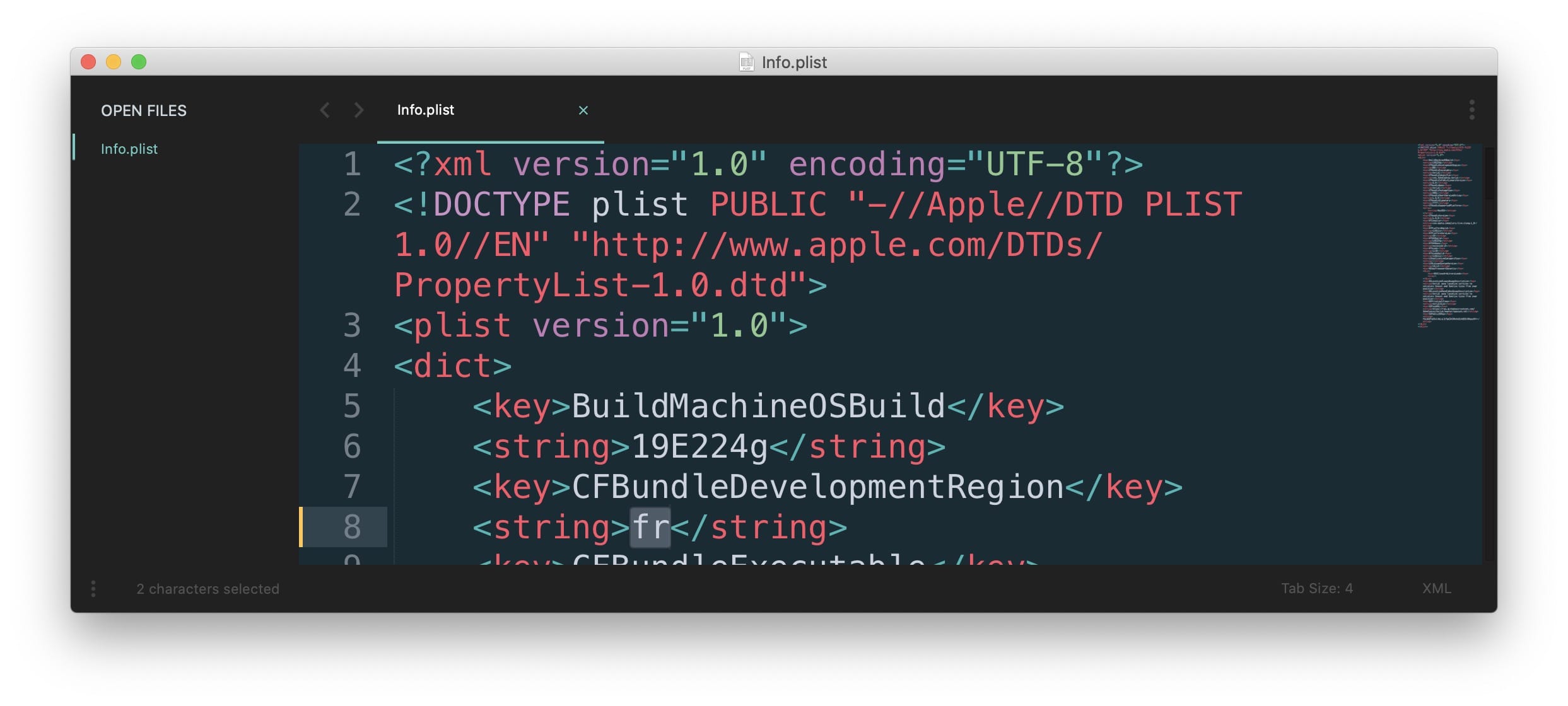
Changing that from "en" to "fr" works as it forces loading the fr files. I tried a lot of things to try to override that value at runtime, but no luck so far... (on top of https://gist.github.com/narikbi/352e93e446e8b1faf283 which looked promising, but didn't work either). Still looking !
glouel
on 19 Feb 2020
Would it be difficult to create an AppleScript to make that edit? Would it be further possible to run such an AppleScript from a button in the UI?
As you may be able to tell, I’m not a developer; just throwing ideas out there 😆
On 19 Feb 2020, 17:51 +0000, Guillaume Louel notifications@github.com, wrote:
I know it’s probably not the most robust plan, but would it be difficult to produce separate versions in each language? I believe there are only a dozen or so, and then users could just download the relevant one? Obviously if that’s not particularly ‘automatable’ then the plan falls apart pretty quickly...
…
So it got me trying more stuff, the good news is, I can actually force a language for a build, yes. But ! It's truly a pain. I could probably automate a lot of it, but then it breaks everything with auto-updates anyway.
One thing that does work, but it's definitely a power user move, is to edit a file in the bundle. It's in /Contents/Info.plist :
Changing that from "en" to "fr" works as it forces loading the fr files. I tried a lot of things to try to override that value at runtime, but no luck so far... (on top of https://gist.github.com/narikbi/352e93e446e8b1faf283 which looked promising, but didn't work either). Still looking !
—
You are receiving this because you were mentioned.
Reply to this email directly, view it on GitHub, or unsubscribe.
domdtyler
on 19 Feb 2020
That's not a bad idea at all !
I'll check, I'm wondering if it will work or not, being able to change a file inside the bundle from something launched "from" Aerial (for the same reason that Aerial can no longer self-update, the sandboxing restrictions). I'll give it a shot tomorrow, who knows !
Having a small script that the user could download/run, and could be bundled in the zip, that one definitely should work. But running that from Aerial... Well, we'll see, thanks for the idea 👍
glouel
on 19 Feb 2020
The app is obviously provided as a zip containing the .saver file - perhaps you could add the script into the zip so it isn’t inside Aerial? Not ideal but presumably you’d only have to run it once on download, and once the auto-update is fixable perhaps this will be too?
Anyway, good luck!
On 19 Feb 2020, 18:23 +0000, Guillaume Louel notifications@github.com, wrote:
That's not a bad idea at all !
I'll check, I'm wondering if it will work or not, being able to change a file inside the bundle from something launched "from" Aerial (for the same reason that Aerial can no longer self-update, the sandboxing restrictions). I'll give it a shot tomorrow, who knows !
Having a small script that the user could download/run, and could be bundle in the zip, that one definitely should work. But running that from Aerial... Well, we'll see, thanks for the idea 👍
—
You are receiving this because you were mentioned.
Reply to this email directly, view it on GitHub, or unsubscribe.
domdtyler
on 19 Feb 2020
Damn it, well it works only for a few seconds, soon enough Gatekeeper kicks in and says that the .saver has been modified (duh) and thus is no longer allowed to run on the system because of invalid signature !
par défaut 19:49:14.984380+0100 legacyScreenSaver Error loading /Users/glouel/Library/Screen Savers/Aerial.saver/Contents/MacOS/Aerial: dlopen(/Users/glouel/Library/Screen Savers/Aerial.saver/Contents/MacOS/Aerial, 0x0109): code signature invalid (errno=1) sliceOffset=0x00000000, codeBlobOffset=0x0024D2B0, codeBlobSize=0x000091F0 for '/Users/glouel/Library/Screen Savers/Aerial.saver/Contents/MacOS/Aerial'
Then Aerial is just dead. Pfft ! So much for that I guess. It was a great idea nonetheless, so thanks for the suggestion. I'll keep looking and harassing Apple, who knows ;)
glouel
on 19 Feb 2020
Haha, good old Gatekeeper looking out for us, making we can’t run any software in any dodgy languages ;-)
On 19 Feb 2020, 18:56 +0000, Guillaume Louel notifications@github.com, wrote:
Damn it, well it works only for a few seconds, soon enough Gatekeeper kicks in and says that the .saver has been modified (duh) and thus is no longer allowed to run on the system because of invalid signature !
par défaut 19:49:14.984380+0100 legacyScreenSaver Error loading /Users/glouel/Library/Screen Savers/Aerial.saver/Contents/MacOS/Aerial: dlopen(/Users/glouel/Library/Screen Savers/Aerial.saver/Contents/MacOS/Aerial, 0x0109): code signature invalid (errno=1) sliceOffset=0x00000000, codeBlobOffset=0x0024D2B0, codeBlobSize=0x000091F0 for '/Users/glouel/Library/Screen Savers/Aerial.saver/Contents/MacOS/Aerial'
Then Aerial is just dead. Pfft ! So much for that I guess. It was a great idea nonetheless, so thanks for the suggestion. I'll keep looking and harassing Apple, who knows ;)
—
You are receiving this because you were mentioned.
Reply to this email directly, view it on GitHub, or unsubscribe.
domdtyler
on 19 Feb 2020
@Soruk I completely forgot to add your translation, here they are in the latest beta, sorry about that : https://github.com/JohnCoates/Aerial/releases/download/v1.8.2beta1/Aerial.saver.zip
@aitor, any luck on your end ? ;)
glouel
on 10 Mar 2020
@glouel sorry about ignored the notification. and I'll finish the translation in the next few days.
just find i made a stupid typo T_T
 LinkeyLeo
on 14 Mar 2020
LinkeyLeo
on 14 Mar 2020
Hi guys, any one working on the Italian translation? Just in case, I may help!
 marguglio
on 18 Apr 2020
marguglio
on 18 Apr 2020
Hi @marguglio !
Would love to have you help if you can! Please send me an email at edited and I'll send you an invite to the lokalise project. Thanks a lot !
glouel
on 18 Apr 2020
Hi @glouel!
I would be happy to help translate your wonderful Aerial screen saver, into Japanese, if needed.
I have been doing voluntary English-Japanese translations for quite a while, with Mac sharewares and also for Geocaching.com website & iOS apps. (BTW, if interested, definitely try Geocaching! It's really fun, and gets you out of your home. ;)
BTW, I noticed a small bug in 1.9.0 weather icons, and will try to post in Issues later.
Thanks for the update! I have a weather icon in Aerial!
 DrMORO617
on 25 May 2020
DrMORO617
on 25 May 2020
@DrMORO617 that would be awesome, please send me an email at * and I'll add you to the lokalise project so you can start translating ! ありがとう !
And yep when you have time let me know about the icon issue you saw, thanks !
glouel
on 25 May 2020
@glouel
PM sent!
DrMORO617
on 25 May 2020
Good news, macOS 11 Big Sur fixed the internationalization bug for the UI that we discussed with @domdtyler previously. I'm still working on the cache issue first but I'll work on UI internationalization next.
glouel
on 23 Jun 2020
@DrMORO617 I'm very sorry, I tried to split the video name translations in Lokalise in a separate project, to import the work you had already done and phase out the old pointOfInterest keys, but I ended up deleting your work so far. I was able to reimport everyone else work but yours. I'm truly sorry about that, I wasn't very familiar with the tool UI.
To everyone else, from now on and to make it easier for everyone, I've made the translations simpler by only having the video names in a separate project, and remove the pointOfInterests we had made as those are no longer relevant to the current videos.
I'm still working on version 2.0 and will make a separate project in Lokalise to translate the UI too for those who want to contribute, probably late next week.
glouel
on 11 Jul 2020
Just saw your request for people that can help with the translations. I can help with the Portuguese (European) translation, in case you're thinking of including it.
Cheers.
 ddiogo22
on 20 Aug 2020
ddiogo22
on 20 Aug 2020
@ddiogo22 thanks for offering ! Please send me an email to [email protected] and I'll set it up !
glouel
on 20 Aug 2020
@DrMORO617 I'm very sorry, I tried to split the video name translations in Lokalise in a separate project, to import the work you had already done and phase out the old pointOfInterest keys, but I ended up deleting your work so far. I was able to reimport everyone else work but yours. I'm truly sorry about that, I wasn't very familiar with the tool UI.
To everyone else, from now on and to make it easier for everyone, I've made the translations simpler by only having the video names in a separate project, and remove the pointOfInterests we had made as those are no longer relevant to the current videos.
I'm still working on version 2.0 and will make a separate project in Lokalise to translate the UI too for those who want to contribute, probably late next week.
@glouel
Too bad, but no problem. I'll just start over with the new Aerial 2.0.
Sorry for being away. Life adjusting to "With Corona" chapter of my life.
BTW, please let me know from which string to focus on translating first.
Thanks for all the hard work!
DrMORO617
on 21 Aug 2020
@DrMORO617 Thank you very much and no worries, it's truly appreciated. I hope things are ok for you, it's quite an adjustment for many of us.
And one last time, let me deeply apologize for the mess I made here by mistakenly deleting your work, while I was trying to do the exact opposite, I was careless, didn't think enough before acting, and will not make that mistake again.
glouel
on 21 Aug 2020
@DrMORO617 Thank you very much and no worries, it's truly appreciated. I hope things are ok for you, it's quite an adjustment for many of us.
And one last time, let me deeply apologize for the mess I made here by mistakenly deleting your work, while I was trying to do the exact opposite, I was careless, didn't think enough before acting, and will not make that mistake again.
@glouel
Just finished all Japanese strings now. Hopefully they will be incorporated into the next build, and I can see for myself the actual translations on screen, and correct them on the fly.
DrMORO617
on 21 Aug 2020
Thank you so much, I'm adding them right now, it will take a couple hours until I release the build with them. I'll ping you then.
And again really sorry about what happened !
glouel
on 21 Aug 2020
@DrMORO617 it's available now : https://github.com/JohnCoates/Aerial/releases/tag/v2.0.2
I put your nickname in credits, if you want your full name please let me know what it is so I can properly credit you !
glouel
on 21 Aug 2020
@DrMORO617 it's available now : https://github.com/JohnCoates/Aerial/releases/tag/v2.0.2
I put your nickname in credits, if you want your full name please let me know what it is so I can properly credit you !
@glouel
Many Thanks! PM sent.
DrMORO617
on 22 Aug 2020
BTW, trying to figure out where the Japanese translations I did are showing up in the Aerial screensaver, as I do not seem to find any somehow. Can you explain where the translated strings are to show in the app? I know the stings in the actual screensaver when showing on screen are NOT translated, as I did not see any of them in the Lokalise section when translating. Thanks!
DrMORO617
on 24 Aug 2020
BTW, trying to figure out where the Japanese translations I did are showing up in the Aerial screensaver, as I do not seem to find any somehow. Can you explain where the translated strings are to show in the app? I know the stings in the actual screensaver when showing on screen are NOT translated, as I did not see any of them in the Lokalise section when translating. Thanks!
Hey there,
So just to clarify, to enable them, normally they should appear automatically if you have japanese as your macOS language. But if not (and that would be weird, maybe a bug ? ) you can override in Settings > Advanced here :
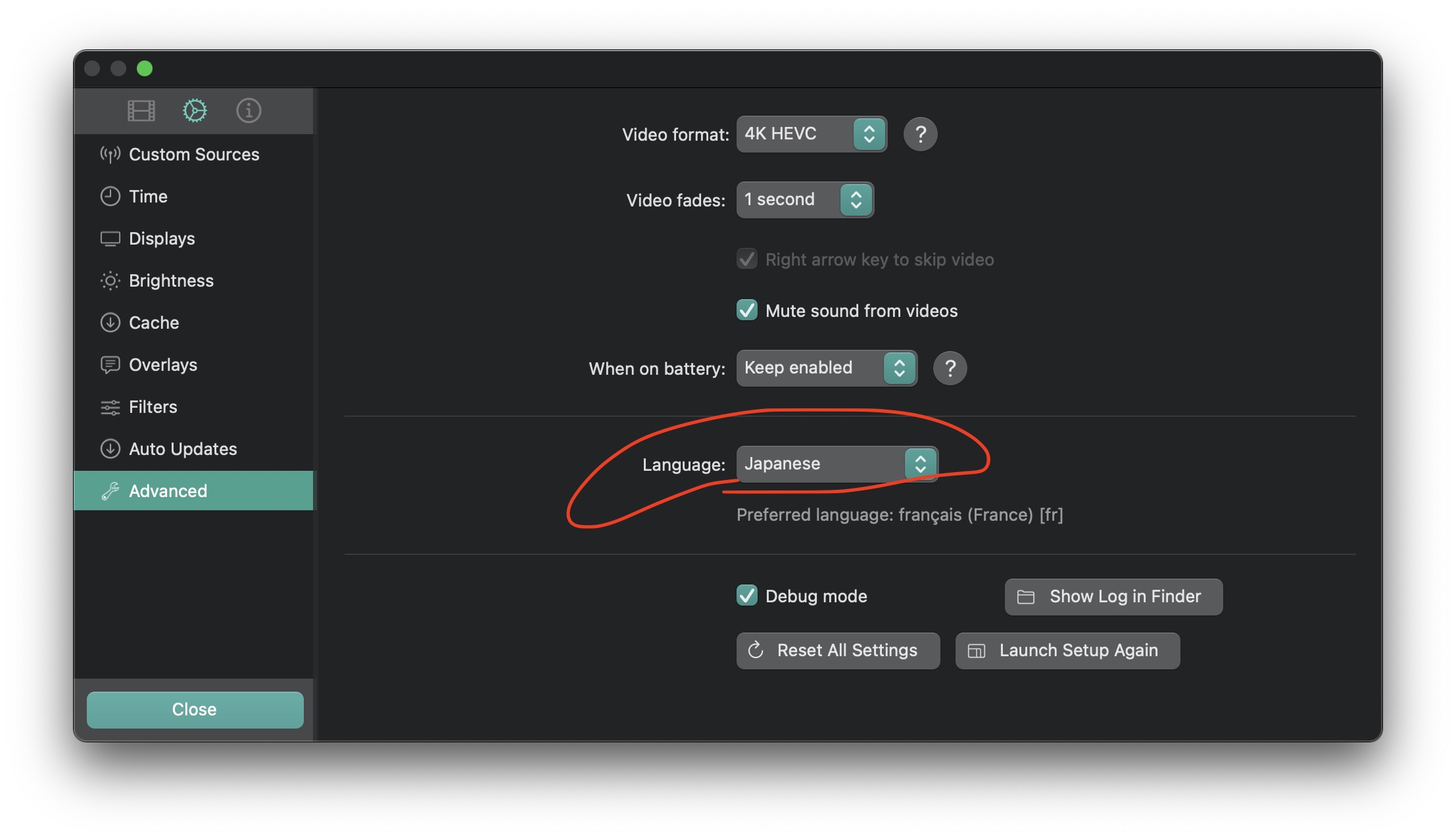
When you do that, you should see your translated names appear here (you need to restart system preferences to reload the new language) :
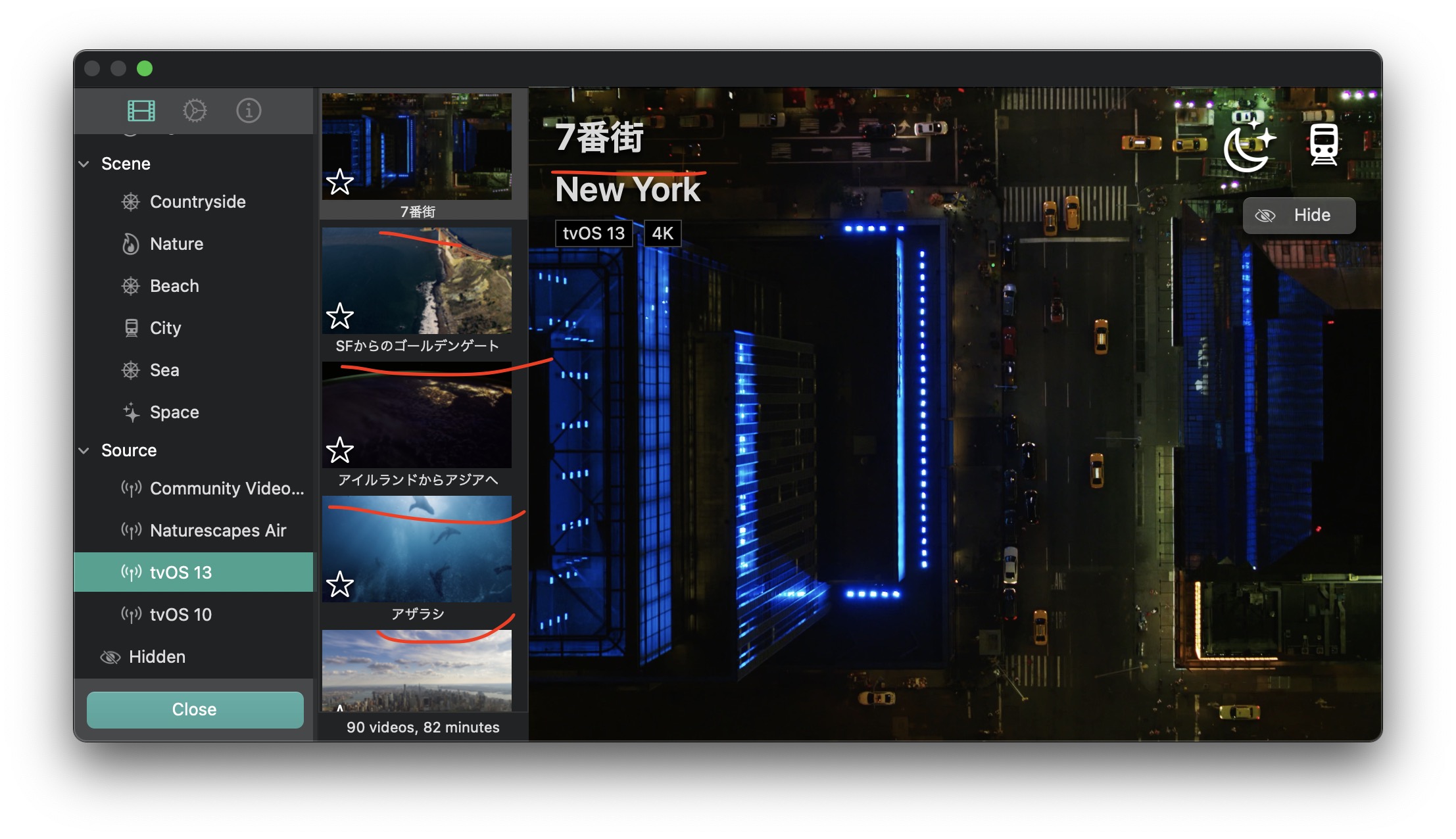
glouel
on 24 Aug 2020
@glouel
Oh, I probably just did not see that setting. Set to preferred, and now I see my translations! Hurry! It's there!
I will keep checking with what's on the screensaver, and edit if seems not fit.
Thanks!
DrMORO617
on 24 Aug 2020
Hi @glouel, I've noticed that Portuguese (pt-br) hasn't yet been added to the translation list thus I'm wondering if I could help with that.
 renansigolo
on 3 Sep 2020
renansigolo
on 3 Sep 2020
Hi @glouel, I've noticed that Portuguese (pt-br) hasn't yet been added to the translation list thus I'm wondering if I could help with that.
Hey there, please send me an email to [email protected] and I'll add you to lokalise, thank you very much !
glouel
on 3 Sep 2020
Related issues
 adri430
·
7Comments
adri430
·
7Comments
 sdugoten
·
7Comments
sdugoten
·
7Comments
 BerryJerry
·
8Comments
BerryJerry
·
8Comments
 jeffehobbs
·
6Comments
jeffehobbs
·
6Comments
 SeanMSmith
·
6Comments
SeanMSmith
·
6Comments
Most helpful comment
Yep, no prob. I'll send the PR today.
On Tue, 25 Jun 2019 at 10:24, Guillaume Louel notifications@github.com
wrote:
--
Kind Regards,
Aitor Garcia
http://aitor.is