Aerial: Doesn't fit multiple screens with different aspect ratios
Just installed this great screensaver and the video looks distorted (just the edges) on my Macbook's display, but not on the monitor. Any ideas how I could fix this?
 theodormarcuOrbital
All 21 comments
+1
 timoa
on 3 Jul 2018
timoa
on 3 Jul 2018
+1
 matttargett
on 7 Jul 2018
matttargett
on 7 Jul 2018
+1 same here - I assume this started with high sierra 10.13.4
 gabel
on 10 Jul 2018
gabel
on 10 Jul 2018
+1 same with 10.13.5
 MikhailKaduchka
on 13 Jul 2018
MikhailKaduchka
on 13 Jul 2018
this started happening my MacBook Air with 10.13.6
I noticed that it happens when the screen brightness is adjusted automatically upon light variations in the environment (or, just when I noticed, when you are coming back to your notebook and passes in front of the screen)
i don't use any external display
 ominixamf
on 17 Jul 2018
ominixamf
on 17 Jul 2018
+1 with 10.13.6
 jonnylangefeld
on 19 Jul 2018
jonnylangefeld
on 19 Jul 2018
+1 with 10.13.6
 mpdifran
on 25 Jul 2018
mpdifran
on 25 Jul 2018
+1 with 10.13.6
 iamsanteri
on 26 Jul 2018
iamsanteri
on 26 Jul 2018
+1 with 10.13.6
 guilherme-simoes
on 30 Jul 2018
guilherme-simoes
on 30 Jul 2018
A photo of the distortion might help identify what is going on. Hard to understand what the distortion looks like for those unaffected.
Also having said that, this seems like more of a bug with the drivers for the Macbook display than a bug in Aerial.
Might help if people could list which year and make of Mac they're seeing this distortion on.
 alistairmcmillan
on 31 Jul 2018
alistairmcmillan
on 31 Jul 2018
MacBook Pro (13-inch, 2018)
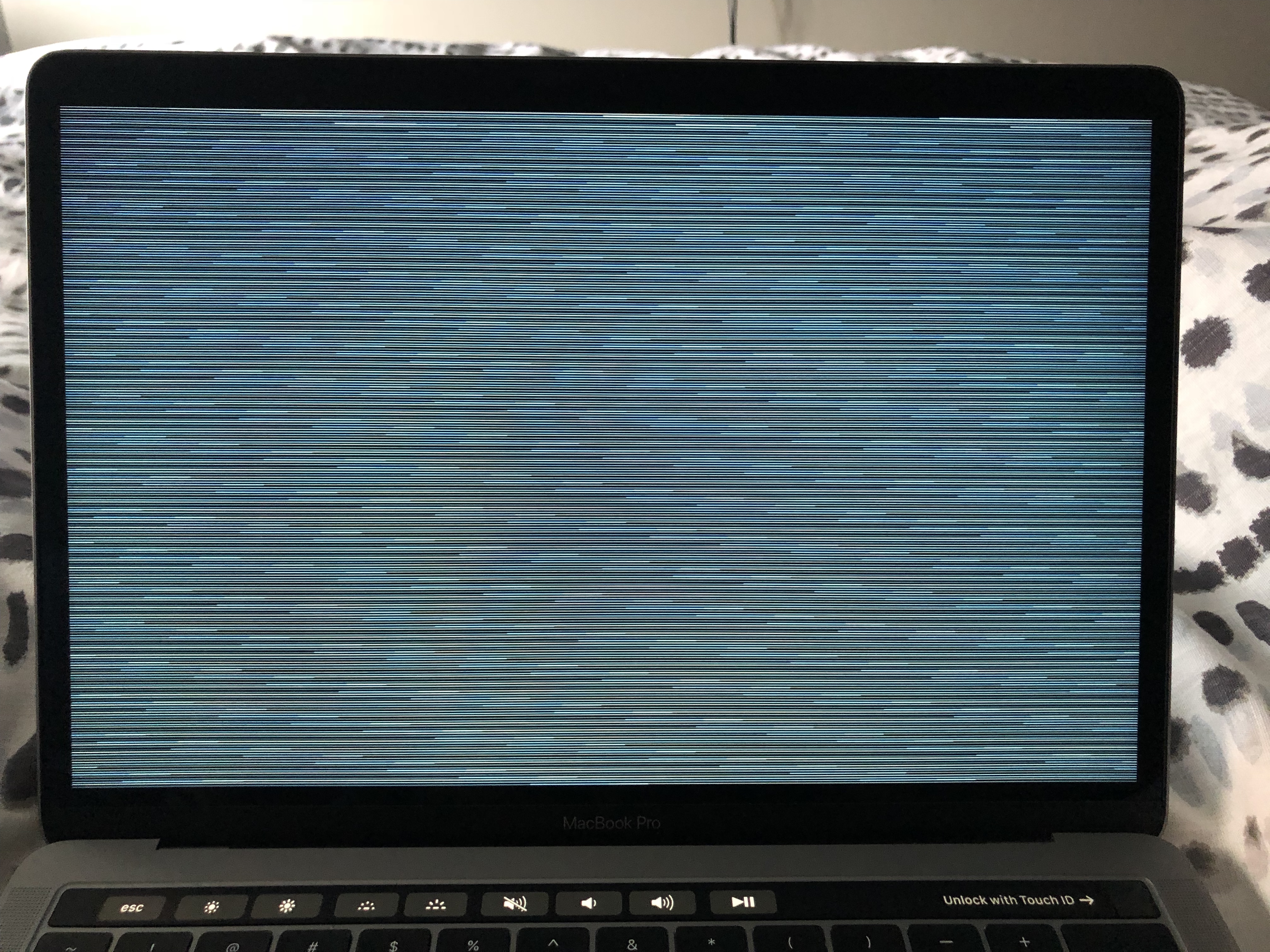
mpdifran
on 31 Jul 2018
@mpdifran What happens if you tick the "Show with clock" button?
alistairmcmillan
on 31 Jul 2018
Enabling "Show with clock" seems to fix it. I see the above screenshot whenever "Show with clock" is disabled.
mpdifran
on 31 Jul 2018
Doesn't fix it for me. @mpdifran @alistairmcmillan

theodormarcuOrbital
on 31 Jul 2018
Yeah, I think I have something similar when connected to my external monitor (21:9 ratio).
mpdifran
on 31 Jul 2018
I also have this issue. When an external monitor is connected, the video on my MacBook is not full screen and zoomed in, looking rather pixelated.

 Fastjur
on 26 Sep 2018
Fastjur
on 26 Sep 2018
@Fastjur Could you check this build :
https://github.com/JohnCoates/Aerial/releases/tag/v1.4.1beta2
This should fix issues in 10.13 particularly (10.14 seemed ok in 1.4), it also has a display on main monitor only option as a fallback. Can you tell me what it gives you ?
 glouel
on 14 Oct 2018
glouel
on 14 Oct 2018
As far as I know this is fixed in 1.4.1, reopen otherwise
glouel
on 16 Oct 2018
Fixed for me with 1.4.1 on macOs Mojave 10.14
Thank you @glouel !!
gabel
on 18 Oct 2018
It fixed for me when updating to Mojave. Thank you!
Fastjur
on 18 Oct 2018
Ok this really looks like a 10.13.6 bug then ! Thanks @gabel and @Fastjur for your feedback !
glouel
on 18 Oct 2018
Related issues
 savraj
·
4Comments
savraj
·
4Comments
 vom513
·
6Comments
vom513
·
6Comments
 jeffehobbs
·
6Comments
jeffehobbs
·
6Comments
 inopinatus
·
8Comments
inopinatus
·
8Comments
 ryan-madrona
·
8Comments
ryan-madrona
·
8Comments
Most helpful comment
As far as I know this is fixed in 1.4.1, reopen otherwise