Aerial: When using scaled display (on eg. Macbook Pro 13) settings, the video does not fill out the screen. There are top and bottom bars.
 thha-borsen
All 62 comments
Same here. And lots of flickering.
Preferences -> Displays -> Resolution: More Space (1680 x 1050)
There's a bit of flickering no matter the resolution, on the first 1-2 seconds, no matter the resolution. But it doesn't stabilize on "More Space".
 andreineculau
on 26 Feb 2018
andreineculau
on 26 Feb 2018
I'm guessing it's the same issue as #428
andreineculau
on 26 Feb 2018
I've also got this problem. I found out that perhaps the bug is related to iTunes? When I got iTunes running in full screen in the background, and the small 'pop-up' which displays the number started playing appears, the screensaver works as supposed. (no top/bottom bars) However, this iTunes 'pop-up' only appears for like 3 seconds, after that the bars appear again.
 Bokdem
on 19 Mar 2018
Bokdem
on 19 Mar 2018
Having the same issue here. I can confirm this only happens on mac os >= 10.13. I just upgraded and didn't have the issue on 10.12.
 binloan
on 4 Apr 2018
binloan
on 4 Apr 2018
Same issue under 10.13.4
worked like a charm under 10.13.3 before ...
(MacBook Pro 13")
 Einstein2150
on 5 Apr 2018
Einstein2150
on 5 Apr 2018
👍
 RSickenberg
on 5 Apr 2018
RSickenberg
on 5 Apr 2018
Same issue under 10.13.4 with 15" MBP, scaled display.
 ghost
on 16 Apr 2018
ghost
on 16 Apr 2018
Same here - after upgrading to 10.13.4
 ezaritov
on 17 Apr 2018
ezaritov
on 17 Apr 2018
Same issue. 😢 Glad to hear I'm not alone.
 davidmontemayor
on 18 Apr 2018
davidmontemayor
on 18 Apr 2018
+1
 funfried
on 19 Apr 2018
funfried
on 19 Apr 2018
Same issue on 10.13.4

 alexriveraz
on 23 Apr 2018
alexriveraz
on 23 Apr 2018
Same! Also, I agree with @Bokdem - it seems to be related to iTunes, as I have a similar issue when playing video in iTunes. The top and bottom 'bars' appearing on my MBP are not black; instead, they appear to be pieces of another video or picture being displayed 'underneath' Aerial.
 jasonflorack
on 23 Apr 2018
jasonflorack
on 23 Apr 2018
I believe this is related to multiple resolutions. I don't use iTunes at all. The problem only seems to crop up when the screensaver is used on multiple screen sizes. And I cannot reproduce if using multiple monitors that are the same size.
 benjamincharity
on 27 Apr 2018
benjamincharity
on 27 Apr 2018
@benjamincharity seems plausible! I cannot reproduce it with 2 monitors of the same size, but it does happen when all 3 (different sizes) are connected
ghost
on 27 Apr 2018
Same here. Getting the issue on 10.13.4 on 13" MacBook Pro with touch bar. Happens with one or two externally connected monitors (but only to the MacBook Pro screen - external monitors look good).
 ntompson
on 2 May 2018
ntompson
on 2 May 2018
And I cannot reproduce if using multiple monitors that are the same size.
Perhaps try rotating one of the displays 90deg.
 srounce
on 4 May 2018
srounce
on 4 May 2018
Perhaps try rotating one of the displays 90deg.
Unfortunately not an option for me since my monitors are not square.
Work setup:
| Left | Center | Right |
|-----|-----|:---:|
| 15" MB | wide 3440x1440 | vertical 1080x1920 |
Home setup:
| Left | Center | Right |
|-----|-----|:---:|
| vertical 1080x1920 | wide 3440x1440 | vertical 1080x1920 |
benjamincharity
on 4 May 2018
Getting stretch effect projecting my second screen (overflow, not duplicate) from Air 13 (Early 2015) to Epson 980w.
10.13.14
Intel HD Graphics 6000 1536 MB
 homertwigg
on 8 May 2018
homertwigg
on 8 May 2018
Unfortunately not an option for me since my monitors are not square.
Neither are mine (or very many displays for that matter) but I still get the issue on same-sized monitors with a different rotation...
srounce
on 8 May 2018
Same here. One of mine is rotated 90° but I get the same issue (only on the Macbook itself)
ghost
on 8 May 2018
I have a 12" MacBook and now a 2014 Late Mac Mini and both started putting black side bars on my widescreen monitor and cropping the video. 3440x1440. Tinkering around with it, checking Display Clock stopped the black bars for me and now looks normal with the clock on. This all started after the latest 10.13.3 and now 10.13.4 Mac OS updates.
 psmith3
on 14 May 2018
psmith3
on 14 May 2018
Nice find @psmith3. Showing the clock did fix the display for my widescreen and laptop display.
Still looks odd on the vertical display for me:

benjamincharity
on 14 May 2018
Same problem that only begun a few days ago, external screen is fine, laptop on starts fine but quickly flashes and the bars appear while the video seems to be bottom aligned, tried removing everything to reinstall but no fix. Only thing that has updated recently was Xcode on the 14th
 gregorsmith
on 17 May 2018
gregorsmith
on 17 May 2018
Similar issue. Recently started. Current MacOS 10.13.4.
I have two identical LG Ultra-wide monitors that are 2560x1080. The primary monitor on my right displays the Aerial Screensaver full width (stretched or fill). While the secondary monitor on my left displays with black bars on the left and right (un-stretched or normal).
Both monitors are setup the same for resolution "Default for display". I have tried "Scaled" as well. Both display properly for everything else (tried other screensavers).
 RUHavingFun
on 21 May 2018
RUHavingFun
on 21 May 2018
This project is dead IMHO
RSickenberg
on 1 Jun 2018
It seems you can workaround by checking "Show with clock", not a real fix but I don't have problems anymore
 DavidBertet
on 5 Jun 2018
DavidBertet
on 5 Jun 2018
I tried the "Show with clock" (mine was already on). What it does is affect the one monitor that is showing as my primary monitor. If enabled the primary screen shows full and the secondary chopped left and right (black bars on left and right). When disabled I can watch as my primary, that was fine, switches from full screen to chopped. I can see it happen and it is just chopping off the sides (in other words it is not a stretch issue). When the screensaver kicks in it is fine for just a second (since it had just previously had the clock on) then it refreshes and chops off the sides. The behavior did not exists a few MacOS versions back.
RUHavingFun
on 5 Jun 2018
Related to #452 - same fix (clock)
 astubbs
on 31 Aug 2018
astubbs
on 31 Aug 2018
To those who still experience issue with this, can you give this build a try :
https://github.com/JohnCoates/Aerial/releases/tag/v1.4.1beta2
This should fix issues in 10.13 particularly (10.14 seemed ok in 1.4), it also has a display on main monitor only option as a fallback.
 glouel
on 14 Oct 2018
glouel
on 14 Oct 2018
Closing as fixed with the release of 1.4.1
glouel
on 16 Oct 2018
Unfortunately, it is still a problem for me in 1.4.1. I am running with external monitor (1920x1200) as main display and laptop screen at 1280x800 equivalent. Main display alternates between full screen and black bars on top and bottom. Laptop screen always has black bars. High Sierra 10.13.6.
 eozh
on 16 Oct 2018
eozh
on 16 Oct 2018
Unfortunately, it is still a problem for me in 1.4.1. I am running with external monitor (1920x1200) as main display and laptop screen at 1280x800 equivalent. Main display alternates between full screen and black bars on top and bottom. Laptop screen always has black bars. High Sierra 10.13.6.
Ok thanks for your feedback, I reopened this and will try and look into it. Can you tell me :
- Mac model
- Preferred video format
- do you see the exact same thing when using the 3 multimonitor mode (main only, mirror, individual)
Thanks
glouel
on 16 Oct 2018
- MacBook Pro 13, 2017, Touch Bar
- 1080p H264 (tried playing HEVC, got high CPU usage on this machine)
In mirrored mode: what I described before: alternating on main display, letterboxed on laptop screen. Also noticed lag between screens (videos not synchronized)
In "only main display" mode: top/bottom flicker a few times, then settles on playing full screen
In "different mode": on both display top and bottom flickers, then plays full screen.
I also tried unplugging the monitor and playing with laptop screen only. The screensaver froze and did not respond to keyboard. After I plugged the monitor back, it eventually crashed the whole session and kicked me to the login screen.
eozh
on 16 Oct 2018
- MacBook Pro 13, 2017, Touch Bar
- 1080p H264 (tried playing HEVC, got high CPU usage on this machine)
In mirrored mode: what I described before: alternating on main display, letterboxed on laptop screen. Also noticed lag between screens (videos not synchronized)
In "only main display" mode: top/bottom flicker a few times, then settles on playing full screen
In "different mode": on both display top and bottom flickers, then plays full screen.
Ok thanks for this, I'll try to replicate.
I also tried unplugging the monitor and playing with laptop screen only. The screensaver froze and did not respond to keyboard. After I plugged the monitor back, it eventually crashed the whole session and kicked me to the login screen.
You mean unplugging while the screensaver was on ? Can you try using the screensaver with the monitor unplugged first (stay in scaled mode) and tell me what that does ? I'll get back to you tommorrow on this, thanks !
glouel
on 16 Oct 2018
That time I unplugged the monitor first. I tried it again and couldn't reproduce the freeze. With laptop screen only, there was brief garbage on the entire screen and then it plays okay full screen.
eozh
on 16 Oct 2018
Unfortunately, it is still a problem for me in 1.4.1. I am running with external monitor (1920x1200) as main display and laptop screen at 1280x800 equivalent. Main display alternates between full screen and black bars on top and bottom. Laptop screen always has black bars. High Sierra 10.13.6.
So I'm gonna need some clarifications because I'm unable to replicate:
- What do you mean by external monitor "as main display" ? As far as I know, there's no such setting to say which display is "main" ?
- Are you running external non scaled, at 1920x1200, and internal scaled at 1280x800 ? Or is external scaled too ?
Screenshots of your precise config would help.
On my Macbook Air with 10.13.6, setting internal scaled at 1280x800, and external non scaled at 1920x1200, everything is ok in mirrored mode and I haven't been able to replicate by messing with scaling on both. I also tried vertical mode and it's all good.
Either there's something I don't get about your settings, or there's something driver related that is different on your machine compared to mine.
It's a long shot but I made a build with expanded logging here:
https://github.com/glouel/Aerial/releases/download/v1.4.2test2/Aerial.saver.zip
Can you install (then quit System Preferences and launch again), go to the Aerial tab, enable debug mode AND log to disk, then close it, And launch the screensaver. If you see black bars or whatever, go to Aerial cache folder and attach the AerialLog.txt ?
glouel
on 17 Oct 2018
as far as 'main' display, they may be referring to while under display preferences, the main display is whichever has the 'white bar' at the top. and you can drag that bar to other/external monitors.
 dVIAN13
on 17 Oct 2018
dVIAN13
on 17 Oct 2018
Oh, that's a pretty well hidden setting ! Thanks for clarification.
so @eozh same thing here setting external as main, let me know about the other stuff thanks !
glouel
on 17 Oct 2018
no problem!, just for reference, my main display(under sys prefs) in one of my two external monitors, both are using scaled settings(2560x1440) and with my MacBookPro open(3rd display, default resolution), I am not seeing any letterboxing on any of the displays. I have tried different settings on different displays and have not been able to reproduce the letterbox effect either. Possibly is the monitor being scaled to non-widescreen aspect ratio, which I would think would cause the letterboxing..?
dVIAN13
on 17 Oct 2018
@dVIAN13 Ha thanks for this. Indeed it could be scaling to non widescreen ratio, although I don't think I saw that option, hmm. With extended logs from the new build we should get exactly what's sent to Aerial so that can give us a clue !
To try and narrow it down, and sorry because I think I've asked you already, are you running Mojave, and Mac model ?
glouel
on 17 Oct 2018
I'm on Mojave, 10.14.1 dev, and on a MacBook Pro 13" w/ Touch Bar
dVIAN13
on 17 Oct 2018
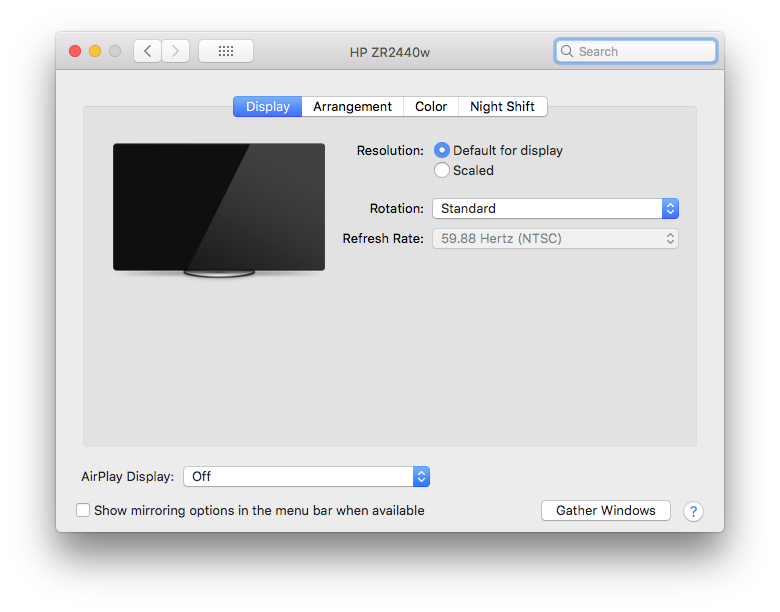
- Are you running external non scaled, at 1920x1200, and internal scaled at 1280x800 ? Or is external scaled too ?
That's correct. It's a little bit more complicates, since unlike your Air, the Pro display is retina. If I recall correctly, it used to be 2x of 1280x800 (2560x1600). In Sierra or so, they switched the default to look like 1440x900, which looks too small to me, so I keep it in the 1280x800 mode. I checked and the same issue happens in the default mode of the internal display.
Can you install (then quit System Preferences and launch again), go to the Aerial tab, enable debug mode AND log to disk, then close it, And launch the screensaver. If you see black bars or whatever, go to Aerial cache folder and attach the AerialLog.txt ?
Attached are the screenshots and the log file. Let me know if I can do anything else to help you reproduce it.
 eozh
on 17 Oct 2018
eozh
on 17 Oct 2018
That's correct. It's a little bit more complicates, since unlike your Air, the Pro display is retina. If I recall correctly, it used to be 2x of 1280x800 (2560x1600). In Sierra or so, they switched the default to look like 1440x900, which looks too small to me, so I keep it in the 1280x800 mode.
Yeah sadly the MBA is the only Mac I have on 10.13.6. Totally understandable about font size !
I checked and the same issue happens in the default mode of the internal display.
Ok so scaled doesn't make a difference ? hmm... I was going to say I was going to do more testing on scaling on my iMac (on mojave unfortunately) but that might not help. I'll let you know tomorrow.
Attached are the screenshots and the log file. Let me know if I can do anything else to help you reproduce it.
Thanks for doing this !
According to the logs, you don't have videos cached (maybe a few only) but that should not matter.
2:43:18 PM : setting up player layer with frame: (0.0, 0.0, 1920.0, 1200.0) / (0.0, 0.0, 1920.0, 1200.0)
2:43:18 PM : setting up player layer with frame: (0.0, 0.0, 1280.0, 800.0) / (-1280.0, 0.0, 1280.0, 800.0)
Those are the two lines I was really hoping to see, so according to them, it seems to detect the screen sizes correctly (and your external screen is on the right if I read that right).
One thing does come to mind : I may have a bug if the main screen is not retina and the 2nd is. Would it be a lot of trouble for you to switch temporarily the main screen to internal just to see ? I think the other way around may be fine (retina main, non retina external) but maybe not the other way around ?
Otherwise, very long shot but I did a quick build with retina detection disabled on main screen. Maybe that will help :
https://github.com/glouel/Aerial/releases/download/v1.4.2test3/Aerial.saver.zip
Again, thanks for helping me figuring this out !
glouel
on 18 Oct 2018
One thing does come to mind : I may have a bug if the main screen is not retina and the 2nd is. Would it be a lot of trouble for you to switch temporarily the main screen to internal just to see ? I think the other way around may be fine (retina main, non retina external) but maybe not the other way around ?
I switched main display to internal. After that video plays full-screen on internal screen (after a momentary glitch) and with black bars on the external.
Otherwise, very long shot but I did a quick build with retina detection disabled on main screen. Maybe that will help :
https://github.com/glouel/Aerial/releases/download/v1.4.2test3/Aerial.saver.zip
tried it, no change
eozh
on 18 Oct 2018
Please note that some people had that bug fixed for them on Mojave : https://github.com/JohnCoates/Aerial/issues/472#issuecomment-430992470
Still, I did try some more stuff today, here's my latest test build if you want to give it a shot. It has proper per screen retina detection and better player start synchronisation. It may not help you but who knows. Out of that, I think I'm out of ideas for you, sorry.
Build here :
https://github.com/glouel/Aerial/releases/download/v1.4.2test4/Aerial.saver.zip
glouel
on 18 Oct 2018
FWIW The 1.4.1 fixed it for me once I completely deleted the existing version, restarted system preferences, and then installed Arial.
Mojave 10.14
Arial 1.4.1
benjamincharity
on 18 Oct 2018
Yep you really need to restart syspref ! Macos bug as far as I know on this one :(
Officially, Apple's documentation still says that Screensavers should be written in Objective-C (https://developer.apple.com/documentation/screensaver/screensaverview although the docs show swift apis 😱) and the Screensaver sample is still not available in swift in xcode. I guess they know there are still some bugs.
glouel
on 18 Oct 2018
test4 version didn't help, but I found some more information:
- when there are black bars at the top and bottom, the video is also cropped horizontally. It's easy to see on the LA Airport video, where the left taxiway is off-screen.
- In the "separate" mode, the videos have similar problems for a second and then go to correct view.
- interestingly, the problem goes away when I set a non-zero fade duration and the video has been cached.
I briefly looked at the code, and although I don't understand it completely, I think it may have something to do with "readyForDisplay" observer and shared views. Timing of the player creation (cached vs. online) might also play a role.
eozh
on 19 Oct 2018
test4 version didn't help, but I found some more information:
- when there are black bars at the top and bottom, the video is also cropped horizontally. It's easy to see on the LA Airport video, where the left taxiway is off-screen.
- In the "separate" mode, the videos have similar problems for a second and then go to correct view.
- interestingly, the problem goes away when I set a non-zero fade duration and the video has been cached.
Interesting ! Was all that with test 4 ?
I briefly looked at the code, and although I don't understand it completely, I think it may have something to do with "readyForDisplay" observer and shared views. Timing of the player creation (cached vs. online) might also play a role.
I would highly suggest you cache videos. I did fix many issues regarding player creation and it's start specifically in test 4, but it's not on this repo. My branch is here if you are curious : https://github.com/glouel/Aerial/blob/feature/v1.4.2/Aerial/Source/Views/AerialView.swift
On old versions the playback was started before the view was properly ready but that may not make that much of a difference. But the ready for display thing is interesting, indeed with streaming it may still start too early. I did a quick build pushing back the play in the rdf observer, it may break things like play a 2nd video but hey, who knows ? Let me know if you're willing to give it a shot :
https://github.com/glouel/Aerial/releases/download/v1.4.2test6/Aerial.saver.zip
glouel
on 19 Oct 2018
Same thing in test4 and test6. Also, if the video is not cached it often just shows black screen.
These issues didn't happen in the versions before 1.4. But I am glad I found a workaround: having it cached + fade in.
eozh
on 19 Oct 2018
Same thing in test4 and test6.
Ok...
Also, if the video is not cached it often just shows black screen.
You mean at cold startup with a cached video, or swapping from cached to non cached maybe ? I suppose you don't see any text either.
These issues didn't happen in the versions before 1.4. But I am glad I found a workaround: having it cached + fade in.
Cache + fades are slightly linked. If a video is not cached, we usually have no idea of it's duration, so we can't put any fades and just bring opacity to 1.
That you have an issue with cache and NO fade is weird though. I'll try rejiggering stuff again 🤷♂️
glouel
on 19 Oct 2018
Also, if the video is not cached it often just shows black screen.
You mean at cold startup with a cached video, or swapping from cached to non cached maybe ? I suppose you don't see any text either.
Ok so this one I reproduced. Sometimes the server just seem to leave the connection hanging, I need to better handle that case. This one is not new, it's just Apple's CDN misbehaving, I had the same issue in Safari too (maybe there's something weird though but this is stuff I haven't touched so far, checking...)
Edit : Things I looked at :
- forcing redirection to the final CDN url -> no change
- maybe it's the old video server only (phobos) -> same issue on new one (sylvia)
What happens : for some reason sometimes, we only get one data response of 100kb and nothing else, it just stops there. One thing I noticed in safari, you can see a tiny image preview before it loads the video, is it linked to that ? I think that we're missing something in our VideoLoader to detect something related to streaming but I have no idea what. I'll put this on hold for now but I'll try to get back to it. Please use cached videos in the meantime.
glouel
on 19 Oct 2018
This is driving me slightly crazy so still looking at it. Maybe getting close. So we seem to be getting an arbitrary amount of data. The data seems identical, sometimes we only get a few KB and everything is great :
15:29:49 : Starting request:
15:29:49 : Received data with length: 16031
Sometimes we get more and everything borks :
15:39:34 : Starting request:
15:39:34 : Received data with length: 712046
It looks like the beggining of a mpeg 4 stream according to mediainfo so I'm assuming the data is good, we just get more than we can handle. In a C world I would have bet on a too small buffer but hmm... Will keep checking.
glouel
on 19 Oct 2018
And I got it. Two requests are made simultaneously by Apple's AVAssetResourceLoader, the contentRequest and the dataRequest. The first one tells what type of file it is, the second brings the data. That first amount of request data gets cached while it probably shouldn't, and that messed the whole thing and subsequent request (for the rest of the data) weren't sent anymore. Anyway, fixed it by disabling some "extra" cache mechanism that tried to fullfill that request while it shouldn't (it would have been useful if we were scrubbing for example but since we don't, it's useless).
Cache Aerials as they play still works correctly, and as soon as you play through a video it's persisted to disk and then you're in the "good path".
Will that fix all your bugs, I don't know, but at least streaming is correctly working again and you should never see those black screen while streaming anymore. I'll post a build soonish.
glouel
on 19 Oct 2018
glouel
on 19 Oct 2018
Thank you. I am still getting black screen often when streaming. But it's intermittent and might be caused by apple's servers. Seems to happen more on pre-tvOS12 videos.
eozh
on 19 Oct 2018
Is it any less at least ? It seemed rock solid here, damn ! I did 99% of my testing on the new server, maybe there's something else on the old one, will check this weekend if I have a sec.
glouel
on 20 Oct 2018
I gave up on streaming and cached the enabled videos, not that there is a nice GUI for it. The other unfortunate thing I noticed is that video looks a little jerky on external display. Not sure if it is related to scaling or sharing the video player.
eozh
on 20 Oct 2018
I gave up on streaming and cached the enabled videos, not that there is a nice GUI for it.
I definitely understand. You mean download checked in the menu below the list ? Cause that's there ;)
The other unfortunate thing I noticed is that video looks a little jerky on external display. Not sure if it is related to scaling or sharing the video player.
That's weird. You're running external as main right ? Can you define "jerky" ? Right now the scaling should be correct per screen so probably not that. Does it really look better when you have 2 different videos (assuming same quality, it varies a lot). Sharing the player, as far as I know, that shouldn't matter as they have different CALayers for the rendering which are set with correct scaling. But If you really see a difference I can try and make a version that doesn't share to see...
glouel
on 20 Oct 2018
I gave up on streaming and cached the enabled videos, not that there is a nice GUI for it.
Mis-typed, should read as "now that there is a nice GUI for it"
That's weird. You're running external as main right ? Can you define "jerky" ?
It is hard to define. The motion doesn't look smooth, where things are moving fast, like waves in Hawaii. It look like judder from either skipped frames or mis-matched frame rate. It is subtle though. I don't see a difference in the 2 videos mode.
eozh
on 20 Oct 2018
Mis-typed, should read as "now that there is a nice GUI for it"
Hehe no problem ;)
It is hard to define. The motion doesn't look smooth, where things are moving fast, like waves in Hawaii. It look like judder from either skipped frames or mis-matched frame rate. It is subtle though. I don't see a difference in the 2 videos mode.
Well, if you don't see a difference between mirrored and independant then it's not the shared thing. 2017 should have HEVC Main10 so probably not that either.
I would suggest you check the videos with quicktime, some can look truly poorly encoded or have lower resolution that we'd think.
One example is comp_GMT026_363A_103NC_E1027_KOREA_JAPAN_NIGHT_v17_SDR_FINAL_25062018_SDR_4K_HEVC.mov (same in any format)
If you look at the very bottom of the screen, near the right corner (maybe 20% to the left of it), you'll see a patch of earth that's not moving at the very beggining of the video for mabye 2-3 secs before it "sticks itself" in the right place as the earth rotate. If you see a quality disparity between Aerial and Quicktime on the same screen then it's an issue !
glouel
on 20 Oct 2018
Will mark this as fixed in 1.4.2, feel free to reopen if you still experience issues.
glouel
on 23 Oct 2018
Related issues
 arnsangra
·
3Comments
arnsangra
·
3Comments
 vivibro
·
6Comments
vivibro
·
6Comments
 jeffehobbs
·
6Comments
jeffehobbs
·
6Comments
 savraj
·
4Comments
savraj
·
4Comments
 jbis9051
·
6Comments
jbis9051
·
6Comments
Most helpful comment
Same issue under 10.13.4
worked like a charm under 10.13.3 before ...
(MacBook Pro 13")