Today Aerial took all available disk space. I think that it needs to be an option to limit the cache size.
 vovapi
All 14 comments
It shouldn't use that much. How much space do you think it used on your Mac?
 alistairmcmillan
on 27 Dec 2015
alistairmcmillan
on 27 Dec 2015
The cache with the current videos consumes ~4.5GB.
 timsutton
on 2 Jan 2016
timsutton
on 2 Jan 2016
Do non-selected videos also gets cached?
 steve1412
on 12 Jan 2016
steve1412
on 12 Jan 2016
I wouldn't think so, but never tested that.
timsutton
on 12 Jan 2016
just wanted to chime in here. not sure if this is the right place, but it seems so.
i'm an IT admin at a tech co, and i noticed one of our engineers was using over 209GB of bandwidth with itunes in 30 days. over 90GB in a week! all the traffic came from itunes which was odd as that's not normal at all. after much debugging, we pinpointed to host apple.com.edgesuite.net which points to akamai CDN, which apple does use.
this did not explain why this user used so much bandwidth when he streams music from pandora, not itunes. then he told me about this screensaver aerial that he recently starting using..and boom! found it. 3 monitors, streaming this beautiful HD video every time his computer screensaver starts.
has anyone else noticed this extreme bandwidth suck? 209GB in a month is huge and will make you reach data caps with most home ISP plans. he told me the code has been updated to cache the data stream so bandwidth will be less. has anyone done tests on this?
highly curious and will be conducted my own tests with the old and new code of aerial.
 fady
on 8 Mar 2016
fady
on 8 Mar 2016
@fady try beta version. It has "cache" option.
@alistairmcmillan I just have downloaded "all cache" (using button "Download Now" in screensaver settings), and:
x@x:~/Library/Caches$ du -sh Aerial
4.5G    Aerial
It's still OK, as I've selected all available videos, but maybe it could be optimized it in some way? SSD space is still bit pricy, especially in Apple's computers...
 kusmierz
on 22 Apr 2016
kusmierz
on 22 Apr 2016
+1 for this.
My current cache size for Aerial is 10GB! That's way too much.
 tomhoad
on 16 Feb 2017
tomhoad
on 16 Feb 2017
You can disble some of the aerials to decrease it.
Good thing would be having an option "Limit cache size to: nn GB".
 robert-cody
on 16 Feb 2017
robert-cody
on 16 Feb 2017
Better would be to delete cached MOVs when their corresponding checkbox is deselected in the preference sheet.
 WebVeteran
on 16 Feb 2017
WebVeteran
on 16 Feb 2017
I ended up disabling @vit0rg @WebVeteran - select in system prefs setting first and then deleted accordingly from cache using: http://a1.phobos.apple.com/us/r1000/000/Features/atv/AutumnResources/videos/entries.json as reference
 kevanchristmas
on 16 Feb 2017
kevanchristmas
on 16 Feb 2017
I would also like a limit cache size to n GB option! HDD space is a much larger problem for me than bandwidth (no data cap), so would prefer to have all videos enabled and re-download videos every now and then than to occupy a large amount of space.
 aronstrandberg
on 20 Aug 2017
aronstrandberg
on 20 Aug 2017
Version 1.4 should fix most of this, you can manage your cache a lot better with individual downloads and a quick access to the cache folder in the finder. We'll add something to show how large the cache currently is in a next version.
 glouel
on 11 Oct 2018
glouel
on 11 Oct 2018
cost around 40GB… I need the limit option.
 puttin
on 27 Dec 2019
puttin
on 27 Dec 2019
@puttin you can delete the videos you don't want by right clicking them in the list and select "Move to trash":
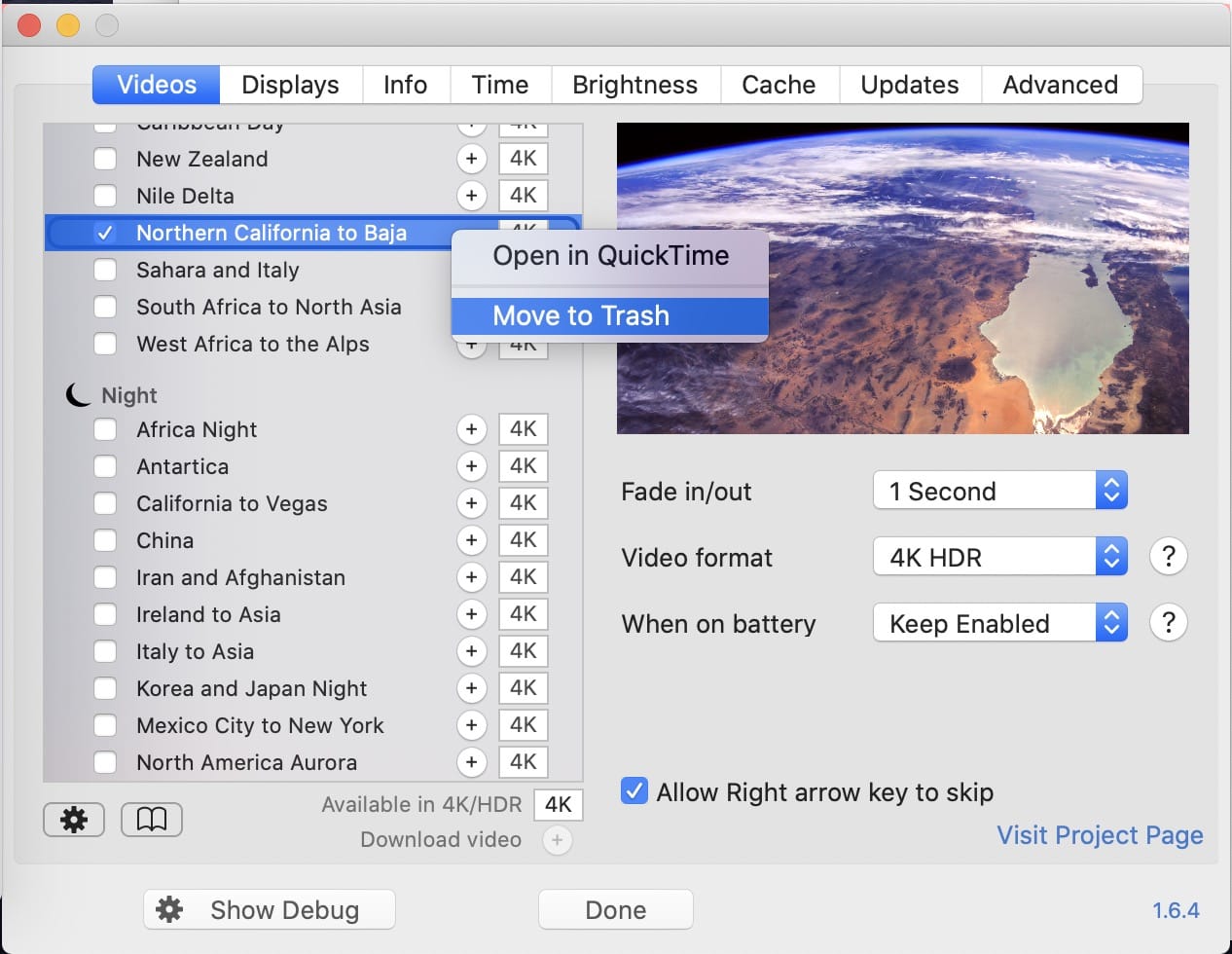
You can then either unselect the videos you don't want to be redownloaded, or just go to the "Cache" tab and check "Never stream videos" so they won't be redownloaded.
glouel
on 27 Dec 2019
Related issues
 mrmckeb
·
4Comments
mrmckeb
·
4Comments
 ryan-madrona
·
8Comments
ryan-madrona
·
8Comments
 BerryJerry
·
8Comments
BerryJerry
·
8Comments
 Pingren
·
7Comments
Pingren
·
7Comments
 1st
·
6Comments
1st
·
6Comments
Most helpful comment
You can disble some of the aerials to decrease it.
Good thing would be having an option "Limit cache size to: nn GB".