Aegis: Syncing using cloud services
All 37 comments
@glocalglocal I'd agree to that. Would be a great option to have seamlessly syncing options across cloud in an encrypted format.
 shadowbone94
on 1 Jan 2020
shadowbone94
on 1 Jan 2020
...or at least the app could facilitate syncthing to do the syncing.
 glocalglocal
on 1 Jan 2020
glocalglocal
on 1 Jan 2020
In the next release, the export functionality will use the Storage Access Framework. This will allow you to select cloud storage to store your exported vault, in addition to local storage.
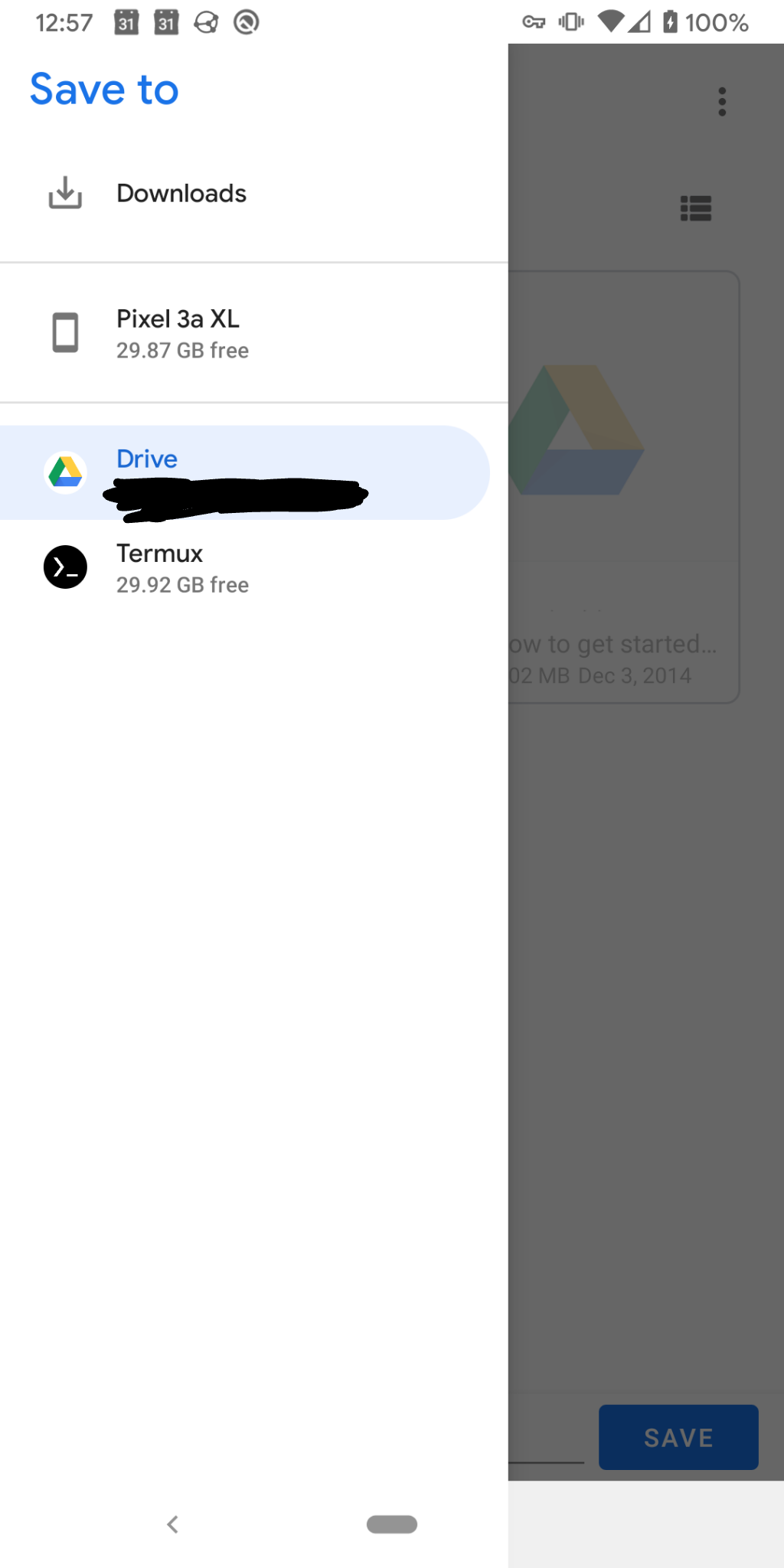
I'm also experimenting with a new automatic backup feature for Aegis. The idea is to allow users to select a folder through the same framework and to write periodic or event-based backups of the vault to that folder. However, it will depend on the cloud provider whether this'll work or not. Apps of cloud providers need to support the ACTION_OPEN_DOCUMENT_TREE intent. This is a different intent than the one used for the export feature, which is ACTION_CREATE_DOCUMENT. So far, even Google Drive doesn't support it, but that feature appears to be in the works: https://issuetracker.google.com/issues/135636079, https://issuetracker.google.com/issues/139965899.
 alexbakker
on 5 Jan 2020
alexbakker
on 5 Jan 2020
Could Nextcloud/OwnCloud/WebDav support also be considered?
 4oo4
on 23 Feb 2020
4oo4
on 23 Feb 2020
Nextcloud supports the ACTION_OPEN_DOCUMENT_TREE intent and thus will be supported.
alexbakker
on 23 Feb 2020
+1 for Sync feature.
I use a different handset for work and currently am manually exporting the encrytped file to Google drive and then importing it to the second device.
A sync feature through Gdrive or Dropbox is the only thing missing in Aegis. :)
 sujitph
on 12 Mar 2020
sujitph
on 12 Mar 2020
Hope to support webdav synchronization.
 Vstory
on 14 Mar 2020
Vstory
on 14 Mar 2020
In the next release, the export functionality will use the Storage Access Framework. This will allow you to select cloud storage to store your exported vault, in addition to local storage.
I'm also experimenting with a new automatic backup feature for Aegis. The idea is to allow users to select a folder through the same framework and to write periodic or event-based backups of the vault to that folder. However, it will depend on the cloud provider whether this'll work or not. Apps of cloud providers need to support the ACTION_OPEN_DOCUMENT_TREE intent. This is a different intent than the one used for the export feature, which is ACTION_CREATE_DOCUMENT. So far, even Google Drive doesn't support it, but that feature appears to be in the works: https://issuetracker.google.com/issues/135636079, https://issuetracker.google.com/issues/139965899.
Would that require me to have Google Drive installed on my phone?
 Marko-HR
on 9 May 2020
Marko-HR
on 9 May 2020
@MarkoXD Yes.
alexbakker
on 9 May 2020
Great! I'm waiting for an update of Google Authenticator so I can switch easily to Aegis (I don't have rooted phone).
Marko-HR
on 9 May 2020
I have not tried the latest Google Authenticator, but the description seems to say that it supports automatic syncing between devices.
So, yeah, I am eager for Aegis to support sync.
 gnulab-id
on 7 Jun 2020
gnulab-id
on 7 Jun 2020
Google Authenticator does not support automatic syncing between devices. It just supports displaying QR codes that other devices can then scan. Aegis will also be able to scan those in the next release.
alexbakker
on 7 Jun 2020
@alexbakker Hi. Does the 1.2 release (at time of writing that is what I can see on the store) support exporting/backing up to a cloud provider (e.g. OneDrive/Google Drive/Dropbox) ? I can't currently see a way of doing it (and tangentially related is #505 which would also be solved if there was access to a cloud provider)
 rnc
on 2 Jul 2020
rnc
on 2 Jul 2020
@rnc Yes, exporting to a cloud provider is supported if you have the OneDrive/Google Drive/Dropbox app installed on your device. Backups are a different story, because very few cloud providers support selecting a folder through the Storage Access Framework. See my comment about that here: https://github.com/beemdevelopment/Aegis/issues/258#issuecomment-570906665. The only provider I'm aware of that supports this is Nextcloud, but it's not working because there appears to be a bug on their end: https://github.com/nextcloud/android/issues/303#issuecomment-576667070).
alexbakker
on 2 Jul 2020
@alexbakker Thanks for the reply.
Well, this is strange. I had rebooted my phone and as per your above image Google Drive wasn't showing up (and neither was Dropbox/OneDrive for that matter). I started Google Drive and now its showing up, although OneDrive/Dropbox isn't for _export_. I have also tried using QuickEdit and Local Storage to test how other apps behave. Intriguingly the _import_ from another apps file correctly shows all cloud providers.
So, it seems there is different behaviour between browsing(opening) a file versus creating (export) and its somewhat inconsistent between various applications and the different intents on what is available :-(
Regarding folders, for _export_ it seems I can navigate to different folders within Google Drive and gives me a option to create a folder. However for backup I can't browse any cloud providers.
rnc
on 2 Jul 2020
@alexbakker
On my Pixel 3a, Import is able to access cloud storage providers, but not Export–see Issue #507
 JNavas2
on 5 Jul 2020
JNavas2
on 5 Jul 2020
I tried to backup to nextcloud but got an error : "com.beemdevelopment.aegis.vault.VaultManagerException: createFile returned null" :/
 skid9000
on 1 Aug 2020
skid9000
on 1 Aug 2020
@skid9000 https://github.com/beemdevelopment/Aegis/issues/258#issuecomment-652845537
alexbakker
on 1 Aug 2020
Oops, didn't saw this one.
Thanks :)
skid9000
on 1 Aug 2020
Sorry to ask this here. Is Aegis vault automatically backed up and restored by Android's backup service (in case of factory reset for example)? If so, how can this be disabled? I really don't want a whole vault to be in google drive against my wishes, would rather make my own backups.
 Rendi-boi
on 8 Aug 2020
Rendi-boi
on 8 Aug 2020
@Rendi-boi No, Aegis does not use Android's backup service. We've disabled that feature and there is currently no way for users to enable it. That may change in the future, but it would certainly not be enabled by default.
alexbakker
on 8 Aug 2020
@Rendi-boi No, Aegis does not use Android's backup service. We've disabled that feature and there is currently no way for users to enable it. That may change in the future, but it would certainly not be enabled by default.
Thank you very much for the confirmation. I was a bit worried that every app is backed up to the cloud against user's wishes, when after factory reset and backup restore andOTP had all my vault, settings and codes like i left them before the reset, despite having the option for Android sync disabled. Will switch to Aegis in this case.
Rendi-boi
on 8 Aug 2020
@Rendi-boi
@alexbakker
As a security professional, I don't support _forcing_ users to do anything, but _blocking Google Auto Backup is just as wrong_, because _for the great majority of users it's the safest course of action_. Losing a vault is far more likely than Google compromise and _far more likely to cause serious harm_.
Part of the problem is that non-experts do _not_ understand security issues, relying instead on _invalid_ assumptions (a major reason there are so many security compromises, like the recent Intel breach):
- Your vault is _not_ secure on your device. Devices are vulnerable to many known attacks (e.g., Qualcomm chip flaws) and an unknown number of unknown attacks. Vaults should _always_ be encrypted with _strong, unique_ passwords.
- Your encrypted vault is _safer_ with Google. While far from perfect, Google is _very_ good at security.
- Loss of your vault is the _bigger risk_. Relying on some other backup method is likely much riskier than using Google Auto Backup.
These are reasons why, as a security professional, I think Aegis should
- Encrypt vaults by default (with a _strong_ warning against not encrypted).
- Warn against weak passwords (_strongly worded_).
- _Enable Google Auto Backup by default_ (with a _strong_ warning against disabling).
Hope that helps,
John
JNavas2
on 8 Aug 2020
@JNavas2 I'll briefly address your points:
- Yes, vulnerabilities exist. Modern smartphones are not as insecure as you make them out to be, quite the contrary, but at least we seem to agree that encryption is important.
- If you have a strong password, it really doesn't matter where you store the backup of your vault. If you have a weak password, it's a different story. Sharing your vault with a third party like Google obviously makes the attack surface larger as a direct consequence, regardless of whether their security is good or not.
- Losing the vault is certainly a big risk, but only having a backup on your Google Drive (which is hopefully protected by 2FA) is not going to help you much when you need to restore. We're still trying to find good ways to make users actively think about their backup strategy. Making backup configuration part of the onboarding could help with that.
As for your recommendations, 1 & 2 are already the case. I don't see 3 happening, but we may make Android's built-in backup an option in the future.
alexbakker
on 8 Aug 2020
@alexbakker
Thank you for the detailed reply. My responses:
- With respect, that's an incorrect assumption. Many Android smartphones have serious security vulnerabilities, especially because of _fragmentation_, with so many having _not received security updates_. I urge you to better inform yourself.
- With respect, it _does_ matter where backups are stored, even when encrypted. That's another invalid assumption. An insecure environment substantially increases the risk of compromise due to _unknown software flaws_. The best security is _security in depth_.
- With respect, a backup on Google Drive _can definitely be helpful_ when good security practices (e.g., Google Account recovery) are followed. (I'm not guessing. Extensive professional experience confirms this.)
- Not committing to Google Auto Backup (or even Google Drive backup) is a _big_ issue to me (along with the invalid security assumptions). _Reliable backup should be a top priority._ You force me to keep looking for a better alternative. (I may even write my own alternative.)
- You've nicely illustrated my earlier point: "Part of the problem is that non-experts do _not_ understand security issues, relying instead on _invalid assumptions_..."
Bruce Schneier (recognized security expert):
- “Security is a process, not a product.”
- "If you think technology can solve your security problems, then you don't understand the problems and you don't understand the technology."
- "You can't defend. You can't prevent. The only thing you can do is detect and respond."
- "I am regularly asked what the average Internet user can do to ensure his security. My first answer is usually 'Nothing; you're screwed'." _[HINT: This is part of why loss of vault is an even bigger risk than compromise.]_
JNavas2
on 8 Aug 2020
What happens when the cops ask Google for a copy of your backups? Bad actors external to Google aren't the only ones to defend oneself against.
 tomkel
on 9 Aug 2020
tomkel
on 9 Aug 2020
@tomkel
If it's a _lawful order_, then Google probably hands it over, just as you would if ordered to do so, no?
And if the file is encrypted, you would then probably be ordered to turn over the encryption key.
You could then have your day in court. So, with encryption, I don't see a real law enforcement issue.
Or am I missing something?
JNavas2
on 9 Aug 2020
Enable Google Auto Backup by default (with a strong warning against disabling).
It shouldn't be enabled by default, most people using Aegis are here for a reason and not be dependent of Google Services as much as they can is one of them.
However strongly suggest to setup backups (Google/NextCloud/Whatever) at the first opening should do the trick.
Your encrypted vault is safer with Google. While far from perfect, Google is very good at security.
If we take for granted that the vault passphrase is strong!
Google can be good at security, sure, but if the vault leak due to human error (crappy pass on google account, no 2FA, shared to the wrong google account, etc...) and have a crappy pass, you're just screwed.
My argument is that it's way more important to have a strong passphrase for your encrypted vault than just have a "secure location".
Since if it leaks, you're going to revoke your tokens and make new ones before anybody could unlock your vault.
So yeah it's probably safe with Google, but it's not safer and it goes the same for everything in this context.
skid9000
on 9 Aug 2020
@JNavas2 I consider that a security vulnerability. Where I live, the federal government wields the state against its political enemies. The threat model here should include a hostile service provider. Which includes code that is not open source and cannot be audited by a third party.
tomkel
on 9 Aug 2020
@skid9000
- We'll have to agree to disagree on this one. (Likewise everyone else I know.)
- Safer with Google means _safer than on your device_, regardless of encryption and password strength.
a. That's because your device is _probably not secure_, and is _more_ vulnerable to human error.
b. Google Auto Backup will not go to the wrong account.
It's securely stored in the account's Google Drive and is not otherwise accessible.
c. You'll only revoke and replace if and when you know you've been compromised, which is usually too late.
"Assumption is the mother of all screw-ups."
JNavas2
on 9 Aug 2020
@tomkel
Again, "if the file is encrypted, you would then probably be ordered to turn over the encryption key.
You could then have your day in court. So, with encryption, I don't see a real law enforcement issue."
I still don't.
JNavas2
on 9 Aug 2020
Interesting discussion, definitely got me thinking. I'm not knowledgeable enough about security to argue, it's just if a person researches and chooses to use authentication app other than the Google's default one, then he probably should be able to make a choice how his backups should be managed. Having such option available shouldn't be an issue. AndOTP has such option to enable use of Google's backup service, it's just it did backup everything even if that option was unchecked, that's my only complaint and the reason why i asked if Aegis does this too. Probably a bug on AndOTP's side, but still. There should be a clear indication where user's data goes or if the backups are entirely up to him. At least that's what i think, could be wrong.
Rendi-boi
on 9 Aug 2020
@JNavas2 Your responses to me seem to be descending into using condescending language, using quotes from Bruce Schneier and misinterpreting/ignoring parts of what I'm saying. I'm going to end the discussion here. I don't think you and I would actually disagree on most security topics, but we do disagree on automatic backups to Google Drive, and that's fine. We go to pretty great lengths to make Aegis as secure as possible, and I don't think you've illustrated in the least that's not the case. Automatic backups to Google Drive _by default_ just don't fit in that model.
alexbakker
on 9 Aug 2020
Some bad news: it looks like Google will not add full support for the Storage Access Framework in Google Drive. See: https://issuetracker.google.com/issues/139965899.
alexbakker
on 9 Sep 2020
Some bad news: it looks like Google will not add full support for the Storage Access Framework in Google Drive. See: https://issuetracker.google.com/issues/139965899.
Does this mean that this feature will not be implemented, or maybe a workaround? I'm loving the app design and functionality, keep of the great work, it's definitely appreciated!
 justinlosh
on 12 Oct 2020
justinlosh
on 12 Oct 2020
We've just released v1.4-beta2, which should fix the issues people were seeing with automatic backups to Nextcloud. Please let us know if it now works for you!
alexbakker
on 4 Dec 2020
(Automatic) backups are excellent but syncing between devices would go a lot further. Authy's great for this. I hope that's on the roadmap.
With the automatic backup feature working, perhaps a semi-automatic import feature would be enough? Check the last export location (Nextcloud, Dropbox, Syncthing folder, etc) for a newer archive and prompt the user to import / overwrite the current device. Not as seamless as true syncing but very functional for the technical users needing OTP.
 jayarmstrong
on 27 Jan 2021
jayarmstrong
on 27 Jan 2021
Related issues
 eloyesp
·
4Comments
eloyesp
·
4Comments
 jidanni
·
5Comments
jidanni
·
5Comments
 3xploiton3
·
3Comments
3xploiton3
·
3Comments
 DaVoodoo
·
3Comments
DaVoodoo
·
3Comments
 PinkDev1
·
5Comments
PinkDev1
·
5Comments
Most helpful comment
In the next release, the export functionality will use the Storage Access Framework. This will allow you to select cloud storage to store your exported vault, in addition to local storage.
I'm also experimenting with a new automatic backup feature for Aegis. The idea is to allow users to select a folder through the same framework and to write periodic or event-based backups of the vault to that folder. However, it will depend on the cloud provider whether this'll work or not. Apps of cloud providers need to support the ACTION_OPEN_DOCUMENT_TREE intent. This is a different intent than the one used for the export feature, which is ACTION_CREATE_DOCUMENT. So far, even Google Drive doesn't support it, but that feature appears to be in the works: https://issuetracker.google.com/issues/135636079, https://issuetracker.google.com/issues/139965899.