Adguardhome: Feature request: test TCP connection speed and return the fastest IP
When upstream return a DNS resolved answer,could AdGuard try to connect all the ip and give the client the IP fastest?
This is because in China the “clean” always means slow.
 Zxilly
All 26 comments
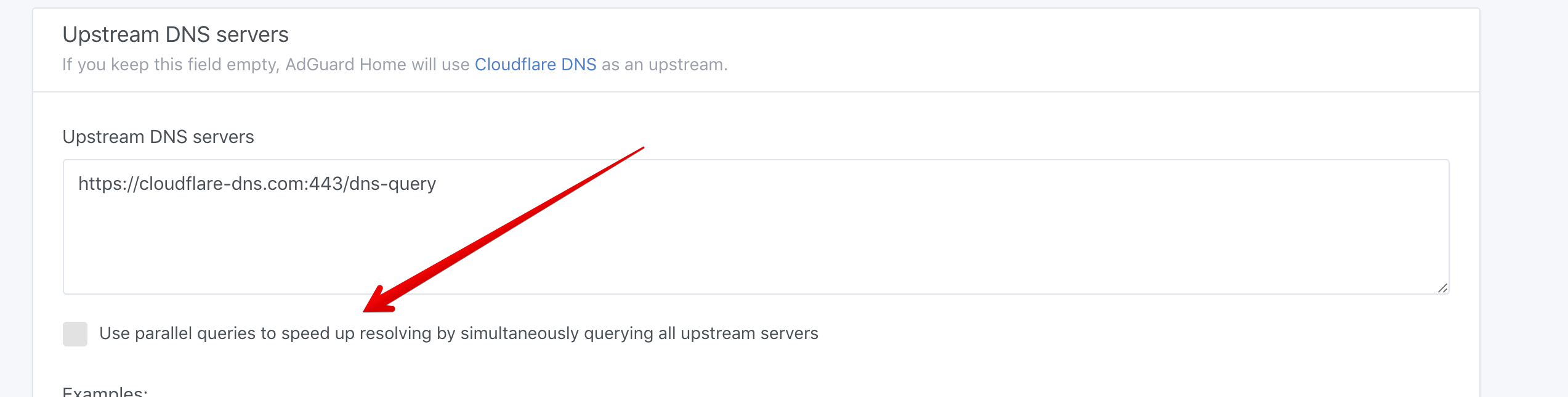
You mean this?
 ameshkov
on 12 Apr 2019
ameshkov
on 12 Apr 2019
You mean this?
This means the fastest result from DNS server.Sometimes,the DNS server will return serveral IP,if the AdGuard could try to connect these IP and give the fastest IP to client,the client could get the better experience
Zxilly
on 12 Apr 2019
@ameshkov Any suggestion?
Zxilly
on 14 Apr 2019
@Zxilly I got the idea, thank you!
Marked as a feature request, let's see how many people vote for it.
Meanwhile, do you have any examples of the software that actually does it?
ameshkov
on 14 Apr 2019
@ameshkov
https://github.com/pymumu/smartdns
https://github.com/zwhFocus/Installtion/tree/master/DNS-choose/dnschooser
But both are not open-source and the document is in Chinese(Maybe because only China has such terrible network environment)
Zxilly
on 15 Apr 2019
What I am interested in is how exactly do they check if IP is available.
Do they send ICMP (ping) the address, or do they actually try to connect to ports 80 or 443?
ameshkov
on 15 Apr 2019
@ameshkov
According to the article of the second project,it choose to make TCP connect to 80 and 443 because ICMP sometimes is not not allowed by some server.
This means it can not make effort on those applications whick are not using standard http port,but it truly improve the experience of HTTP.
Zxilly
on 15 Apr 2019
- Test depends on protocol (HTTP/HTTPS/TCP/UDP/etc.);
- ICMP may be measured, not sure about others protocols;
- Idea sounds good, looks like some simplified PfR (Performance Routing);
but: - Realization of the check may be difficult enough;
- Fastest response doesn't guarantee fastest service (back-end may be overloaded, for example);
- Anyway, it must be a user's choice to turn this feature on.
 alexsannikov
on 22 Apr 2019
alexsannikov
on 22 Apr 2019
Well, let's see how many upvotes does this feature request collect.
It is doable, but it is not easy of course.
ameshkov
on 22 Apr 2019
The Project "SmartDNS" 's document in English
https://github.com/pymumu/smartdns/blob/master/ReadMe_en.md
 ghost
on 25 Apr 2019
ghost
on 25 Apr 2019
Sometimes, I use parallel queries, it return an IP address that have no access to it . Cause we use Chinese public DNS... Maybe you could according the GEOIP to judge which DNS Server we could use , Or give us a choice . thx
 WhoJave
on 16 Aug 2019
WhoJave
on 16 Aug 2019
I also requested to increase the DNS resolution to return the fastest ip to the user, otherwise this will cause the page to open very slowly.
 thb007
on 30 Oct 2019
thb007
on 30 Oct 2019
there are some downloads use muti cdn to speedup download,block slower ip may have bad influence,if you want to use,maybe you can set smartdns as the only upstream of AdGuardHome
 rufengsuixing
on 22 Nov 2019
rufengsuixing
on 22 Nov 2019
Well, let's see how many upvotes does this feature request collect.
It is doable, but it is not easy of course.
SmartDNS is finally open source, can you refer to its source code? I think this will be helpful for this project.
 QiuSimons
on 3 Jan 2020
QiuSimons
on 3 Jan 2020
@QiuSimons thank you, we'll take a look!
ameshkov
on 6 Jan 2020
Is smartdns functionality going to be release in 0.102?
https://github.com/pymumu/smartdns/blob/master/ReadMe_en.md
 lordraiden
on 24 Mar 2020
lordraiden
on 24 Mar 2020
Yes
ameshkov
on 24 Mar 2020
Yes
This is a huge improvement, thanks a lot.
Please try to expose as much configuration settings as possible if not all through the interface, if this is too much put it somewhere more hidden under advanced settings but still available in the UI.
https://github.com/pymumu/smartdns/blob/master/ReadMe_en.md#configuration-parameter
Probably some of them doesn't make sense or are available somewhere else.
Having as well advanced settings for the cache avaialable in the interface would be nice.
Similar to what you can see in the right side of this screenshot.
https://forum.netgate.com/assets/uploads/files/1567263869587-settings.png
lordraiden
on 24 Mar 2020
Any benefit in using this outside of China?
 sassansh
on 15 May 2020
sassansh
on 15 May 2020
@sassansh regardless of your location, it can improve connection quality and make it more reliable as it will make sure that the IP addresses are really reachable from your location. Just don't use it with too many resolvers, 2-3 max.
ameshkov
on 15 May 2020
@ameshkov cool! can it be used with just 1 resolver?
sassansh
on 15 May 2020
@sassansh sure, but in this case, it will simply filter out unreachable/slow IPs from domains with multiple IPs (different CDNs and such).
ameshkov
on 15 May 2020
@ameshkov so is it best to use 2-3 resolvers when using this feature?
sassansh
on 15 May 2020
I set it up as such:

We'll see how it goes...
sassansh
on 15 May 2020
Scratching my head for a while before realizing the options "Fastest IP address" and "Parallel requests" are mutual exclusive :-(
Why not changing them to radio?
 yegle
on 27 May 2020
yegle
on 27 May 2020
Yeah, we'll make it clear in the next update:)
ameshkov
on 27 May 2020
Related issues
 zeus10000
·
31Comments
zeus10000
·
31Comments
 akmLaVx
·
31Comments
akmLaVx
·
31Comments
 Mosney
·
35Comments
Mosney
·
35Comments
 bestpika
·
48Comments
bestpika
·
48Comments
 DavidTai780
·
33Comments
DavidTai780
·
33Comments
Most helpful comment
Well, let's see how many upvotes does this feature request collect.
It is doable, but it is not easy of course.