Adguardforsafari: Settings panel still opens at login (1.4.1)
See issue #141. It was listed as fixed in v. 1.4.1, but I'm still seeing it happen. I've tested with toggling the "open at login setting" off and on, with the "Reopen windows when logging back on" box both checked and unchecked, etc.
Steps to reproduce
- Make sure "Launch AdGuard for Safari at Login" is checked.
- Log out of macOS
- Log back into macOS
Expected behavior
AdGuard will silently start running in the background.
Actual behavior
Settings window and dock icon open up.
Your environment
- AdGuard for Safari version: 1.4.1
- Environment name and version: Safari 12.1.1 (14607.2.6.1.1)
- Operating System: macOS Mojave 10.14.5
- Filters you use in AdGuard: AdGuard Tracking Protection filter, AdGuard Social Media filter, AdGuard Annoyances filter, I don't care about cookies, Spam404, NoCoin Filter List, Filter unblocking search ads and self-promotion, AdGuard Safari filter
- Any other browser extensions you have installed: Open in IINA (disabled), NewsGuardExt
 devburke
All 68 comments
Confirmed - same wrong behavior at my Mac - same versions for AdGuard, Safari and MacOS
 Madd33n
on 19 Jul 2019
Madd33n
on 19 Jul 2019
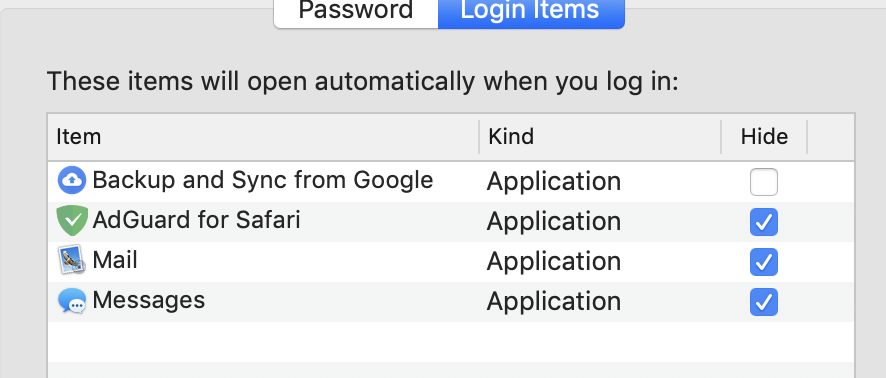
I see this too. If the Hide button is checked in System Preferences>Users & Groups>Login Items (see below), AdGuard should be silently running on login, but it doesn't, it opens fully.
 BranchS
on 20 Jul 2019
BranchS
on 20 Jul 2019
+1
 bro-ep
on 23 Jul 2019
bro-ep
on 23 Jul 2019
+1
 maciboy
on 24 Jul 2019
maciboy
on 24 Jul 2019
Hello!
Do you guys have the same output format
as it was metioned [here]?(https://github.com/AdguardTeam/AdGuardForSafari/issues/141#issuecomment-504311486)
who | grep -i "$USER.*console"
Sample output:
myuser console Jun 21 00:18
 Mizzick
on 1 Aug 2019
Mizzick
on 1 Aug 2019
@Mizzick
output:
myuser console Aug 6 19:59
where my user is my account name, I don't think GitHub shows this properly, though. three spaces between myuser and console, two between console and august and august and 6, and one between 6 and 19:59.
BranchS
on 7 Aug 2019
@Mizzick we really need to add logging there to figure what's wrong.
 ameshkov
on 7 Aug 2019
ameshkov
on 7 Aug 2019
Serious question: every other app I’ve ever used (including AdGuard before a few updates ago) has no problem with this. Do they all use workarounds? Or is there some built in function that we’re missing?
BranchS
on 8 Aug 2019
Have you always used apps from the Mac App Store?
There are no issues with it in standalone apps, but App Store apps due to some restrictions have to use ridiculous workarounds to open in the background at login :(
ameshkov
on 8 Aug 2019
HI, i have the same issue with Version 1.4.1.
Switching off "Open at login" did not help, and it s not available in Login items.
Any way to fix this?
 siideffect
on 14 Aug 2019
siideffect
on 14 Aug 2019
Can you please try the latest beta?
https://github.com/AdguardTeam/AdGuardForSafari/releases/tag/v1.5.2-beta
Mizzick
on 10 Sep 2019
Hi @Mizzick , the problem is gone, thank you.
However, safari now has become very slow. When i uninstalled adguard, all got fixed. Maybe that s because beta still need some improvements?
siideffect
on 13 Sep 2019
@siideffect could you please explain how exactly it became slow? Is it slow startup or maybe something else?
ameshkov
on 19 Sep 2019
@ameshkov it is slow from when i press on the safari icon to open the browser, until the safari homepage appears (favorites and so on). In fact, safari window doesn't show up after i press on the icon, but only after several seconds.
siideffect
on 19 Sep 2019
@siideffect so it's a slow startup. We're trying to figure what's wrong here: https://github.com/AdguardTeam/AdGuardForSafari/issues/209
Most likely, this is due to the fact that there are more content blockers now, and it takes more time to compile the rules. Hopefully, this is something we'll be able to fix.
ameshkov
on 19 Sep 2019
I am still having the main issue (settings opens at login even when hide is checked in login options) in 1.6.
BranchS
on 26 Sep 2019
guys! if you are sure that all content blockers are enabled in Safari settings and settings screen still opens at login, then send log file (~/Library/Logs/AdGuardSafariApp/log.log) to apple[at]adguard[dot]com, please. I will also reply to your emails with the link to test build later.
 zzebrum
on 1 Oct 2019
zzebrum
on 1 Oct 2019
zzebrum:
1) that address: apple[at]adguard[dot]com - [email protected] comes back undeliverable.
2) ~/Library/Logs/AdGuardSafariApp/log.log does not show up in search of hard drive on updated safari/majove (they often move things around - so i did a general search - still nada)
3) I did find a file of 17 -- refer to item # 1 above.
4) for clarity this gal - has all content blockers enabled in Safari and has closed down / turned off/shutdown her imac numerous times. Please Add my email to your list of who to send to. I now need to get back to my life :)_
 midco
on 3 Oct 2019
midco
on 3 Oct 2019
@midco
- Please try using
am at adguard.cominstead. - Try using
Console.appto find the file: https://uploads.adguard.com/up04_0k76g_Console.png
ameshkov
on 3 Oct 2019
Thanks:
- Found “console” via spotlight - an easy way into utilities.
There is no adguardsafariapp. there is only adguard. There are no “log.log” to be found on my Desktop.
I see but 2 options uninstall and reinstall but I already uninstalled and cleaned out all adguard files and reinstalled via Mac store not long ago - or - give me a realistic tentative release-date for such.
Your post noted 1.6 update. Do you know when? I am up to date with 1.5.4 as far as this adguard thinks.
I have a busy schedule and this issue will receive no more of of time at the present. Still, please know that
your responses and quickness of responses is appreciated. Keep up the astounding work y’all do and THANKS
On Oct 3, 2019, at 13:33, Andrey Meshkov notifications@github.com wrote:
@midco https://github.com/midco
Please try using am at adguard.com instead.
Try using Console.app to find the file: https://uploads.adguard.com/up04_0k76g_Console.png https://uploads.adguard.com/up04_0k76g_Console.png
—
You are receiving this because you were mentioned.
Reply to this email directly, view it on GitHub https://github.com/AdguardTeam/AdGuardForSafari/issues/204?email_source=notifications&email_token=AMN7LPL3IXDJOM2C2746TSTQMY3IVA5CNFSM4IEM4IF2YY3PNVWWK3TUL52HS4DFVREXG43VMVBW63LNMVXHJKTDN5WW2ZLOORPWSZGOEAJE45A#issuecomment-538070644, or mute the thread https://github.com/notifications/unsubscribe-auth/AMN7LPMMXPETPFX5FVPUIPLQMY3IVANCNFSM4IEM4IFQ.
midco
on 4 Oct 2019
- Your post noted 1.6 update. Do you know when? I am up to date with 1.5.4 as far as this adguard thinks.
The first beta version will be available some time next week
ameshkov
on 4 Oct 2019
Can confirm I also do not have the log file requested on my system (same as midco). All extensions are enabled, it still opens at first login.
BranchS
on 4 Oct 2019
 SoLenny
on 16 Oct 2019
SoLenny
on 16 Oct 2019
@devburke @Madd33n @BranchS @bro-ep @maciboy @siideffect @midco Hello, guys. We recently published a new beta version in which we tried to fix this bug.
Could you try it and say whether your problem has been resolved?
SoLenny
on 31 Oct 2019
@SoLenny - looks good for the moment. AdGuard starts and goes to the background without the configuration window popping up°°
Running AdGuard on 1.6.1 on macOS 10.15.1.
I'll test it more within the next days and give a feedback if its stable
Thanks!
Madd33n
on 31 Oct 2019
@SoLenny hi, i have downloaded beta from site and it looks good for now as mad33n reports above. I will let you know if troubles occur, good work !
siideffect
on 1 Nov 2019
@siideffect @Madd33n Thank you!
SoLenny
on 1 Nov 2019
@SoLenny i updated the beta as i got prompted to do so, and i am not having any issue(beta was fine too). I might say the problem is gone(at least, for me).
siideffect
on 9 Nov 2019
@SoLenny Still not fixed for me (1.6.2). Logs exported from app are attached.
adg_safari_logs_1580272746694.zip
BranchS
on 29 Jan 2020
@BranchS Hello, please try the latest version https://github.com/AdguardTeam/AdGuardForSafari/releases/tag/v1.6.4
This issue should be gone.
SoLenny
on 29 Jan 2020
@SoLenny typo. I’m on that version from MAS. The logs are from that version as well. It’s still opening at login despite hide being checked in system preferences. My bad!
BranchS
on 29 Jan 2020
@SoLenny were the logs of any help? I am on the latest version. Thank you!
BranchS
on 31 Jan 2020
I'm having this issue was well. v1.6.4 from the App Store. I have "Launch AdGuard for Safari at login" unchecked, and have not just hidden but completely removed the app from Login Items in system preferences.
AdGuard still starts at login and opens the preference pane. Based on the number of issues created in the last 6 months concerning this it seems like it's a pretty widespread bug. Maybe it would be good to keep an issue open to track it.
I'm happy to submit logs or help in any other way, let me know
 ajgrover
on 7 Feb 2020
ajgrover
on 7 Feb 2020
@ajgrover may I ask you to collect log file from ~/Library/Logs/AdGuardSafariApp/ and send it to apple[at]adguard[dot]com, please?
zzebrum
on 10 Feb 2020
@ajgrover sorry for my mistake, if you are on MAS build, then you need just export logs as shown here:
https://uploads.adguard.com/up04_hmyga_AdGuard_for_Safari_-_Settings.png
zzebrum
on 10 Feb 2020
@zzebrum my logs posted above have been sent to that email.
BranchS
on 10 Feb 2020
@zzebrum done
ajgrover
on 10 Feb 2020
@BranchS @ajgrover it seems that mail server or filter were not in the mood so I can't see your emails, guys.
Can you resend it to [email protected]
zzebrum
on 11 Feb 2020
@zzebrum done
ajgrover
on 11 Feb 2020
Done.
BranchS
on 11 Feb 2020
@BranchS please check if you have AdGuard for Safari in System Preferences -> Users & groups -> login items
zzebrum
on 12 Feb 2020
@zzebrum i do and hide at login is checked.
BranchS
on 12 Feb 2020
@BranchS can you remove it and check if it helps?
zzebrum
on 13 Feb 2020
@zzebrum it does not, which is confusing-- Why is AdGuard not respecting that setting? If it's removed, it shouldn't launch at all, and if it's added there with "Hide" checked, it should launch in the background only.
BranchS
on 15 Feb 2020
@BranchS this is what sober-minded person would expect. But it's doesn't work that way,
in fact we made an obscure workaround, mostly because openAsHidden property is not available on MAS builds. Check this out if you are interested:
https://www.electronjs.org/docs/api/app#appgetloginitemsettingsoptions-macos-windows
So for now, it should work without visible login items at all, launching always hidden by default.
Mizzick
on 15 Feb 2020
@Mizzick except, as I said, it doesn’t. Even removing it from there, it still launches in the foreground.
BranchS
on 15 Feb 2020
@BranchS do you use "Reopen windows when logging back on"?
Mizzick
on 17 Feb 2020
No, I do not. @Mizzick
BranchS
on 17 Feb 2020
@BranchS @ajgrover
Could you please try the latest beta?
https://github.com/AdguardTeam/AdGuardForSafari/releases/tag/1.7.0
Mizzick
on 19 Feb 2020
seems like it's working now, thank you! is there a combo of configurations that will run adguard in the background? if I uncheck "launch at login" adguard doesn't run until I manually start it via the extension icon.
ajgrover
on 19 Feb 2020
@ajgrover well, it doesn't run the UI, but content blockers will work in Safari anyway at this case.
zzebrum
on 19 Feb 2020
ah, got it. didn't see the notice that content blocking still works. thanks everyone!
ajgrover
on 19 Feb 2020
Sorry for my delay in commenting. @SoLenny this is NOT fixed for me in 1.7.1. Settings STILL opens at login despite following all advice above. This is unbelievably annoying. Here are my logs attached.
log.log
Notice this part (which is when the app launched after reboot):
[2020-03-07 16:00:23.817] [info] Starting AdGuard v1.7.1
[2020-03-07 16:00:23.821] [info] App ready - creating browser windows
[2020-03-07 16:00:23.821] [info] App is launching in foreground
[2020-03-07 16:00:24.431] [info] Application initialization..
[2020-03-07 16:00:24.432] [info] Starting antibanner service..
[2020-03-07 16:00:24.777] [info] Filters metadata loaded
Why is the app launching in foreground?? (It is not listed in my user preferences>login items at all)
Also, the automated way to export logs was removed for some reason in 1.7.1. That should be readded.
BranchS
on 7 Mar 2020
Also, the automated way to export logs was removed for some reason in 1.7.1. That should be readded.
It was moved to the navbar's menu
ameshkov
on 9 Mar 2020
@BranchS
First of all, Apple (surprisingly) recommend using login items added via "Service Management framework" and they're not visible in the preferences.
That's why I think that there are some leftovers from the previous versions in these hidden login items, and that's what's causing the issue.
Have you tried reinstalling AG?
ameshkov
on 9 Mar 2020
@ameshkov hi! I tried dragging AG to the trash and redownloading it from MAS. that didn't fix. Where in the system would the "leftovers" be stored-- that I can delete from there? Also, maybe in the next update, AG could remove the leftovers itself? I have some non-techy family members who have been using AG but won't know how to fix this.
BranchS
on 9 Mar 2020
@BranchS
Also, maybe in the next update, AG could remove the leftovers itself?
We did 😢
Quick question - would it be launched if you uncheck "launch adguard at login" in the settings?
ameshkov
on 10 Mar 2020
@ameshkov yup, still launches even then (which is concerning that it's not respecting the settings).
Again the key problem, 3rd Line in the log from the reboot. The app should not be launching in foreground, and actually should not be launching at ALL if "launch at login" is disabled.
[2020-03-10 10:48:36.307] [info] Starting AdGuard v1.7.1
[2020-03-10 10:48:36.327] [info] App ready - creating browser windows
[2020-03-10 10:48:36.328] [info] App is launching in foreground
[2020-03-10 10:48:36.945] [info] Application initialization..
[2020-03-10 10:48:36.945] [info] Starting antibanner service..
[2020-03-10 10:48:37.234] [info] Filters metadata loaded
[2020-03-10 10:48:37.254] [info] Filters i18n metadata loaded
yup, still launches even then
Well, so this is definitely some leftover from the previous installation which we for some reason failed to remove.
At least the new approach is not flawed, it's still the old one that creates problems, we're looking into it.
ameshkov
on 10 Mar 2020
@BranchS
Hello, please run the following in Terminal
launchctl list | grep com.adguard
if something found, please remove it with
launchctl remove [name]
Mizzick
on 11 Mar 2020
@Mizzick @ameshkov After everything, that FINALLY fixed it! Thank you! The below three were the ones present. Can these be properly removed by AdGuard in the next update for non-techy users?

BranchS
on 11 Mar 2020
Huh, finally, thank you!
It should've been removed. Apparently, not for everyone, we'll try to figure out what went wrong now.
ameshkov
on 11 Mar 2020
Thank you! Should I open another issue specifically for this or do you guys have it taken care of?
BranchS
on 11 Mar 2020
No, this one should be enough, thank you!
ameshkov
on 11 Mar 2020
I ran launchctl list | grep com.adguard and which found a login helper. Removed that with launchctl remove com.adguard.safari.AdGuard.loginhelper. Next login, the window still appeared and the login helper was back in launchctl. Did I miss something?
 mcg
on 12 Mar 2020
mcg
on 12 Mar 2020
@mcg weird, most likely you have an old AG version somewhere on the disk.
AG v1.7 registers com.adguard.safari.AdGuard.login-helper (with a dash), it cannot create a "loginhelper" one.
Could you please search for an old version?
ameshkov
on 12 Mar 2020
Under /Applications/AdGuard for Safari.app/Contents/Library/LoginItems I have AdGuard Login Helper.app and AdGuard for Safari Login Helper.app. Possibly one of these?
mcg
on 12 Mar 2020
I went ahead and moved AdGuard Login Helper.app out of LoginItems. Seems to have fixed the issue. Starts on login now, no window.
mcg
on 18 Mar 2020
Related issues
 Oleg-Chashko
·
7Comments
Oleg-Chashko
·
7Comments
 Sergey-Lyapin
·
5Comments
Oleg-Chashko
·
4Comments
ameshkov
·
3Comments
Sergey-Lyapin
·
5Comments
Oleg-Chashko
·
4Comments
ameshkov
·
3Comments
 Rjevski
·
11Comments
Rjevski
·
11Comments
Most helpful comment
guys! if you are sure that all content blockers are enabled in Safari settings and settings screen still opens at login, then send log file (
~/Library/Logs/AdGuardSafariApp/log.log) toapple[at]adguard[dot]com, please. I will also reply to your emails with the link to test build later.