Adguardforsafari: AdGuard for Safari Electron app no longer opens and throws `Something wrong with rules` & unhandled promise exceptions
Steps to reproduce
- Install AdGuard for Safari
- ???
- Try to open AdGuard for Safari from the Applications folder or Spotlight
Expected behavior
AdGuard for Safari configuration window opens
Actual behavior
Nothing happens, no window is opened.
Running the app manually from the terminal yields the following:
$ /Applications/AdGuard\ for\ Safari.app/Contents/MacOS/AdGuard\ for\ Safari
Electron could not be found. No hard resets for you!
2019-02-26T10:56:35.703Z: Application initialization..
2019-02-26T10:56:35.707Z: Starting antibanner service..
2019-02-26T10:56:36.197Z: Initializing toolbar controller..
2019-02-26T10:56:36.197Z: Show preferences callback
2019-02-26T10:56:36.199Z: Initializing toolbar controller ok.
2019-02-26T10:56:36.292Z: Filters metadata loaded
2019-02-26T10:56:36.311Z: Filters i18n metadata loaded
2019-02-26T10:56:36.600Z: Starting loading filter rules from the storage
2019-02-26T10:56:37.281Z: Finished loading filter rules from the storage in 681 ms
2019-02-26T10:56:37.282Z: Starting request filter initialization.
2019-02-26T10:56:37.282Z: Adding rules for filter 2, rules count: 34354
2019-02-26T10:56:37.315Z: Adding rules for filter 3, rules count: 7466
2019-02-26T10:56:37.320Z: Adding rules for filter 4, rules count: 5779
2019-02-26T10:56:37.329Z: Adding rules for filter 12, rules count: 697
2019-02-26T10:56:37.330Z: Adding rules for filter 14, rules count: 10061
2019-02-26T10:56:37.338Z: Adding rules for filter 118, rules count: 7503
2019-02-26T10:56:37.342Z: Something wrong with rules:undefined
2019-02-26T10:56:37.343Z: Application initialization finished
(node:2918) UnhandledPromiseRejectionWarning: Unhandled promise rejection (rejection id: 1): TypeError: safariToolbar.extensionsState is not a function
(node:2918) [DEP0018] DeprecationWarning: Unhandled promise rejections are deprecated. In the future, promise rejections that are not handled will terminate the Node.js process with a non-zero exit code.
Your environment
- AdGuard for Safari version: 1.2.1 (App Store)
- Environment name and version: Safari 12.0.3 (14606.4.5)
- Operating System: 10.14.3 (18D109)
- Filters you use in AdGuard: n/a (no way to check, but it's only default filters, no custom ones installed)
- Any other browser extensions you have installed: 1Password (but should be irrelevant as it's due to the Electron app and not the browser extension itself)
 Rjevski
All 11 comments
@Mizzick any idea?
Something wrong with rules:undefined
TypeError: safariToolbar.extensionsState is not a function
 ameshkov
on 26 Feb 2019
ameshkov
on 26 Feb 2019
Note, maybe this is relevant - I have the Safari toolbar button extension disabled, however it should fallback gracefully in this case (and in fact it did the first few times). But out of the blue the app was refusing to open and I can't open it ever since.
(would also appreciate any instructions to reset its state in the meantime so I can actually open it again)
Rjevski
on 26 Feb 2019
Hello!
Have you tried to open application from safari toolbar icon?
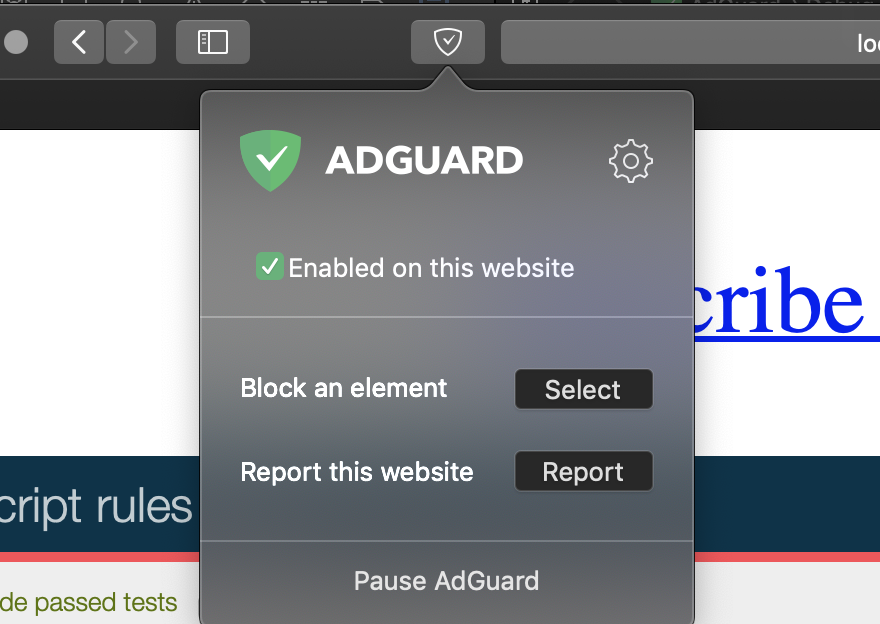
 Mizzick
on 26 Feb 2019
Mizzick
on 26 Feb 2019
I tend to leave the toolbar icon disabled for privacy reasons but I'm gonna try it once on a clean browser instance.
On 26 Feb 2019, at 14:16, Mizzick notifications@github.com wrote:
Hello!
Have you tried to open application from safari toolbar icon?—
You are receiving this because you authored the thread.
Reply to this email directly, view it on GitHub, or mute the thread.
Rjevski
on 26 Feb 2019
I successfully got it to open after enabling the toolbar icon, but the problem still persists if I try to open the app stand-alone from the Applications folder or the Terminal. Same errors in the terminal too.
Rjevski
on 26 Feb 2019
Do you have Show AdGuard for Safari in the menu bar turned off as well?
Mizzick
on 26 Feb 2019
Hi!
Is this the same bug?
https://github.com/AdguardTeam/AdGuardForSafari/issues/118
 superlex
on 26 Feb 2019
superlex
on 26 Feb 2019
@Mizzick yes. Let me disable that (by opening the settings from the Safari icon) and see if I can reproduce the bug.
Rjevski
on 26 Feb 2019
@superlex I guess yes.
Mizzick
on 26 Feb 2019
So re-enabling the menu bar icon allows me to get back into AdGuard from there, however trying to open it from applications or the terminal yields the same error and also puts a second, duplicate icon in the menu bar. Both icons work and can be used to open the preferences.
This leads me to believe the errors aren't actually the issue and it's just a design flaw where trying to launch the app would hide it in the background (and if the icon is disabled, with no way of bring it back) instead of just telling the already running instance to show itself.
Rjevski
on 26 Feb 2019
You are right, this is a design issue.
We will fix it in #118.
Thanks everyone!
Mizzick
on 26 Feb 2019
Related issues
 justinlovesmen
·
4Comments
justinlovesmen
·
4Comments
 Oleg-Chashko
·
4Comments
Oleg-Chashko
·
4Comments
 kinoute
·
3Comments
ameshkov
·
3Comments
kinoute
·
3Comments
ameshkov
·
3Comments
 zecanard
·
3Comments
zecanard
·
3Comments