Adguardforsafari: AdGuard for Safari doesn't work on OS Catalina
Screenshot 1
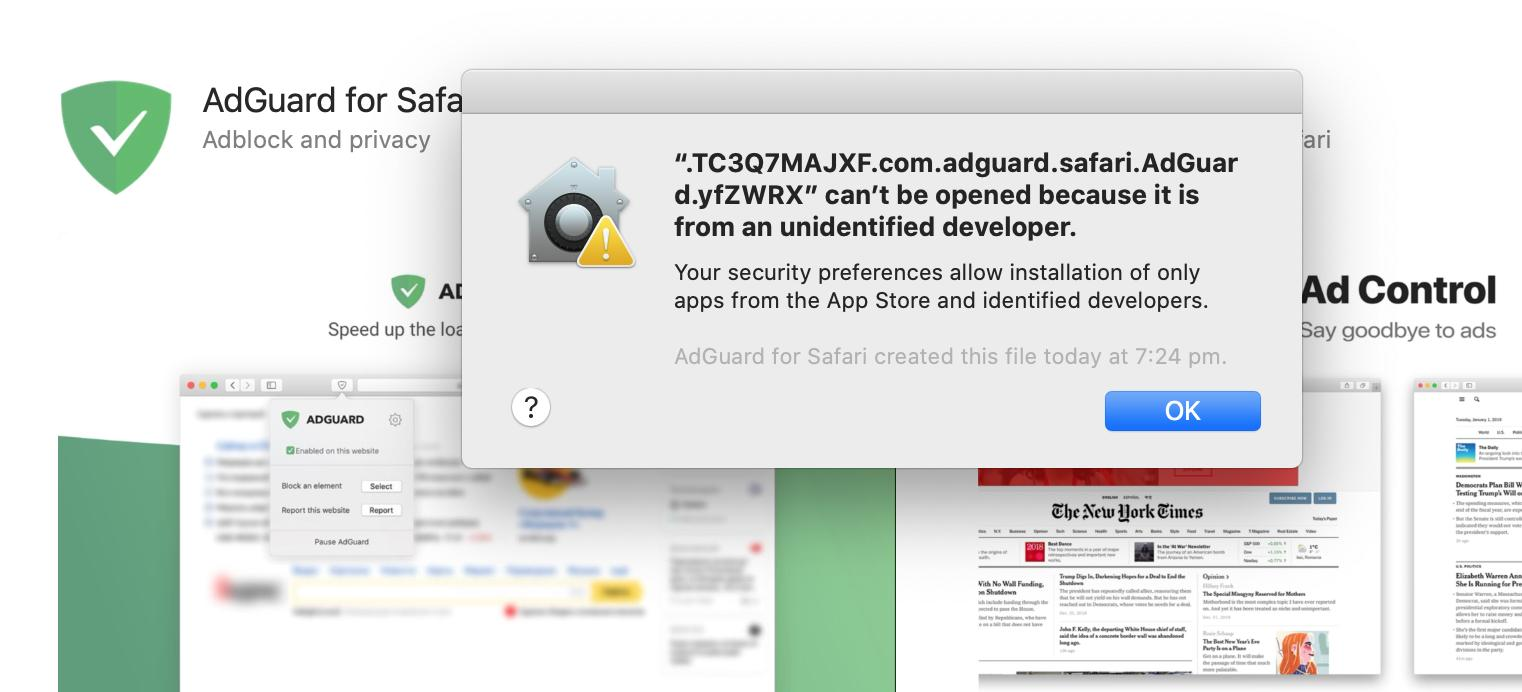
Screenshot 2

 vbagirov
All 19 comments
Works for me? I'm using the latest beta
 choco
on 5 Jun 2019
choco
on 5 Jun 2019
@choco Latest beta of Catalina or AdGuard?
Fresh install of AdGuard and Catalina here and definitely not working
 JasSmiths
on 5 Jun 2019
JasSmiths
on 5 Jun 2019
Latest AdGuard beta. I didn't do a clean install, but upgraded from Mojave.
choco
on 5 Jun 2019
@choco checking latest beta now
JasSmiths
on 5 Jun 2019
Confirm latest beta works fine!
Thanks @choco
JasSmiths
on 5 Jun 2019
I think this is a bug in Catalina itself because WhatsApp also fails to launch with the same Gatekeeper error:

Perhaps just something related to Electron apps. I'll see if I can find more to test.
 Yoshi2889
on 1 Jul 2019
Yoshi2889
on 1 Jul 2019
What's weird is that apparently the created file is properly signed:

I've filed a bug with the Feedback Assistant on the 1st of July but there hasn't been any updates since.
Yoshi2889
on 3 Jul 2019
@Yoshi2889 could you please check if there's any issues with the standalone build of AdGuard?
 ameshkov
on 3 Jul 2019
ameshkov
on 3 Jul 2019
@ameshkov The GitHub releases build seems to work just fine, it doesn't throw any errors.
Gatekeeper is behaving a bit weird however:

Speaking of Gatekeeper, my idea of checking the signing status of the file came from this blog post: https://eclecticlight.co/2019/06/12/grokking-gatekeeper-in-catalina/
Apparently not only the binary that's being launched is checked now. But, as the file is properly signed, that should not be an issue. Might help with narrowing down this issue on your side though.
Looking through the Task Explorer app, none of the standalone app's open files list any file named similarly to what throws the error on the MAS version.
EDIT: Wrong image, oops.
Yoshi2889
on 3 Jul 2019
I am starting to think that it requires the library to be notarized, and not just signed.
The question is why it is not notarized automatically when we upload the app to the appstore? After all, the standalone build is properly notarized.
ameshkov
on 3 Jul 2019
@Mizzick let's try getting rid of dlopen and electron-rebuild to get ours included into the main binary:
https://github.com/electron/electron/blob/master/docs/tutorial/using-native-node-modules.md#installing-modules-and-rebuilding-for-electron
ameshkov
on 4 Jul 2019
I am starting to think that it requires the library to be notarized, and not just signed.
Just to clarify, it's now a requirement in Catalina, your whole app must be signed and notarized. Every file needs to be properly signed inside for notarization to work. Notarization will fail if one file is not signed, but at least it will give you a good error output on which files are not signed.
You can have a look here : https://developer.apple.com/documentation/security/notarizing_your_app_before_distribution/customizing_the_notarization_workflow?language=objc
This is mandatory for all distributions methods, so your builds in this repository should also be notarized or they won't work without disabling gatekeeper.
 glouel
on 19 Jul 2019
glouel
on 19 Jul 2019
@glouel well, we notarize the standalone build, and it works just okay on Catalina.
But it's not that simple with the MAS build. In theory, we shouldn't do anything, it all must be done on the App Store side.
ameshkov
on 19 Jul 2019
Is the non MAS version sandboxed? I’m thinking that there might be a difference that causes that file to only be generated under the MAS version.
Yoshi2889
on 19 Jul 2019
@Yoshi2889 nope, it's just with hardened runtime enabled.
I’m thinking that there might be a difference that causes that file to only be generated under the MAS version.
Hm, sounds interesting.
ameshkov
on 19 Jul 2019
Hm, might be worth checking if the MAS is sandboxed.
I’ll check if the standalone WhatsApp client also works on Catalina tonight seeing how its MAS version is also broken in a similar way.
Yoshi2889
on 19 Jul 2019
@Yoshi2889
The MAS version is sandboxed, this is the main difference comparing to standalone.
I’m thinking that there might be a difference that causes that file to only be generated under the MAS version.
Are you talking about that native node module file?
 Mizzick
on 19 Jul 2019
Mizzick
on 19 Jul 2019
@glouel well, we notarize the standalone build, and it works just okay on Catalina.
Apologies, I assumed you didn't. FYI for some reason 1.4.1 (this file : https://github.com/AdguardTeam/AdGuardForSafari/releases/download/v1.4.1/AdGuard.for.Safari.app.zip ) won't launch on my system on Catalina beta 4. I had previously installed the MAS version a few days ago (I think 1.3.3 ?) and had the same error as top post (I bypassed it by disabling gatekeeper temporarily).
But right now the standalone 1.4.1 file won't launch, a quick check show the file is quarantined :
glouel@iMac-de-Guillaume-2:/Applications$ xattr -v AdGuard\ for\ Safari.app/
AdGuard for Safari.app/: com.apple.quarantine
If I run codesign, looks like the Electron framework is indeed the culprit as you guessed earlier:
glouel@iMac-de-Guillaume-2:/$ codesign -vvv --deep --strict /Applications/AdGuard\ for\ Safari.app/
(...)
/Applications/AdGuard for Safari.app/: bundle format unrecognized, invalid, or unsuitable
In subcomponent: /Applications/AdGuard for Safari.app/Contents/Frameworks/Electron Framework.framework
Usually removing the quarantine bit should do the trick (xattr -d com.apple.quarantine filename). It doesn't do the trick for me so I assume there's something linked to having the MAS version, having removed it and being unable to install the standalone version in it's place. I doubt the issue is on your end, but the Electron Framework thing is probably relevant anyway.
But it's not that simple with the MAS build. In theory, we shouldn't do anything, it all must be done on the App Store side.
Since 1.4.1 is also on the MAS now, I grabbed it there and it's better, in the sense I have the "usual" gatekeeper error :

Funnily enough, it looks like it's properly signed:
(...)
--prepared:/Applications/AdGuard for Safari.app/Contents/Frameworks/Electron Framework.framework/Versions/Current/.
--validated:/Applications/AdGuard for Safari.app/Contents/Frameworks/Electron Framework.framework/Versions/Current/.
AdGuard for Safari.app/: valid on disk
AdGuard for Safari.app/: satisfies its Designated Requirement
(so here Electron framework seems to be signed differently than in your standalone build chain).
System policy seems to find the file ok too :
$ spctl -a -v AdGuard\ for\ Safari.app/
AdGuard for Safari.app/: accepted
source=Mac App Store
My guess is you may be having some issues with the hardened runtime, possibly the JIT part but not only. Here's what I see in Console :
erreur 12:38:43.103533+0200 kernel Sandbox: AdGuard for Safa(1131) deny(1) mach-lookup com.apple.GameController.gamecontrollerd
(GameController ?)
and
erreur 12:39:27.343628+0200 tccd Prompting policy for hardened runtime; service: kTCCServiceAppleEvents requires entitlement com.apple.security.automation.apple-events but it is missing for ACC:{ID: com.adguard.safari.AdGuard, PID[1131], auid: 501, euid: 501, binary path: '/Applications/AdGuard for Safari.app/Contents/MacOS/AdGuard for Safari'}, REQ:{ID: com.apple.appleeventsd, PID[368], auid: 55, euid: 55, binary path: '/System/Library/CoreServices/appleeventsd'}
So you need entitlements (this happens just before you try to set it for relaunch):
par défaut  12:39:32.273323+0200    loginwindow -[PersistentAppsSupport saveLogoutPersistentState:finalSnapshot:] |      checkAgainstApp is : AdGuard for Safari
par défaut  12:39:32.273339+0200    loginwindow -[PersistentAppsSupport appShouldBeRelaunched:] | entered. checking app: AdGuard for Safari
par défaut  12:39:32.273365+0200    loginwindow -[PersistentAppsSupport saveLogoutPersistentState:finalSnapshot:] |           Adding to relaunchArray: AdGuard for Safari
So at the very least you need com.apple.security.automation.apple-events. I would probably suggest you also check this just to be sure about the JIT issues with hardened runtime : https://github.com/electron-userland/electron-builder/issues/4040
To get back to making the MAS version work, here's what I did and should work for everyone:
- Close AdGuard For Safari
- In terminal type
sudo spctl --master-disable - Launch AdGuard For Safari (it will launch correctly)
- In terminal type
sudo spctl --master-enable
Don't forget the last step to reenable Gatekeeper.
Sorry for the long post but hopefully that will help you figure out the issues.
glouel
on 19 Jul 2019
Hm, might be worth checking if the MAS _is_ sandboxed.
I’ll check if the standalone WhatsApp client also works on Catalina tonight seeing how its MAS version is also broken in a similar way.
Apologies for my late reply, I totally forgot. I tried the official WhatsApp Desktop client and it also works if you download its standalone website build. It is also not sandboxed in that case.
Yoshi2889
on 21 Jul 2019
Related issues
ameshkov
·
4Comments
 Oleg-Chashko
·
3Comments
Oleg-Chashko
·
3Comments
 kinoute
·
3Comments
kinoute
·
3Comments
 anonyme123
·
10Comments
anonyme123
·
10Comments
 zecanard
·
3Comments
zecanard
·
3Comments
Most helpful comment
Apologies, I assumed you didn't. FYI for some reason 1.4.1 (this file : https://github.com/AdguardTeam/AdGuardForSafari/releases/download/v1.4.1/AdGuard.for.Safari.app.zip ) won't launch on my system on Catalina beta 4. I had previously installed the MAS version a few days ago (I think 1.3.3 ?) and had the same error as top post (I bypassed it by disabling gatekeeper temporarily).
But right now the standalone 1.4.1 file won't launch, a quick check show the file is quarantined :
If I run codesign, looks like the Electron framework is indeed the culprit as you guessed earlier:
Usually removing the quarantine bit should do the trick (xattr -d com.apple.quarantine filename). It doesn't do the trick for me so I assume there's something linked to having the MAS version, having removed it and being unable to install the standalone version in it's place. I doubt the issue is on your end, but the Electron Framework thing is probably relevant anyway.
Since 1.4.1 is also on the MAS now, I grabbed it there and it's better, in the sense I have the "usual" gatekeeper error :
Funnily enough, it looks like it's properly signed:
(so here Electron framework seems to be signed differently than in your standalone build chain).
System policy seems to find the file ok too :
My guess is you may be having some issues with the hardened runtime, possibly the JIT part but not only. Here's what I see in Console :
(GameController ?)
and
So you need entitlements (this happens just before you try to set it for relaunch):
So at the very least you need
com.apple.security.automation.apple-events. I would probably suggest you also check this just to be sure about the JIT issues with hardened runtime : https://github.com/electron-userland/electron-builder/issues/4040To get back to making the MAS version work, here's what I did and should work for everyone:
sudo spctl --master-disablesudo spctl --master-enableDon't forget the last step to reenable Gatekeeper.
Sorry for the long post but hopefully that will help you figure out the issues.