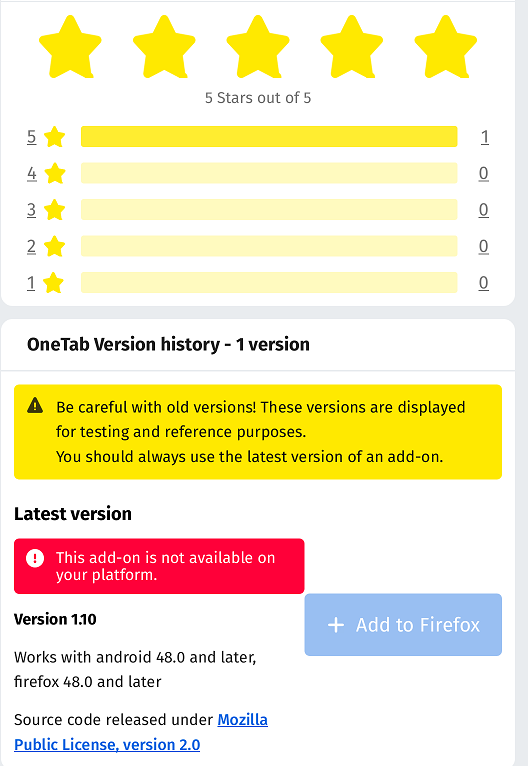
Addons-frontend: Careful with old version yellow message is not displayed
STR:
- Load AMO dev and go to an add-on with multiple versions such as https://addons-dev.allizom.org/en-US/firefox/addon/awesome-screenshot-plus-/versions/
- Observe the screen
Expected result:
The yellow message Be careful with old versions! is displayed. The mocks specify it https://user-images.githubusercontent.com/6797635/43019637-821abdea-8c12-11e8-9715-118b7bebdcac.png
Actual result:
The message is not available.
Notes:
This issue is reproducible on AMO dev with FF64(Win10).

 ioanarusiczki
All 7 comments
@pwalm I'm trying to figure out what to use for the exclamation mark for the warning message. We do not currently have a warning style Notice defined for the site. I took a look at https://design.firefox.com/photon/components/message-bars.html, but the triangle icon there is different from the one in the mock at https://user-images.githubusercontent.com/6797635/43019637-821abdea-8c12-11e8-9715-118b7bebdcac.png.
I tried using the existing exclamation.svg which we use for the error message, but it doesn't work. I also went into inVision to see if I could extract the icon from there, but it doesn't seem to let me do that. I may just not be understanding the steps to do it.
In any case, I need an icon for this Notice, and am having trouble getting one, so could you please either provide one or let me know how I can get one for myself?
 bobsilverberg
on 9 Jan 2019
bobsilverberg
on 9 Jan 2019
You can find more icons here. I've attached the icon below!
Warning.svg.zip
 pwalm
on 10 Jan 2019
pwalm
on 10 Jan 2019
Thanks @pwalm. A couple of things:
- That's the triangle icon, which is fine, but I just wanted to confirm that's what you want because it's not what's in the mock.
- That icon is 24x24, but the mock shows the icon as being 16x16, which is also the maximum size of any of our other Notice icons. Should we display this as 24x24, or if not can you make a 16x16 version?
bobsilverberg
on 10 Jan 2019
That icon is 24x24, but the mock shows the icon as being 16x16, which is also the maximum size of any of our other Notice icons. Should we display this as 24x24, or if not can you make a 16x16 version?
it's a svg, you can either resize it with css or change its size in an editor. Sketch can do it IIRC otherwise there are tons of online tools.
 willdurand
on 10 Jan 2019
willdurand
on 10 Jan 2019
Resizing with css doesn't seem to work, probably because it's a background-image and not an img. Or maybe I'm not doing it correctly. Just setting height and width doesn't work and crops the image.
bobsilverberg
on 10 Jan 2019
I think you need background-size, no?
willdurand
on 10 Jan 2019
Verified on AMO dev - FF64, Chrome (Win10 and Android 8.0)
ioanarusiczki
on 14 Jan 2019
Related issues
 kumar303
·
6Comments
ioanarusiczki
·
4Comments
kumar303
·
6Comments
ioanarusiczki
·
4Comments
 AlexandraMoga
·
5Comments
ioanarusiczki
·
5Comments
ioanarusiczki
·
5Comments
AlexandraMoga
·
5Comments
ioanarusiczki
·
5Comments
ioanarusiczki
·
5Comments
Most helpful comment
I think you need
background-size, no?