Addons-frontend: Re-implement mozAddonManager features in the install button
We need to think about what features of mozAddonManager would be useful to add back to the install button on AMO.
Before we can implement something we need to know from product and UX what features we want to add back and what they should look like.
Here's a few of the features to consider.
- Download progress
- Reflect installation state
- Uninstallation
 muffinresearch
All 27 comments
Out of those 3, I don't particularly care about download progress. User research points to uninstallation being very important, and I don't think we can do it without installation state, so I think we should work on those 2.
Unrelated to mozAddonManager, but related to the look of the install UI, we also got feedback from user research that we should indicate that an add-on is free to install.
 jvillalobos
on 21 Nov 2017
jvillalobos
on 21 Nov 2017
The installation state is really helpful as well for moving stuff out of about:addons, eg: search, so users can tell if that add-on is installed. The inbetween states less so for me.
 andymckay
on 21 Nov 2017
andymckay
on 21 Nov 2017
Proposed states:

The left column would be the detail page view button. The right is the list view button. The smaller one would use the tab loading indicator instead of copy to maintain its scale.
For the installed state ("Manage", or the gear icon), can we open a new tab with add-ons management? Instead of only being able to provide one option ("disable"), we could drop them in the add-ons manager so the user could do more that way, and we could make a clearer connection into the browser.
 pwalm
on 5 Dec 2017
pwalm
on 5 Dec 2017
The "Manage extension" is not currently possible, we'd have to file a bug for that. By the way, the disco pane doesn't do disable, it does uninstall.
andymckay
on 5 Dec 2017
The "Manage extension" is not currently possible
Can we not link to about:addons with target=_blank?
 kumar303
on 5 Dec 2017
kumar303
on 5 Dec 2017
No, the browser console error is: "Security Error: Content at ... may not load or link to about:addons." Should be pretty simple to try and prove me wrong though :)
andymckay
on 5 Dec 2017
No, the browser console error is: "Security Error: Content at ... may not load or link to about:addons." Should be pretty simple to try and prove me wrong though :)
Yep I see the same thing trying that.
muffinresearch
on 25 Jan 2018
@pwalm - can we get an update on an alternative handling for "Manage" e.g. could it just indicate "Installed"? We need to get something in place for this as soon as we can since Firefox will soon be linking more directly to AMO from about:addons.
muffinresearch
on 5 Feb 2018
"Installed" works for now. Behaviour can change in the future.
pwalm
on 7 Feb 2018
@pwalm @brassy- We want to work on this in Q3, but it might need some tweaking. After discussing with Emanuela, we should consider changing the button to a Remove action when the add-on is installed. She also had some thoughts about the "Installing" states.
jvillalobos
on 18 Jun 2018
Ok cool! I'll align with @brassy- when she gets back from holiday
pwalm
on 19 Jun 2018
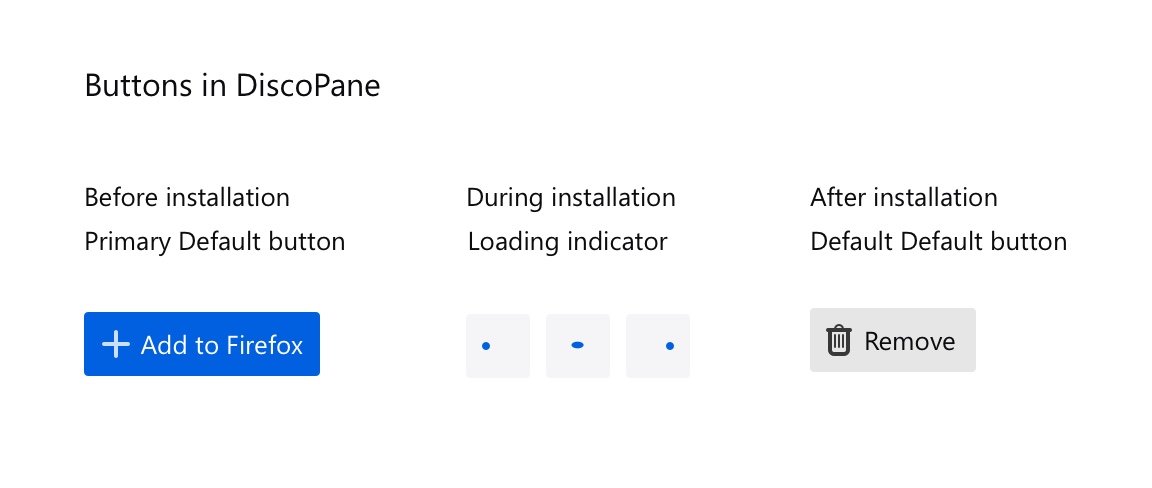
Hey everyone, here the different states for the buttons.
As we can see, we have three states: before, during, and after installation.
Buttons in the before and after installation state have a hover, pressed and focus (as documented in the design system).
During installation state, the button is not clickable. We're going to use the same loading indicator we use in Firefox for the page loading. I'm talking with the Motion Team to understand how the implemenent the animation so far (afaik, it's a svg sprite, but I let you know).
@pwalm what do you think?
 brassy-
on 17 Jul 2018
brassy-
on 17 Jul 2018
Follow up from my previous comment...
Here’s the technique to implement the SVG sprite http://msuja.ws/svg.html
Here’s something Sam worked on to quickly change the colour of the svg, if we need this! https://sfoster.github.io/svgspritesheet/preview-context-colors.html
For reference: here’s how they implemented the add to pocket animation
And, finally, here we can find the SVG sprite!
brassy-
on 18 Jul 2018
Thanks @brassy-! Can we remove the "needs: ux" label now?
 willdurand
on 18 Jul 2018
willdurand
on 18 Jul 2018
@willdurand sure thing, I'll remove it.
brassy-
on 18 Jul 2018
@brassy- With bug 1313298 in mind would it be reasonable to show an "Enable" button if the add-on is installed but disabled?
 wagnerand
on 20 Jul 2018
wagnerand
on 20 Jul 2018
Definitely!
Il giorno ven 20 lug 2018 alle 16:14 Andreas Wagner <
[email protected]> ha scritto:
@brassy- https://github.com/brassy- With bug 1313298
https://bugzilla.mozilla.org/show_bug.cgi?id=1313298 in mind would it
be reasonable to show an "Enable" button if the add-on is installed but
disabled?—
You are receiving this because you were mentioned.
Reply to this email directly, view it on GitHub
https://github.com/mozilla/addons-frontend/issues/3954#issuecomment-406613380,
or mute the thread
https://github.com/notifications/unsubscribe-auth/AGBHw2QBwmNXvY-IIThtBBIKtz9pnKcZks5uIeXJgaJpZM4QmEKw
.
brassy-
on 20 Jul 2018
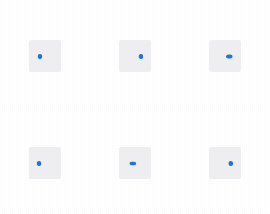
Here is an update on the animation:

willdurand
on 24 Jul 2018
Quick update taking @brassy-'s comments into account:
willdurand
on 24 Jul 2018
@muffinresearch should I completely remove InstallTrigger and only rely on mozAddonManager?
willdurand
on 25 Jul 2018
@muffinresearch should I completely remove InstallTrigger and only rely on mozAddonManager?
Yes you can, the only thing to take into account is how to handle static themes since due to https://bugzilla.mozilla.org/show_bug.cgi?id=1477328 they aren't enabled when installed by mozAddonManager without a workaround.
muffinresearch
on 25 Jul 2018
Yes you can, the only thing to take into account is how to handle static themes since due to https://bugzilla.mozilla.org/show_bug.cgi?id=1477328 they aren't enabled when installed by mozAddonManager without a workaround.
Yep, @rebmullin and I talked about it already.
willdurand
on 25 Jul 2018
@willdurand for enable button let's reuse the + icon, thanks!
brassy-
on 26 Jul 2018
A few words about mozAddonManager and fallbacks and resist fingerprinting:
- From https://github.com/mozilla/addons-frontend/issues/3867, the MITM issue is not a problem with
mozAddonManager:
The alternative here would be to use mozAddonManager since installs in the discovery pane work fine when using Charles to MITM the connection.
mozAddonManageris only exposed to addons.mozilla.org. In Resist Fingerprinting mode, we keep it exposed.
We need to set the additional (not present by default)
privacy.resistFingerprinting.block_mozAddonManagerpref totruein order to disablemozAddonManager, which is a strong commitment.Currently the Disco Pane (which uses the
mozAddonManager) disables the install switches and there is no easy way to download the add-ons.AMO always shows an install button that is enabled because it uses the
InstallTrigger, not themozAddonManager. I believe that users who manually setprivacy.resistFingerprinting.block_mozAddonManagerreally don't want to install add-ons, so we could fallback to the download URL but probably not toInstallTrigger.
willdurand
on 3 Aug 2018
I verified the installation and the new button states using FF63(Win10).

For what I've noticed I filed https://github.com/mozilla/addons-frontend/issues/5929
 ioanarusiczki
on 14 Aug 2018
ioanarusiczki
on 14 Aug 2018
@ioanarusiczki how indeed?
all I get is this on Firefox 63.0b6

 Riajyuu
on 18 Sep 2018
Riajyuu
on 18 Sep 2018
@Riajyuu it is not enabled in -prod yet.
willdurand
on 18 Sep 2018
Related issues
 SeanPrashad
·
6Comments
ioanarusiczki
·
5Comments
SeanPrashad
·
6Comments
ioanarusiczki
·
5Comments
 Sparsh1212
·
5Comments
Sparsh1212
·
5Comments
 ValentinaPC
·
4Comments
ValentinaPC
·
4Comments
 AlexandraMoga
·
6Comments
AlexandraMoga
·
6Comments
Most helpful comment
Hey everyone, here the different states for the buttons.
As we can see, we have three states: before, during, and after installation.
Buttons in the before and after installation state have a hover, pressed and focus (as documented in the design system).
During installation state, the button is not clickable. We're going to use the same loading indicator we use in Firefox for the page loading. I'm talking with the Motion Team to understand how the implemenent the animation so far (afaik, it's a svg sprite, but I let you know).
@pwalm what do you think?