Adaway: [Amazon Shopping] compatibility report
Describe the third party app
- Name: [Amazon Shopping]
- Version: [20.10.0.100]
Describe the compatibly issue
When opened with AdAway enabled the app when instantly opened shows an [UH-OH Something went wrong on our end. Error CS3] screen. Is also does when searching for items; technically anytime an advert is trying to be shown the app errors.
It works perfectly with AdAway paused/disabled.
Workaround
None yet, I have also tried adding *amazon-adsystem.com to the allowed/whitelist section of AdAway v5.0.4 but still does it.
 benten2000
All 23 comments
what happens when you use just the Adaway list? I know what you're talking about and I have the Adaway list at least trimmed down to not cause me breakage. If there is still breakage with just the Adaway list and you're not in the U.S., it may be that I need to remove some more if it's a regional server that's causing the problem.
You may want to play with the TCPdump/logging feature to whitelist one-by-one which domains might be causing the breakage so we can trace it to a particular entry.
Other than that, if another list is causing the break you'll have to get in touch w/ their list maintainer.
 jawz101
on 11 Jun 2020
jawz101
on 11 Jun 2020
I too am having this issue in the US running with the default list
 Trueinsanity
on 11 Jun 2020
Trueinsanity
on 11 Jun 2020
I'd just need some actual entries to address or steps to reproduce. I have Amazon on my phone right now and it works fine for me.
Adaway has a tcpdump utility (I think that's what it's called) that lets you see what DNS traffic you're apps are doing. You can then click on each one and allow or block them to find the culprit.
jawz101
on 11 Jun 2020
Using the dns requests utility its not listing any requests with the red block symbol, having the default 3 lists when i disable adaway the problem stops
the page loads in the app for ~1 sec the goes to the uh-oh page
Edit:
after uninstalling the pre-release 5.0.4 and moving down to release 4.3.4 the problem goes away
Trueinsanity
on 12 Jun 2020
It was a little better just now as it took a few openings of the app for it to go to the CS3 error page than usually every time. Managed to get the DNS logged for when it happened.
https://imgur.com/a/ahIsZTm
benten2000
on 12 Jun 2020
well there aren't any ...amazon.co.uk entries in the adaway list and none of the others are in it either. There's actually only 12 amazon.com or amazon-adsystem entries at all so it might actually be nice to block their co.uk/eu counterparts.
ones on the default Adaway list (note your log does show some similar ones but are eu or co.uk top-level domain
aan.amazon.com
aax-us-iad.amazon.com
device-metrics-us.amazon.com
device-metrics-us-2.amazon.com
fls-na.amazon.com
mads.amazon.com
aax.amazon-adsystem.com
aax-us.amazon-adsystem.com
aax-us-east.amazon-adsystem.com
c.amazon-adsystem.com
mads.amazon-adsystem.com
s.amazon-adsystem.com
Are you sure you don't have any other blocklists enabled? Or maybe some in your blocklist (ones you've manually added?) i.e. not the pgl.yoyo one or any other lists.
I've stared and tinkered with the Amazon entries so much I'm pretty familiar with what breaks the app - at least for someone connecting from the U.S. That's why the list is so tiny.
There has to be some other list on your device involved. Either way, I would just try manually whitelisting them one by one (long click and it gives you the option to whitelist (aka allow) them., then update your filters so it reloads the hosts file, and try playing around in the Amazon app. At some point it will stop breaking and whichever thatt last domain you tried is the culprit.
jawz101
on 12 Jun 2020
i have no other block lists other than the ones that came with the app.
https://imgur.com/mAehwkb (host list)
when reverting to 5.0.4 i first just installed over the 4.3.4 and amazon continued to work, confused i uninstalled the app and reinstalled 5.0.4 and the block came back.
using the dns logger i got the following results but none say they were blocked
https://i.imgur.com/8tLgzqk.png (dns log)
Trueinsanity
on 12 Jun 2020
I have the same 3 default lists as Trueinsanity with the whitelist entry of *amazon-adsystem.com as mentioned in the wiki for problematic apps.
benten2000
on 12 Jun 2020
Can you uncheck the yoyo one? I can't see what it contains from my work computer but I'm guessing it's the one causing the problems. You'll have to reach out to him at pgl.yoyo.org or his Twitter I guess to let him know if it's the list causing the problem. I just maintain the Adaway list. The other 2 lists are just 2 other lists
I'd argue that just using Steven Black's is good enough. Since adaway is one of his source lists, it's all you need, really. That's what I do.
jawz101
on 12 Jun 2020
unchecking any one of the three hosts lists then clicking apply just rechecks it for me
Trueinsanity
on 13 Jun 2020
I guess @PerfectSlayer will have to address that. But either way, you'll probably have to look at the other 2 lists and see if either contain any of the domains you've logged. mag, unagi, msh.. those ones I know will cause breakage.
jawz101
on 13 Jun 2020
Just a FYI - Amazon UK works fine.
 p3yot3
on 13 Jun 2020
p3yot3
on 13 Jun 2020
Been ok the past few days here in the UK but just tested now and instantly the CS3 screen. Will start trying the list posted by jawz101 one by one to see if it works.
Update:
Tried each entry in the whitelist section but none have helped.
As mentioned unticking a source and applying will retick it so instead I deleted each one and tested and found the 3rd entry was causing my constant CS3 error now
(https://raw.githubusercontent.com/StevenBlack/hosts/master/hosts)
benten2000
on 15 Jun 2020
Ok so 5.05 allows me to uncheck a hosts list, but now if I re check the list it shows to be checked but the blocked list is not updated with the blocked hosts from that list
https://imgur.com/D1EN3L4 (all three lists enabled)
https://imgur.com/6hrNqtW (only 2 lists lists in the host file with three enabled)
Trueinsanity
on 29 Jun 2020
I think I found out what's causing this.
If I do a dns log, almost nothing is being found. It's a bug in adaway because it's not whitelisting logged dns requests. Here are the steps to reproduce the error:
- disable adaway,
- Enable dns logging in adaway
- force close the amazon app
- clear the cache from the amazon app
- then reopen amazon, now it works back
- Click on random items and go to your orders
- Open adaway and stop dns logging
- Refresh the dns log list by pulling down from the top
- Now you see way more dns servers.
- Whitelist the servers by clicking on the checkmark
- Hit apply
- Here comes the error: Now refresh the list again and your whitelisted servers are blacklisted again:
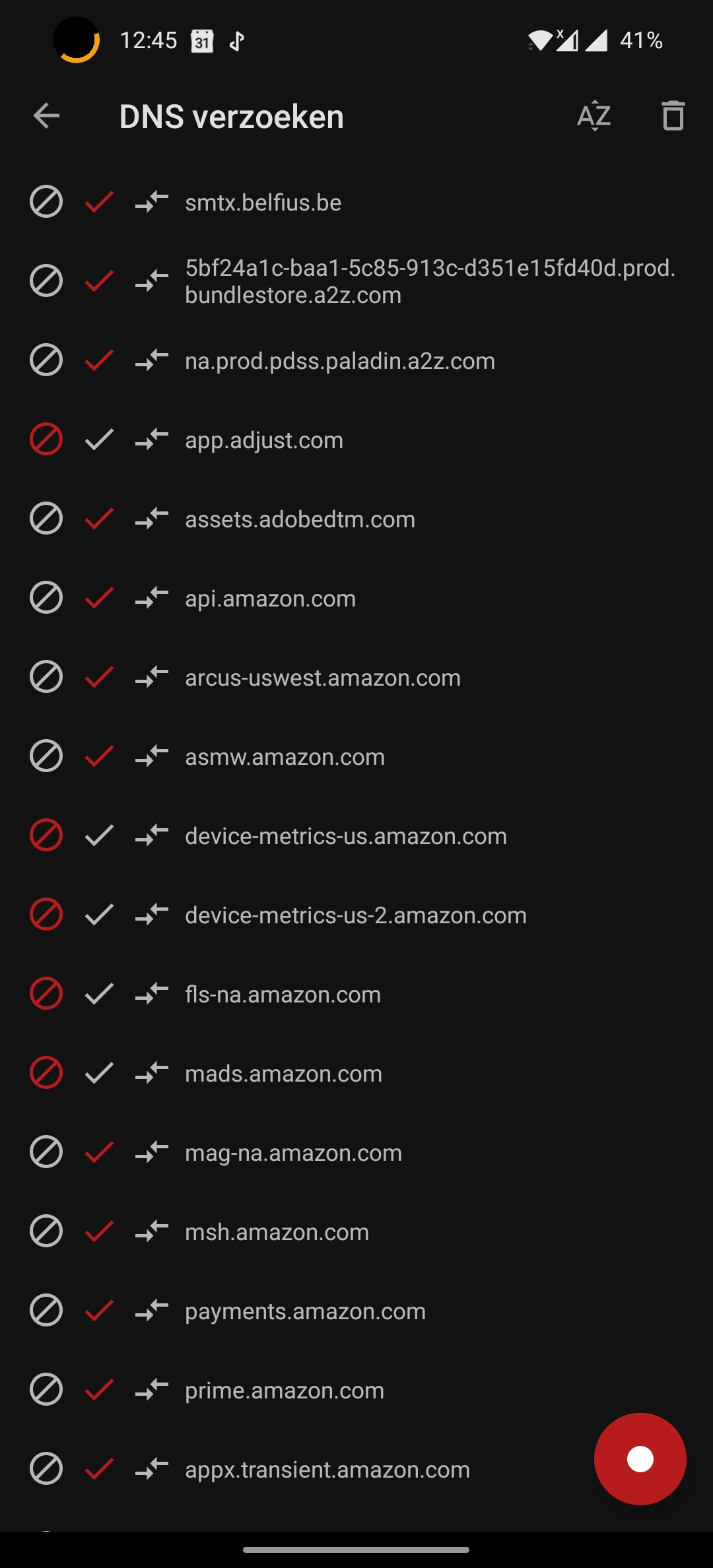
 said50
on 16 Jul 2020
said50
on 16 Jul 2020
Have exactly the same problem with Amazon shopping US v20.14.00.100.
IDK why there is not an option to whitelist an app.
TIA
 rypz79
on 26 Jul 2020
rypz79
on 26 Jul 2020
Because it can't be done... The next version will offer this feature if you use the non root version.
 PerfectSlayer
on 26 Jul 2020
PerfectSlayer
on 26 Jul 2020
Because it can't be done... The next version will offer this feature if you use the non root version.
Can you plz explain why? technically root users should have more options then non-root (I don't remember even once that having root access was a shortcoming).
There seems to be a problem with AdAway v5.0.5 and the _system/etc/hosts_ file I searched both a regex _*.amazon.com_ and private instance _aax-us-iad.amazon.com_ they weren't there however they were still shown as blocked (and whitelisted at the same time which is impossible)
TIA


rypz79
on 27 Jul 2020
Can you plz explain why?
The root solution is based on DNS resolution using /etc/hosts file. The DNS resolution is system wide and does not have any idea from which part of the system the request comes from (so no idea of which app make the request).
The non root solution use the VPN API which can select which app to include or not in the VPN tunnel. So you can't have different settings for different apps, it's just a yes or no solution.
technically root users should have more options then non-root (I don't remember even once that having root access was a shortcoming).
They have! They can choose the ad-blocking method they like where non-root users should stick with VPN method 😉
PerfectSlayer
on 27 Jul 2020
There was report on XDA forum for root ad-block user to disable the web server and change redirect to 0.0.0.0 instead of the default 127.0.0.1 fix the isuse. Can you confirm?
PerfectSlayer
on 20 Sep 2020
There was report on XDA forum for root ad-block user to disable the web server and change redirect to
0.0.0.0instead of the default127.0.0.1fix the isuse. Can you confirm?
Fixed now. Confirmed!
 jontaix
on 27 Sep 2020
jontaix
on 27 Sep 2020
I think I found out what's causing this.
If I do a dns log, almost nothing is being found. It's a bug in adaway because it's not whitelisting logged dns requests. Here are the steps to reproduce the error:
- disable adaway,
- Enable dns logging in adaway
- force close the amazon app
- clear the cache from the amazon app
- then reopen amazon, now it work back
- Click on random items and go to your orders
- Open adaway and stop dns logging
- Refresh the dns log list by pulling down from the top
- Now you see way more dns servers.
- Whitelist the servers by clicking on the checkmark
- Hit apply
- Here comes the error: Now refresh the list again and your whitelisted servers are blacklisted again:
This worked for me. Thank you for finding the bug
 Raslin777
on 23 Dec 2020
Raslin777
on 23 Dec 2020
I manage to do the manipulation to have the dns to check
but I cannot uncheck the ones that are already blocked in AdAway 5.2.1
 gsm0607455890
on 9 Jan 2021
gsm0607455890
on 9 Jan 2021
Related issues
 GuardianMajor
·
3Comments
GuardianMajor
·
3Comments
 ipdev99
·
3Comments
ipdev99
·
3Comments
 dragozo
·
7Comments
dragozo
·
7Comments
 clonechill
·
11Comments
clonechill
·
11Comments
 zgfg
·
10Comments
zgfg
·
10Comments
Most helpful comment
There was report on XDA forum for root ad-block user to disable the web server and change redirect to
0.0.0.0instead of the default127.0.0.1fix the isuse. Can you confirm?