Adaway is not blocking ads at all after updating. I get message after updating Applied hosts sources 2/3. How to fix it?
 davex2012
All 22 comments
I have same problem.i updated 4-5 times but it keep telling me to update.
Show message "Applied host sources 2/3" before asking to restart.
 punjabi12
on 1 Oct 2018
punjabi12
on 1 Oct 2018
Go to hosts sources -> long press over the entry https://hosts-file.net/ad_servers.txt -> edit -> enter the following URL https://hosts-file.net/download/hosts.txt . After you apply you'll get 3/3 sources.
It's relatively a large file (17.12MB) and not updated very often (last update was 16 March 2018) so for those who want to "play" with their lists (white/black) and re-apply often I wish there were an option to grab it/redirect it from/to a local path and not from the internet.
EDIT: it takes long time (about 2 minutes) for me to apply changes, downloading is relatively quick with wi-fi the problem is with the parsing , merging and applying your lists to the hosts file so if there was an option only to apply the lists without applying/updating the sources
(which shouldn't be updated anyhow because the file timestamp was not updated) that will be better.
 rypz79
on 1 Oct 2018
rypz79
on 1 Oct 2018
the first url is working now ( https://hosts-file.net/ad_servers.txt )
and it was updated today, see here:
https://hosts-file.net/?s=Download
 patrickdrd
on 1 Oct 2018
patrickdrd
on 1 Oct 2018
@patrickdrd I get unknown update status. Something wrong with the first link.
And second links how can I know the link is still alive?
davex2012
on 1 Oct 2018
"unknown update status" doesn't mean there's a problem,
all the github links return the same message too,
the developer said he found a way to determine last update
from the last commit status for them,
but still no beta version,
as for this link, I tested it in windows and it opened fine from my browser,
I don't know how it behaves in adaway and in each version (3.3/4.0.9)
anyway, you can pick any link you'd like from the page:
https://hosts-file.net/?s=Download
(just click/open the page from a browser and pick a hosts link)
and then test in adaway
patrickdrd
on 1 Oct 2018
Can't block ads If I used the first link.?
davex2012
on 1 Oct 2018
of course you can, give it a try
patrickdrd
on 1 Oct 2018
Yep many times but no success. Many people have the same exact problem. Can't used the first link.
davex2012
on 1 Oct 2018
ok, use something else then,
you can try with these:
https://github.com/AdroitAdorKhan/Energized
https://raw.githubusercontent.com/StevenBlack/hosts/master/hosts
patrickdrd
on 1 Oct 2018
Go to hosts sources -> long press over the entry https://hosts-file.net/ad_servers.txt -> edit -> enter the following URL https://hosts-file.net/download/hosts.txt . After you apply you'll get 3/3 sources.
It's relatively a large file (17.12MB) and not updated very often (last update was 16 March 2018) so for those who want to "play" with their lists (white/black) and re-apply often I wish there were an option to grab it/redirect it from/to a local path and not from the internet.
EDIT: it takes long time (about 2 minutes) for me to apply changes, downloading is relatively quick with wi-fi the problem is with the parsing , merging and applying your lists to the hosts file so if there was an option only to apply the lists without applying/updating the sources
(which shouldn't be updated anyhow because the file timestamp was not updated) that will be better.
☝️☝️ Works for me. Updated 3/3 now.
punjabi12
on 1 Oct 2018
I appreciate the workaround but is there a fix for the servers.txt? As it seems it's more updated.
 rogeriskira
on 1 Oct 2018
rogeriskira
on 1 Oct 2018
@patrickdrd I checked the updated on 10/1/18 tag as you mentioned earlier and noticed that it loads to a blank file. That might be the reason it is failing on Adaway. It seems the file was updated with a blank file.
rogeriskira
on 1 Oct 2018
@rypz79 do you have other smaller version? I noticed that my phone becomes a bit laggy.
davex2012
on 1 Oct 2018
@patrickdrd when i open https://hosts-file.net/ad_servers.txt is show nothing just blank.

davex2012
on 1 Oct 2018
I notice that you can curl that URL though with a valid response (about 2.2MB of hosts entries). e.g.
curl -vv "https://hosts-file.net/ad_servers.txt" -O
Maybe there's some checks on the user-agent on that web host, and Adaway is also failing because of that?
 RicoYao
on 2 Oct 2018
RicoYao
on 2 Oct 2018
@patrickdrd when i open https://hosts-file.net/ad_servers.txt is show nothing just blank.
it's working fine for me (my browser),
maybe you're using an adblocker?
I think it was mahakala that send me a prompt asking me if I want to visit this page on firefox,
because he blocks hosts-file.net (amazing right?)
anyway, I would use other sources, which I do actually,
rather than use their huge host file,
I have posted some of them above
patrickdrd
on 2 Oct 2018
After adding it, it shows applied hosts 3/4 instead of 2
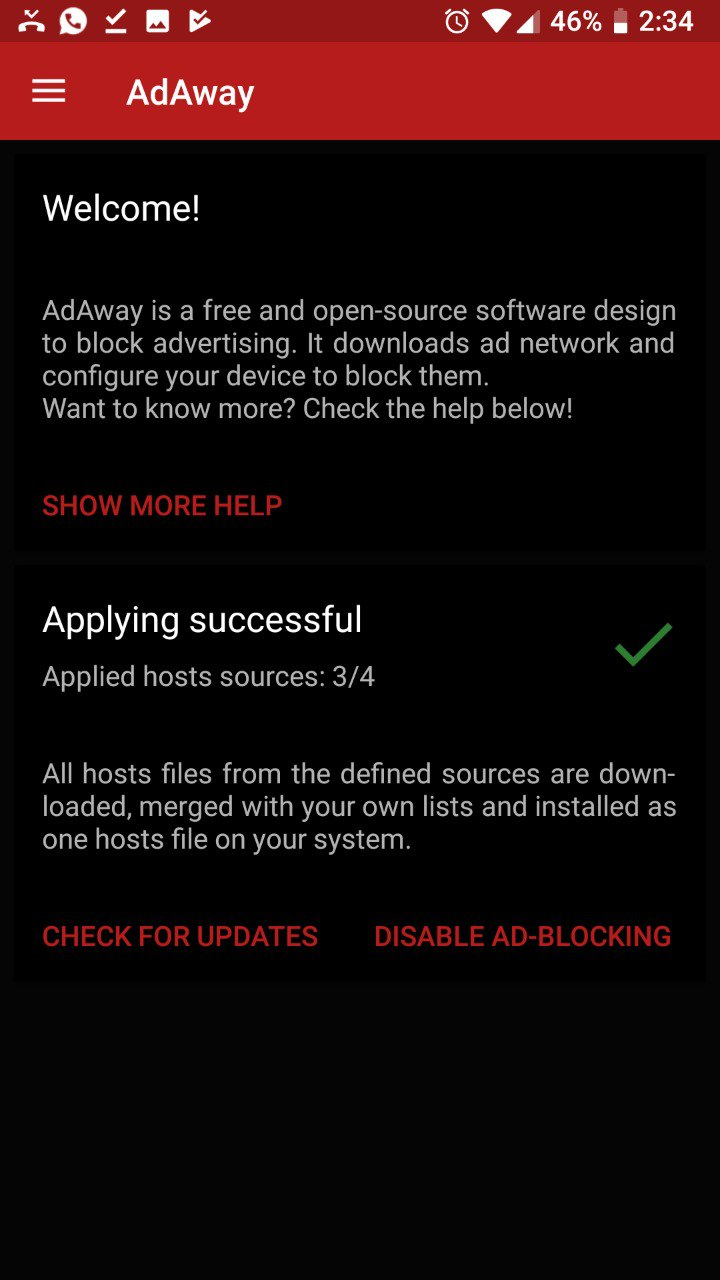
 MarcAnt01
on 2 Oct 2018
MarcAnt01
on 2 Oct 2018
Guys, now I have found a better solution.
1) Unistall AdAway
2) Go with a root file explorer (I've used Solid Explorer) and edit hosts.txt so that it's an empty document and save it
3) Install AdAway again
4) Enjoy
MarcAnt01
on 2 Oct 2018
I know I'm new here, but I've been working on a solution to this all night. I'm pretty sure this will work for everyone. This method will create a local "txt" file which will be an exact match to the most recent available "ad_servers.txt" that was recorded via the Wayback Machine. I did this using version 3.3 for Android. Here goes…
1) First, go to this url: https://archive.org/web/
2) Then enter this url into the search box: https://hosts-file.net/ad_servers.txt
3) You'll receive 51 save points, but use want to use the most recent available copy, which was recorded on August 24 of the year. (07-24-2018). Scroll down and tap on that one. When the page comes up, save it as a "txt" file. If you are doing this completely over an android device, you may not have the option to do that directly. In that situation, go to the next step.
4) With the Wayback page for August 24th version "ad_servers.txt" file open and visible to you (make sure you give it time to completely load), select and copy ALL text on the page and COPY it. If you cannot do that, than with the Chrome browser for android open to that page, tap on the download arrow and save it as a "mhtml" file.
5) Open an good text editor you have installed on your device. For this, I used the free version of Polaris Office 5, that came pre-istalled with my android. We're going to have to edit out all the html code that was added to it, which is the next step.
6) You want this file to look exactly as the original "ad_servers.txt" file, which means deleting all the html coding that was placed in there by the Chrome browser. The important part here is the text file should begin with: "# hpHosts - Ad and Tracking servers only" and the very end of the file should be: "# Hosts: 45753" The file should be about 575 lines. Now, SAVE the file as "ad_servers.txt". Place the file into any folder or directory on your device.
7) That's your own personal "ad_servers.txt" Hold on that for it you ever need it again after this. Now, open AdAway and tap on the 3-dots on the top right and select "Your Lists". Make sure the tab you see selected is the "Black" list. Now, tap on 3-dots at the top right and select "Import All Lists". A document selection screen will open. Browse to the "ad-servers.txt" file you just created. If you have to, go to settings and "Show advanced device opt" in order for "txt" files to appear. Select your file and let it load.
8) Even though the file is less than 2 mb, this is gonna take a while so let it do it's thing. For me it took about 45 minutes to import all lines. Just walk away from it and chill until it's done. After it's complete, you'll see all the new lines under the "Black" section of Adaway. Now, make sure to reapply Adaway and and RESTART.
9) All done, you got all the info from "ad_servers.txt" locally in Adaway!
Really hope this helps like it helped me. :)
 bellshock
on 2 Oct 2018
bellshock
on 2 Oct 2018
Yikes, thats quite a workaround! In a similar vein (of trying to be helpful) I have come up with this workaround (hopefully very temporary):
I think @RicoYao found the key, which is that curl is successfully able to fetch the file. I have set up a regular task (daily for now) to fetch the latest ad_servers.txt using curl.
It is being served at: https://ad-servers.ravipatel.org, so adding this path to your Hosts sources should be equivalent to "https://hosts-file.net/ad_servers.txt"
 rpatel
on 2 Oct 2018
rpatel
on 2 Oct 2018
Yikes, thats quite a workaround! In a similar vein (of trying to be helpful) I have come up with this workaround (hopefully very temporary):
I think @RicoYao found the key, which is that curl is successfully able to fetch the file. I have set up a regular task (daily for now) to fetch the latest ad_servers.txt using curl.
It is being served at: https://ad-servers.ravipatel.org, so adding this path to your Hosts sources should be equivalent to "https://hosts-file.net/ad_servers.txt"
Looks like whatever issue was causing the hosts-file problem is resolved. Taking down ad-servers.ravipatel.org
rpatel
on 2 Oct 2018
@bellshock you don't need to make it local just enter it's URL
https://web.archive.org/web/20180824072322/https://hosts-file.net/ad_servers.txt
directly into a new entry (or edit the current */ad_servers.txt) in "Hosts Sources" and it will grab it from there (1.69MB I've checked it at /etc/hosts).
@davex2012 I hope that answeres your question.
rypz79
on 3 Oct 2018
Related issues
 tinaag
·
3Comments
tinaag
·
3Comments
 zgfg
·
10Comments
zgfg
·
10Comments
 monzta
·
3Comments
monzta
·
3Comments
 clonechill
·
11Comments
clonechill
·
11Comments
 Sadi58
·
4Comments
Sadi58
·
4Comments
Most helpful comment
Go to hosts sources -> long press over the entry https://hosts-file.net/ad_servers.txt -> edit -> enter the following URL https://hosts-file.net/download/hosts.txt . After you apply you'll get 3/3 sources.
It's relatively a large file (17.12MB) and not updated very often (last update was 16 March 2018) so for those who want to "play" with their lists (white/black) and re-apply often I wish there were an option to grab it/redirect it from/to a local path and not from the internet.
EDIT: it takes long time (about 2 minutes) for me to apply changes, downloading is relatively quick with wi-fi the problem is with the parsing , merging and applying your lists to the hosts file so if there was an option only to apply the lists without applying/updating the sources
(which shouldn't be updated anyhow because the file timestamp was not updated) that will be better.