Adaptivecards: [HTML][rendering] [video player icon clipped, not rendered correctly]
Platform
Back end: C#, .Net Core 2.1. Microsoft Bot Framework 4.9.1 (NuGet packages).
Microsoft travel bot sample (back end). Microsoft web chat client sample (front end).
Author or host
Sending adaptive cards to web host.
Bot code is Microsoft travel bot sample.
Card markup is product details sample from adaptive card designer.
Demo page is here:
https://dnctestbot.z13.web.core.windows.net
Type any message (eg hi) to wake up the bot.
The play icon in the video item in the card is clipped. Right side of arrow is truncated.
I posted this question on StackOverflow and Kyle Delaney identified that the cause is a reliance on a box-sizing: border box; CSS rule in the host page. This rule is not present in the web chat sample.
Version of SDK
Microsoft Bot Framework 4.9.1
 mindmodel
All 9 comments
Here's a link to the question I posted on StackOverflow for this issue and one other.
mindmodel
on 19 May 2020

Screen shot of the video player with clipped icon.
mindmodel
on 19 May 2020
Hey @mindmodel I tried to repro this on our designer tool with your sample json below from the stackoverflow linked above but don't observe the clipping appear? Are you still able to repro this with your webchat scenario? And also had you tried the json with the designer tool at your end earlier (or now) and saw(see) it repro?
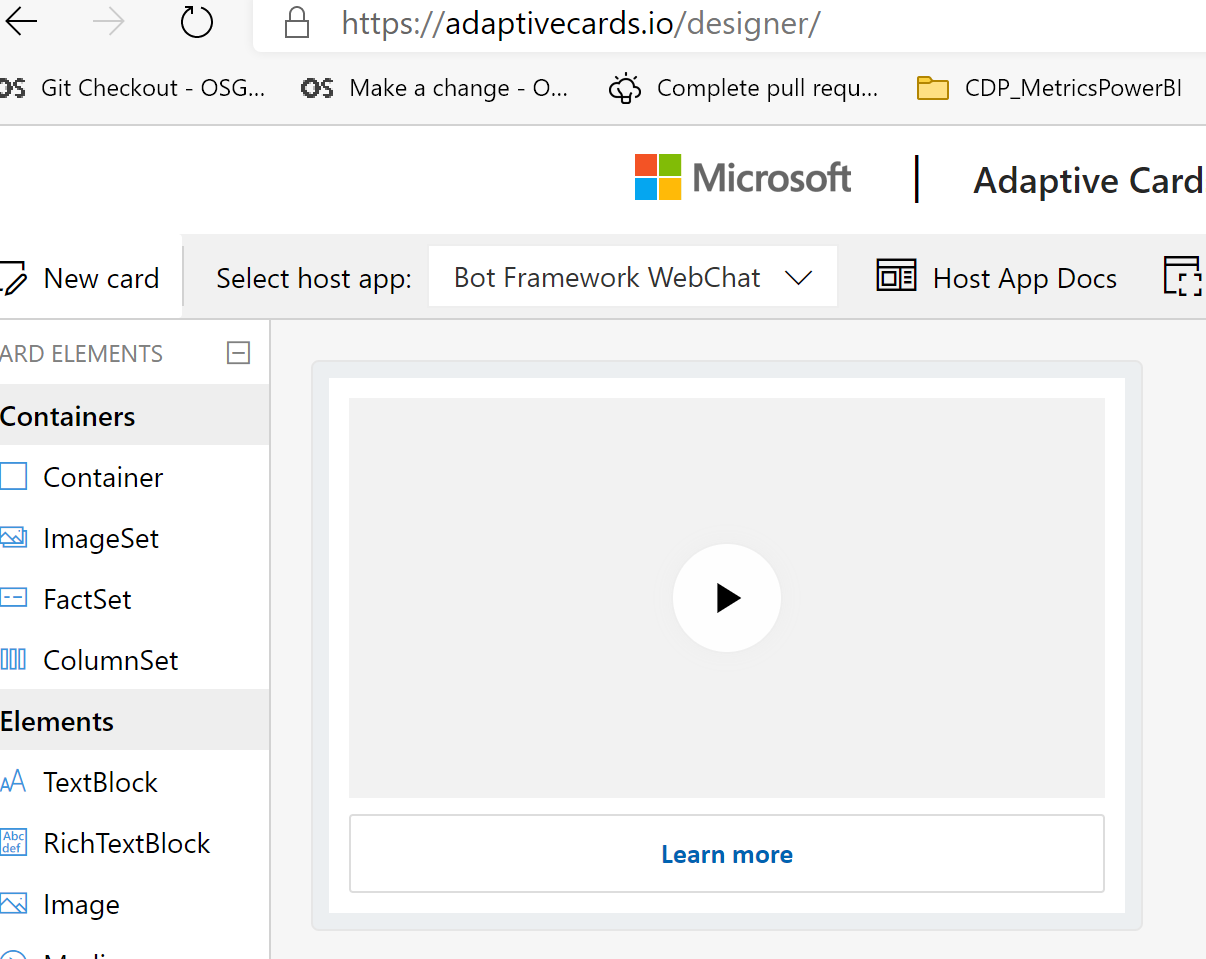
@dclaux / @ckkashyap thoughts on this one?
{
      "$schema": "http://adaptivecards.io/schemas/adaptive-card.json",
      "type": "AdaptiveCard",
      "version": "1.1",
      "fallbackText": "This card requires Media to be viewed. Ask your platform to update to Adaptive Cards v1.1 for this and more!",
      "body": [
        {
          "type": "Media",
          "sources": [
            {
              "mimeType": "video/mp4",
              "url": "https://adaptivecardsblob.blob.core.windows.net/assets/AdaptiveCardsOverviewVideo.mp4"
            }
          ]
        }
      ],
      "actions": [
        {
          "type": "Action.OpenUrl",
          "title": "Learn more",
          "url": "https://adaptivecards.io"
        }
      ]
    }
 shalinijoshi19
on 3 Jun 2020
shalinijoshi19
on 3 Jun 2020
Hi @mindmodel. We have acknowledged this issue report. Please continue to follow this issue for updates/progress/questions. @matthidinger / @dclaux / @rebeccaanne / @paulcam206 / @jwoo-msft / @almedina-ms FYI.
![msftbot[bot] picture](https://avatars2.githubusercontent.com/in/26612?v=4&s=40) msftbot[bot]
on 3 Jun 2020
msftbot[bot]
on 3 Jun 2020
Hello @mindmodel! We need some additional information from you to process this issue. Please see discussion comments above. Thanks!
msftbot[bot]
on 3 Jun 2020
Regarding the failure to replicate in the adaptive card designer web site, I agree. I have seen the same behavior. I don't know whether the code behind the card designer is identical to the Visual Studio bot framework travel bot sample, but I suspect it's not. For example, the card designer might use React. All my code does is read the JSON markup for the card from an embedded resource, call MessageFactory.Attachment, then call SendActivityAsync to send the card. All in C# on the server. Card markup is from the product sample.
mindmodel
on 3 Jun 2020
Thanks @mindmodel for following up on this issue. A member of our triage crew will re-engage as soon as possible to follow up. Thanks.
msftbot[bot]
on 3 Jun 2020
@mindmodel the AdaptiveCards designer doesn't use react.
@ckkashyap / @dandriscoll would you know why the code above, hosted at https://dnctestbot.z13.web.core.windows.net, and that spits out the JSON card above, would show a clipped image in WebChat but not in the standalone AC designer?
@matthidinger / @dclaux in case they have some insights around the webchat discrepancy also.
shalinijoshi19
on 5 Jun 2020
The answer by Kyle Delaney to the StackOverflow item referenced above
describes the proximate cause of the display error.
Please refer to this SO page for details.
mindmodel
on 5 Jun 2020
Related issues
 bandmask
·
4Comments
bandmask
·
4Comments
 rajjagani021
·
4Comments
rajjagani021
·
4Comments
 lindach167
·
3Comments
lindach167
·
3Comments
 dipja
·
6Comments
dipja
·
6Comments
 summertony15
·
3Comments
summertony15
·
3Comments