Adaptivecards: [iOS][Adaptive Cards)] [Flow Bot Adaptive Card with button isn't getting displayed in Teams for iOS]
Platform
What platform is your issue or question related to? (Delete other platforms).
- iOS
Author or host
Author, sending cards from Flow to Teams using the "post your own adaptive card as the Flow bot to a channel" step in my flow.
Version of SDK
Tried formatting my message in adaptive card version 1.0 and 1.2, but that didn't make any difference.
Details
Please have a look at the attached screenshots. The pictures are of the same message sent by the Flow bot. As you can see, on desktop, the message with the "approve" button looks like you would expect. On iOS, the message isn't displayed at all. You just see the Flow bot icon and the timestamp.
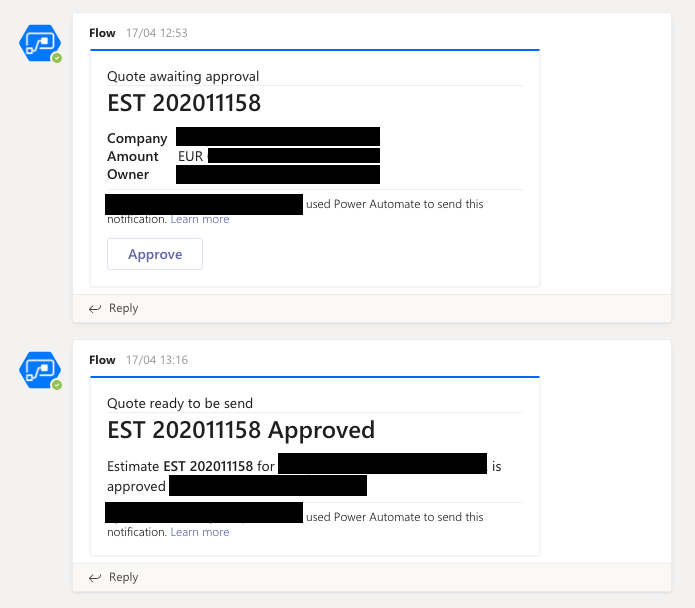
Please look into this, as we have people working on iPads who need to interact with these messages.
 menbren
All 15 comments
@menbren do you happen to have the sample JSON that is attempted to be rendered here at all? Thanks.. @jwoo-msft FYI.
 shalinijoshi19
on 21 Apr 2020
shalinijoshi19
on 21 Apr 2020
We have acknowledged this issue report. Please continue to follow the issue for updates/progress/questions. @matthidinger / @dclaux / @rebeccaanne / @paulcam206 / @nesalang / @almedina-ms FYI.
![msftbot[bot] picture](https://avatars2.githubusercontent.com/in/26612?v=4&s=40) msftbot[bot]
on 21 Apr 2020
msftbot[bot]
on 21 Apr 2020
Here's a copy of the JSON:
{
    "$schema": "http://adaptivecards.io/schemas/adaptive-card.json",
    "type": "AdaptiveCard",
    "version": "1.0",
    "body": [{
        "type": "ColumnSet",
        "columns": [{
            "type": "Column",
            "width": 2,
            "items": [{
                    "type": "TextBlock",
                    "text": "Quote awaiting approval in PandaDoc"
                },
                {
                    "type": "TextBlock",
                    "text": "@{variables('quote_number')}",
                    "weight": "Bolder",
                    "size": "ExtraLarge",
                    "spacing": "None",
                    "separator": true,
                    "horizontalAlignment": "Left"
                },
                {
                    "type": "FactSet",
                    "facts": [{
                            "title": "Company",
                            "value": "@{variables('account_name')}"
                        },
                        {
                            "title": "Amount",
                            "value": "@{variables('currency')} @{variables('amount')}"
                        },
                        {
                            "title": "Owner",
                            "value": "@{body('Get_owner_record')?['firstname']} @{body('Get_owner_record')?['lastname']}"
                        }
                    ]
                }
            ]
        }],
        "selectAction": {
            "type": "Action.OpenUrl"
        }
    }],
    "actions": [{
        "type": "Action.OpenUrl",
        "title": "Approve",
        "url": "Removed on purpose",
        "style": "positive"
    }]
}
menbren
on 21 Apr 2020
In addition, I have another message in the same flow (for when a quote is approved). This one is showing up on iOS, but the button isn't working. It remains "pressed" for about two seconds, but then nothing happens. It works as expected on desktop. Here's the JSON for that:
{
    "$schema": "http://adaptivecards.io/schemas/adaptive-card.json",
    "type": "AdaptiveCard",
    "version": "1.2",
    "body": [
        {
            "type": "ColumnSet",
            "columns": [
                {
                    "type": "Column",
                    "width": 2,
                    "items": [
                        {
                            "type": "TextBlock",
                            "text": "Quote ready to be send"
                        },
                        {
                            "type": "TextBlock",
                            "text": "@{variables('quote_number')} Approved",
                            "weight": "Bolder",
                            "size": "ExtraLarge",
                            "spacing": "None",
                            "separator": true,
                            "horizontalAlignment": "Left"
                        },
                        {
                            "type": "RichTextBlock",
                            "inlines": [
                                {
                                    "type": "TextRun",
                                    "text": "@{variables('quote_number')} ",
                                    "weight": "Bolder"
                                },
                                {
                                    "type": "TextRun",
                                    "text": "for "
                                },
                                {
                                    "type": "TextRun",
                                    "text": "@{variables('account_name')} ",
                                    "weight": "Bolder"
                                },
                                {
                                    "type": "TextRun",
                                    "text": "with a total of "
                                },
                                {
                                    "type": "TextRun",
                                    "text": "@{variables('currency')} @{variables('amount')} ",
                                    "weight": "Bolder"
                                },
                                {
                                    "type": "TextRun",
                                    "text": "is approved and ready to be send."
                                }
                            ]
                        }
                    ]
                }
            ]
        }
    ],
"actions": [{
        "type": "Action.OpenUrl",
        "title": "Send Quote",
        "url": "Removed on purpose",
        "style": "positive"
    }]
}
menbren
on 21 Apr 2020
@menbren,
It's because of malformed json for actions.
- selectAction is missing url property
- Action.OpenUrl contains malformed url, you could just leave as "", instead of "Removed on purpose"
Desktop version is based on JS, so it's more tolerant.
 jwoo-msft
on 21 Apr 2020
jwoo-msft
on 21 Apr 2020
Thanks, will give this a try. The formatting of the cards I used are straight from adaptivecard.io, so that might be worth looking into.
menbren
on 21 Apr 2020
Thanks, will give this a try. The formatting of the cards I used are straight from adaptivecard.io, so that might be worth looking into.
Yes, that is one of the inconsistency issues we are looking into.
jwoo-msft
on 21 Apr 2020
@nesalang, do we have a bug tracking the inconsistency on the JS side we can reference here? Thanks
shalinijoshi19
on 22 Apr 2020
We have acknowledged this issue report. Please continue to follow the issue for updates/progress/questions. @matthidinger / @dclaux / @rebeccaanne / @paulcam206 / @nesalang / @almedina-ms FYI.
msftbot[bot]
on 22 Apr 2020
@jwoo-msft, got the message card to work, but upon clicking on the button in the iOS Teams app, my URL gets escaped automatically, so for example the "#" in my URL turns into "%23", making the URL useless. (On desktop the URL isn't escaped)
menbren
on 22 Apr 2020
cc @shalinijoshi19
menbren
on 23 Apr 2020
@menbren, can you share the url you used?
jwoo-msft
on 23 Apr 2020
@jwoo-msft https://app.pandadoc.com/a/#/documents/4Nw3YxHpiNeypvzk2CzVR2 turned into https://app.pandadoc.com/a/%23/documents/4Nw3YxHpiNeypvzk2CzVR2 rendering it useless.
menbren
on 23 Apr 2020
@jwoo-msft, what's the status here? Thanks :)
menbren
on 4 May 2020
@jwoo-msft, what's the status here? Thanks :)
@menbren, the conversion doesn't happen at iOS SDK.
@shalinijoshi19, can you help me forward this issue to Teams mobile?
- (void)didFetchUserResponses:(ACOAdaptiveCard *)card action:(ACOBaseActionElement *)action
{
    if (action.type == ACROpenUrl) {
        NSURL *url = [NSURL URLWithString:[action url]];
       /// [action url] returned url in string unchanged.
Payload used
{
    "type": "AdaptiveCard",
    "version": "1.0",
    "body": [],
    "actions": [
        {
            "type": "Action.OpenUrl",
            "title": "Action.OpenUrl",
            "url": "https://app.pandadoc.com/a/#/documents/4Nw3YxHpiNeypvzk2CzVR2 "
        }
    ],
    "$schema": "http://adaptivecards.io/schemas/adaptive-card.json"
}
Related issues
 cavr
·
5Comments
cavr
·
5Comments
 rajjagani021
·
4Comments
rajjagani021
·
4Comments
 bandmask
·
4Comments
shalinijoshi19
·
5Comments
bandmask
·
4Comments
shalinijoshi19
·
5Comments
 jonathanmachado
·
4Comments
jonathanmachado
·
4Comments
Most helpful comment
@menbren,
It's because of malformed json for actions.
Desktop version is based on JS, so it's more tolerant.