Adaptivecards: Input.ChoiceSet auto complete functionality
Summary
When there are thousands of choices in a menu (like assigning a task to someone, when there's thousands of people in your org), you need to have a searchable select menu that dynamically loads data as the user searches (since including 1,000 or more choices statically in the card/data isn't a good option).
Status: Proposal Approved

Open Issues
- [ ] Need to investigate the different platform limitations and cost with regard to
isMultiSelectsupport.
Requirements
- P0: The input can dynamically fetch the list of choices from a remote backend as the user types
- P0: Hosts can specify 1 or more pre-determined datasets that get the first-chance to fulfill the request. (E.g., Microsoft Teams could query the Active Directory list of users by hooking into the
graph.microsoft.com/usersdataset). If the host hasn't registered a matching dataset, the request will be sent to the backend. - P0: A static list of choices can be provided, and any dynamic ones will get appended to the end
- P1: The input will support
"isMultiSelect": trueand"style": "compact"where possible
Spec/schema
Input.ChoiceSet
| Property | Type | Required | Description |
| -------------- | ------------ | -------- | ---------------------------------------------------------------- |
| choices.data | Data.Query | No | Enables dynamic autocomplete as the user types, by fetching a remote set of choices from a backend |
Data.Query
Data.Query includes the metadata necessary to fetch remote data.
| Property | Type | Required | Description |
| --------- | -------- | -------- | --------------------------------------------------- |
| dataset | string | Yes | The type of data that should be fetched dynamically |
Example
Step 1: Card Payload
{
    "type": "Input.ChoiceSet",
    "id": "selectedUser",
    "choices": [
        { "title": "Static 1", "value": "Static 1" }
    ],
    "choices.data": {
        "type": "Data.Query",
        "dataset": "graph.microsoft.com/users"
    }
}
Step 2: Setup a backend to fulfill the request
As the user types, the renderer will create a JSON object that includes all the properties from the Data.Query, along with what the user has typed, plus any additional options such as the current skip/count and max results to be returned.
{
        "type": "Data.Query",
        "dataset": "graph.microsoft.com/users",
    "value": "<VALUE-AS-TYPED-BY-USER>",
        "count": 25,
        "skip: 0
}
Universal Action Model support:
Out of the box we will include support for the
The format will be as follows:
{
  "type": "invoke",
  "name": "adaptivecard/action",
  "value": {
    "action": {
        "type": "Data.Query",
        "dataset": "graph.microsoft.com/users",
    "value": "<VALUE-AS-TYPED-BY-USER>"
    }
}
Step 3: Backend responds with array of choices
The backend will inspect the Data.Query to determine what type of data should be fetched, and what the user has currently typed.
E.g., if the user had typed "Ma" it would return something like:
[
   { "title": "Matt", "value": "1" },
   { "title": "Mark", "value": "2" }
   { "title": "Mack", "value": "3" }
   { "title": "May", "value": "4" }
]
Step 4: Display the results
The Input choices property is set to the array returned by the backend and renders as specified by the isMultiSelect and style properties.
 productboard-ac
All 19 comments
productboard-ac
on 14 Apr 2020
ProductBoard auto-generated feature
![msftbot[bot] picture](https://avatars2.githubusercontent.com/in/26612?v=4&s=40) msftbot[bot]
on 14 Apr 2020
msftbot[bot]
on 14 Apr 2020
@matthidinger my suggestions to this spec are parked here https://github.com/siduppal/general/blob/master/AutoComplete-Proposal.md
 siduppal
on 25 Aug 2020
siduppal
on 25 Aug 2020
@siduppal here is the latest, taking into consideration the group chat we had separately.
AC Payload
We would extend the existing Input.ChoiceSet as follows:
{
    "type": "Input.ChoiceSet",
    "id": "selectedUser",
    "choices": [
        { "title": "Matt", "value": "1" },
    { "title": "David", "value": "2" }
    ],
    "value": "2",
    "choicesSource": {
        "type": "Data.Query",
        "dataSet": "<name of data set to fetch from>",
        "searchField": "<name of field in the dataset to match what the user types to>
    }
}
The contract here is:
- The static
choicesproperty holds the default, built-in choices that can be shown immediately to the end user - If
choicesSourceis specified, it MUST be an object of type "Data.Query" (see notes below) and itsdataSetproperty must be specified
- As the user types, what they have typed so far is used as a search keyword to fulfill the "Data.Query"
- The client is responsible for fullfilling that "Data.Query"
- The client decides the page size (number of items) to query
- If the client has a built-in way to "Data.Query" from the specified dataset (for instance, if
dataSetis set to "Directory"), it can do that - Otherwise the client defers the "Data.Query" to the backend Bot by sending it an activity (see below)
Questions:
- Is the
searchFieldproperty really necessary? Are there scenarios where a Bot might search a single dataset against different fields? - Do we also want to support paging?
- If we do, the client is responsible for also providing a page number to query
- The control also needs to be able to dynamically query more results (i.e. the next page) as the user scrolls the list
Data.Query response
The response to a "Data.Query" MUST be an object that includes a data property of type array. Each item in the array MUST have at least a title and a value property. Example:
{
    "data": [
        {
            "title": "David Claux",
            "value": "[email protected]",
            ... optional fields
        },
        {
            "title": "Sid Uppal",
            "value": "[email protected]",
            ... optional fields
        }
    ]
}
As the client receives this response, it dynamically populates the list of choices with the data from the response.
Channel-to-Bot protocol
Option 1: Reuse composeExtension/query
"Data.Query" can be mapped to the existing composeExtension/query activity. Example:
{
    "type": "Input.ChoiceSet",
    "id": "selectedUser",
    "choices": [
        { "title": "Matt", "value": "1" },
    { "title": "David", "value": "2" }
    ],
    "value": "2",
    "choicesSource": {
        "type": "Data.Query",
        "dataSet": "Directory",
        "searchField": "userName"
    }
}
The above "Data.Query" translates into this composeExtension/query activity:
{
  "type": "invoke",
  "name": "composeExtension/query",
  "value": {
    "commandId": "Directory",
    "parameters": [
      {
        "name": "userName",
        "value": "<VALUE-AS-TYPED-BY-USER>"
      }
    ],
    "queryOptions": {
      "skip": 0,
      "count": 25
    }
  }
}
Pros:
composeExtension/queryalready exists and is already documented. We'd be reusing a model Bot developers are already familiar with.
Not pros but also not cons:
- The
commandIdproperty is used to specify the "dataSet" - probably not a big deal? - If "Data.Query" doesn't support paging (at least initially),
queryOptions.skipwould always be 0. That wouldn't pose any problem.
Cons:
- We might instead want to use a model that better fits in the Universal Bot/ACv2 model - see the following
Option 2: Define new model
We could define a model that fits better with UB/ACv2:
{
  "type": "invoke",
  "name": "adatptiveCard/action",
  "value": {
    "action": {
        "type": "Data.Query",
        "dataSet": "Directory",
        "searchField": "userName"
    }
    "options": {
      "skip": 0,
      "count": 25,
      "value": "<VALUE-AS-TYPED-BY-USER>"
    }
  }
}
The response format would be the same, but encapsulated into a standard ACv2 response shape.
Pros:
- Builds upon the ACv2 model
- Would leverage the ACv2 auth model (just-in-time OAuth as well as SSO)
Not pros but also not cons:
- The term "action" might not sound "right" to everyone. I think it's a detail.
- Clearly separates the use case from the compose extension model
Cons:
- Does not reuse a model developers are already familiar with. That said it is extremely likely that developers willing to take advantage of the capability will have to write new code anyway
 dclaux
on 1 Oct 2020
dclaux
on 1 Oct 2020
@dclaux Couple notes on your proposal:
choicesanddynamicChoices, instead ofchoicesSourcemaybe?Data.Queryis a completely new type, right? If so, would it make sense to keep it consistent with the other actions and name itAction.Query? This way we can also define a consistent way to do query in other locations.- Having the
searchFieldproperty might be a little too verbose, since the dataset is a custom variable anyways the bot developer/integration could supportDirectory/username,emailto specify searchfields, or just defineDirectoryto search in the default way.
 JamyDev
on 1 Oct 2020
JamyDev
on 1 Oct 2020
@JamyDev thanks for your comments. Let me try to address:
- At this point all the names I'm proposing are up for debate. We are really more interested in finalizing the model to start with. So
dynamicChoicesis not out of the question. The reason forchoicesSourcethough is that it is consistent with the way XAML does things - Interesting that you'd say this - Using "Action." is my preference for it is consistent with how we do other things, but we've had internal discussions and some folks questioned the use of the term "Action" as not being relevant in the context of "fetching data". So I wanted to reflect that in this proposal.
- Interesting point again. The reason for
searchFieldis that it maps to the way compose extensions are done already. Also, I have a question in the proposal asking whether or not we believe there is a scenario where two queries might target the same data set but search against different fields - I think answering that could allow us to simply not support the search field concept at least to start with, as you suggest in your last sentence. One thing however that I happen to have a strong opinion on (might be just me) is I would really prefer to avoid conflating thedataSetproperty with other things. I'd really rather keep things separate and not introduce a convention for parsing thedataSetproperty into its various components
dclaux
on 1 Oct 2020
Thanks @dclaux. Overall, the proposal looks good to me. Few queries I have on the proposal -
- Reg.
searchField- In case of directory search, as I understand, the search matching is fuzzy and not really a single field that's searched. Is there a strong need forsearchField, since it's being specified by the bot anyway in the first place? Instead can we have some parameters (like we haveverbanddatain ACv2) that could be passed for bot to be able to respond? Data.Queryis a new model (as is implied with Data prefix) with completely new response type and response types for ACv2 such as Adaptive Card and message also do not apply here. Should we have a different invoke name likeadaptiveCard/data?- I hope clients can support
isMultiSelectand other options available inInput.ChoiceSetfor autocomplete scenarios as well. - Reg. your comment on not parsing and doing different things based on
dataSetproperty - some of thesedataSetchoices could have a different UX - such as showing the profile picture, email/title in case of "Directory" etc. See screenshot below. How do we recommend hosts to handle such cases?
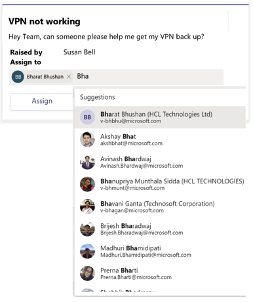
- Related to this, hosts may want to support custom data sets as well. In case of Teams, we have scenarios where we want choices to be scoped to just members of that chat or channel roster in which the card is posted.
- Could we allow for
dataSetwithoutData.Queryfallback? In case a client does not support a specific dataset natively, it could only use the static choices specified in the card and wouldn't query the bot
 sowrabh
on 5 Oct 2020
sowrabh
on 5 Oct 2020
@sowrabh thanks for your feedback. Let me try to address:
I asked this very question in my write up: is
searchFieldreally necessary? Personally I do not think so. I am fine excluding it for now.The ACv2 model we adopted for activities is the activity
nameis alwaysadaptiveCard/actionand the activity'svalueproperty must be an object with an 'action` property set to a copy of what was found in the card:
{
  "type": "invoke",
  "name": "adatptiveCard/action",
  "value": {
    "action": {
        "type": "Data.Query",
        "dataSet": "Directory",
        "searchField": "userName"
    }
    "options": {
      "skip": 0,
      "count": 25,
      "value": "<VALUE-AS-TYPED-BY-USER>"
    }
  }
}
So a developer would know what type of action to execute by looking at activity.value.action and not at activity.name. What would be the value add of introducing a new adaptiveCard/data activity name?
Supporting
isMultiselectconsiderably complicates the feature in terms on the interaction model. Unless there is a strong need for it, I would rather table it for now.I believe we've discussed this to some extent aside from this issue, and the conclusion was that it was fine not to support visual customization for now. Hosts that really need/want specific visuals in certain cases can piggyback on the value of the
dataSetproperty and display a custom control.
dclaux
on 12 Oct 2020
Thanks @dclaux.
- A different invoke name would allow channels to have different throttling rates based on name (first level property). Teams' channel infra does not support throttling based on payload.
- Multi select is a P1 requirement in case of people picker for teams. Apps such as approvals today support this capability through task module in Teams and having this in Adaptive card would significantly improve the UX.
 sowrabh-msft
on 13 Oct 2020
sowrabh-msft
on 13 Oct 2020
For scenarios like Approvals, the average number of approvers is 2 as per their data, so multiselect becomes an important part of the scenario that we need to support for People Pickers and its a strong P1 @dclaux.
 shiladityasaha
on 13 Oct 2020
shiladityasaha
on 13 Oct 2020
Working Group Notes 10/21
Open Issues and Decisions
- [x] Decide on the "bot request payload" (aka channel-to-bot protocol)
- Should it be new activity type or reuse
composeExtension/query - DECISION: Group felt that reusing
composeExtension/querywas a bit too strange for this scenario, so we should get broader feedback and explore either reusing the ACv2 invoke activity as-is, or create a new similar one that specifically matches this scenario.
- Should it be new activity type or reuse
- [X] Choices source property name naming
- DECISION: The group felt that
choices.datamade the most sense and allows us to apply a similar pattern to other properties that may get dynamic-querying support in the future.
- DECISION: The group felt that
- [x] Multiple teams have strongly asked for
isMultiSelectsupport
- [ ] ACTION: We need to investigate the cost of this, do libs exist on each platform to easily make this possible or not? @shalinijoshi19 we need to find a time to do basic investigation here to unblock them and give a Go/No-go
- [ ] Ojasvi suggested their teams may be able to contribute to the native AC SDKs (for this, and other things). He will setup a sync.
Choices source property name
Some brainstorming ideas for the property name:
choicesSourcedynamicChoiceschoices.data
{
    "type": "Input.ChoiceSet",
    "id": "selectedUser",
    "choices": [
        { "title": "Static 1", "value": "Static 1" }
    ],
    "choices.data": {
             ...
    }
}
Data querying schema / conventions
Previously in this issue we've discussed two distinct requirement for fetching data
- To fetch generic data from a Bot backend;
- The ability to query built-in data warehouses such as the Graph User Directory.
Other schema techniques to support this would be to use the Data.<QUERY-TYPE> naming convention. Or a similar model to Adaptive Components (#4761) where the name property could be namespaced (e.g., graph.microsoft.com/users.
To fetch from a Bot, we could use something like:
- Data.Query OR
- Data.Execute OR
- Data.BotRequest
{
    "type": "Input.ChoiceSet",
    "id": "selectedUser",
    "choices": [
        { "title": "Static 1", "value": "Static 1" }
    ],
    "choices.data": {
        "type": "Data.Execute",
        "verb": "findCities"
    }
}
To fetch from a well-known source, that Hosts would be able to provide, we could do:
- Data.MicrosoftGraph.Users
{
    "type": "Input.ChoiceSet",
    "id": "selectedUser",
    "choices": [
        { "title": "Static 1", "value": "Static 1" }
    ],
    "choices.data": {
        "type": "Data.MicrosoftGraph.Users"
    }
}
OR
{
   "type": "Data",
   "name": "graph.microsoft.com/users"
}
Bot Request payload
Option A:
Reuse same thing from Action.Execute
{
  "type": "invoke",
  "name": "adaptivecard/action",
  "value": {
    "action": {
        "type": "Data.Query",
        "verb": "findUser"
    },
    "options": {
      "skip": 0,
      "count": 25,
      "value": "<VALUE-AS-TYPED-BY-USER>"
    }
  }
}
Option B:
Slightly tweak the activity to match the scenario exactly.
{
  "type": "invoke",
  "name": "adaptivecard",
  "value": {
    "query": {
        "type": "Data.Query",
        "verb": "findUsers",
        "keyword": "<WHAT-USER-TYPED>"
    }
  }
}
MultiSelect
{
    "type": "Input.ChoiceSet",
    "id": "selectedUser",
    "choices": [
        { "title": "Static 1", "value": "Static 1" }
    ],
    "isMultiSelect": true,
    "choices.data": {
        ...
    }
}
 matthidinger
on 22 Oct 2020
matthidinger
on 22 Oct 2020
I wasn't able to attend the meeting (last week?) so I would like to share my opinion now that's I've been able to review the above.
- Data.Query: I am really not sure why we need to move away from the "Action." prefix here. "Action." means "this is the action that is performed as a result of
" and I don't see why it couldn't be Action.Query, meaning "the action is to query". If we want to be more explicit about what "querying" means I would go with Action.DataQuery - Data.Query.verb: "verb" doesn't hit me as the right term here. We execute a verb, but we query a dataset. If we're going to use a
verbproperty, then we need to stick to Action.Execute. - Activity protocol: if we were to continue using the "Action." prefix as I suggest, I see no reason to change the activity name, and we should stick to what we defined for Universal Bots, namely
adaptiveCard/action. If we do introduce a prefix other than "Action." then I do think that using simply "adaptivecard" as the activity name makes sense, but then we should also consider using that in the context of Action.Execute - options: It seems to me that we should follow the Action.Execute model for passing "parameters". With Action.Execute the values of inputs (basically the equivalent of the keyword in the context of a data query) is passed as part of the action object's
dataproperty. In this case I thinkoptionsshould follow the same model. That would allow us to define this model as part of the AC spec, and every implementation would follow that same model (Matt this is something you said you'd like)
So all in all I think this would make more sense:
{
    "type": "Input.ChoiceSet",
    "id": "selectedUser",
    "choices": [
        { "title": "Static 1", "value": "Static 1" }
    ],
    "choices.data": {
        "type": "Action.DataQuery",
        "dataset": "cities"
    }
}
And the activity protocol - note options is part of the action object:
{
  "type": "invoke",
  "name": "adaptiveCard/action",
  "value": {
    "action": {
        "type": "Action.DataQuery",
        "dataset": "cities",
        "options": {
          "skip": 0,
          "count": 25,
          "value": "<VALUE-AS-TYPED-BY-USER>"
        }
    }
}
Meeting 10/28
- People picker will be customized when the
Directorydataset is used. - Custom item template that includes the profile image and a subtitle. Teams will pass those user properties along to the custom Fluent UI control
isMultiSelectwill be supported for "people picker" out of the box, and we will work hard to ensure it works with other types of choices, pending investigation on the cost to implemented on each platform. Without this it will cause confusion/fragmentation if the property only works properly with the PeoplePicker data set vs a custom data set, so hopefully we'll be able to figure something out here- We will followup with the Bot Framework team to clarify guidance on the activity protocol and whether a new name or some other mechanism is most appropriate to switch between an autocomplete scenario and an Action.Execute
matthidinger
on 29 Oct 2020
Updated the root issue with the final proposal and set to approved.
matthidinger
on 3 Nov 2020
@matthidinger under the Data.Query definition in the root issue, it looks like the dataset is defined as all lowercase, but in the examples dataSet is written in camelCase. Am I right to assume the camelCase version is the correct one?
JamyDev
on 23 Nov 2020
@JamyDev I did some quick internet searching and it appears that Dataset is all one word lowercase. So I will update the spec accordingly. @dclaux sound good?
matthidinger
on 24 Nov 2020
@matthidinger yes, one word all lowercase.
dclaux
on 24 Nov 2020
Another question came up:
Should the static choices be ignored if we receive a set back from the server, or should they be merged. Based on the line The Input choices property is set to the array returned by the backend I am guessing replace, and only render the static choices if the server fails to reply?
JamyDev
on 30 Nov 2020
@JamyDev yes the static choices should only be used if the backend doesn't respond. @matthidinger you OK with that?
dclaux
on 30 Nov 2020
Related issues
 rajjagani021
·
4Comments
rajjagani021
·
4Comments
 dipja
·
6Comments
dipja
·
6Comments
 jesuspsalas2
·
3Comments
jesuspsalas2
·
3Comments
 serialoverflow
·
4Comments
serialoverflow
·
4Comments
 jonathanmachado
·
4Comments
jonathanmachado
·
4Comments