Adaptivecards: Schema 1.1 SelectAction
Platform
- .NET HTML
- JavaScript
Author or host
Author, sending cards to WebChat emulator and DirectLine
Version of SDK
NuGet 1.0.3
Issue
As of this morning, the card JSON I had written in my database is no longer passing through JSON Schema validation.
The cards sent are still version 1.0; they're not using any of the new 1.1 features; however, the schema information I was using was pulling directly from the url https://adaptivecards.io/schemas/adaptive-card.json. I noticed that it has changed since last Friday with the new 1.1 features.
Playing around with the JSON and the schema in https://www.jsonschemavalidator.net/, I noticed that my cards have images with 'selectAction' properties. The old and new schemas are differing in these values.
The old schema just mentioned that Action.ShowCard is not supported in the description, but set the Action as any from Action:
"selectAction": {
  "description": "An Action that will be invoked when the Image is tapped or selected. Action.ShowCard not supported",
  "$ref": "#/definitions/Action"
}
The new schema explicitly specifies that this isn't supported:
"selectAction": {
  "description": "An Action that will be invoked when the `Image` is tapped or selected. `Action.ShowCard` is not supported.",
  "type": "object",
  "enum": [
    "Action.Submit",
    "Action.OpenUrl"
  ]
}
I've only just started playing with json schemas, so I'm not sure, but the enum there doesn't actually specify what the selectAction can be. Isn't that expecting a string with any of those values?
Indeed, I got the following issue from the validator:

I changed the relevant section to:
"selectAction": {
  "description": "An Action that will be invoked when the `Image` is tapped or selected. `Action.ShowCard` is not supported.",
  "type": "object",
  "item": {
    "anyOf":[
        { "$ref": "#/definitions/Action.Submit" },
        { "$ref": "#/definitions/Action.OpenUrl" }
    ]
  }
}
and the problem went away.
Is this correct? If not, this block is in the schema 4 times, Image, ColumnSet, Column. and Container.
 Benjathing
All 8 comments
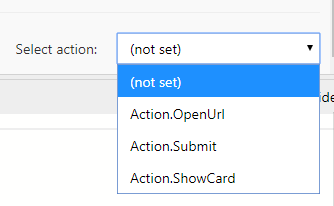
Ironically, the new designer allows "ShowCard" actions on select:
Benjathing
on 15 Oct 2018
@matthidinger seems like we should update the JSON schema for selectAction to the following as Benjathing suggested
"selectAction": {
  "description": "An Action that will be invoked when the `Image` is tapped or selected. `Action.ShowCard` is not supported.",
  "type": "object",
  "item": {
    "anyOf":[
        { "$ref": "#/definitions/Action.Submit" },
        { "$ref": "#/definitions/Action.OpenUrl" }
    ]
  }
}
 andrewleader
on 15 Oct 2018
andrewleader
on 15 Oct 2018
I also noticed a couple of other things with the schema today. I love the new designer, but even disregarding the issue I noted above, the JSON constructed from it still doesn't pass the schema.
It appears to be for two reasons:
- Child AdaptiveCards (those triggered by Action.ShowCard buttons) require a version number, according to the schema. I think you can just remove the 'version' requirement around line 193 in the schema, as the top level object has its own version requirement (line 41).
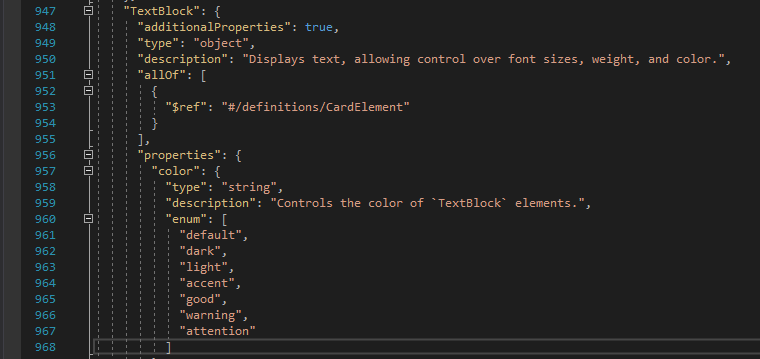
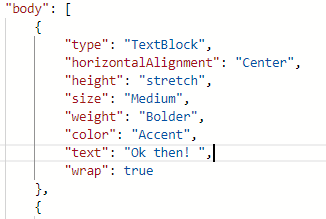
- All of the string enums are case sensitive, and in the schema, many of them are written in lower-case. This includes properties such as 'style', 'horizontalAlignment', 'color', etc. However, in the designer, these are outputted in title case.
Benjathing
on 16 Oct 2018
Per this issue decision was made that enum values would be case insensitive, and the JS renderer (which the designer uses) got updated to not be case sensitive.
Problem is, JSON, which is very tied to JavaScript, is case sensitive by nature, and so is an enum defined in a JSON schema. We have a little bit of a conundrum here, where the renderers are case-insensitive but the schema prescribes a case for all enum values. Is there a way to define a case-insensitive enum in a JSON schema? If not, what should we do?
 dclaux
on 16 Oct 2018
dclaux
on 16 Oct 2018
Apparently case-insensitive enums were proposed, but it doesn't look like they went anywhere (seemingly because dealing with case sensitivity cross-locale is tricky).
 paulcam206
on 16 Oct 2018
paulcam206
on 16 Oct 2018
It's terrifying, but my current workaround is:
        "color": {
          "description": "Controls the color of `TextBlock` elements.",
          "type": "string",
          //"enum": [
          //  "default",
          //  "dark",
          //  "light",
          //  "accent",
          //  "good",
          //  "warning",
          //  "attention"
          //]
          "oneOf": [
            { "pattern": "^[Dd][Ee][Ff][Aa][Uu][Ll][Tt]$" },
            { "pattern": "^[Dd][Aa][Rr][Kk]$" },
            { "pattern": "^[Ll][Ii][Gg][Hh][Tt]$" },
            { "pattern": "^[Aa][Cc][Cc][Ee][Nn][Tt]$" },
            { "pattern": "^[Gg][Oo][Oo][Dd]$" },
            { "pattern": "^[Ww][Aa][Rr][Nn][Ii][Nn][Gg]$" },
            { "pattern": "^[Aa][Tt][Tt][Ee][Nn][Tt][Ii][Oo][Nn]$" }
          ]
        }
Unfortunately, you can't use flags in json-schema patterns either,
EDIT:
similarly, I replaced the single value enums for the object types with patterns too:
"type": {
  "type": "string",
  "description": "Must be `\"Action.ShowCard\"`.",
  //"enum": [
  //  "Action.ShowCard"
  //]
  "pattern": "^[Aa][Cc][Tt][Ii][Oo][Nn]\\.[Ss][Hh][Oo][Ww][Cc][Aa][Rr][Dd]$"
}
@matthidinger to followup
 shalinijoshi19
on 22 Apr 2019
shalinijoshi19
on 22 Apr 2019
Our new 1.2 schema has a TON of improvements which likely fix all the issues mentioned in this thread, including...
- selectAction property values should be correct now
- case-insensitive enum values!!
- validation within nested layers of containers/columns/etc works correctly
- validation is STRICT, meaning any unknown enums or types will cause validation to fail (so that you know you did something wrong, or if you purposefully used a custom element/enum, you can knowingly ignore the error)
Get the new schema file here! https://adaptivecards.io/schemas/1.2.0/adaptive-card.json
We're working on updating the samples to point to this new schema file
andrewleader
on 28 Jun 2019
Related issues
 dsanvita
·
3Comments
dsanvita
·
3Comments
 lindach167
·
3Comments
lindach167
·
3Comments
 lostromb
·
5Comments
lostromb
·
5Comments
 ryanzjohnson
·
7Comments
ryanzjohnson
·
7Comments
 rajjagani021
·
4Comments
rajjagani021
·
4Comments
Most helpful comment
@matthidinger seems like we should update the JSON schema for selectAction to the following as Benjathing suggested