Activitywatch: macOS Big Sur breaks AW
- [x] I am on the latest ActivityWatch version.
- [x] I have searched the issues of this repo and believe that this is not a duplicate.
- OS version and name:
macOS 11.0 Beta (20A4299v) - ActivityWatch version:
0.9.2
Describe the bug
ActivityWatch app doesn't start in macOS Big Sur.
localhost:5600 is uavailable
To Reproduce
- Upgrade to macOS Big Sur beta
- Launch ActivityWatch app
- Nothing happens
Expected behavior
ActivityWatch should started
 alexriabtsev
All 12 comments
Without a log or error message this is not very helpful.
Could you try running it from the command line and check the system journal?
 ErikBjare
on 29 Jun 2020
ErikBjare
on 29 Jun 2020
➜  ~ open /Applications/ActivityWatch.app
LSOpenURLsWithRole() failed with error 2 for the file /Applications/ActivityWatch.app.
 fr-kyleli
on 30 Jun 2020
fr-kyleli
on 30 Jun 2020
Googling for the particular error code ("LSOpenURLsWithRole() failed with error 2", with quotes) gave no result...
The only somewhat similar results were for the infamous error code -10810, it would be nice if someone could double-check the workarounds in that link because I really have no idea how to make progress on this with the information given.
ErikBjare
on 30 Jun 2020
WARNING:root:Could not import pymongo, not available as a datastore backend
maybe this helps?
PS
how to switch on debug mode?
alexriabtsev
on 30 Jun 2020
So you could start it but it crashes? Please provide full logs and by which method you run it (double-clicking the app, running open ActivityWatch.app, running one of the binaries in the ActivityWatch.app folder, etc). That particular warning isn't relevant.
There is no debug mode that would be useful for this particular issue (not without building from source anyway).
ErikBjare
on 30 Jun 2020
I can start it without crash only with command line
open /Applications/ActivityWatch.app/Contents/MacOS/aw-server&
but not the icon
alexriabtsev
on 30 Jun 2020
I tried both chmod +x and xattr via link above - nothing worked for me
alexriabtsev
on 30 Jun 2020
I wrote above that JOSM doesn't start too but it threws another error
➜  ~ open /Applications/ActivityWatch.app
LSOpenURLsWithRole() failed with error 2 for the file /Applications/ActivityWatch.app.
➜  ~ open /Applications/JOSM.app
LSOpenURLsWithRole() failed with error 1 for the file /Applications/JOSM.app.
If I do this to launch AW,
/Applications/ActivityWatch.app/Contents/MacOS/aw-server
it will work.
fr-kyleli
on 30 Jun 2020
@fr-kyleli confirmed
alexriabtsev
on 11 Jul 2020
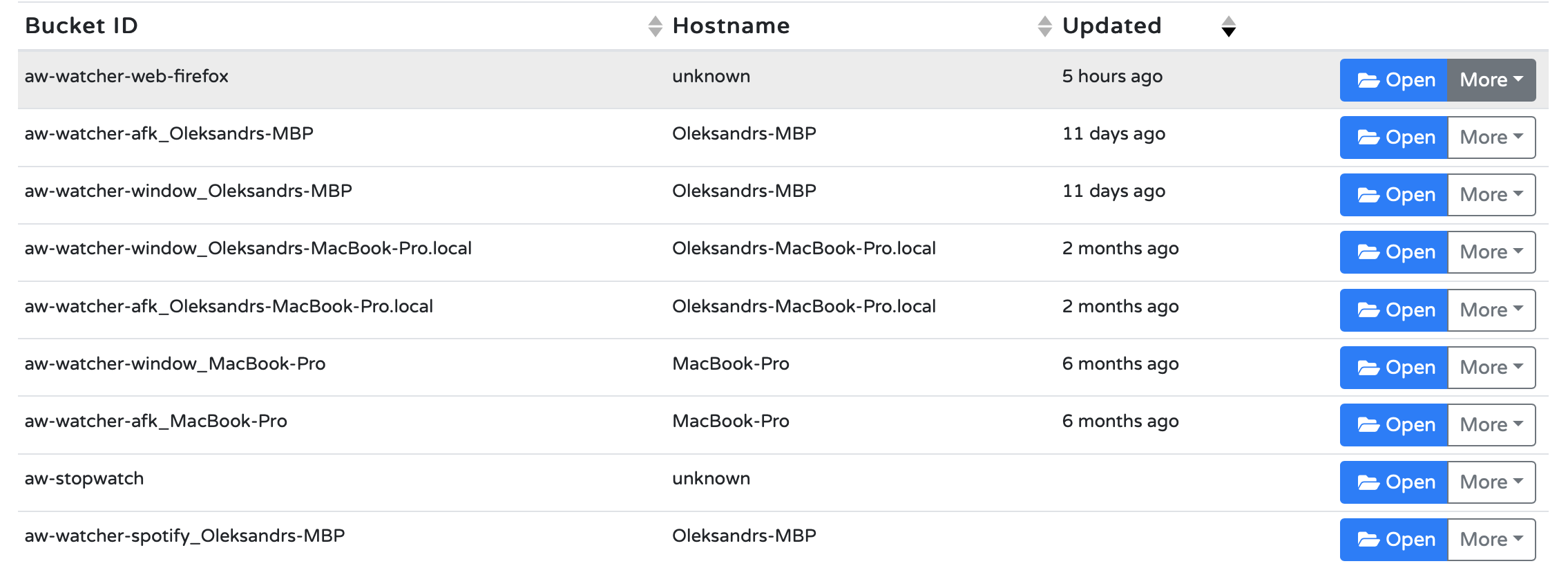
Found an issue with running /Applications/ActivityWatch.app/Contents/MacOS/aw-server
AW doesn't understand host this way:
alexriabtsev
on 11 Jul 2020
OK, today I managed to run AW via launchd
<?xml version="1.0" encoding="UTF-8"?>
<!DOCTYPE plist PUBLIC "-//Apple//DTD PLIST 1.0//EN" "http://www.apple.com/DTDs/PropertyList-1.0.dtd">
<plist version="1.0">
    <dict>
        <key>KeepAlive</key>
        <true/>
        <key>Label</key>
        <string>local.ActivityWatch.keepAlive</string>
        <key>ProgramArguments</key>
        <array>
            <string>/usr/bin/open</string>
            <string>-W</string>
            <string>/Applications/ActivityWatch.app</string>
        </array>
    </dict>
</plist>
BUT :)
localhost:5600 says that there are no afk and window watchers :(
EDIT:
fall back to commad line launch:
/Applications/ActivityWatch.app/Content/MacOS/aw-qt&
this way I managed to get afk and window watchers running. Spotify watcher isn't working yet.
alexriabtsev
on 13 Jul 2020
Related issues
 TheOrigins
·
6Comments
TheOrigins
·
6Comments
 nikanar
·
4Comments
ErikBjare
·
10Comments
nikanar
·
4Comments
ErikBjare
·
10Comments
 MarcManhart
·
3Comments
MarcManhart
·
3Comments
 iamsoorena
·
10Comments
iamsoorena
·
10Comments