Activitywatch: Take new screenshots
Before taking them
- Get some good example data
- Wait for the top domains feature to land?
How to take them
Stylize/frame and scale them appropriately. Maybe give them borders or include a minimal browser window frame.
What to screenshot?
- [x] Activity view
- [ ] Bucket view
- [x] Trayicon
- [ ] Web extension
Where to put them
- [x] README
- [x] Website
- [ ] Chrome Web Store
- [ ] Mozilla Addons
- [ ] AlternativeTo
- [x] ProductHunt
 ErikBjare
All 7 comments
Someone on reddit wanted more screenshots. They are probably instrumental to people actually installing ActivityWatch so we should try to get several nice screenshots to show off.
Bumping priority.
ErikBjare
on 18 Nov 2017
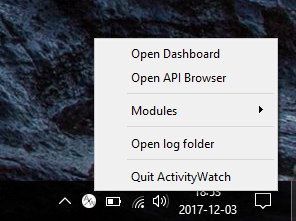
Here's a screenshot for the tray icon on Windows:
ErikBjare
on 4 Dec 2017
You really need screenshots of the UI. Just take some of your install, blur your data, and post them on the website and readme until you can get something better.
 shaund
on 10 Feb 2018
shaund
on 10 Feb 2018
Here's one, will update the README as v0.8 is released.

ErikBjare
on 29 May 2018
Just updated the README with new screenshots and removed the notice
ErikBjare
on 11 Jul 2019
This issue has been automatically marked as stale because it has not had recent activity. It will be closed if no further activity occurs. Thank you for your contributions.
![stale[bot] picture](https://avatars3.githubusercontent.com/in/1724?v=4&s=40) stale[bot]
on 15 Feb 2020
stale[bot]
on 15 Feb 2020
This was done to a satisfactory degree. There will undoubtedly come a time when we need to do it again, but closing for now.
ErikBjare
on 15 Feb 2020
Related issues
 ankushdas9
·
8Comments
ankushdas9
·
8Comments
 Chuhtra
·
7Comments
Chuhtra
·
7Comments
 nikanar
·
4Comments
ErikBjare
·
4Comments
nikanar
·
4Comments
ErikBjare
·
4Comments
 xylix
·
6Comments
xylix
·
6Comments
Most helpful comment
Here's one, will update the README as v0.8 is released.