Activitywatch: Accessibility privilege given to "Terminal" (OS X)
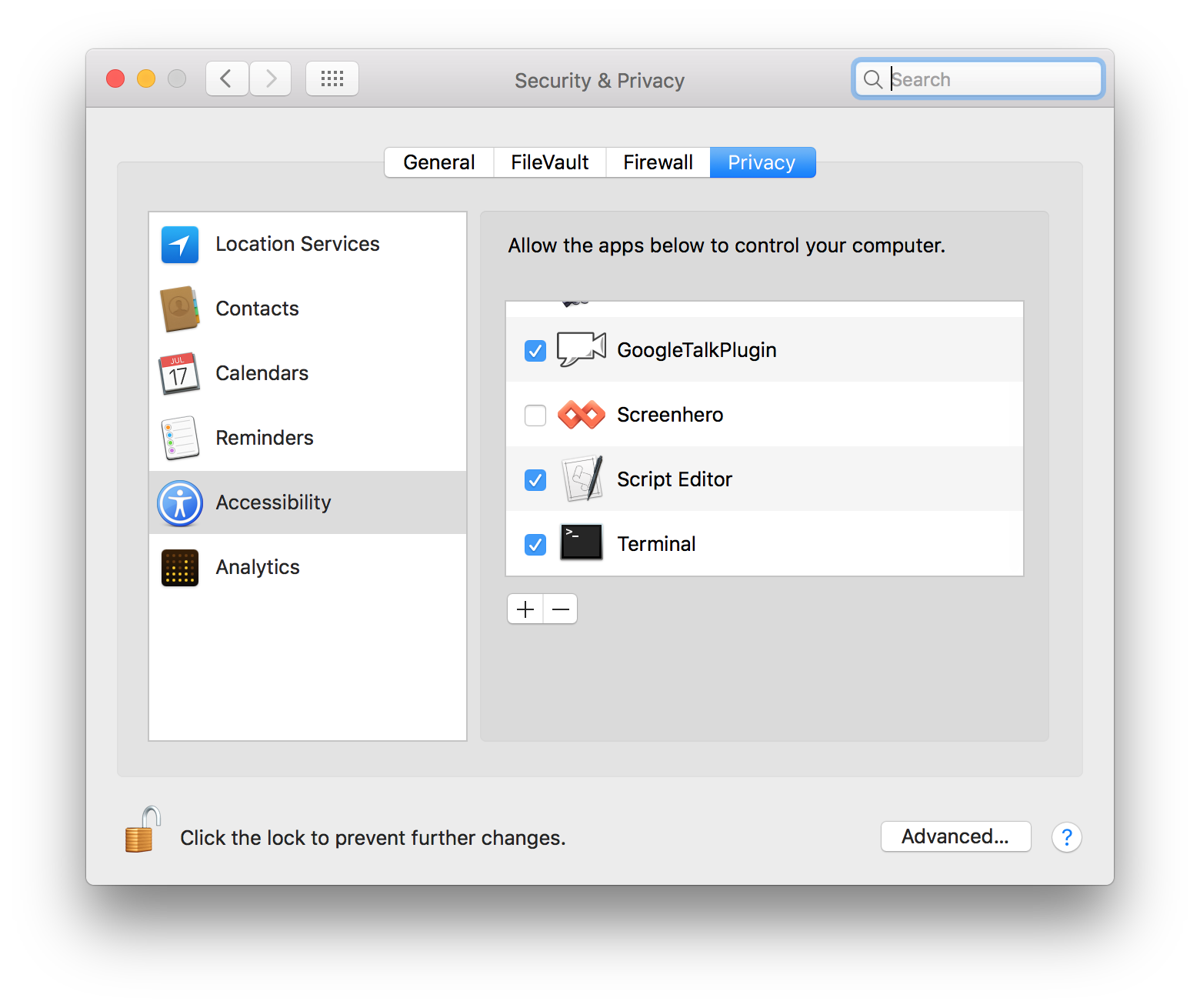
On the first run, a pop-up displays saying I need to authorize the app for Accessibility use. However, OS X only gives me the option to authorize the Terminal, and not specifically ActivityWatch.
This could be a security concern as it opens un-necessary permissions for other Terminal apps. Ideally ActivityWatch should be packaged as an App (?), and that way Accessibility privileges can be granularly handed out.
ActivityWatch 0.7.0b1
MacOS Sierra 10.12.5 (16F73)
Want to back this issue? Post a bounty on it! We accept bounties via Bountysource.
 sughodke
All 12 comments
You are right! This was planned but I realize now that I never created an issue for it.
What is needed is to configure PyInstaller to create a .app file as you mentioned. Should be easy enough, just don't have easy access to a Mac so never dug into it.
This will hopefully be landing in one of the later betas. (Need some time to get my hands on a Mac first, or run it in VirtualBox)
 ErikBjare
on 23 Jun 2017
ErikBjare
on 23 Jun 2017
Looks unlikely to make it into 0.7 right now, sorry.
ErikBjare
on 5 Jul 2017
@sughodke You're successfully running on Sierra 10.12.5? When running (release version, not from source) aw-qt, I get the following message:
Error loading Python lib '/Applications/activitywatch/.Python': dlopen(/Applications/activitywatch/.Python, 10): image not found
While I'm not certain, this seems like it might be related to the macOS System Integrity Protection (SIP)? If I'm doing something wrong then this is just a documentation issue, otherwise it seems like there is some other bug.
 jwiese
on 26 Aug 2017
jwiese
on 26 Aug 2017
@jwiese Thanks for testing out macOS support, it used to work but I haven't personally run it on macOS for a long time. It's been my plan to test it, but that plan fell through due to other priorities.
- Does running aw-server, aw-watcher-afk and aw-watcher-window independently work fine?
- If not, running from source is very likely to still work since it's tested in CI.
I will definitely look into this, but I need to get my hands on a Mac and I can't promise when that will happen. Right now the best bet on macOS is to install from source.
ErikBjare
on 26 Aug 2017
Just to close the loop on this, I tested this. None of them worked initially, but they worked from source. aw-qt still does not work (at least, not yet), but aw-server, aw-watcher-afk, and aw-watcher-window work fine independently, as does aw-webui.
Thanks!
jwiese
on 31 Aug 2017
I've finally managed to borrow a MacBook Air which I plan to do some testing on soon. Will make an attempt to create a .app file but not sure how the packaging process would work given the multiple processes.
Use of the PyInstaller builds on macOS and Linux is discouraged until issues like this one are resolved.
@jwiese How did aw-qt not work when built from source? Could you give me the output?
ErikBjare
on 23 Sep 2017
I've started work towards creating an app bundle, but had some issues: https://github.com/ActivityWatch/aw-qt/pull/28
ErikBjare
on 24 Sep 2017
Not sure if this is still useful, but this was the output I was getting after building from source:
$ aw-qt
Traceback (most recent call last):
  File "/Users/jasonwiese/anaconda/bin/aw-qt", line 11, in <module>
    load_entry_point('aw-qt==0.1', 'console_scripts', 'aw-qt')()
  File "/Users/jasonwiese/anaconda/lib/python3.6/site-packages/setuptools-27.2.0-py3.6.egg/pkg_resources/__init__.py", line 565, in load_entry_point
  File "/Users/jasonwiese/anaconda/lib/python3.6/site-packages/setuptools-27.2.0-py3.6.egg/pkg_resources/__init__.py", line 2598, in load_entry_point
  File "/Users/jasonwiese/anaconda/lib/python3.6/site-packages/setuptools-27.2.0-py3.6.egg/pkg_resources/__init__.py", line 2258, in load
  File "/Users/jasonwiese/anaconda/lib/python3.6/site-packages/setuptools-27.2.0-py3.6.egg/pkg_resources/__init__.py", line 2264, in resolve
  File "/Users/jasonwiese/anaconda/lib/python3.6/site-packages/aw_qt-0.1-py3.6.egg/aw_qt/__init__.py", line 1, in <module>
    from . import resources
ImportError: cannot import name 'resources'
Might just be something dumb on my end
jwiese
on 27 Sep 2017
That is actually really helpful! Nothing dumb on your end :smile:
I know what's the cause of that. The file missing should be created by this command in the aw-qt Makefile. You could try running it manually and see what went wrong. I'm a bit surprised that the command didn't cause make build to fail so curious what happens if you run it manually.
Thanks for the stacktrace :+1:
ErikBjare
on 27 Sep 2017
@jwiese The Error loading Python lib '/Applications/activitywatch/.Python': dlopen(/Applications/activitywatch/.Python, 10): image not found bug was fixed in #119. The just released v0.7.0b4 release contains the fix 😃
ErikBjare
on 23 Oct 2017
This issue has been automatically marked as stale because it has not had recent activity. It will be closed if no further activity occurs. Thank you for your contributions.
![stale[bot] picture](https://avatars3.githubusercontent.com/in/1724?v=4&s=40) stale[bot]
on 15 Feb 2020
stale[bot]
on 15 Feb 2020
This was fixed a long time ago, and especially so in the .app bundle that will be available in the next release.
ErikBjare
on 15 Feb 2020
Related issues
 MarcManhart
·
3Comments
MarcManhart
·
3Comments
 austil
·
3Comments
ErikBjare
·
4Comments
austil
·
3Comments
ErikBjare
·
4Comments
 toXel
·
5Comments
ErikBjare
·
9Comments
toXel
·
5Comments
ErikBjare
·
9Comments