Activitywatch: v0.8.0b7 doesn't start on Windows 10
The new release isn't working on Windows 10. I've tested it on two Windows 10 machines. On one ActivityWatch was never installed. I also deleted all ActivityWatch configs and data on the other machine. Still no luck. It doesn't even create log files so I can't attach them.
To reproduce just try to run aw-qt.exe on a Windows 10 machine. It will run for a second or so and then quit.
 toXel
toXel
All 5 comments
Oh no! Sorry about the trouble. I'll mention it to the release notes.
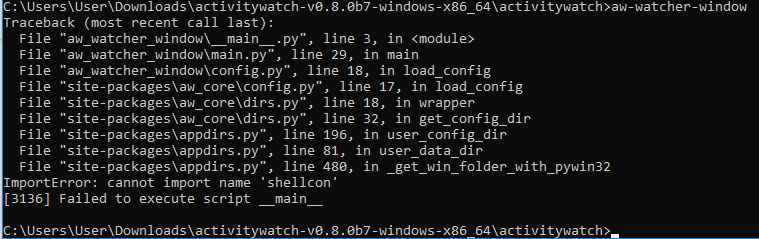
When I try to run them in the console aw-qt crashes without output, aw-server runs fine, aw-watcher-afk crashes without any output, and aw-watcher-window outputs this:
 ErikBjare
on 5 Nov 2018
ErikBjare
on 5 Nov 2018
As mentioned on https://github.com/ActivityWatch/activitywatch/issues/250#issuecomment-440463800, Windows Defender marks the file as a virus.
After unzipping the folder, I tried to find the aw-qt.exe file which is mentioned in the Getting started docs. However, I couldn't find it. Windows Defender had removed it without telling me. When I looked at the threat history, the file was there. I've then restored the file but the program just crashes out after temporarily starting.
I've now downloaded and tried b6 and it's working as expected.
 Harvzor
on 27 Nov 2018
Harvzor
on 27 Nov 2018
I can't use aw-watcher-vscode because it will only work with activitywatch v0.8.0b7, which won't work on Windows. Please let us know if there are any updates 🙏
 gpassero
on 11 Feb 2019
gpassero
on 11 Feb 2019
@gpassero I worked on it a few hours last weekend, it's an issue with the latest version of PyInstaller. I tried to debug it and solve it the proper way with the newest PyInstaller verison but with no success so I'm considering testing it with and old version of PyInstaller next with hopes that it should work.
https://github.com/ActivityWatch/activitywatch/pull/270
https://github.com/ActivityWatch/aw-qt/issues/43
 johan-bjareholt
on 12 Feb 2019
johan-bjareholt
on 12 Feb 2019
v0.8.0b8 was just released and includes a fix, closing.
ErikBjare
on 9 Mar 2019
Related issues
 Chuhtra
·
7Comments
Chuhtra
·
7Comments
 iamsoorena
·
10Comments
iamsoorena
·
10Comments
 TheOrigins
·
6Comments
TheOrigins
·
6Comments
 pahofmann
·
10Comments
pahofmann
·
10Comments
 bawasi
·
8Comments
bawasi
·
8Comments
Most helpful comment
@gpassero I worked on it a few hours last weekend, it's an issue with the latest version of PyInstaller. I tried to debug it and solve it the proper way with the newest PyInstaller verison but with no success so I'm considering testing it with and old version of PyInstaller next with hopes that it should work.
https://github.com/ActivityWatch/activitywatch/pull/270
https://github.com/ActivityWatch/aw-qt/issues/43