Accessibility-insights-web: Reading order visualization
Is your feature request related to a problem? Please describe.
When a user is tabbing through or listening to a page, having content visually appear outside of an expected flow can be counfounding. For users who cannot see the page, it also means offering help (face-to-face or through documentation) can be harder since the code order is opaque to most users. There are even WCAG success criteria devoted to this (1.3.1: Info and Relationships; Level A and 1.3.2: Meaningful Sequence; Level A). CSS absolute positioning, floats, flex, and grid can all make it trivially easy to create a page that is visually out of sequence but does not immediately register as a problem to a developer.
Describe the desired outcome
As a developer / tester / auditor / etc, I see benefit in providing an easy way to visualize the reading order of content on the page. In addition, applying simplified rules (if the arrow goes up and to the left for LTR languages, for example) can highlight places that a developer should review.
Describe alternatives you've considered
I have asked the Firefox Developers Tools team to consider adding this as part of their grid and flex inspector. The feature request exists as an issue report and a blog post.
Additional context
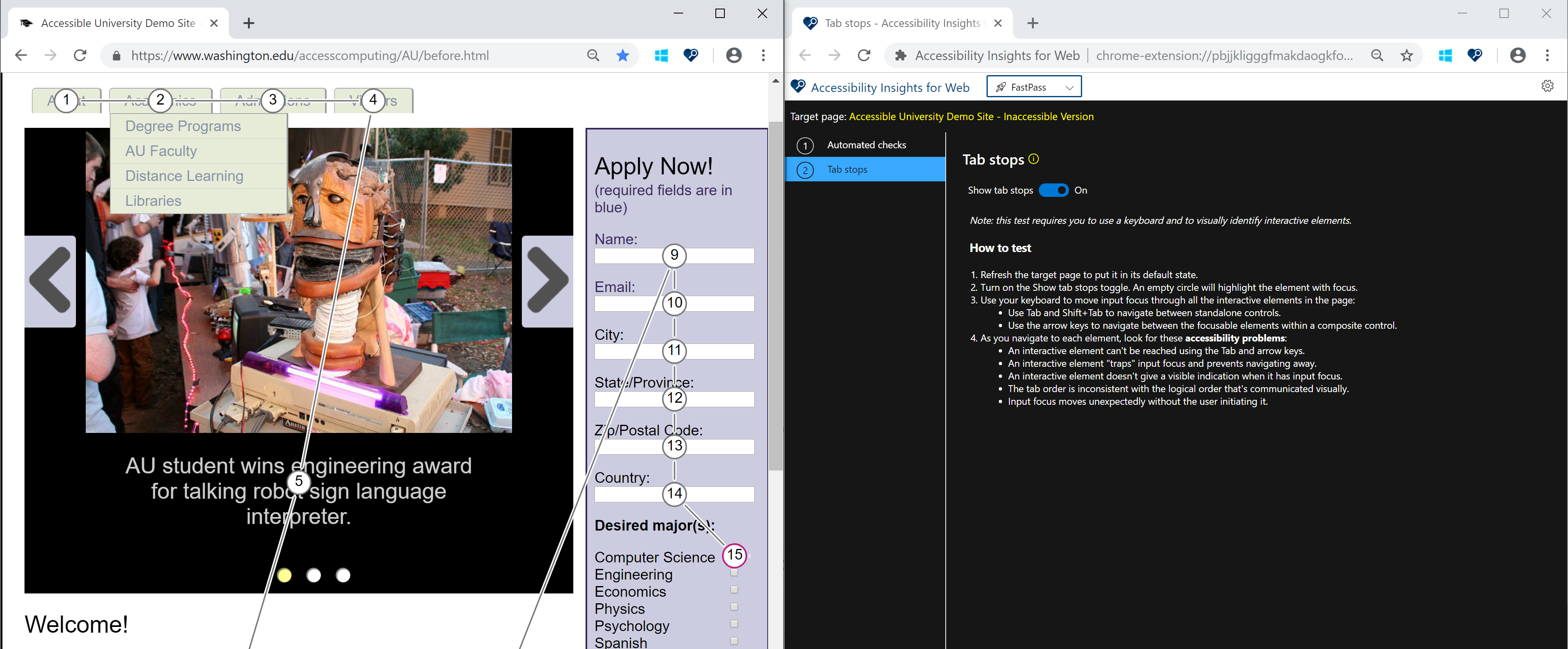
I see Accessibility Insights provides a visualization for tab order that looks very similar to my idea for visualizing reading order. This suggests that the visualization technique itself has some merit. Attached is a sample image I made for my Firefox feature request (with the last arrow in the step highlighted because it most likely violates reading order).

 aardrian
All 11 comments
Thank you for filing this issue. We will triage it in our weekly review and update the issue. Thank you for contributing to Accessibility Insights!
 msft-github-bot
on 20 Mar 2019
msft-github-bot
on 20 Mar 2019
Hi Adrian, thanks for your interest on the tool!
Have you take a look at our tab stops test in FastPass? the visualization indicates which elements are receiving focus and in what order, using numbers and arrows while you use your keyboard to move input focus with Tab or arrow keys:
 ferBonnin
on 20 Mar 2019
ferBonnin
on 20 Mar 2019
@ferBonnin , yes, I have. That is what prompted me to post this feature request.
That feature only indicates interactive controls (or content that has been made a tab stop with tabindex). I am looking to show the _reading_ order for all the content on the page, not just the tab stops.
In my example above, none of that content is tabbable so its reading order is not exposed in the tool. My feature request would expose its reading order.
Does that help clarify it?
aardrian
on 20 Mar 2019
@aardrian got it! yes, this clarifies it :)
ferBonnin
on 20 Mar 2019
@aardrian thanks for the feature request! it is a great suggestion and we are looking into this.
ferBonnin
on 23 Mar 2019
This is a great suggestion that can help add visualizations for a couple of requirements.
We will keep active and add it into our backlog, but if you or someone in the community wants to help please feel free to work on this! We would be happy to provide guidance 😊
Thanks!
ferBonnin
on 1 Apr 2019
This stack is outside my wheelhouse, so it is unlikely I will learn it, get it set up in my dev environment, and contribute anything meaningful in the near term. I will poke around to see if I can find someone, but, well, yeah.
aardrian
on 1 Apr 2019
I created a bookmarklet that acts as both a proof of concept and a stop-gap until this feature is natively implemented in browsers and/or testing tools: http://adrianroselli.com/2019/04/reading-order-bookmarklet.html

aardrian
on 14 Apr 2019
Like
 SOPHYSTAKATED1
on 16 Aug 2019
SOPHYSTAKATED1
on 16 Aug 2019
I made a video that played at Smashing Conference NYC to try to garner broader community support: https://adrianroselli.com/2019/10/smashing-web-we-want-video-pitch.html
It is also on YouTube: https://www.youtube.com/watch?v=UjXCAuWuXdk
aardrian
on 28 Oct 2019
The Edge DevTools team has deployed this feature to Chromium and it is coming in Edge 86:
https://docs.microsoft.com/en-us/microsoft-edge/devtools-guide-chromium/experimental-features#enable-source-order-viewer
While I think it still has value in the Insights tool, I will close this since the core feature is at least available to devs.
aardrian
on 10 Sep 2020
Related issues
 jechols
·
4Comments
jechols
·
4Comments
 LiLoDavis
·
3Comments
LiLoDavis
·
3Comments
 hollsk
·
6Comments
LiLoDavis
·
6Comments
hollsk
·
6Comments
LiLoDavis
·
6Comments
 cglong
·
4Comments
cglong
·
4Comments