Abp: How to uninstall the old ABP CLI version or upgrade the ABP CLI?

When I plan to upgrade the latest ABP CLI, but failed.
dotnet tool update -g Volo.Abp.Cli
The error messages as below:
Tool 'volo.abp.cli' failed to update due to the following:
Failed to create shell shim for tool 'volo.abp.cli': Command 'abp' conflicts with an existing command from another tool.
Tool 'volo.abp.cli' failed to install.
I just want to list all the dotnet tool.
dotnet tool list
But no items list. And I want to uninstall the package using the command:
dotnet tool uninstall -g Volo.Abp.Cli
The follow message display: Tool 'volo.abp.cli' has multiple versions installed and cannot be uninstalled.
Anyone can give some suggestions? Thanks so much.
 jack-gaojz-zz
All 5 comments
Hello,
I tried and I get the same result,
to get the lastest abp you can use other ways
> switch-to-preview: Switches packages to preview ABP version.
> switch-to-stable: Switches packages to stable ABP version from preview version.
> switch-to-nightly: Switches packages to nightly preview ABP version.
 amSaighi
on 21 Sep 2020
amSaighi
on 21 Sep 2020
hi
Volo.Abp.Cli is dotnet tool. and it's published on nuget.org.
You can refer to: https://docs.microsoft.com/en-us/dotnet/core/tools/global-tools
 maliming
on 22 Sep 2020
maliming
on 22 Sep 2020
Hello,
I tried and I get the same result,
to get the lastest abp you can use other ways
> switch-to-preview: Switches packages to preview ABP version.
> switch-to-stable: Switches packages to stable ABP version from preview version.
> switch-to-nightly: Switches packages to nightly preview ABP version.
I try to install the "Volo.Abp.Cli" and it always throws the error message as below:
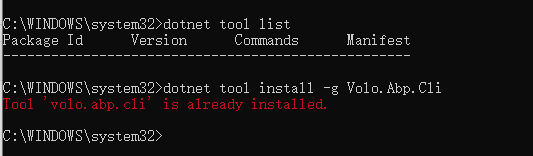
So I have to uninstall the previous version firstly. :(
jack-gaojz-zz
on 22 Sep 2020
@jack-gaojz
1) Open %USERPROFILE%\.dotnet\tools directory, delete abp.exe.
2) Then open .store folder and delete volo.abp.cli folder.
3) Run dotnet tool install Volo.Abp.Cli -g command.
 yekalkan
on 22 Sep 2020
yekalkan
on 22 Sep 2020
@jack-gaojz
- Open
%USERPROFILE%\.dotnet\toolsdirectory, delete abp.exe.- Then open
.storefolder and deletevolo.abp.clifolder.- Run
dotnet tool install Volo.Abp.Cli -gcommand.
It works, thanks so much. 👍
jack-gaojz-zz
on 22 Sep 2020
Related issues
 vincywindy
·
14Comments
vincywindy
·
14Comments
 abllyboy
·
16Comments
abllyboy
·
16Comments
 stay2be
·
35Comments
maliming
·
33Comments
stay2be
·
35Comments
maliming
·
33Comments
 Znow
·
37Comments
Znow
·
37Comments
Most helpful comment
It works, thanks so much. 👍