I use Swashbuckle.AspNetCore 5.0.0-rc4 on Abp 0.21.0 .It seems to work,But there are no auth button in swagger
 vincywindy
All 14 comments
I try add this code
c#
context.Services.AddSwaggerGen(
options =>
{
options.SwaggerDoc("v1", new Microsoft.OpenApi.Models.OpenApiInfo { Title = "Aimer API", Version = "v1" });
options.DocInclusionPredicate((docName, description) => true);
options.AddSecurityDefinition("bearerAuth", new Microsoft.OpenApi.Models.OpenApiSecurityScheme()
{
Description = "JWT Authorization header using the Bearer scheme. Example: \"Authorization: Bearer {token}\"",
Name = "Authorization",
In = Microsoft.OpenApi.Models.ParameterLocation.Header,
Type = Microsoft.OpenApi.Models.SecuritySchemeType.OAuth2,
Flows = new Microsoft.OpenApi.Models.OpenApiOAuthFlows() { Password = new Microsoft.OpenApi.Models.OpenApiOAuthFlow() { TokenUrl = new Uri("https://****") } }
});
});
It show‘s a dialog to login

I login success,but still no Bearer header in request.
And if it has Multi-tenant, how to add Multi-tenant header?
vincywindy
on 9 Oct 2019
Okey ,I slove it a half,the code like this
```c#
context.Services.AddSwaggerGen(
options =>
{
options.SwaggerDoc("v1", new Microsoft.OpenApi.Models.OpenApiInfo { Title = "AimerCS API", Version = "v1" });
options.DocInclusionPredicate((docName, description) => true);
options.AddSecurityDefinition("Bearer", new OpenApiSecurityScheme()
{
Description = "Swagger使用JWT来进行授权",
Name = "Authorization",
In = Microsoft.OpenApi.Models.ParameterLocation.Header,
Type = Microsoft.OpenApi.Models.SecuritySchemeType.OAuth2,
Scheme = "bearer",
BearerFormat = "JWT",
Flows = new Microsoft.OpenApi.Models.OpenApiOAuthFlows() { Password = new Microsoft.OpenApi.Models.OpenApiOAuthFlow() { TokenUrl = new Uri("https://**/connect/token") } }
});
options.AddSecurityRequirement(new OpenApiSecurityRequirement
{
{
new OpenApiSecurityScheme
{
Reference = new OpenApiReference { Type = ReferenceType.SecurityScheme, Id = "Bearer" }
},
new string[] {}
}
});
});
And then
```c#
app.UseSwaggerUI(options =>
{
options.SwaggerEndpoint("/swagger/v1/swagger.json", "AimerCS API");
options.OAuthClientId("your ClientId");
options.OAuthClientSecret("your ClientSecret");
});
It works! But only on Single-tenant, Beacause I didn't find the way to add tenant header
vincywindy
on 9 Oct 2019
Maybe you can refer to this implementation.
https://github.com/aspnetboilerplate/module-zero-core-template/blob/master/aspnet-core/src/AbpCompanyName.AbpProjectName.Web.Host/wwwroot/swagger/ui/index.html#L72
 maliming
on 9 Oct 2019
maliming
on 9 Oct 2019
Ok I Solve it,Here is the code, to some one who need!
abp.swagger.js
var abp = abp || {};
(function () {

    /* Swagger */

    abp.swagger = abp.swagger || {};

    abp.swagger.addAuthToken = function () {
        var authToken = abp.auth.getToken();
        if (!authToken) {
            return false;
        }

        var cookieAuth = new SwaggerClient.ApiKeyAuthorization(abp.auth.tokenHeaderName, 'Bearer ' + authToken, 'header');
        swaggerUi.api.clientAuthorizations.add('bearerAuth', cookieAuth);
        return true;
    }

    abp.swagger.addCsrfToken = function () {
        var csrfToken = abp.security.antiForgery.getToken();
        if (!csrfToken) {
            return false;
        }
        var csrfCookieAuth = new SwaggerClient.ApiKeyAuthorization(abp.security.antiForgery.tokenHeaderName, csrfToken, 'header');
        swaggerUi.api.clientAuthorizations.add(abp.security.antiForgery.tokenHeaderName, csrfCookieAuth);
        return true;
    }

    function loginUserInternal(tenantId, callback) {
        var usernameOrEmailAddress = document.getElementById('userName').value;
        if (!usernameOrEmailAddress) {
            alert('Username or Email Address is required, please try with a valid value !');
            return false;
        }

        var password = document.getElementById('password').value;
        if (!password) {
            alert('Password is required, please try with a valid value !');
            return false;
        }

        var xhr = new XMLHttpRequest();

        xhr.onreadystatechange = function () {
            if (xhr.readyState === XMLHttpRequest.DONE) {
                if (xhr.status === 200) {
                    var responseJSON = JSON.parse(xhr.responseText);
                    var result = responseJSON;
                    var expireDate = new Date(Date.now() + (result.expires_in));
                    abp.auth.setToken(result.access_token, expireDate);
                    callback();
                    location.reload();
                } else {
                    alert('Login failed !');
                }
            }
        };

        xhr.open('POST', '**IdentityUrl**', true);
        xhr.setRequestHeader('__tenant', tenantId);
        xhr.setRequestHeader('Content-type', 'application/x-www-form-urlencoded');
        xhr.send("grant_type=password&scope=AimerCS&username=" + usernameOrEmailAddress + "&password=" + password + "&client_id=AimerCS_App&client_secret=1q2w3e*");

    };

    abp.swagger.login = function (callback) {
        //Get TenantId first
        var tenancyName = document.getElementById('tenancyName').value;

        if (tenancyName) {
            var xhrTenancyName = new XMLHttpRequest();
            xhrTenancyName.onreadystatechange = function () {
                if (xhrTenancyName.readyState === XMLHttpRequest.DONE && xhrTenancyName.status === 200) {
                    var responseJSON = JSON.parse(xhrTenancyName.responseText);
                    var result = responseJSON;
                    if (result.success) { // Tenant exists and active.
                        loginUserInternal(result.tenantId, callback); // Login for tenant
                    } else {
                        alert('There is no such tenant or tenant is not active !');
                    }
                }
            };

            xhrTenancyName.open('GET', '/api/abp/multi-tenancy/find-tenant/' + tenancyName, true);
            xhrTenancyName.send();
        } else {
            loginUserInternal(null, callback); // Login for host
        }
    };

    abp.swagger.logout = function () {
        abp.auth.clearToken();
        location.reload();
    }

    abp.swagger.closeAuthDialog = function () {
        if (document.getElementById('abp-auth-dialog')) {
            document.getElementsByClassName("swagger-ui")[1].removeChild(document.getElementById('abp-auth-dialog'));
        }
    }

    abp.swagger.openAuthDialog = function (loginCallback) {
        abp.swagger.closeAuthDialog();

        var abpAuthDialog = document.createElement('div');
        abpAuthDialog.className = 'dialog-ux';
        abpAuthDialog.id = 'abp-auth-dialog';

        document.getElementsByClassName("swagger-ui")[1].appendChild(abpAuthDialog);

        // -- backdrop-ux
        var backdropUx = document.createElement('div');
        backdropUx.className = 'backdrop-ux';
        abpAuthDialog.appendChild(backdropUx);

        // -- modal-ux
        var modalUx = document.createElement('div');
        modalUx.className = 'modal-ux';
        abpAuthDialog.appendChild(modalUx);

        // -- -- modal-dialog-ux
        var modalDialogUx = document.createElement('div');
        modalDialogUx.className = 'modal-dialog-ux';
        modalUx.appendChild(modalDialogUx);

        // -- -- -- modal-ux-inner
        var modalUxInner = document.createElement('div');
        modalUxInner.className = 'modal-ux-inner';
        modalDialogUx.appendChild(modalUxInner);

        // -- -- -- -- modal-ux-header
        var modalUxHeader = document.createElement('div');
        modalUxHeader.className = 'modal-ux-header';
        modalUxInner.appendChild(modalUxHeader);

        var modalHeader = document.createElement('h3');
        modalHeader.innerText = 'Authorize';
        modalUxHeader.appendChild(modalHeader);

        // -- -- -- -- modal-ux-content
        var modalUxContent = document.createElement('div');
        modalUxContent.className = 'modal-ux-content';
        modalUxInner.appendChild(modalUxContent);

        modalUxContent.onkeydown = function (e) {
            if (e.keyCode === 13) {
                //try to login when user presses enter on authorize modal
                abp.swagger.login(loginCallback);
            }
        };

        //Inputs
        createInput(modalUxContent, 'tenancyName', '租户名');
        createInput(modalUxContent, 'userName', '用户名或者邮箱');
        createInput(modalUxContent, 'password', '密码', 'password');

        //Buttons
        var authBtnWrapper = document.createElement('div');
        authBtnWrapper.className = 'auth-btn-wrapper';
        modalUxContent.appendChild(authBtnWrapper);

        //Close button
        var closeButton = document.createElement('button');
        closeButton.className = 'btn modal-btn auth btn-done button';
        closeButton.innerText = 'Close';
        closeButton.style.marginRight = '5px';
        closeButton.onclick = abp.swagger.closeAuthDialog;
        authBtnWrapper.appendChild(closeButton);

        //Authorize button
        var authorizeButton = document.createElement('button');
        authorizeButton.className = 'btn modal-btn auth authorize button';
        authorizeButton.innerText = 'Login';
        authorizeButton.onclick = function () {
            abp.swagger.login(loginCallback);
        };
        authBtnWrapper.appendChild(authorizeButton);
    }

    function createInput(container, id, title, type) {
        var wrapper = document.createElement('div');
        wrapper.className = 'wrapper';
        container.appendChild(wrapper);

        var label = document.createElement('label');
        label.innerText = title;
        wrapper.appendChild(label);

        var section = document.createElement('section');
        section.className = 'block-tablet col-10-tablet block-desktop col-10-desktop';
        wrapper.appendChild(section);

        var input = document.createElement('input');
        input.id = id;
        input.type = type ? type : 'text';
        input.style.width = '100%';

        section.appendChild(input);
    }

})();
Just Change the IdentityUrl to your IdentityAuthUrl ,It is seen like http://**/connect/token
vincywindy
on 9 Oct 2019
Maybe you can refer to this implementation.
https://github.com/aspnetboilerplate/module-zero-core-template/blob/master/aspnet-core/src/AbpCompanyName.AbpProjectName.Web.Host/wwwroot/swagger/ui/index.html#L72
I hope it can help you to import it to V1.0!
vincywindy
on 9 Oct 2019
Thanks, please follow https://github.com/abpframework/abp/issues/1874
maliming
on 9 Oct 2019
And how to generator typescript code, should I change the service.config.nswag?
vincywindy
on 9 Oct 2019
Abp provides the module's npm package for angular. Now I don't know much about it, you can take a look.
maliming
on 10 Oct 2019
Should change this
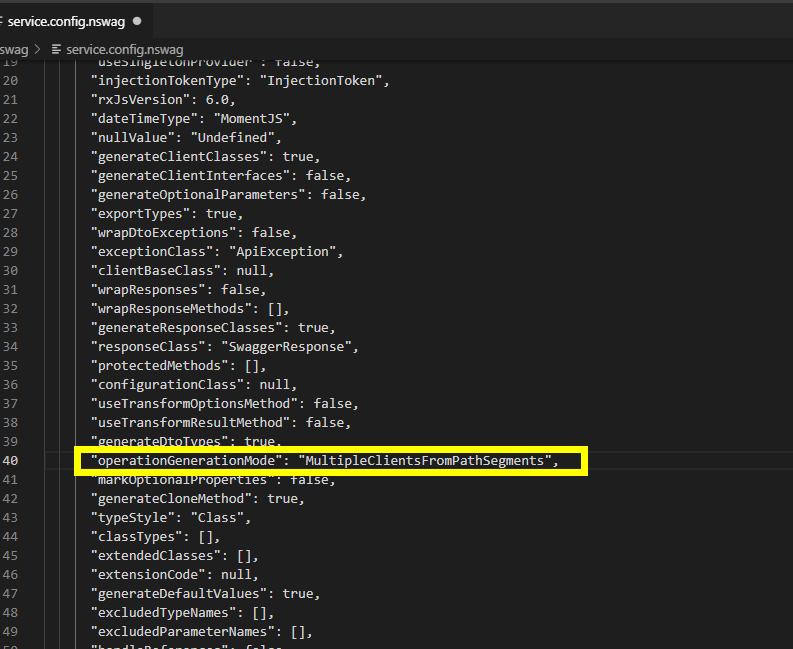
MultipleClientsFromPathSegments will has exception,
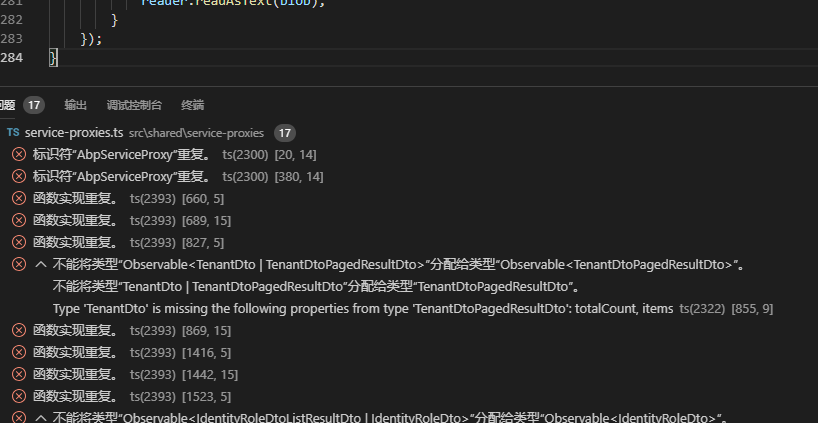
It says the class is repeated.
Change it to MultipleClientsFromOperationId
vincywindy
on 10 Oct 2019
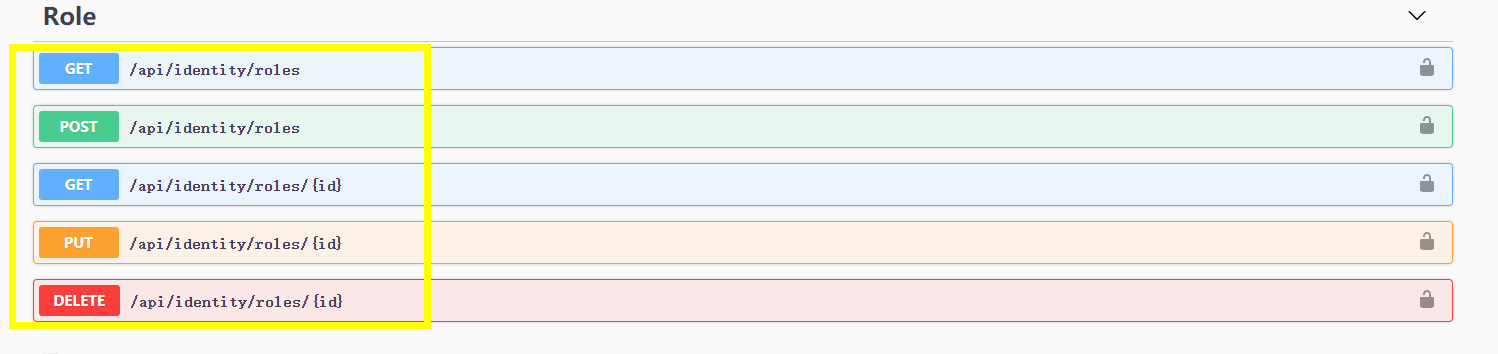
It can‘t use MultipleClientsFromPathSegments beacause there have same name.
vincywindy
on 10 Oct 2019
The reason is because.typescript does not allow this kind of overload.
This is a bug related with nswag.
The problem is get roles and get roles with param id, it will generate two func with the same name getRoles with different param and response type.
But ts does not allow this kind of overload.
One solution is to use another generation mode, but it is very ugly.
It generates something like getRoles1 getRoles2 which is unreadable.
 KidoPlay
on 21 Oct 2019
KidoPlay
on 21 Oct 2019
The reason is because.typescript does not allow this kind of overload.
This is a bug related with nswag.
The problem is get roles and get roles with param id, it will generate two func with the same name getRoles with different param and response type.
But ts does not allow this kind of overload.
One solution is to use another generation mode, but it is very ugly.
It generates something like getRoles1 getRoles2 which is unreadable.
Yes,I think the best way is use method+function names,like /api/identity/getroles /api/identity/postroles,but it seems like there are no way to do it on nswag
vincywindy
on 22 Oct 2019
The reason is because.typescript does not allow this kind of overload.
This is a bug related with nswag.
The problem is get roles and get roles with param id, it will generate two func with the same name getRoles with different param and response type.
But ts does not allow this kind of overload.
One solution is to use another generation mode, but it is very ugly.
It generates something like getRoles1 getRoles2 which is unreadable.Yes,I think the best way is use method+function names,like /api/identity/getroles /api/identity/postroles,but it seems like there are no way to do it on nswag
getRoles and PostRoles can be generated.
but getRoles(no param) and getRoles(withParam) is a pain
KidoPlay
on 22 Oct 2019
The reason is because.typescript does not allow this kind of overload.
This is a bug related with nswag.
The problem is get roles and get roles with param id, it will generate two func with the same name getRoles with different param and response type.
But ts does not allow this kind of overload.
One solution is to use another generation mode, but it is very ugly.
It generates something like getRoles1 getRoles2 which is unreadable.Yes,I think the best way is use method+function names,like /api/identity/getroles /api/identity/postroles,but it seems like there are no way to do it on nswag
getRoles and PostRoles can be generated.
but getRoles(no param) and getRoles(withParam) is a pain
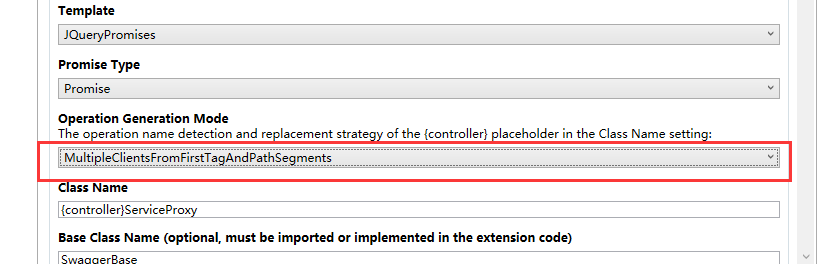
How about use this mode ,use differrent tag with the same method
vincywindy
on 23 Oct 2019
Related issues
 hikalkan
·
3Comments
hikalkan
·
3Comments
hikalkan
·
3Comments
hikalkan
·
3Comments
 derily
·
3Comments
hikalkan
·
3Comments
hikalkan
·
3Comments
derily
·
3Comments
hikalkan
·
3Comments
hikalkan
·
3Comments
Most helpful comment
Ok I Solve it,Here is the code, to some one who need!
abp.swagger.js
Just Change the IdentityUrl to your IdentityAuthUrl ,It is seen like http://**/connect/token