360controller: Xbox Elite v2 Controller Support
Type of Controller
Xbox Elite v2
OS Version
10.15.1
Driver Version
1.0.0-alpha.5
Connection Method
Bluetooth, via USB the controller is not recognized
Device Name and Info
(If you don't know this information, please refer to the README for how to find it. Enter N/A if not applicable)
Device Name: Xbox Elite Wireless Controller
Product ID: 0x0B05
Vendor ID: 0x045E
Services: Xbox Bluetooth Gamepad
Response of Controller
When connected the guide button is constantly lit.
Response in Preference Pane
In the preference pane it says no devices found
Detailed Explaination of Issue
Under advanced I've checked Enable Driver, however there is no controller recognized, the deadzones doesn't provide any feedback and on controller test no buttons identify themselves when pressed on the controller. So while the controller is paired and connected via bluetooth there is no input being registered on the computer.
 edolyne
All 97 comments
The preference pane only provides feedback for controllers that are using the driver. Xbox controllers are natively supported through Bluetooth on macOS, so they won't show up in the preference pane. You can use something like an HTML5 gamepad tester if you want to make sure that the controller is working. Otherwise, the wired support will require a patch to the driver to work properly. I should have a patch for you within a week.
 FranticRain
on 5 Nov 2019
FranticRain
on 5 Nov 2019
Here's a build with your controller added. Let me know how it works. I want to make sure that the new elite controller works as expected.
FranticRain
on 12 Nov 2019
Hi, I didn't open this issue but I did try the build linked above. It doesn't work for me, although my controller is listed with a different product ID:
Product ID:   0x0b00
Vendor ID:    0x045e
It is also an Xbox Elite Wireless Controller 2, so maybe there are multiple product IDs for it.
 grp
on 13 Nov 2019
grp
on 13 Nov 2019
I tried a local build with the product ID above added. It detects the controller, but no input works. I am on Catalina so that may be #968.
grp
on 13 Nov 2019
It’s far more likely that there is a new byte packet than a duplicate of that issue. Do you have any other Xbox controllers you could test with the driver? Because if it is only the elite controller that doesn’t work, it’s the byte packet. If it’s for both, then it’s a duplicate to that issue.
FranticRain
on 13 Nov 2019
Just a quick question
I don’t know if this is possible
But is there a way to extract the controller support from Catalina and migrate it into this program ?
I don’t know if it would only be possible on Mojave or is it possible at all
Sorry I’m not the most code savvy person
 mattmactimpson
on 13 Nov 2019
mattmactimpson
on 13 Nov 2019
I have my xbox one x refresh controller that works on usb but not the elite series 2 if that helps on info
mattmactimpson
on 13 Nov 2019
I don’t, unfortunately. Maybe someone else with this controller does (or isn’t on Catalina) and could figure that out.
grp
on 13 Nov 2019
I am running Mojave and have 2 controllers the series 2 does not work the one x controller does work
mattmactimpson
on 13 Nov 2019
@mattmactimpson This is impossible and out of scope. Bluetooth controllers are supported natively through macOS and not within the purview of this driver. As for your wired issues, are you using the the driver version included in this thread? Can you confirm the vendor and product IDs of your controller? Instructions are included in the README of this project.
@grp My current guess is that it's a different packet format. I want to get some more information to make sure. If you could, and if you have a windows PC available, I need a USB packet capture. The process is listed here: http://vestigl.com/sniffing/index.html I just need the button press packets, so you don't need to worry about getting the connection logic. Just plug the controller in to a port, start the sniff, press some buttons, and then end the sniff.
FranticRain
on 13 Nov 2019
Bluetooth Xbox controllers are not supported on Mac OS Mojave
Yes I’m using current driver
Vendor id 0x045e
Product id 0x0b00
mattmactimpson
on 13 Nov 2019
@mattmactimpson Okay. That's definitely not going to work because that ID isn't recognized by the driver. I'll get a special version out to you soon that should work with your controller.
FranticRain
on 13 Nov 2019
Here's a build that should include support for that 0x0b00 version of the Elite controller. Let me know how it works.
FranticRain
on 14 Nov 2019
Probably expected, but the new build has the same result as my local build. I'll see if I can borrow a Windows PC to run the capture.
grp
on 14 Nov 2019
@grp Yeah. I didn't anticipate that would work, but the kernel works in mysterious ways, so I wanted to check.
To anyone with this controller, if you can get me a packet sniff, that'd be amazing. It isn't going to be feasible to solve this without it. Dunno why Microsoft changed the packets again, but you know. Gotta make some more work for me, right?
FranticRain
on 14 Nov 2019
hey @grp and @FranticRain I went and dumped the controller, I did two dumps to be sure (I think I screwed up the button presses on the first one)
 b3ll
on 16 Nov 2019
b3ll
on 16 Nov 2019
@b3ll Thanks for that. I should be able to get it working with this.
In case anyone was curious what this looks like:
It's a similar style of packet to the original elite controller, but now contains 5 extra bytes of data. None of the sniffs provided any insight into what this extra data was because it was all 00. Similarly, the original elite controller contained a sort of "true" value in the secondary part of the packet, where it would record the real value from the controller and not the mapped one. For example, if you had remapped your A button to LB, then the first part of the packet would report LB and the second part would report A when you pressed the A button on your gamepad. However, in these sniffs, the second half of the packet is 0-ed out. Even the sticks. It would probably require some more investigation to figure out what this means for the actual contents of the packets, but for now I'm not particularly worried about it.
FranticRain
on 16 Nov 2019
In reviewing the code, these changes to the byte packet shouldn't be preventing the controller from properly passing data through the driver. I'm a little bit stumped. Weird question, but can you get the guide button to report a press at all?
FranticRain
on 16 Nov 2019
Hi, same problem here, is there anything I can do to help ?
 sNohz
on 29 Nov 2019
sNohz
on 29 Nov 2019
@sNohz If you could answer the question above, using one of the drivers linked in this thread, that might help. Does pressing the guide button ever show up in the preference pane in macOS?
FranticRain
on 29 Nov 2019
Oh ! I just reinstalled the build from 16 days ago and this time all the controller is working
sNohz
on 29 Nov 2019
@sNohz Can you confirm what the product ID of your controller is? If you don’t know how to find this, there is a guide in the README.
To everyone else: I am going to assume that this problem is solved and close it in the coming days unless anyone can confirm that they are having issues with the build I posted in this thread.
FranticRain
on 29 Nov 2019
I have
Product ID: 0x0b00
sNohz
on 29 Nov 2019
Hello,
I tried the build from 16 days ago and My Elite 2 controller is detected now but none of the inputs are being registered in the controller test. Let me know if you require any further details.
 newcontender
on 30 Nov 2019
newcontender
on 30 Nov 2019
@newcontender What is the product ID of your controller? And have you checked every profile on your controller?
FranticRain
on 30 Nov 2019
Hi,
I have tried all the profiles on the controller. Here is the Product and Vendor ID:
Product ID: 0x0b00
Vendor ID: 0x045e
OS X: Catalina
newcontender
on 30 Nov 2019
Okay so now we have two identical controllers with two different results. Have you tried updating the firmware on your controller? Just to make sure, since this seems like the only difference now.
FranticRain
on 1 Dec 2019
I updated the firmware on the controller when I first purchased it 2 weeks ago. Has there been any updates since? I can check again tomorrow when I have time.
newcontender
on 1 Dec 2019
I wouldn’t know. I don’t own one. That seems like the only difference between the previous poster and you, though. I have no idea what else would be causing these to act differently.
FranticRain
on 1 Dec 2019
Okay it seems it is working now after rebooting into my Windows 10 partition to check the firmware ( 4.8.1908.0.) When booting back into Catralina it was working fine... It seems it simply required a reboot after the initial installation reboot.
Either way, I'm happy to report everything is okay so far.
To further add to this prior issue the Xbox button must be solid and not flashing for inputs to register. The prior issue happened to me again.
newcontender
on 2 Dec 2019
Playing wired is fine but Just to further understand the technicalities of all this. What would prevent the Xbox controller from being recognized in other applications via Bluetooth? I know it works with Steam. Is it simply a driver issue?
newcontender
on 3 Dec 2019
It is a game issue. A lot of games are really dumb and do really dumb stuff like look for the driver specifically in order to connect with devices. Other games are only designed to work with USB based controllers. Long story short, macOS's controller support has been really bad for a really long time. And we can't take a Bluetooth device and make it look like a USB device. So the problem really is in the games, and there isn't much we can do about it.
FranticRain
on 16 Dec 2019
Ah, I see. More specifically, I have been trying to get it to work with Openemu - a popular Multiplatform emulator. I haven't used any other Xbox controller with this application before. PS4 controller support via bluetooth has worked fine with this though.
I have done some digging and it seems this controller may just need a firmware update to rectify these issues. People have been complaining about bluetooth not working with their IOS devices and such. I am not sure if you are familiar with the Openemu platform but have Xbox wireless controllers been able to work with them in the past?
newcontender
on 16 Dec 2019
In my experience, OpenEmu has had some of the best controller support in an application that I’ve ever seen. It should support all controllers no matter how you connect them. Be it via the driver in wireless/wired or via Bluetooth. I originally made the (Xbox One) driver because I wanted to play Metal Gear Solid via OpenEmu, so I can confirm that it works via all of the methods listed above. Personally, I always suggest that people use the best supported path, which is Bluetooth. Any issues specific to the Elite 2, I can’t comment on.
FranticRain
on 16 Dec 2019
Funny, MGS was one of the first games I tested when I tried the Bluetooth on this controller. I will just bank on a firmware update resolving it in time. Thanks for your detailed explanations :)
newcontender
on 16 Dec 2019
Hi there!
We received the Elite Series 2 at the office and we're in that boat, it's not working on macOS (both wired and wireless, tested with the driver posted by @FranticRain earlier here).
Product ID: 0x0b05 (it's a different one!)
Vendor ID: 0x045e
Firmwave ID: 0x0903 (it's the latest, we updated it on Windows)
We're on Catalina.
Here's a packet sniffing dump: https://www.dropbox.com/s/uh5te32m3fuhog7/elite2?dl=1
Cheers!
 mrhelmut
on 16 Dec 2019
mrhelmut
on 16 Dec 2019
@newcontender You've probably already done this, but make sure to configure your controller in the OpenEmu preferences.
@mrhelmut You have the same PID as the OP, so this device should be recognized by the driver. What's the response in the preference pane when you connect the device? Can you confirm via the "enable driver" checkbox that the driver is set up correct and enables without error message? And your packet dump doesn't really tell me much. As far as it's concerned, you didn't press any buttons, and there was just a lot of useless noise from a device on the same bus. I don't think I need a packet sniff to solve your problem, though.
FranticRain
on 16 Dec 2019
Ah right!
Enabling/disabling is fine.
When wired, it is found but absolutely nothing responds.
Over bluetooth it isn't found at all (while being connected to macOS properly).
Also, I noticed that the different PIDs are depending on the connection.
0x0b05 = bluetooth
0x0b00 = wired
I'll do another dump, this one comes from Windows VM which is likely the reason why the inputs didn't got through.
mrhelmut
on 16 Dec 2019
Ah, perfect! Thanks for that PID find. That will help me clean up the plist.
Note that wired is the only thing this driver cares about, and that I can help you with. macOS supports this controller via Bluetooth natively, and therefore the driver is not used to control this device. Therefore, it doesn't appear in the preference pane. Not ideal, I realize. If you want to test it in Bluetooth mode, check out an HTML5 gamepad tester or something of that ilk. Any further support of Bluetooth Xbox One controllers is out of scope of this driver, currently.
For wired, I absolutely don't know what's going on. By all accounts, the packets that this device sends should work just fine. And they do, in fact, work for some people. This is beyond perplexing to me. Can you turn off the bluetooth on your device and then plug the controller in and see if it works?
FranticRain
on 16 Dec 2019
I'm aware about this driver being for wired only, it's fine. :) Just thought mentioning my results.
macOS Catalina and iOS 13 don't support the Elite 2. It was advertised as supported at first, but it ended up not being supported and Apple removed it from the supported controllers list. It pairs but that's all.
Would it be possible that the driver conflicts with a previous version of it from override it with a driver with the same version number? (just a random thought since it appears they both are 1.0.0-alpha.5)
This is puzzling me too as those controllers should be using the same base protocol. I'm tempted to think it's an issue from our side.
mrhelmut
on 17 Dec 2019
The installation process deletes all artifacts of all versions of previous installations before installing the new one. I do development builds with identical version numbers all the time and have no problems whatsoever. The version number is purely for customers and has no real bearing on the implementation or execution of the code.
My fear is that you are plugging the controller in, and it is pairing with the Bluetooth on your device. So you are recognized by the driver, but all buttons are being sent via Bluetooth. So if you could run that test I mentioned in my last comment where you turn off the Bluetooth on your device and plug in the controller, do you get a different result?
FranticRain
on 17 Dec 2019
Just tested with the bluetooth completely turned off. Controller is recognized and appears in the list, but nothing more happens.
mrhelmut
on 17 Dec 2019
@mehelmut Just out of curiosity is the light on your Elite 2 home button solid when you test out the controller inputs? I noticed mine wouldn't register at one point unless the light was solid.
@FranticRain Yup, I checked the controller configuration in the OpenEmu preferences. It doesn't even appear when over Bluetooth but shows up fine when connected wired.
newcontender
on 17 Dec 2019
The solid indicator light should confirm a proper pairing. There's a bad state that the controller can get in to in which the light would be solid, but we'd have to send a bad initialization packet to get that to happen. I just don't understand how both of you can have the same controller, with the same version of the driver, and have completely different results.
FranticRain
on 17 Dec 2019
Home button is properly lit when wired and listed in the driver as "Xbox One Wireless Controller (Wired)" but nothing responds.
We tested multiple other controllers to make sure that our macOS installation isn't broken (X360, regular Xbox One, and Elite v1) and everything works.
I also checked if the mapping profiles inside the controller are fine and they are all set to default.
I'll send you a proper input dump later if that may prove useful (though I'm expecting there will be nothing new).
mrhelmut
on 18 Dec 2019
god... so technical ... after reading all those comments I still don't have a clue what's happening .. so it the elite 2 controller working on macOS Catalina yet? I don't mind just wired support as soon as I can use it to play deadcell
 testerfruit
on 21 Dec 2019
testerfruit
on 21 Dec 2019
so it the elite 2 controller working on macOS Catalina yet?
If you're speaking about Apple's official support for bluetooth controllers, no, the Elite Series 2 is not part of the official Catalina supported controllers (only the Xbox One S controller is supported; pre-2016 controllers aren't).
mrhelmut
on 21 Dec 2019
@henrycc265 As for wired, I dunno, maybe. Try any of the builds posted in this thread and see if it works for you. Works for some people, doesn’t for others.
FranticRain
on 21 Dec 2019
Hi,
I have tried the build from here on macOS Catalina with Xbox Elite Series 2. The controller is not recognised from "Xbox 360 Controllers". The controller is connected to the Mac via Bluetooth. Is there anything that I miss?
 mariopavlov
on 23 Dec 2019
mariopavlov
on 23 Dec 2019
@mariopavlov As I’ve explain in this thread before, and as stated in the README, this driver does nothing for Bluetooth devices. Those devices are supported natively and therefore do not appear in the preference pane. If you want to test a Bluetooth controller, use something like an HTML5 game pad tester.
FranticRain
on 23 Dec 2019
@FranticRain I think some of the confusion is because this particular device doesn’t work over Bluetooth at all. Of course this driver wouldn’t change that.
grp
on 23 Dec 2019
@grp Bluetooth works on Steam for me, but that is all so far. I haven't had time to test it with many other games/applications.
newcontender
on 23 Dec 2019
@grp That's fair. Ideally, I'd like to find all controllers in the preference pane and then disable settings customization for non-driver supported controllers and maybe call it Xbox One Controller (Bluetooth) [Not Using 360Controller]. But I'm not planning on putting too much more effort into how things currently are when I'm going to have to redo everything for DriverKit anyway. :)
FranticRain
on 23 Dec 2019
@FranticRain About to give my elite V2 a try later. Is this working now?
 Taconite12
on 7 Jan 2020
Taconite12
on 7 Jan 2020
@Taconite12 Nothing has changed. As stated a few posts up in this thread, you're welcome to try the build in this thread. It should work, and I have confidence that it does work. If you've used the controller via Bluetooth, make sure to disconnect it from the PC or phone you connected it to and plug it in to a Windows machine once to reset it before you plug it in to your Mac.
FranticRain
on 7 Jan 2020
@FranticRain What do you mean by reseting it on a windows machine? I am on vacation and do not have anything windows with me but hopefully it will work without reconnecting to an xbox. Downloading the build from this thread now and will report back.
Taconite12
on 7 Jan 2020
@FranticRain So it looks like it is recognized by the software just fine but there is no ability to test the controller and the controller seems to have no ability on the game (Fortnite) that i am playing.
Taconite12
on 8 Jan 2020
When I say "reset" you just need to plug it into a Windows machine that can properly start it up, and sort of "reset" it from Bluetooth state into wired state. I'm pretty sure that people having issues with this controller are experiencing this issue and not an actual issue with the Elite 2 specifically, seeing as how it works for some people.
FranticRain
on 8 Jan 2020
I can confirm the build you provided in November worked out of the box for S2 after a restart. Any idea why it took like 5 real minutes for the installer script to run?
(Note, only tried wired. Bluetooth on Mojave did not work in Obra Dinn (to my surprise), and then I unpaired before trying 360Controller. I was too frustrated and wanting to play to mess with it further. No idea what should and shouldn't work these days...)
 jspiro
on 13 Jan 2020
jspiro
on 13 Jan 2020
Okay, that’s good. I’m going to basically declare the Elite V2 problem solved then. It seems like the rest of the issues are the same as #993. Going to leave this open since you’ll need a build in this thread to work, but I’m considering this done as soon as that other issue is fixed.
FranticRain
on 13 Jan 2020
@jspiro As to why install takes a long time, that’s all out of my hands. As far as I know, that’s just macOS introducing a random wait in order to drive you to distributing on the App Store. Also Obra Dinn is great. I hope you enjoy it.
FranticRain
on 13 Jan 2020
@FranticRain Aha interesting (and disappointing, Apple!). Was just curious, hoping perhaps your test build was not optimized or something. Note that Bluetooth does not work at all*, but my hands are happy and I can get back to hour three of imagining how folks die terrible deaths. Thank you for your devoted efforts all these years!
- So this is bizarre. If I connect via BT and load the game, I see a mouse cursor–as soon as I touch a stick, the mouse disappears and a menu item in the correct direction gets selected, but that's it for connectivity–no buttons, no second motions, nothing–one frame the game picks up and done.
Also, I remember reading news like this (https://www.cnet.com/how-to/how-to-connect-ps4-xbox-one-controller-to-a-mac/) a while back–is this something with the Elite controllers vs the new BT XBox One controllers? Maybe the BT support is only per-game if it's compiled in?
jspiro
on 14 Jan 2020
Oh also, might want to add tips/docs/message box somewhere stating the Elite 2 needs to be briefly plugged into a Windows (or maybe also Xbox?) machine briefly after attempting a bluetooth pairing and deleting the pairing. It's basically dead until you do this.
jspiro
on 14 Jan 2020
This driver is not intended for BT, only for wired USB.
BT support is provided directly by Apple, though only the Xbox One S controller works when it comes to Microsoft branded devices. The Elite Series 2 is not supported by Apple at the moment (it is recognized, but it processes no input).
mrhelmut
on 14 Jan 2020
I can 100% confirm that the gamepad need to be "initialized in USB by being plugged into Windows" prior to working in USB on macOS (otherwise it'll be recognized, but no input will work).
If the gamepad is connected via bluetooth, it is then switched to bluetooth mode and won't work anymore on macOS unless replugged to Windows in USB again.
mrhelmut
on 16 Jan 2020
Yeah. This is all something I need to figure out but I honestly haven't had the time, I'm so sorry. Been swamped with work responsibilities all of the sudden. This is all the same as the linked issue, #993. I'll get to it as soon as I can carve out some time.
FranticRain
on 16 Jan 2020
No worries, life happens, it's an open source project, it's already cool enough that the problem has been narrowed. :)
I guess this specific issue can be marked as resolved, it's pretty much only about #993 now.
mrhelmut
on 16 Jan 2020
I don't want to mark it as resolved since it isn't release yet. You still need the driver version from this thread, and I don't want to release until that issue is fixed. So it'll stay open for now. Wish I could put a banner up at the beginning of the issue to tell people to just download the version from this thread, though. :P
FranticRain
on 16 Jan 2020
Just wanted to chime in that I read through the thread, downloaded the latest version posted, and now my elite v2 shows up in preferences and all button presses seem to work (including guide, because that was asked earlier). The only thing I see that is odd and different from my elite v1 is the start(menu)/select(view) seem to be backwards.
When I connect my v1 elite to my Mac, and use html5gamepad to test, select shows as b8 and start shows as b9.
When I connect my v2 elite to my Mac, and use html5gamepad to test, select shows as b9 and start shows as b8.
When I connect my v1 or v2 elite to my PC and use the same site, select shows as b8 and start shows as b9 (which is the desired functionality) for both.
I've verified that I didn't remap those buttons (in fact, you can't with the xbox accessories app), so I'm not sure what else it would be. They don't appear backwards in the preferences tester though, just in the html5 gamepad tester and all games I've tried (via steam).
 snollygolly
on 8 Feb 2020
snollygolly
on 8 Feb 2020
@FranticRain About to give my elite V2 a try later. Is this working now?
yes it works with the cable connected which is fine by me at least I got to use it now and play DeadCell on my Mac Pro
testerfruit
on 23 Feb 2020
Ok! I have and Elite 2 (Product ID: 0x0b00 Vendor ID: 0x045e) and I tried the latest version in this issue and it isn't working for me. My controller is detected (Wired) but the driver is not detecting input.
 Division69
on 26 Mar 2020
Division69
on 26 Mar 2020
Ok! I have and Elite 2 (Product ID: 0x0b00 Vendor ID: 0x045e) and I tried the latest version in this issue and it isn't working for me. My controller is detected (Wired) but the driver is not detecting input.
did you connect the controller with the usb -C cable and close and restart steam before you start a game? it also depends on what game you play with ( Cuphead / DIRT 4 / mad max / dead cells all works fine for me )
also it won't work with Apple Arcade games
god I am so sick of apple's half ass vague attitude towards gaming , with their money and manpower this shit could have been fixed in an hour,
I KNEW that apple should have hire me as head of merge & acquisition , the first thing I would do is to buy steam and enforce the rule of all games must have macOS version and full controller support )
also 10 million budget to make an apple controller better than the Microsoft elite 2 controller , apple promoting something from the 3rd party like now? such a disgrace .... I would never let that happen
testerfruit
on 26 Mar 2020
I'm not running on steam. I'm using the 360Controller driver to have the controller act as a keyboard and mouse.
Division69
on 26 Mar 2020
And I'm using a usb-c to usb-c cable which seams to be working like a normal usb would.
Division69
on 26 Mar 2020
I'm not running on steam. I'm using the 360Controller driver to have the controller act as a keyboard and mouse.
lololol.... then I don't know , it only works in steam I think
testerfruit
on 26 Mar 2020
I had actually tried it in big screen mode on steam a few weeks ago and I couldn't get it to work lol.
Division69
on 26 Mar 2020
And yeah apple can be pretty annoying about this kind of thing.
Division69
on 26 Mar 2020
there are some weird glitch for the macOS Catalina 10.15.4, I have to toggle the option enable drive on / off and close + restart steam to be able to get it to recognize my elite 2 controller and detectable ....
I wish the developer could have work harder on it and just make it able to plug & play like native support...
testerfruit
on 15 Apr 2020
To be fair, Steam itself is doing a whole lot of dirty injections when it comes to gamepad support, overriding any system defined stuff sometimes (Steam kind of comes with its own driver that bypass what games are trying to do).
Steam is the worst benchmark when it comes to testing. Better test gamepads outside of Steam first (if it works outside, but not while Steam is launched, it is very likely that it is Steam config messing around).
mrhelmut
on 15 Apr 2020
Wow this was a pain, finally got it working on steam with this driver, thanks!
 flantrinil
on 19 Apr 2020
flantrinil
on 19 Apr 2020
I can connect my Elite v2 and it shows up as "Xbox One Wired Controller (Wired)", but it doesn't work. Neither the test in the system settings plugin itself nor on https://html5gamepad.com.
I testet it in some Arcade games as well and some like LEGO Brawls don't detect it at all, others like Butter Royale show "Controller connected" but don't accept any input. Oceanhorn also doesn't work. Using it natively via Bluetooth in Oceanhorn, at least the A button worked, though nothing else. With the Driver, not even the A-Button works.
Thanks for your continued efforts!
 melgu
on 5 Jun 2020
melgu
on 5 Jun 2020
You'll need to plug it into a Windows machine to reset the USB connection and then plug it back in to the mac. That should fix it.
FranticRain
on 5 Jun 2020
Just as an update. Xbox Elite v2 Support has been implemented into iOS 14 and macOS 11 natively.
melgu
on 27 Jun 2020
Has support for any other Xbox controllers been implemented? It would be nice to have a full list. I can't install macOS Big Sur on here yet.
It would be nice if Apple provided a DriverKit method for implementing a game controller.
 d235j
on 27 Jun 2020
d235j
on 27 Jun 2020
They added the Elite v2 and the Adaptive Controller.
melgu
on 27 Jun 2020
Only bluetooth Xbox controllers have been added. That is: Elite v2 (not the v1), Adaptive Controller, and Xbox One S (not the original Xbox One) controller.
Wired support is unclear and likely not supported by Apple. It seems to be only about bluetooth and MiFi enabled games.
mrhelmut
on 27 Jun 2020
Since Apple is looking at a unified experience for controllers across all of their platforms, Bluetooth is really all they care about. Wired might be an ideal use case for some people at a desk, but do you really want to plug a controller into an iPad? I'm sure in their minds, that's wasted engineering time and it really isn't the ideal that they have for that platform. So Bluetooth becomes the target.
DriverKit and the Game Controller framework are sort of different beasts. Sure, I'd love to be able to take a PDP Rock Candy controller and let you have the same experience as if you were using an Elite 2 via Bluetooth. The question is whether or not that really has any value in the era of Apple Silicon. All of the legacy games are going to disappear, all that's left is going to be stuff that has been ported to this brave new world. The ideal of 360Controller as some sort of "legacy support" interface goes out the window. Games will need to conform to the new Game Controller framework. Given how excellent that framework is, is there really a lot of engineering value in spending time iterating for HID devices and enumerating them in your game? It's like when X-Input just started obliterating the need to support the nightmare that was DirectInput.
I'm still trying to figure out what a DriverKit implementation of 360Controller looks like, or if it's even still needed. I've been working with Apple engineers to flush out the issues with DriverKit, as well as determine if things like haptics are still even possible with DriverKit. There isn't much to say beyond that. I'm working on it, but I don't know if anyone will ever see it.
FranticRain
on 27 Jun 2020
Just as an update. Xbox Elite v2 Support has been implemented into iOS 14 and macOS 11 natively.
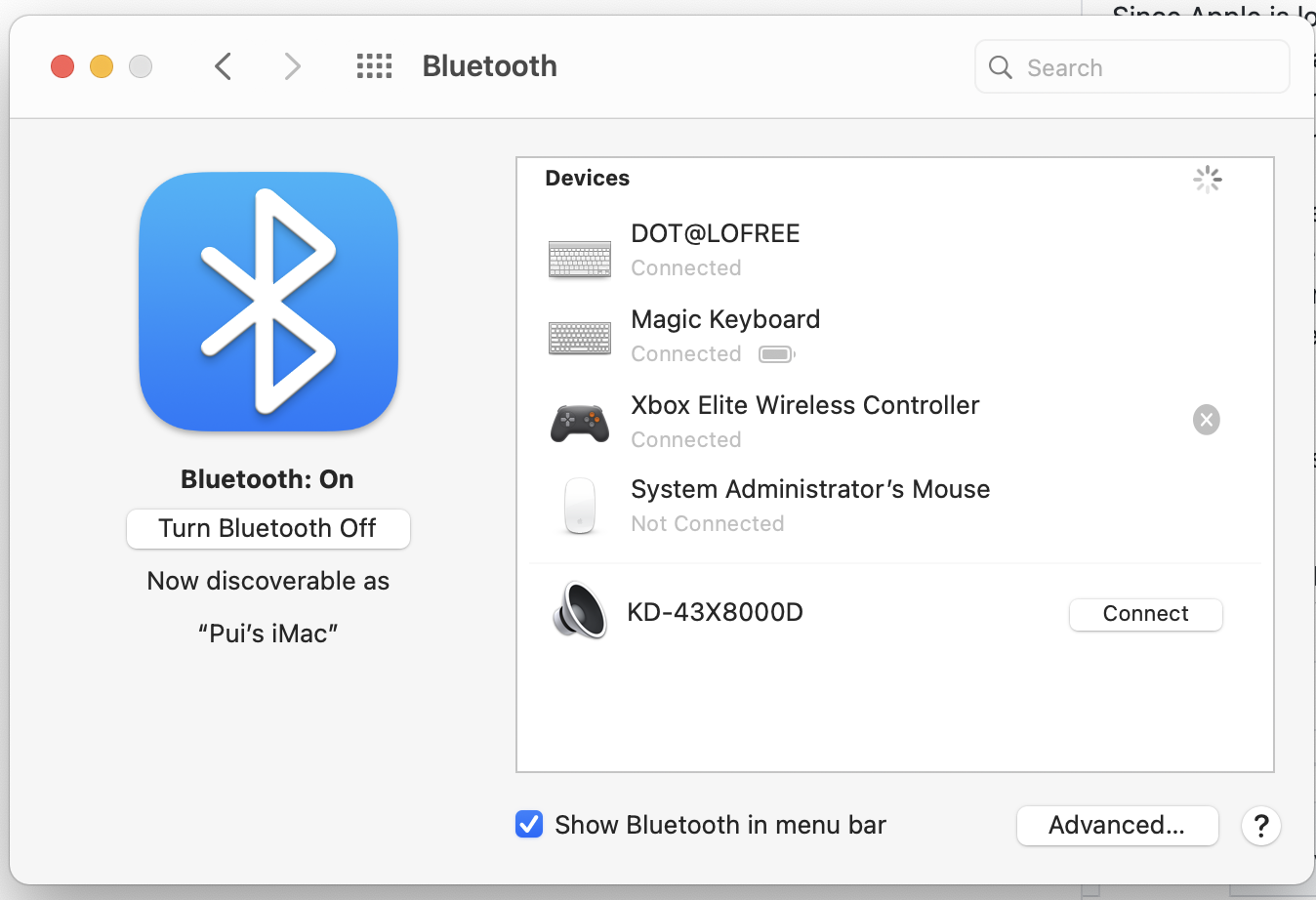
so far only the xbox one s controller has been able to wirelessly connected natively without any 360Controller
elite 2 has failed or dropped connection in an error message after connected
macOS Big Sur is a clean install without any 360Controller driver
I don't think the elite 2 is working yet ? god ... why does apple failed so miserably on just natively support a controller ??

testerfruit
on 8 Jul 2020
If you haven’t already, please file a bug report.
I will join the beta process once the public beta starts.
melgu
on 8 Jul 2020
If you haven’t already, please file a bug report.
I will join the beta process once the public beta starts.
I have reported
now the elite 2 controller paired and connected normally but no response to wether Apple Arcade or steam games
testerfruit
on 8 Jul 2020
Seems like before the OS update 🤔
That's pretty much as far as the support was in Catalina. Hope that gets fixed from Apple or game devs.
Edit: On iOS 14, it works flawlessly with existing games. Couldn't try on Big Sur yet.
melgu
on 8 Jul 2020
hi folks, I have tried to fully troubleshoot this issue so hopefully I'm not reporting a solved issue... I can not get 360Controller to recognize my Elite Series 2 controller. I just see "No devices found."
I have tried plugging the controller into my Windows laptop and it is immediately recognized and the light stays solid white. But when I plug the controller into my Late 2014 Mac Mini running Catalina 10.15.6 , the light continues to flash on and off until eventually the controller turns off.
I have a different Xbox Series S controller that works just fine when I plug it in to my Mac, 360Controller recognizes the device and the inputs.
Also, when I go into System Report the Hardware does show the Elite Series 2 controller, Product ID 0x0b00 and Vendor ID 0x045e . Version 4.08 , which should be the latest.
Any suggestions would be appreciated, thanks! I am trying to make sure that I can solve this issue before upgrading to a new Mac Mini, which I plan on using for some games (I will be upgrading the graphics card and RAM).
EDIT: I will note that when I look at the system report, the "Current Required (mA)" line does not show up for the Elite Series 2 as it does for all the other USB attached devices, including the Series S controller.
Also, I just tested my old Elite Series 1 controller and it was recognized immediately and the inputs are also recognized correctly... it's only the Elite Series 2 that is not being recognized. When I connect the Elite 2, instead of the home light immediately turning on the light stays dark until I manually turn on the controller. Then it just blinks for about 2-3 minutes until turning back off. It's like the controller doesn't recognize that it's connected to the Mac.
 LucidFiasco
on 30 Jul 2020
LucidFiasco
on 30 Jul 2020
If you haven’t already, please file a bug report.
I will join the beta process once the public beta starts.
I am on macOS Big Sur version 11.0 Beta (20A5364e)
some games detect elite 2 , some dont. many of those games on steam aren't detecting elite 2
apple has replied to me
Thanks for your feedback. Some of these Apple Arcade games are built using game engines that access game controllers in a different way than through the Apple-provided Game Controller framework, which knows how to work with the Elite V2 controller. Over time as games and game engines update we expect they’ll begin supporting more controllers. We’re regret the inconsistency of this when playing Arcade titles on macOS.
testerfruit
on 17 Sep 2020
Upgraded to the official release of Big Sur and the Elite 2 is no longer detected.
newcontender
on 15 Nov 2020
Big Sur only supports the Xbox One S gamepad, and over bluetooth only.
No other Xbox gamepad is supported by the official macOS support (original Xbox One isn't supported, Elite v1 and v2 aren't, Series S|X isn't supported, PS5 isn't supported). And: the official support is only limited to GameKit games, which pretty much limit the support to Apple Arcade games.
mrhelmut
on 15 Nov 2020
Ah, I see. Any chance of a workaround in the near future or will be have to wait on Apple? This is a pretty popular controller not sure why they wouldn't prioritize supporting it further.
newcontender
on 26 Nov 2020
Guys, does the automapping work for your xbox wireless controller?

This latest controller works on my mac, but the automapping seems not working.
 crysislinux
on 2 Dec 2020
crysislinux
on 2 Dec 2020
Related issues
 danvtim
·
10Comments
danvtim
·
10Comments
 NachoFornier
·
10Comments
NachoFornier
·
10Comments
 danielfox
·
3Comments
danielfox
·
3Comments
 urbanman2004
·
14Comments
urbanman2004
·
14Comments
 phnakarin
·
4Comments
phnakarin
·
4Comments
Most helpful comment
This driver is not intended for BT, only for wired USB.
BT support is provided directly by Apple, though only the Xbox One S controller works when it comes to Microsoft branded devices. The Elite Series 2 is not supported by Apple at the moment (it is recognized, but it processes no input).