ZXing.Net.Mobile.Forms.ZXingScannerView Image extremely strechted / wrong aspect ratio
Hello,
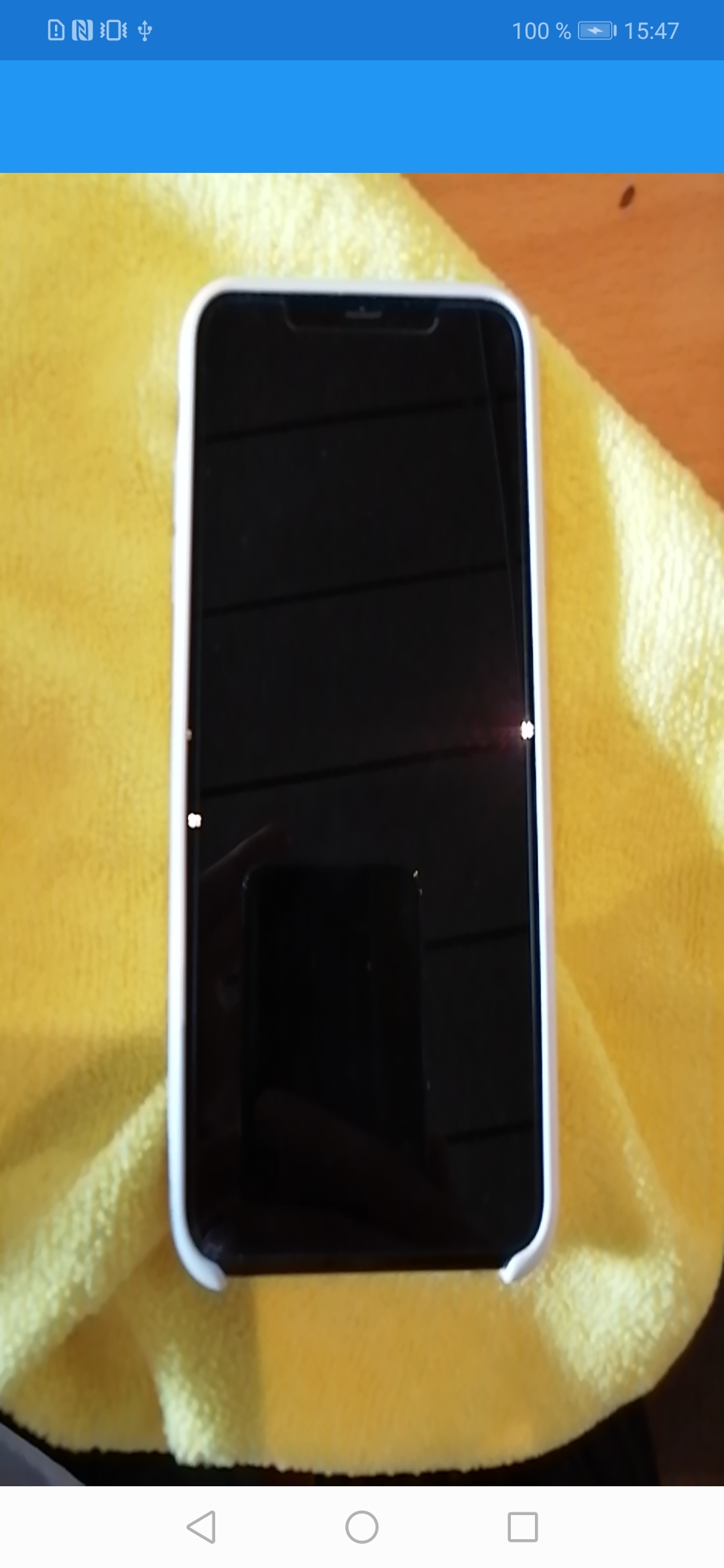
I am experiencing an extremely strechted preview in the Xamarin.Forms example as well as in the implementation of the ZXingScannerView on my Android device. Unfortunately, I don't have a MacBook at hand, so I can't test the behaviour on my iPhone.
This is how it looks on my Huawei Mate 20 lite.
How can I fix this?
 BRB2000
All 15 comments
I have the same problem on my Nexus 5x.
 MSiccDev
on 24 Mar 2019
MSiccDev
on 24 Mar 2019
I experienced the same problem with my Oneplus 3T and these NuGets:
ZXing.Net.Xamarin v2.99.0-CI-20190225-092434
ZXing.Net.Xamarin.Forms v2.99.0-CI-20190225-092434
The same thing with these older NuGets:
ZXing.Net.Mobile v2.4.1
ZXing.Net.Mobile v2.4.1
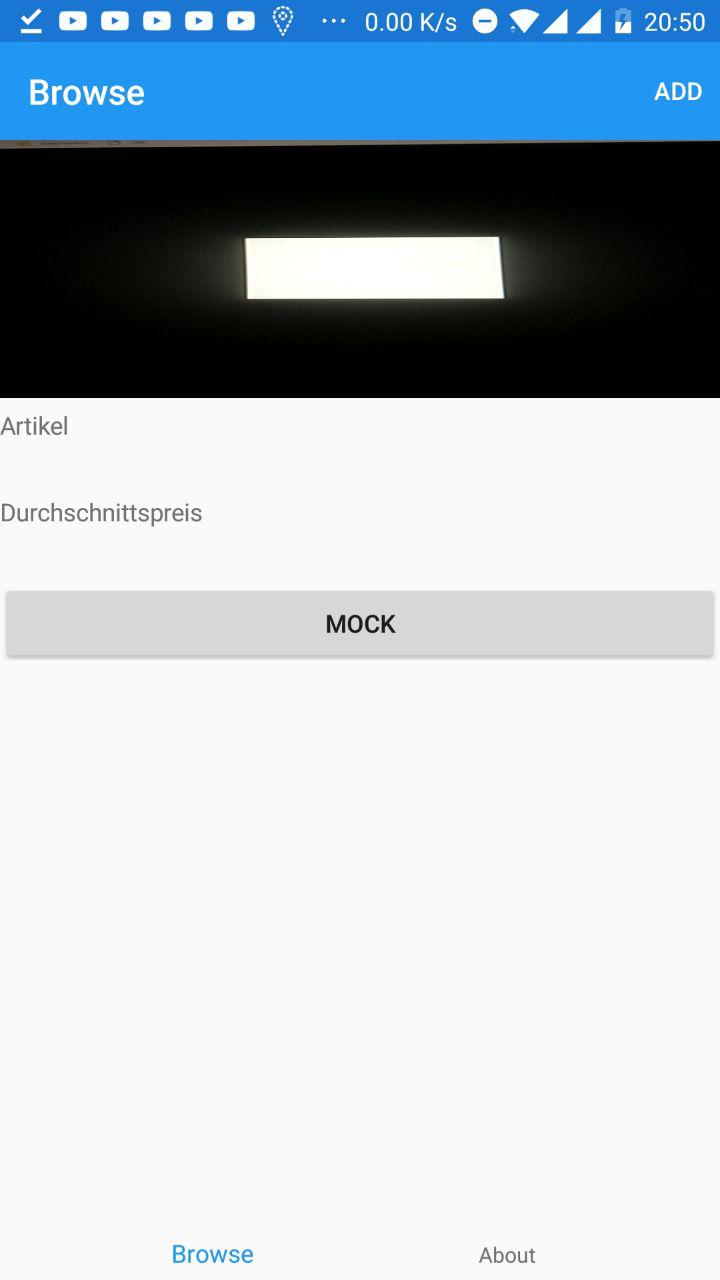
I wanted to create a small Barcode Reader at the top. The white rectangle is supposed to be square.
The whole camera image gets squeezed into the small space instead of showing only a part of the camera but with the correct aspect ratio.
 Canonip
on 24 Mar 2019
Canonip
on 24 Mar 2019
I have been analyzing the issue in the last few days. The stretching happens due to the automatic selection of a preview resolution that has the wrong aspect ratio (in my case, it selects 800x600). You should be able to get around this by passing in a CameraResolutionSelectorDelegate that selects a preview resolution with the correct aspect ratio. Will do a write up on that topic on my blog soon.
MSiccDev
on 20 Apr 2019
Like I promised, here is the write up why the distortion happens and how to fix it: https://bit.ly/2W7RoJF
Hope this helps you all.
MSiccDev
on 26 Apr 2019
@MSiccDev Thank you for the write up! I just found this issue after encounting it myself for UWP for the front facing camera on a Surface book and your solution solved it for UWP as well! Maybe you should try to get this merged in as the default fall back method if no delegate is provided?
 dberroa
on 2 May 2019
dberroa
on 2 May 2019
@MSiccDev Thank you for the write up! I just found this issue after encounting it myself for UWP for the front facing camera on a Surface book and your solution solved it for UWP as well! Maybe you should try to get this merged in as the default fall back method if no delegate is provided?
Given the fact the library is not very active, I will put it up in my fork soon. I did some more changes to it (e.g. removing PCL in favor of .netStandard libs) to move on in my project.
MSiccDev
on 6 May 2019
@MSiccDev Just throwing this out there that I'm still seeing stretched images on a Galaxy S8. It's a friends phone so I don't have access to debug it to see what resolution was ultimately picked but it looks like it did before hand. My LG G5 does look better though stretched wise. The S8 has a weird shape in the fact its thin and long so maybe that has something to do with it.
I also am having extreme lag using this method on my USB webcam on UWP on my home desktop so I need to look into that more later today to find out what resolution is selected.
dberroa
on 6 May 2019
@dberroa out of curiosity, can you try this on the S8?
var smallestDiff = supportedPreviewSizes.OrderBy(s =>
{
    var ratio = DeviceDisplay.MainDisplayInfo.Orientation == DisplayOrientation.Portrait ? (double)s.Width / s.Height : (double)s.Height / s.Width;
    return Math.Abs(ratio = (DeviceDisplay.MainDisplayInfo.Height / DeviceDisplay.MainDisplayInfo.Width));

}).FirstOrDefault();

resolution = new CameraResolution()
{
    Width = smallestDiff.Width,
    Height = smallestDiff.Height
};
On my Nexus, this returns always the highest resolution. But this modification comes from another user that also has a Samsung. Maybe this works as a fallback method for devices with strange display sizes.
MSiccDev
on 9 May 2019
@MSiccDev I got my friend to let me debug and found that the code you have in your blog returned null for his phone and then new code you gave returned 1920x1080. When it returned 1920 x 1080 the camera looked correct and looked the same as the on device camera.
Is the second code you used what should replace the original code in all cases?
dberroa
on 10 May 2019
@dberroa nope. If you look at the OpenCamera() method in my fork here (https://github.com/MSiccDev/ZXing.Net.Mobile/blob/master/Source/ZXing.Net.Mobile.Android/CameraAccess/CameraController.cs), you’ll see that I use a combination of the one in my blog post and the one I suggested above. If after these two ways we are still at null, let the Camera use the default preview size (which is the highest in most cases). It will slow down the detection, but at least it will not be distorted. HTH.
MSiccDev
on 10 May 2019
Faced with the same issue. Dear team, when are you supposed to solve it?
 mgrishkov
on 8 Aug 2019
mgrishkov
on 8 Aug 2019
Same issue in here - on all devices..
 YordanYanakiev
on 29 Oct 2019
YordanYanakiev
on 29 Oct 2019
When will we have the fix for this issue?
 higher-faster-better
on 2 Dec 2019
higher-faster-better
on 2 Dec 2019
Same issue with a Samsung A80.
With others phones the image is distorted.
 esaavedra89
on 17 Jan 2020
esaavedra89
on 17 Jan 2020
I'm sure this can be fixed in the Zxing-Code itself.
But until someone has the time to do this, you can solve this in your Xamarin.Forms PageView like this:
in XAML i have attached the SizeChange event. This is the function
`private void Scanner1_SizeChanged(object sender, EventArgs e)
{
//-- Scanner muss deaktiviert werden um die Auflösung zu ändern
scanner1.IsEnabled = false;//-- eine Routine übergeben mit der die passende Auflösung ermittelt werden kann scanner1.Options.CameraResolutionSelector = new MobileBarcodeScanningOptions.CameraResolutionSelectorDelegate(SelectLowestResolutionMatchingDisplayAspectRatio); //-- scanner wieder aktivieren; Zxing ruft dann die übergebene Funktion auf um eine Auflösung zu bekommen scanner1.IsEnabled = true; }`
and this is the function with the calculations:
`public CameraResolution SelectLowestResolutionMatchingDisplayAspectRatio(List
{
CameraResolution result = null;
//a tolerance of 0.1 should not be visible to the user
double aspectTolerance = 0.1;
        //-- Wir stellen sicher, dass diese Funktion im SizeChanged genutzt wird, dann haben wir width/heigt vom Control
        var displayOrientationHeight = scanner1.Width;
        var displayOrientationWidth = scanner1.Height;

        //calculating our targetRatio
        var targetRatio = displayOrientationHeight / displayOrientationWidth;
        var targetHeight = displayOrientationHeight;
        var minDiff = double.MaxValue;

        //camera API lists all available resolutions from highest to lowest, perfect for us
        //making use of this sorting, following code runs some comparisons to select the lowest resolution that matches the screen aspect ratio and lies within tolerance
        //selecting the lowest makes Qr detection actual faster most of the time
        foreach (var r in availableResolutions.Where(r => Math.Abs(((double)r.Width / r.Height) - targetRatio) < aspectTolerance))
        {
            //slowly going down the list to the lowest matching solution with the correct aspect ratio
            if (Math.Abs(r.Height - targetHeight) < minDiff)
                minDiff = Math.Abs(r.Height - targetHeight);
            result = r;
        }
        return result;
    }`
This way we choose the best fitting camera-resolution for the current aspect ratio
 boris-df
on 8 Jul 2020
boris-df
on 8 Jul 2020
Related issues
 SansDK
·
6Comments
SansDK
·
6Comments
 horacehylee
·
7Comments
horacehylee
·
7Comments
 R2D221
·
3Comments
R2D221
·
3Comments
 huangjinshe
·
6Comments
huangjinshe
·
6Comments
 faceoffers28
·
7Comments
faceoffers28
·
7Comments
Most helpful comment
Faced with the same issue. Dear team, when are you supposed to solve it?