Zxing.net.mobile: .NET Standard support
Any chance there will be a version of ZXing.Net.Mobile soon which supports .NET Standard?
 roycornelissen
All 36 comments
See section "Referencing Non .NET Standard Libraries" maybe helpful. You can reference any PCL in .NET Standard you only need to install Xamarin.Forms 2.3.5.256-pre6 and add the PackageTargetFallback https://xamarinhelp.com/visual-studio-2017-net-standard-xamarin/
 ericbrunner
on 18 Jul 2017
ericbrunner
on 18 Jul 2017
Any plans for this?
 mnusr
on 21 Sep 2017
mnusr
on 21 Sep 2017
The other night when I was looking into this, I read @ericbrunner comment and went to the link but the article starts out talking upgrading and conversion. As a result I glossed over it and determined it was not a solution. With a fresh mind this morning, I started looking into this again and the solution is in that article and it is super simple. So, to hopefully save somebody else some time I am going to include the solution here. Xamarin.Forms 2.4 is out so you do not have to install a pre-release version, now. In Visual Studio, right click on the shared .NET standard project and select 'Edit projectname.csproj'. Then add PackageTargetFallback to the PropertyGroup section
<PropertyGroup>
    <TargetFramework>netstandard1.3</TargetFramework>
    <PackageTargetFallback>$(PackageTargetFallback);portable-win+net45+wp8+win81+wpa8</PackageTargetFallback>
  </PropertyGroup>
This makes the project compatible with portable libraries. You can then install the ZXing Xamarin forms Nuget package and everything works as expected.
 bradwyoung
on 7 Oct 2017
bradwyoung
on 7 Oct 2017
I'm also waiting for .net standard support. Any news on this?
 PaulVrugt
on 5 Dec 2017
PaulVrugt
on 5 Dec 2017
Same here, now Xamarin's shared project is .NET Standard by default.
Any updates on this?
mnusr
on 27 Dec 2017
Same. Starting new projects forces .NET Standard.
 dberroa
on 4 Jan 2018
dberroa
on 4 Jan 2018
Yeah,I‘m waiting for it too, now Xamarin's shared project is .NET Standard by default.
Any updates on this?
 devinZhou102
on 7 Jan 2018
devinZhou102
on 7 Jan 2018
08/01/2018 I'm still wating for it, rayos.
 1cinisra1
on 8 Jan 2018
1cinisra1
on 8 Jan 2018
Please support .NET Standard,
 AgileCodeCO
on 10 Jan 2018
AgileCodeCO
on 10 Jan 2018
Hi, somebody knows when support for :NET standar will be available ? or if there are any workarround. Thank you.
 pablogarnica
on 11 Jan 2018
pablogarnica
on 11 Jan 2018
@pablogarnica see @bradwyoung comments at the begin. You can reference non .Net Standard in .Net Standard project
ericbrunner
on 11 Jan 2018
Thank you for your response.
I need ina Xamarin Project, but MicroSoft removes Xamarin PCL type of
project.
anyway Thank you
Best Regards.
Pablo Garnica S.
Desarrollo de Software .Net
[email protected]
[email protected]
SKYPE: pablo-garnica
Bogotá D.C. - Colombia
Cel. 315 - 469 9870
2018-01-11 15:04 GMT-05:00 Eric Brunner notifications@github.com:
@pablogarnica https://github.com/pablogarnica see @bradwyoung
https://github.com/bradwyoung comments at the begin. You can reference
non .Net Standard in .Net Standard project—
You are receiving this because you were mentioned.
Reply to this email directly, view it on GitHub
https://github.com/Redth/ZXing.Net.Mobile/issues/578#issuecomment-357045606,
or mute the thread
https://github.com/notifications/unsubscribe-auth/ANP7lqhaFnDDK20mzWMsZihi5CYxyS4gks5tJmllgaJpZM4OL4Tx
.
pablogarnica
on 12 Jan 2018
I pablo, i have a new xamarin forms project using .net standard 2.0 and I could use non .net standard libraries. I my case I'm using a library compiled in framework 4.6 and after editing this line of code in the .csproj file it is working ok.
<PropertyGroup>
    <TargetFramework>netstandard2.0</TargetFramework>
    <AssetTargetFallback>$(AssetTargetFallback);net46;</AssetTargetFallback>
  </PropertyGroup>
AgileCodeCO
on 12 Jan 2018
Thank you...
I will try.....
Best Regards
Pablo Garnica S.
Desarrollo de Software .Net
[email protected]
[email protected]
SKYPE: pablo-garnica
Bogotá D.C. - Colombia
Cel. 315 - 469 9870
2018-01-12 17:18 GMT-05:00 AgileCodeCO notifications@github.com:
I pablo, i have a new xamarin forms project using .net standard 2.0 and I
could use non .net standard libraries. I my case I'm using a library
compiled in framework 4.6 and after editing this line of code in the
.csproj file it is working ok.
netstandard2.0
$(AssetTargetFallback);net46;
—
You are receiving this because you were mentioned.
Reply to this email directly, view it on GitHub
https://github.com/Redth/ZXing.Net.Mobile/issues/578#issuecomment-357370091,
or mute the thread
https://github.com/notifications/unsubscribe-auth/ANP7loIe3Tdea15Lfxe6O8mMUTEVA4_oks5tJ9o2gaJpZM4OL4Tx
.
pablogarnica
on 13 Jan 2018
@AgileCodeCO @Redth
For me It was added with warnings and results in exception in runtime.
Waiting for .net standard support.
Maybe will just fork this repo
 godrose
on 18 Jan 2018
godrose
on 18 Jan 2018
Just getting started with latest versions of VS and Xamarin for an app targeting iOS & Android which is going to be heavily based around barcode scanning, so adding my wishes for support for .Net Standard support!
 ConfusedTA
on 18 Jan 2018
ConfusedTA
on 18 Jan 2018
Is someone has a working sample with .net standard 2.0, can they upload it please?
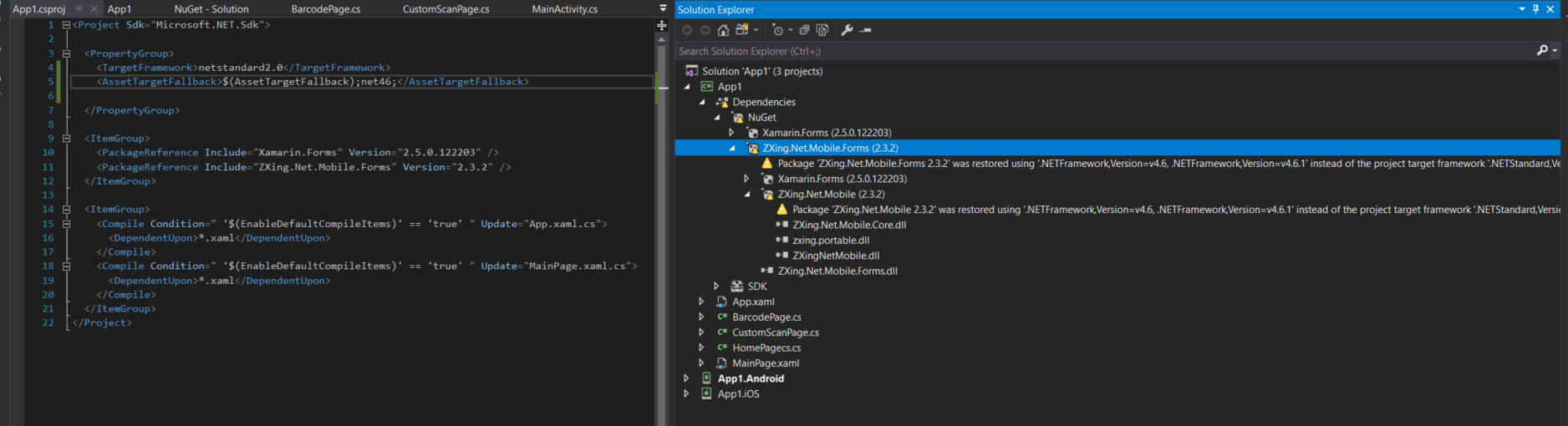
Thats what I have and it's keeps giving me errors.
 knight1219
on 24 Jan 2018
knight1219
on 24 Jan 2018
I have a working example with barcode scanner. My code above:
- Edit the .csproj. You will receive a warning but your project will compile succesfully
<PropertyGroup>
    <TargetFramework>netstandard2.0</TargetFramework>
    <AssetTargetFallback>$(AssetTargetFallback);net46;</AssetTargetFallback>
  </PropertyGroup>
Add nuget package
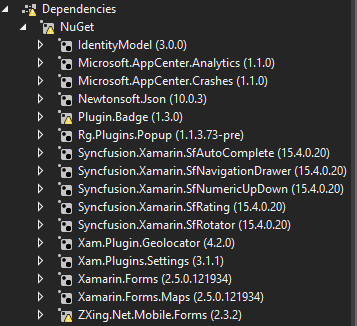
Create a Content page for scanner
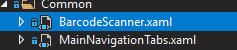
- This is the code behind of the content page. In this example I'm opening this page in a modal.
`using System;
using System.Collections.Generic;
using System.Linq;
using System.Text;
using System.Threading.Tasks;
using Xamarin.Forms;
using Xamarin.Forms.Xaml;
using ZXing.Mobile;
using ZXing.Net.Mobile.Forms;
namespace LaFarmaciaApp.Views.Common
{
[XamlCompilation(XamlCompilationOptions.Compile)]
public partial class BarcodeScanner : ContentPage
{
ZXingScannerView zxing;
ZXingDefaultOverlay overlay;
    public event EventHandler<string> BarcodeReaded;

    public BarcodeScanner()
    {
        InitializeComponent();

        var options = new MobileBarcodeScanningOptions
        {
            AutoRotate = false,
            UseFrontCameraIfAvailable = false,
            TryHarder = true,
            PossibleFormats = new List<ZXing.BarcodeFormat>
                {
                   ZXing.BarcodeFormat.EAN_8, ZXing.BarcodeFormat.EAN_13
                }
        };

        zxing = new ZXingScannerView
        {
            HorizontalOptions = LayoutOptions.FillAndExpand,
            VerticalOptions = LayoutOptions.FillAndExpand,
            Options = options
        };

        zxing.OnScanResult += (result) =>
            Device.BeginInvokeOnMainThread(async () =>
            {

                // Stop analysis until we navigate away so we don't keep reading barcodes
                zxing.IsAnalyzing = false;

                BarcodeReaded?.Invoke(this, result.Text);

                // Navigate away
                await Navigation.PopModalAsync();
            });

        overlay = new ZXingDefaultOverlay
        {
            TopText = "Sostenga su teléfono sobre el código de barras",
            BottomText = "El código se escaneará automaticamente",
            ShowFlashButton = zxing.HasTorch,
        };

        overlay.FlashButtonClicked += (sender, e) =>
        {
            zxing.IsTorchOn = !zxing.IsTorchOn;
        };

        var abort = new Button
        {
            Text = "Cancelar",
            VerticalOptions = LayoutOptions.End,
            TextColor = Color.FromHex("#FFF"),
            BackgroundColor = Color.FromHex("#4F51FF")
        };

        switch (Device.RuntimePlatform)
        {
            case Device.iOS:
                abort.HeightRequest = 40;
                break;
            case Device.Android:
                abort.HeightRequest = 50;
                break;
        }

        abort.Clicked += (object s, EventArgs e) =>
        {
            zxing.IsScanning = false;

            Device.BeginInvokeOnMainThread(async () =>
            {
                await Navigation.PopModalAsync();
            });
        };

        var grid = new Grid
        {
            VerticalOptions = LayoutOptions.FillAndExpand,
            HorizontalOptions = LayoutOptions.FillAndExpand,
        };

        grid.Children.Add(zxing);
        grid.Children.Add(overlay);
        grid.Children.Add(abort);

        // The root page of your application
        Content = grid;
    }

    protected override void OnAppearing()
    {
        base.OnAppearing();

        zxing.IsScanning = true;
    }

    protected override void OnDisappearing()
    {
        zxing.IsScanning = false;

        base.OnDisappearing();
    }
}
}`
- In the android project you have to include this code in MainActivity.cs
public override void OnRequestPermissionsResult(int requestCode, string[] permissions, Permission[] grantResults)
        {
            ZXing.Net.Mobile.Android.PermissionsHandler.OnRequestPermissionsResult(requestCode, permissions, grantResults);
        }
- Modify AndroidManifest with this permissions:
<uses-permission android:name="android.permission.CAMERA" />
  <uses-permission android:name="android.permission.FLASHLIGHT" />
- Modify info.plist to include this:
<key>NSCameraUsageDescription</key>
    <string>Message</string>
AgileCodeCO
on 25 Jan 2018
Thanks @AgileCodeCO for the sample. I have got it successfully working on UWP direct on my development machine in a Shared Project, however iOS and Android via Live Player still give the following error, whether in a Shared Project or .NET Standard project.
Exception of type 'System.Collections.Generic.KeyNotFoundException' was thrown.
This must now be an incompatibility between ZXing and Live Player.
ConfusedTA
on 30 Jan 2018
@ConfusedTA
I was having the same problem as you and it's the Live Player. Once I connected my Android and deployed the app, everything was working. That exception must be that it can't find the camera.
Hope this helps!
 jlhernandez1388
on 2 Feb 2018
jlhernandez1388
on 2 Feb 2018
Hi @AgileCodeCO
I tried your solution, but my app crashed on start, with null reference exception. I didnt event implement the code, just add the nuget package and the deploy.
Do you know what was wrong with this?
Thanks
 ydydxhg
on 6 Feb 2018
ydydxhg
on 6 Feb 2018
In my case I received the same error, but after clean and build the android project it works.
AgileCodeCO
on 6 Feb 2018
@AgileCodeCO, so did you add the nuget package in both the form project and the android project?
ydydxhg
on 6 Feb 2018
That's correct, you should import the package in all projects (Shared, Android, IOS or UWP if you have it).
AgileCodeCO
on 7 Feb 2018
@AgileCodeCO
Great, that works for me now. I cleaned the whole solution and rebuild it
Thanks so much
ydydxhg
on 7 Feb 2018
The project you depend on ZXing.Net (https://github.com/micjahn/ZXing.Net) has created a NetStandard2.0 build a few days ago. Maybe now is a good time to add it to your project too.
 gmarbury
on 21 Mar 2018
gmarbury
on 21 Mar 2018
I am also waiting for .NS 2 support
 AdamGrzesiak
on 29 Mar 2018
AdamGrzesiak
on 29 Mar 2018
In the duplicate issue https://github.com/Redth/ZXing.Net.Mobile/issues/675 @Redth said "There's a 2.4.0-beta1 on nuget which has this. Please give it a try!"
 knocte
on 29 Mar 2018
knocte
on 29 Mar 2018
When using the Xamarin Forms version of 2.4.0-beta 1, I get the following error when building:
Exception while loading assemblies: System.IO.FileNotFoundException: Could not load assembly 'ZXingNetMobile, Version=2.4.0.0, Culture=neutral, PublicKeyToken='. Perhaps it doesn't exist in the Mono for Android profile?
File name: 'ZXingNetMobile.dll'
at Java.Interop.Tools.Cecil.DirectoryAssemblyResolver.Resolve(AssemblyNameReference reference, ReaderParameters parameters)
at Xamarin.Android.Tasks.ResolveAssemblies.AddAssemblyReferences(DirectoryAssemblyResolver resolver, ICollection`1 assemblies, AssemblyDefinition assembly, Boolean topLevel)
at Xamarin.Android.Tasks.ResolveAssemblies.Execute(DirectoryAssemblyResolver resolver) Ids2A.Android
 Terry1511512
on 2 Apr 2018
Terry1511512
on 2 Apr 2018
@Terry1511512
Check if it works on a device. I had the same problem when I run app on emulator and it turned out that this is because my emulator does not handle a camera.
AdamGrzesiak
on 13 Apr 2018
When compiling with Zxing.Net.Mobile.Forms it still get the original error:
Exception while loading assemblies: System.IO.FileNotFoundException:
Could not load assembly 'ZXingNetMobile, Version=2.4.1.0,
Culture=neutral, PublicKeyToken='. Perhaps it doesn't exist in the Mono
for Android profile?
File name: 'ZXingNetMobile.dll'
at
Java.Interop.Tools.Cecil.DirectoryAssemblyResolver.Resolve(AssemblyNameReference
reference, ReaderParameters parameters)
at
Xamarin.Android.Tasks.ResolveAssemblies.AddAssemblyReferences(DirectoryAssemblyResolver
resolver, ICollection`1 assemblies, AssemblyDefinition assembly, Boolean
topLevel)
at
Xamarin.Android.Tasks.ResolveAssemblies.Execute(DirectoryAssemblyResolver
resolver)
On 13/04/2018 3:11 PM, AdamGrzesiak wrote:
>
@Terry1511512 https://github.com/Terry1511512
Check if it works on a device. I had the same problem when I run app
on emulator and it turned out that this is because my emulator does
not handle a camera.—
You are receiving this because you were mentioned.
Reply to this email directly, view it on GitHub
https://github.com/Redth/ZXing.Net.Mobile/issues/578#issuecomment-381025614,
or mute the thread
https://github.com/notifications/unsubscribe-auth/AHpPYkjTqzxiwc12u9KGOe3EjPIWopYmks5toDORgaJpZM4OL4Tx.
Terry1511512
on 13 Apr 2018
@Terry1511512 see issue #703
This is probably your problem
PaulVrugt
on 13 Apr 2018
Could very well be.
Mine is from a brand new project not after an update.
On 13/04/2018 4:38 PM, PaulVrugt wrote:
>
@Terry1511512 https://github.com/Terry1511512 see issue #703
https://github.com/Redth/ZXing.Net.Mobile/issues/703
This is probably your problem—
You are receiving this because you were mentioned.
Reply to this email directly, view it on GitHub
https://github.com/Redth/ZXing.Net.Mobile/issues/578#issuecomment-381038821,
or mute the thread
https://github.com/notifications/unsubscribe-auth/AHpPYjm00iQPLSQf-Jb8xUnKWtyuJGrIks5toEfsgaJpZM4OL4Tx.
Terry1511512
on 13 Apr 2018
@Terry1511512
that doesn't make any difference. The package is the package, it doesn't matter whether you update the package or install it from scratch
PaulVrugt
on 13 Apr 2018
Thanks for reporting this issue! Unforunately it took me way too long to respond 😭. Sorry, I apologize! Recently the source code for this project was completely refactored to modernize it. Many PR's were included in this effort, and many bugs were hopefully fixed. Please try out the latest 3.x series of NuGet packages (currently in prerelease). To try and make the project more maintainable in my spare time going forward, I've decided to close all existing issues to start with a clean slate. If you're still experiencing this issue on the newest version, please open a new issue with as much detail as possible. Thank you for your patience and understanding! Happy scanning!
 Redth
on 13 Mar 2020
Redth
on 13 Mar 2020
Awesome work @Redth! Thanks for persisting 😄
roycornelissen
on 13 Mar 2020
Related issues
 mdkitzman
·
7Comments
mdkitzman
·
7Comments
 TobioDev
·
4Comments
TobioDev
·
4Comments
 Zexuz
·
6Comments
Zexuz
·
6Comments
 sushibear
·
6Comments
sushibear
·
6Comments
 PhredPS
·
5Comments
PhredPS
·
5Comments
Most helpful comment
The project you depend on ZXing.Net (https://github.com/micjahn/ZXing.Net) has created a NetStandard2.0 build a few days ago. Maybe now is a good time to add it to your project too.