Zwavejs2mqtt: [bug] node is connected and communicating, but shows as "unconnected" in network graph
Version
Checklist:
- [x] I am not using HomeAssistant. Or: a developer has told me to come here.
- [x] I have checked the troubleshooting section and my problem is not described there.
- [x] I have read the changelog problem was not mentioned there.
Build/Run method
- [x] Docker
- [ ] PKG
- [ ] Snap package
- [ ] Manually built (git clone - yarn install - yarn run build )
zwavejs2mqtt version: 5.0.4
zwave-js version: 7.7.5
Note: I am using ZwaveJS connected to HomeAssistant, but this issue is isolated within the ZwaveJS2MQTT dashboard and does not involve HA.
Describe the bug
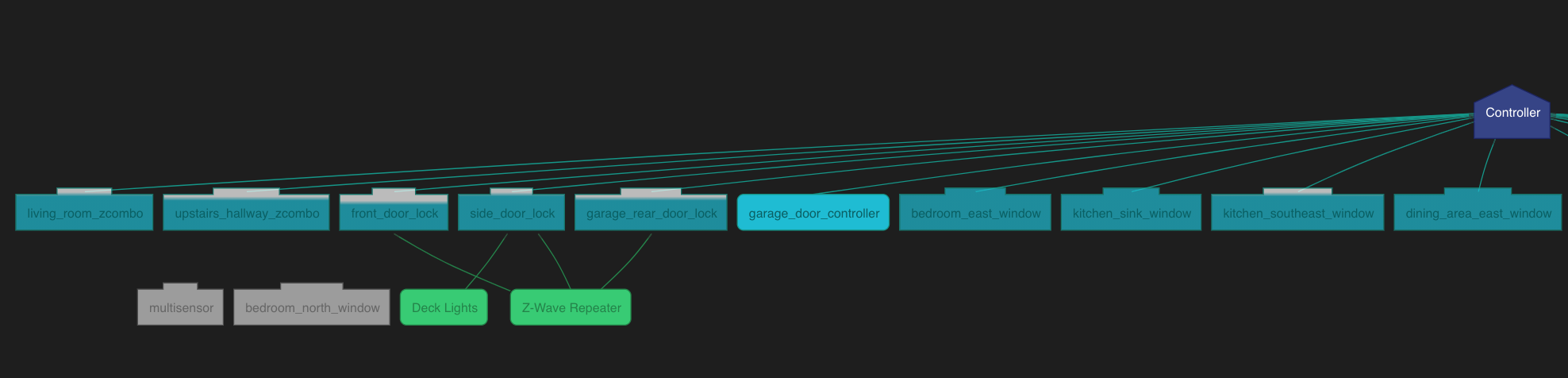
I have a ZwaveJS setup with a controller and 23 other devices. All of my devices seem to be working as expected, but two of them - a door/window sensor and a 4-in-1 multisensor - are listed as "Unconnected" in the network graph. Despite this, they're showing the expected sensor data in the Notification section of each node (i.e. when I open and close the window sensor, I see the ZwaveJS2MQTT UI update to show the open/closed status).
To Reproduce
Steps to reproduce the behavior:
I can reproduce/observe this issue by watching my sensors correctly update their values in the Notification section of the ZwaveJS2MQTT dashboard, then viewing the network graph, where they are shown as Unconnected.
Expected behavior
If my nodes are Unconnected, I would expect them to fail to communicate updates to my controller. If they are successfully communicating with the controller and ZwaveJS, I would expect to see them connected in the network graph.
Additional context
I have attached JSON exports for the two misbehaving nodes. Please let me know if there's any other data I can export to help determine what's going on, or please let me know if any of my assumptions/expectations are invalid.
 sphanley
All 13 comments
When a node is not connected it means that his neighbors are not detected as a routing devices (the forwards property is evaluated to false). If he ios still communicating it means that maybe the check isn't correct:
forwards:
                        node.isControllerNode ||
                        (node.ready &&
                            !node.failed &&
                            (node.isListening || node.isRouting))
@AlCalzone any clue?
 robertsLando
on 21 Jun 2021
robertsLando
on 21 Jun 2021
The map is drawn using the known neighbors of the nodes, which is information that the controller has about the nodes. In this case, there are no neighbors, but that just means the controller doesn't know them. As long as the nodes know how to reach the controller, they'll continue working.
That being said, the controller should have a complete view of the network. Here it is pretty clear that it doesn't. The unconnected nodes must have neighbors, since they are working and the battery powered locks in the screenshot above cannot be routing to the Repeater - that should be the other way round.
It might be worth doing a heal here.
@robertsLando I think the isRouting part is wrong. The battery powered locks in the screenshot above cannot be routing to the Repeater.
 AlCalzone
on 21 Jun 2021
AlCalzone
on 21 Jun 2021
I get it from the node, what ou mean with 'is wrong' ? That is not detected correctly on your side?
robertsLando
on 21 Jun 2021
I mean that if a node is not permanently listening, it cannot be forwarding messages. So the || node.isRouting part is wrong IMO.
AlCalzone
on 21 Jun 2021
For what it's worth: I only added the repeater a day or two ago, specifically to see if doing so and then running a Heal would help fix this issue and improve the resiliency of my network. Doing so didn't seem to make any difference to the way these two nodes are displaying. Prior to adding the repeater, my only non-battery powered devices were my controller, my garage door opener, and the node marked "deck lights", which is an outdoor Z-Wave outlet that I added only the night before (and which was repeatedly dropping off the network until I added the repeater).
Also, here's a full screenshot of my graph (sorry for the very small scale):

sphanley
on 21 Jun 2021
I mean that if a node is not permanently listening, it cannot be forwarding messages. So the || node.isRouting part is wrong IMO.
Ok so what's the best way to check if a node can forword messages?
robertsLando
on 22 Jun 2021
                        node.isControllerNode ||
                        (node.ready &&
                            !node.failed &&
-                           (node.isListening || node.isRouting))
+                           node.isListening)
🤷🏻♂️
AlCalzone
on 22 Jun 2021
Ok but that would not fix the problem shown here, I mean even If I remove that the unconnected nodes will not be connected
robertsLando
on 22 Jun 2021
No, the problem is on the stick.
AlCalzone
on 22 Jun 2021
Can you say more about what you mean by "the problem is on the stick"? Like, is this something where if I exclude and reinclude the nodes which are displaying as unconnected, they may be picked back up in a way where their network paths can be correctly reported? Or is this just a Zwave oddity that I ought to just ignore since my network seems to be working fine in reality?
sphanley
on 22 Jun 2021
I'm not an expert in these internals, but as far as I understand the stick should know the network topology, which it doesn't in your case - or it won't tell us.
It might be that the issue will resolve itself over time. It might also be that you need to reset the controller to fix it.
Since it seems to be working, I'd leave it as is and ignore the network map. It really doesn't give as much useful info as people seem to think.
AlCalzone
on 22 Jun 2021
That makes sense. I'll see if it resolves itself and otherwise won't worry too much. Like I alluded to earlier, I was only really looking at the network map because I added an outdoor Zwave plug which was getting poor connectivity to the controller - I'd forgotten that so few of my devices were capable of acting as repeaters. Ever since adding the one extra standalone repeater, that issue seems resolved, though, so no big deal if the network map is inaccurate.
I appreciate the responsiveness and helpfulness of the team here! Thanks for the hard work you all put in on this project!
sphanley
on 22 Jun 2021
Thanks to you @sphanley 🙏🏼 Closing this for now, feel free to reopen this if you have more questions
robertsLando
on 23 Jun 2021
Related issues
 bushvin
·
6Comments
bushvin
·
6Comments
 Illsley
·
4Comments
Illsley
·
4Comments
 LordMike
·
8Comments
LordMike
·
8Comments
 balloob
·
4Comments
balloob
·
4Comments
 haavardNO
·
3Comments
haavardNO
·
3Comments
Most helpful comment
That makes sense. I'll see if it resolves itself and otherwise won't worry too much. Like I alluded to earlier, I was only really looking at the network map because I added an outdoor Zwave plug which was getting poor connectivity to the controller - I'd forgotten that so few of my devices were capable of acting as repeaters. Ever since adding the one extra standalone repeater, that issue seems resolved, though, so no big deal if the network map is inaccurate.
I appreciate the responsiveness and helpfulness of the team here! Thanks for the hard work you all put in on this project!