Zwavejs2mqtt: [bug] Snap package needs serial-port plug added for VMware
Checklist:
- [x] I am not using HomeAssistant. Or: a developer has told me to come here.
- [X] I have checked the troubleshooting section and my problem is not described there.
- [X] I have read the changelog problem was not mentioned there.
Build/Run method
- [ ] Docker
- [ ] PKG
- [X] Snap package
- [ ] Manually built (git clone - npm install - npm run build )
zwavejs2mqtt: 3.4.0.39bad95
zwave-js: 7.2.4
Describe the bug
Zwave dongles under vmware are enumerated as serial ports, NOT as usb devices. (i.e. /dev/ttyS1 not /dev/ttyACM0) So the snap package needs to have serial-port added to it as a plug, otherwise running zwavejs2mqtt under vmware is impossible via a snap. (Zwavejs2mqtt says can't open the serial port, because snap won't let it, and you can't tell snap to give it permission to do so!)
To Reproduce
Steps to reproduce the behavior:
- Fire up a ubuntu VMware VM. Pass through a usb zwave serial dongle. (It'll likely come through as /dev/ttyS1.)
- Install zwavejs2mqtt via snap package
- sudo snap connect zwavejs2mqtt:serial-port
- error: snap "zwavejs2mqtt" has no plug named "serial-port"
So... can't run zwave2js under vmware because you can't give the snap rights to read a serial port.
Expected behavior
Well once the serial-port plug is added to the snap, should be easy to give the snap access to the serial port using snap connect as above.
Thanks!
 TheKorn2
All 19 comments
@jmgiaever any clue?
 robertsLando
on 4 May 2021
robertsLando
on 4 May 2021
Yes,I'll add it. I'll let you know when it's compiled and available. // J
 jmgiaever
on 4 May 2021
jmgiaever
on 4 May 2021
There's a new version including the missing plug in the edge channel.
If the package is already installed, you can switch with sudo snap zwavejs2mqtt --channel=edge and refresh sudo snap refresh zwavejs2mqtt.
Let me know if it works correctly @TheKorn2 as I'm traveling and do not have physical devices to test with.
jmgiaever
on 4 May 2021
Well one step forwards! Almost...
\~$ sudo snap download --channel=edge zwavejs2mqtt
Fetching snap "zwavejs2mqtt"
Fetching assertions for "zwavejs2mqtt"
Install the snap with:
snap ack zwavejs2mqtt_94.assert
snap install zwavejs2mqtt_94.snap
\~$ sudo snap ack zwavejs2mqtt_94.assert
\~$ sudo snap install zwavejs2mqtt_94.snap
zwavejs2mqtt v4.0.1 from Giaever.online (giaever-online) installed
\~$ sudo snap connect zwavejs2mqtt:serial-port
error: snap "snapd" has no "serial-port" interface slots
\~$ sudo snap connect zwavejs2mqtt:serial-port /dev/ttyS0
error: snap "/dev/ttyS0" has no "serial-port" interface slots
\~$ snap connections zwavejs2mqtt
Interface Plug Slot Notes
hardware-observe zwavejs2mqtt:hardware-observe :hardware-observe manual
network zwavejs2mqtt:network :network -
network-bind zwavejs2mqtt:network-bind :network-bind -
raw-usb zwavejs2mqtt:raw-usb :raw-usb manual
serial-port zwavejs2mqtt:serial-port - -
So at least it's no longer telling me flat-out no, just "no place to stuff it". ;)
(My current serial port is /dev/ttyS0, but I can easily make it /dev/ttyS1, which is the default. As part of troubleshooting I nuked the built-in serial port, easy to put back if necessary.)
TheKorn2
on 4 May 2021
Hi, which device do you use? Since I don't have any of my dev devices with me, it's hard to give a proper guidance of usage of the serial-port. But if I remember correctly, you'll have to do the following:
$ snap set system experimental.hotplug=true
$ systemctl restart snapd.service
Then connect the plug serial-port with a (gadget?) snap that has support for it. There was one for the Aeotec Z-stick Gen-5, but can't recall exactly. You can also try to connect with core:usb20-serial or snapd:usb20-serial
jmgiaever
on 4 May 2021
Try to examine the slots-sections, which snaps provide support for the interface, from the following: snap interface serial-port or check the docs..
I guess you need to have your USB dongle plugged in.
jmgiaever
on 4 May 2021
I'm using a homeseer smartstick+... basically just the sigma reference design with a homeseer logo on it.
snap interface serial-port replies...
\~/pc-amd64-gadget$ snap interface serial-port
name: serial-port
summary: allows accessing a specific serial port
So I'm unfortunately kind of lost at this point. Reading this would lead me to believe that what I'm trying to do is impossible, which seems crazy but I really can't seem to get anything to play ball.
I tried running through ogra's response (#4) here here but it appears that the format of snapcraft.yaml has changed since that reply was written, because the resulting file refuses to validate.
Also keep in mind that using the usb mental model isn't correct here. While it's physically a usb stick, vmware is abstracting it as a 16550A uart chip. So I don't think the hot plugging is relevant. (I could be wrong!)
$ dmesg | grep ttyS
[ 1.469812] 00:05: ttyS0 at I/O 0x3f8 (irq = 4, base_baud = 115200) is a 16550A
Apologies as I didn't really intend to open up a can of worms, but the wriggling things on the floor seem to insist.
TheKorn2
on 4 May 2021
Thinking about this more, I think at this point it's OK to close. Even though I'm not working, seems to be an issue with snap itself vs. the snap package, which was updated. (Thanks!!)
TheKorn2
on 4 May 2021
Thanks @jmgiaever
robertsLando
on 5 May 2021
Hi,
First off: Sorry for my late reply on this but I've been very busy lately.
As I'm not a Windows/Mac user I'm not able to install VMWare and debug this issue. But I've tried with an LXD instance on my Linux setup and it works just with raw-usb.
I guess your host OS is Windows or Mac?
This is what I did to reproduce with LXD:
# ON HOST
# Install lxd, I'm using Snap. Make sure it's available on your system.
$ snap install lxd

# Ensure your user has the group (change joachim to whatever).
sudo usermod joachim -a -G lxd
# Reboot
sudo reboot

# Add new container (don't use sudo)
lxc launch ubuntu:20.04 zwavejs2mqtt

# Add USB/Serial device to guest.
# Change ttyAMC0 to whatever your device is indentified by
# Set CALLED_IN_HOST as it's identified on HOST (e.g ttyACM0)
# Set CALLED_IN_GUEST as what you want it to be identified in GUEST (e.g ttyACM0)
$ lxc config device add zwavejs2mqtt CALLED_IN_GUEST unix-char mode=0666 gid=20 path=/dev/CALLED_IN_HOST

# Find IPV4 of GUEST and NOTE it
$ lxc list zwavejs2mqtt

# Login to guest
$ lxc exec zwavejs2mqtt -- /bin/bash
# ON GUEST
# Install zwavejs2mqtt
$ snap install zwavejs2mqtt

# Connect necessary interfaces
$ snap connect zwavejs2mqtt:raw-usb
$ snap connect zwavejs2mqtt:hardware-observe

# Reboot container (and RETURN TO HOST)
$ sudo reboot

# (Log back in to the container as described in the last command for HOST)

# Set server.host to IPV4
$ snap set zwavejs2mqtt server.host=<IPV4 address>

# Start zwavejs2mqtt and follow output
$ zwavejs2mqtt.exec
Now go into the browser at http://<IPV4 address>:8091/ and to «settings». You will now find /dev/CALLED_IN_GUEST in the list of devices under the «general»-tab.
I will try figure out how to do this in VirtualBox too, as I can remember that it was much trickier to get the controller available under VBox, to reach it from a VM instance of Win10 when I had to upgrade the chip. Just need to get the darn VirtualBox to work first :sweat:
jmgiaever
on 20 May 2021
Well I don't see much use in virtual box, because this is kind of specific to how vmware virtualizes its serial ports.
What I remember as the show stopping issue with the snap was snap itself throwing a total security fit re: serial ports. Honestly it was two weeks ago and the brain has already flushed it all at this point, sorry!
TheKorn2
on 20 May 2021
Hi,
I'm mostly interested in figuring out these details as it might help others within the community.
I've now tested with VirtualBox too and also here you'll add the USB device and it will show up as a USB device under the VM and in the list under settings of zwavejs2mqtt. No serial-port interface needed, only raw-usb.
Can you share which VMWare you're using?
EDIT: Found out that VMware was available for Linux. Now trying with VMware Workstation 16 Player.
jmgiaever
on 20 May 2021
I've now successfully done it similar to how I did it with VIrtualBox. Make sure USB 2.0 is enabled. For simplicity I didn't add any filter or only allow specific device(s) through.
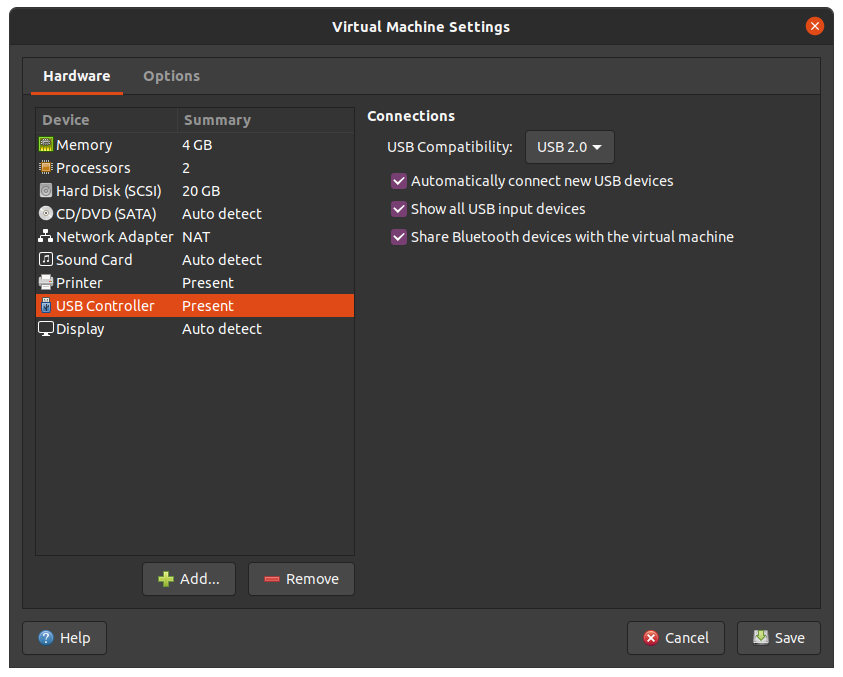
Then connect the device from the toolbar on the bottom. Mine is called «Sigma Design Modem» on VMware, and something similar on VirtualBox.

When you have booted the VM and passed through the USB device,
- install the snap package
sudo snap install zwavejs2mqtt - connect
raw-usbandhardware-observeinterfaces withsudo snap connect zwavejs2mqtt:<interface> - start
zwjs2mwithsudo zwavejs2mqtt.execand follow the output from the terminal.
If you're running a Linux desktop you can from the VM guest instance launch a browser locally and reach zwavejs2mqtt on http://localhost:8091/.
If you're using a server or minified version of linux (e.g Ubuntu Server or Core), you have to set the server.host to make zwjs2m listen on the correct interface and not use «localhost» (you probably want to do this anyway?), so you can reach it from the host machine.
On newer versions of Ubuntu that do not ship net-tools anymore, you'll have to use the command ip addr show to find the IP address on correct interface. Other distros of Linux might ship net-tools and you can then use the command ifconfig.
Set the host-ip with
sudo snap set zwavejs2mqtt server.host=<IP addr>
and restart zwavejs2mqtt as in 3. above.
You can now access zwavejs2mqtt from the host on http://IP:8091/.
Now go to Settings > Zwave and select your device. In my case it was /dev/ttyACM0.
When everything runs as expected. End the command zwavejs2mqtt.exec and run zwavejs2mqtt.enable to daemonize it so it will start on boot and run in the background.
jmgiaever
on 20 May 2021
Well something doesn't add up here. I'm using vmware workstation, and was passing through and connecting things just as you are. But the usb stick was NOT coming up as /dev/ttyACM0, it was coming up as /dev/ttyS0.
I still have the vm hanging around, I'll see if I can recreate.
Change of plan; in the interest of expediency I'm going to spin up a brand new vm, load ubuntu 21.04 on it, and see what's what. If that comes up clean, then it's not worth anyone's time to figure out what went wrong before.
TheKorn2
on 20 May 2021
Ahhhh, OK... Now that I'm seeing it again (clean OS install finished) I'm remembering the problem.
The root problem is that vmware refuses to virtualize this zwave stick as a usb device, not entirely an uncommon event. It allows it to pass through _as a serial port_ (see /dev/ttyS0, /dev/ttyS1, etc.) and can be used that way just fine in the guest, but it cannot be passed through as a usb device inside the guest OS, only as a serial port. The upshot is that anything that references /dev/ttyACM0 is a non-starter because that simply doesn't exist in this context. Anything that references passing through as a USB device is a non-starter because even though I can have other devices pass through as USB, this particular one I can't for whatever technical behind the scenes vmware reason.
The zwave faux serial port works in this config (I told the docker install to use /dev/ttyS0 , and it's happily sending and receiving zwave data), just snap doesn't. I don't think it's _the_ snap's problem/fault, I think it's snap itself. (I got as far as some security problem with snap and serial ports falling out of google and at that point I didn't care anymore and switched horses to docker.)
TheKorn2
on 20 May 2021
Hi,
Ah. Since VMware do pass mine through as an USB device, it probably makes things easier.
Do you know which USB device this is?
jmgiaever
on 20 May 2021
TheKorn2
on 20 May 2021
Thanks, I can only find the G3 version. I guess that's the upgraded kind, but looks like it's working the same ("virtual COM device").
Before I order one to investegate further, I'll just want to make sure that you've tried to enable hotplug support?
sudo snap set system experimental.hotplug=true
sudo systemctl restart snapd.service
and checked that it doesn't show up in the list of slots of the command:
sudo snap interface serial-port
I guess Snapd is loading this based on the vendor & product id and Snapd doesn't have any option to identify it since it's , in your case, forwarded as a serial port and not an USB device.
This is the output in VM of dmesg when I passthrough the devices from the toolbar:
[  484.576893] usb 2-2.2: new full-speed USB device number 6 using uhci_hcd
[  484.964652] usb 2-2.2: New USB device found, idVendor=0658, idProduct=0200, bcdDevice= 0.00
[  484.964659] usb 2-2.2: New USB device strings: Mfr=0, Product=0, SerialNumber=0
[  484.969385] cdc_acm 2-2.2:1.0: ttyACM0: USB ACM device
[  503.890512] usb 2-2.2: USB disconnect, device number 6
[  510.300949] usb 2-2.2: new full-speed USB device number 7 using uhci_hcd
[  510.692007] usb 2-2.2: New USB device found, idVendor=0658, idProduct=0200, bcdDevice= 0.00
[  510.692013] usb 2-2.2: New USB device strings: Mfr=0, Product=0, SerialNumber=0
[  510.696782] cdc_acm 2-2.2:1.0: ttyACM0: USB ACM device
[  528.094069] usb 2-2.2: USB disconnect, device number 7
[...]
[  644.860131] usb 2-2.2: new full-speed USB device number 8 using uhci_hcd
[  645.256773] usb 2-2.2: New USB device found, idVendor=10c4, idProduct=ea60, bcdDevice= 1.00
[  645.256782] usb 2-2.2: New USB device strings: Mfr=1, Product=2, SerialNumber=3
[  645.256787] usb 2-2.2: Product: CP2102N USB to UART Bridge Controller
[  645.256792] usb 2-2.2: Manufacturer: Silicon Labs
[  645.256796] usb 2-2.2: SerialNumber: 6ab01867cb08ea11bc2bd1352473482f
[  645.312686] usbcore: registered new interface driver usbserial_generic
[  645.314655] usbserial: USB Serial support registered for generic
[  645.320221] usbcore: registered new interface driver cp210x
[  645.320714] usbserial: USB Serial support registered for cp210x
[  645.321212] cp210x 2-2.2:1.0: cp210x converter detected
[  645.340174] usb 2-2.2: cp210x converter now attached to ttyUSB0
[  650.112112] usb 2-2.3: new full-speed USB device number 9 using uhci_hcd
[  650.500376] usb 2-2.3: New USB device found, idVendor=0658, idProduct=0200, bcdDevice= 0.00
[  650.500382] usb 2-2.3: New USB device strings: Mfr=0, Product=0, SerialNumber=0
[  650.504885] cdc_acm 2-2.3:1.0: ttyACM0: USB ACM device
This is the output from snap inteface serial-port on my VM, when hotplug is enabled:
name:    serial-port
summary: allows accessing a specific serial port
slots:
  - snapd:aeotecz-stickgen5zw0 (allows accessing a specific serial port)
  - snapd:cp210xuartbridge (allows accessing a specific serial port)
Yeah they recently upgraded it, so did the usual thing of a fire sale to blow out all the old product.
To be honest I wouldn't bother ordering one to investigate. As far as I'm concerned this is an edge case, and one that's probably _not_ all that common. So if it stays a non-functional edge case I doubt it's really going to affect all that many people.
Unless it's going to keep you up at night, of course. ;)
~$ sudo snap get system experimental.hotplug

true
~$ sudo snap interface serial-port
name:    serial-port
summary: allows accessing a specific serial port
plugs:
  - zwavejs2mqtt
~$ dmesg | grep tty
[    0.199904] printk: console [tty0] enabled
[    1.458207] 00:05: ttyS0 at I/O 0x3f8 (irq = 4, base_baud = 115200) is a 16550A
And that is the _only_ reference in dmesg. Obviously, it's no 16550A, but I guess that's how vmware is virtualizing it. It works though, so can't really complain!
~$ snap interface serial-port
name:    serial-port
summary: allows accessing a specific serial port
plugs:
  - zwavejs2mqtt
I think that was where I hit the road block, I couldn't define a slot that I could let zwavejs2mqtt plug into. I'm no snap expert, mind you, I can just putter my way around.
TheKorn2
on 21 May 2021
Related issues
 raymonvdm
·
3Comments
raymonvdm
·
3Comments
 Illsley
·
4Comments
Illsley
·
4Comments
 LordMike
·
8Comments
LordMike
·
8Comments
 drjjr2
·
7Comments
drjjr2
·
7Comments
 slobberbone
·
3Comments
slobberbone
·
3Comments