Zwavejs2mqtt: [bug] Timed out while waiting for a response from the node, but command seems to be send
Hi,
Well, i got this message in the log podman-zwave.log
2020-11-24T15:47:32.534Z z2m:Zwave Error while writing 0 on 7-38-1-targetValue: Timed out while waiting for a response from the node
2020-11-24T15:47:32.535Z z2m:Zwave Unable to write 0 on 7-38-1-targetValue
How-ever the command was received since the node 007 (I should call that one James i guess) did close the shutter.
And i looks like the command send is also logged:
zwave-1.log
15:47:30.894 DRIVER » [Node 007] [REQ] [SendData]
                      │ transmit options: 0x25
                      │ callback id:      62
                      └─[SecurityCCCommandEncapsulation]
                        │ nonce id: 138
                        └─[MultiChannelCCCommandEncapsulation]
                          │ source:      0
                          │ destination: 1
                          └─[SupervisionCCGet]
                            │ session id:      32
                            │ request updates: true
                            └─[MultilevelSwitchCCSet]
                                target value: 0
As you can see in the log i did send value 0 to 12 nodes at the same time (in there own topic).
The issue is now from mqtt perspective (and the management website) the current value is still 99 but it is physically closed.
Node 7 is "bathroom" but node 6 "study" has the same issue, also in that log.
Thnx again, keep up the good work!
Lets eat all this small snacks , you guys created something nice!
 ODINServ
All 17 comments
@AlCalzone Could this be caused by too quick write request set in sequence? Because I'm not awating them
 robertsLando
on 25 Nov 2020
robertsLando
on 25 Nov 2020
No, the driver queues the requests and makes sure there are no overlaps. Whats happening here is that the driver requests updates regarding the command progress (using the Supervision CC), but that update does not come.
Supervision is used by default for Multilevel Switch CC (if Supervision CC is supported), because some devices only report the final values after the transition is complete, e.g. Fibaro Roller Shutter 3.
 AlCalzone
on 25 Nov 2020
AlCalzone
on 25 Nov 2020
So the observation is correct that the command is sent and acknowledged by the node, but the expected reply never comes. Looking at the rest of the log it seems like the other nodes do respond.
AlCalzone
on 25 Nov 2020
So the observation is correct that the command is sent and acknowledged by the node,
So the "Time out" message is a little bit to early?
but the expected reply never comes. Looking at the rest of the log it seems like the other nodes do respond.
So does that mean that it is to busy at the network, or is it firmware related?
Because if a get (by restart the app) will get the correct value.
Can i trigger a get to the node ? by a /get on the currentValue
ODINServ
on 25 Nov 2020
So the "Time out" message is a little bit to early?
node-zwave-js might be a bit too strict sometimes, but since no command is returned at all, this is indeed a timeout.
So does that mean that it is to busy at the network, or is it firmware related?
I'm not sure. The others seem to come through, so maybe it is firmware related.
Because if a get (by restart the app) will get the correct value.
It would probably also get the correct value if you request one manually after the set. However when using Supervision, the driver waits for the confirmation until it requests a new value.
Can i trigger a get to the node ? by a /get on the currentValue
@robertsLando ?
AlCalzone
on 25 Nov 2020
Can i trigger a get to the node ? by a /get on the currentValue
Nope this isn't supported, but maybe you mean a value refresh request?
robertsLando
on 25 Nov 2020
Yes by get i mean it should get the actual value from the node, which sounds the same to me as value refresh indeed.
ODINServ
on 25 Nov 2020
I think we should try to figure out why this is happening instead of hacking workarounds. Are nodes 6 and 7 different from the others that work?
AlCalzone
on 25 Nov 2020
And would you mind trying this experimental PR?
https://github.com/zwave-js/node-zwave-js/pull/1153
AlCalzone
on 25 Nov 2020
I'm running it now, i'll let you know, but also still on the multicast branch of the mqtt project, i guess i do live on the edge now.
So my blinds are on the outside of the house, not playing that much with them.
As you asked,
I bought all 12 fgr223 nodes at the same time.
And are build in there own plastic i guess junction box. https://upload.wikimedia.org/wikipedia/commons/8/8a/Junction_box_1.jpg
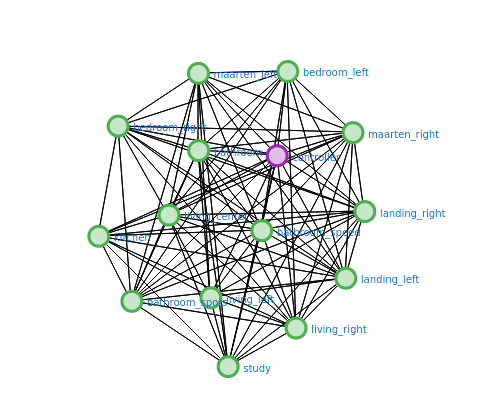
Nodes 2 to 9 are on the same floor (attic, the wires end there) all there own plastic junction boxes.
Node 2 -5 spacing between the nodes is approx 30 cm, they are on the left side of the attic
Nodes 6 - 9 there is approx 30 cm spacing between them, they are on the right side of the attic
I guess the attic is like 8 to 10 meters wide
According to the mesh they are able to communicate with each-other and the controller
The controller is two floors down (one wood, one concrete), but in the middle of the house.
ODINServ
on 26 Nov 2020
So my first test dont have those error, but i've also disabled all energy reports, i will enable them again, i dont have more time now :) will report back later
ODINServ
on 26 Nov 2020
Hey, i did get the timeout but now after i send a broadcast, (indeed again on node 6 which is also interesting to me) but now the target value was correct in the end. 👍
I will keep testing for the coming days.
I have some questions if you wont mind?:
- How does the driver / application know when to re request the value? Is that based on time , or some other event?
- Why do i get this timeout when i send a broadcast ?
- Because, i red that in zwave a multicast/broadcast is not acknowledged, so how does it than know it could not write to node 6 ?,
- Also in tcp/ip you have the broadcast address on which all clients of that network are listening
- * * I assume this is the same for zwave ?
- And in tcp/ip you have the multicast addresses on which one can subscribe to receive data
- * * I assume in zwave all nodes are subscribed always to there own multicast address?
So i guess i do understand now also robertsLando better, because if i look at the logging it seems that the mqtt app is not sending a real broadcast, and also just iterating over all nodes with that commandclass and sending all messages individually?
I have logs if your interested, then i will clean them and attach them
ODINServ
on 27 Nov 2020
* How does the driver / application know when to re request the value? Is that based on time , or some other event?
When talking to a single node, the current value is requested...
- ...directly after a SET
- (if supervised) ...when a Supervision Report indicates success (the change is complete) or working (the change is in progress)
- (if supervised and with experimental PR 1153) ...after each supervision report
Why do i get this timeout when i send a broadcast ?
Is it a real broadcast (target node 255)? Then you shouldn't get a timeout.
If it is "multicast", this can be explained by the fact that zwavejs2mqtt iterates through all nodes and sends a singlecast to each node.
Also in tcp/ip you have the broadcast address on which all clients of that network are listening
Yep, that is node ID 255
I assume in zwave all nodes are subscribed always to there own multicast address?
In ZWave you can use a special send command which accepts multiple target node IDs instead of just one. This is not possible yet through the commandClasses API which zjs2mqtt uses, but I've opened a feature request.
AlCalzone
on 27 Nov 2020
Is it a real broadcast (target node 255)? Then you shouldn't get a timeout.
Actually even broadcasts requests are sent like multicast, one by one
@AlCalzone How should I send it using the node 255? What about creating a method sendBroadcast(valueId, value) ?
robertsLando
on 27 Nov 2020
Uh, you're right, that doesn't work through the commandClasses API either. Only if you sendCommand manually. I'll add it to the feature request.
AlCalzone
on 27 Nov 2020
Is there something left to do here? The multicast API is tracked in a different issue. And I think we have one for the timeout errors that aren't caught?
AlCalzone
on 3 Dec 2020
That's true, I'll wait for the new API
ODINServ
on 3 Dec 2020
Related issues
 Illsley
·
4Comments
Illsley
·
4Comments
 Lopton
·
5Comments
Lopton
·
5Comments
 jonathan-reisdorf
·
3Comments
jonathan-reisdorf
·
3Comments
 balloob
·
4Comments
balloob
·
4Comments
 crxporter
·
8Comments
crxporter
·
8Comments