Zulip: Move wrong password warning to next to the password field when fetching an API key through setting modal
Original chat: https://chat.zulip.org/#narrow/stream/6-frontend/topic/show.20a.20warning.20when.20password.20is.20wrong.20(fetch.20api.20key)/near/744694
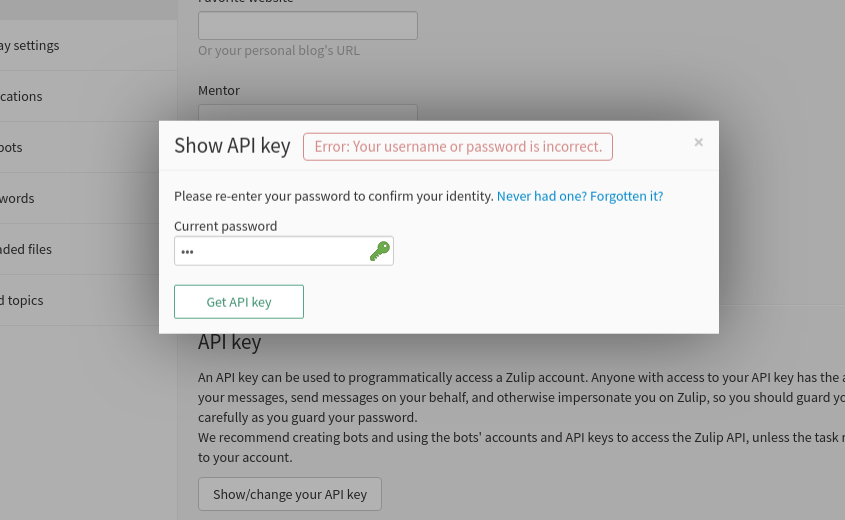
When we want to fetch an API key from the setting modal, we have to input our password, but if the submitted password is wrong, the warning is shown at the top of the setting modal instead of being shown next to the password field. This is pretty confusing since most of the users won't notice the warning because they have to scroll to the top of the modal first.
How to reproduce:
- Log in to Zulip.
- Open settings.
- In "Your account" tab, scroll down and find the API key section.
- Click on "Show/change your API key"
- Fill a wrong password in the current password field.
- Click on "Get API key" button
Then the warning will be shown at the top of the setting modal.
Expected result:
The warning should be shown next to the password field.
 refeed
All 3 comments
Hello @zulip/server-settings members, this issue was labeled with the "area: settings (user)" label, so you may want to check it out!
 zulipbot
on 28 May 2019
zulipbot
on 28 May 2019
Agreed; I guess we missed this in the "error feedback" migration. Though it's potentially going to be done by accident in #10102; we might want to focus on that first.
 timabbott
on 28 May 2019
timabbott
on 28 May 2019
Fixed in cbae51db63587b31636cfb92573972e633512fa8.
 tommyip
on 15 Aug 2019
tommyip
on 15 Aug 2019
Related issues
 JulianGro
·
3Comments
timabbott
·
5Comments
JulianGro
·
3Comments
timabbott
·
5Comments
 showell
·
4Comments
showell
·
4Comments
 brainwane
·
4Comments
brainwane
·
4Comments
 wdaher
·
5Comments
wdaher
·
5Comments