Zsh-autosuggestions: Use Ctrl+Enter for executing current autosuggestion; Using
I have an issue regarding keybindings:
- How can I replace the Up-key with Ctrl+k such that I move to the next possible suggestion with vi-like bindings?
Unfortunately I didn't find any documentation on which keybinding I have to set to make this work.
- How can I use Ctrl+Enter to execute the currently shown suggestion? "^M" corresponds to Enter, I don't see a way to add the Ctrl control-sequence
Thanks for help
 moritzschaefer
All 5 comments
Regarding the second part, your terminal emulator probably does not distinguish between Enter, Ctrl-Enter, and Shift-Enter. You can check this by hitting Ctrl-v Enter, Ctrl-v Ctrl-Enter... They most likely all send ^M.
One solution is to create a custom keycode. I've used iTerm to send the escape sequence [[CE, and then used the binding bindkey '^[[[CE' autosuggest-execute
In iTerm, this is done underProfile -> Keys. Click the + to add a new mapping, enter the desired key sequence, and then choose Send Escape Sequence
 mattsoutherden
on 8 Aug 2017
mattsoutherden
on 8 Aug 2017
How can I replace the Up-key with Ctrl+k such that I move to the next possible suggestion with vi-like bindings?
This plugin doesn't support cycling through suggestions. To see what the up-key is bound to in your environment, type bindkey ', hit ctrl+v and the up arrow, then close the quote ' and hit enter. On my machine this looks like this:
% bindkey '^[[A'
"^[[A" up-line-or-history
Meaning that the up key is bound to the up-line-or-history widget. In order to bind ctrl+k to up-line-or-history, run bindkey '^K' up-line-or-history. If you want that to take effect on every zsh session going forward, add it to your .zshrc.
How can I use Ctrl+Enter to execute the currently shown suggestion? "^M" corresponds to Enter, I don't see a way to add the Ctrl control-sequence
In addition to @mattsoutherden's answer, check out a previous question here: https://github.com/zsh-users/zsh-autosuggestions/issues/154
 ericfreese
on 11 Aug 2017
ericfreese
on 11 Aug 2017
@mattsoutherden Thank you for your previous comment about using iTerm to send an escape sequence. I'd like to learn more about this, as it's still not working as I expect. Here's the binding I set up:
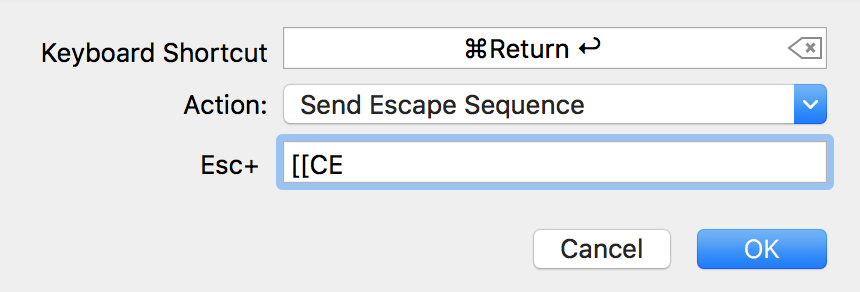
Is it supposed to have the [[ proceeding it? It results in this mapping, which does seem to match the bindkey '^[[[CE' autosuggest-execute binding you suggest above:

From iTerm when I press Command+Enter I see:
➜  ~ cat -v
^[[[CE
Which I think is correct? However, when I attempt to use the binding, with autosuggestions, the suggestion is replaced with just a capital "E". For example, if I start typing "cat" into the terminal, autosuggest suggests appending -v:
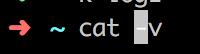
When I press Command+Enter it then becomes:
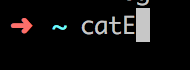
I'd like to learn more about all of this. Your help would be appreciated.
 bbuchalter
on 1 Oct 2018
bbuchalter
on 1 Oct 2018
this is what I have in my .zshrc and it works:
export ZSH_AUTOSUGGEST_BUFFER_MAX_SIZE=20
export ZSH_AUTOSUGGEST_USE_ASYNC=1
antigen bundle zsh-users/zsh-autosuggestions
bindkey '^[[[CE' autosuggest-execute
did you load the autosuggest plugin before the bindkey command? could you post your .zshrc? @bbuchalter
 timfeirg
on 2 Oct 2018
timfeirg
on 2 Oct 2018
Sorry, not sure. I have not been able to replicate that behaviour, so I can't suggest what may be causing it.
mattsoutherden
on 8 Oct 2018
Related issues
 fgr0
·
3Comments
fgr0
·
3Comments
 mindyourlifeguide
·
6Comments
mindyourlifeguide
·
6Comments
 raulferras
·
3Comments
raulferras
·
3Comments
 Kenmmm
·
4Comments
Kenmmm
·
4Comments
 glacambre
·
3Comments
glacambre
·
3Comments
Most helpful comment
Regarding the second part, your terminal emulator probably does not distinguish between
Enter,Ctrl-Enter, andShift-Enter. You can check this by hittingCtrl-v Enter,Ctrl-v Ctrl-Enter... They most likely all send^M.One solution is to create a custom keycode. I've used iTerm to send the escape sequence
[[CE, and then used the bindingbindkey '^[[[CE' autosuggest-executeIn iTerm, this is done under
Profile->Keys. Click the+to add a new mapping, enter the desired key sequence, and then chooseSend Escape Sequence