Zsh-autosuggestions: bindkey with Ctrl+Space doesn't work anymore
I just reinstalled zsh-autosuggestions from the new repository and since then my key binding for autosuggest-accept doesn't work anymore.
I overwrite my settings in the file $ZSH_CUSTOM/autosuggestion-settings.zsh with the following statement:
bindkey '^ ' autosuggest-accept
The file is definitely sourced.
I use the newest version, which is _v0.2.17_ at the moment.
Other keys like / work like a charm.
Does anyone have the some issue?
 timofurrer
All 11 comments
What is the output of bindkey '^ ' and echo $widgets[autosuggest-accept]?
Does the binding work if you source zsh-autosuggestions without the rest of your config?
% zsh -f
%% source ~/.oh-my-zsh/custom/plugins/zsh-autosuggestions/zsh-autosuggestions.zsh
%% bindkey '^ ' autosuggest-accept
Also, what other oh my zsh plugins do you have enabled? Does the binding work when you disable all other plugins?
 ericfreese
on 5 Mar 2016
ericfreese
on 5 Mar 2016
Output of bindkey '^ ':
"^@" autosuggest-accept
Output of echo $widgets[autosuggest-accept]:
user:_zsh_autosuggest_widget_accept
It doesn't work either when use zsh -f and source and bind manually.
My other plugins:
plugins=(git git-extras python common-aliases command-not-found zsh-syntax-highlighting zsh-autosuggestions)
Disabling the other plugins doesn't help.
I just took a default .zshrc and added my stuff and uploaded it to this gist: https://gist.github.com/timofurrer/9b59786b16c1c985c54f
EDIT: btw. my zsh version is zsh 5.0.5. I've got another machine with a nearly identical zsh configuration (oh-my-zsh is not up to date there) but the zsh version is: zsh 5.1.1 and it works fine.
Do you know about known problems with older zsh versions?
EDIT 2:
Two of the unit tests also fail but I'm not sure if this is related, because the testWidgetAccept was running successfully...
$ make test
./script/test.zsh
testHighlightDefaultStyle
testHighlightApplyWithSuggestion
testHighlightApplyWithoutSuggestion
testHighlightReset
testWidgetFunctionClear
testWidgetFunctionModify
testWidgetFunctionAcceptCursorAtEnd
testWidgetFunctionAcceptCursorNotAtEnd
testWidgetFunctionPartialAcceptCursorMovesOutOfBuffer
testWidgetFunctionPartialAcceptCursorStaysInBuffer
ASSERT:BUFFER was modified expected:<echo hello> but was:<echo >
ASSERT:POSTDISPLAY was modified expected:< world> but was:<hello>
testWidgetAccept
testWidgetClear
testEscapeCommandPrefix

Ran 13 tests.

FAILED (failures=2)
make: *** [test] Error 1
What do you get if you press in your terminal: ctrl+v and then ctrl+space?
What terminal and OS are you running?
Can you successfully bind '^ ' to any other widgets?
I don't think those test failures are related, but I've fixed them in another branch. I'll go ahead and pull those over and make a new 0.2.x release.
ericfreese
on 8 Mar 2016
Nothing happens when I press this combination either.
It's an ubuntu 14.04 with konsole.
It doesn't work to bind '^ ' to any other widgets ...
timofurrer
on 9 Mar 2016
It doesn't work to bind '^ ' to any other widgets ...
This leads me to believe that this isn't actually a problem with this plugin, but instead has something to do with your environment. So I'm going to go ahead and close this issue.
Can you try binding a different key combination to autosuggest-accept and verify that it does work?
As for why ctrl+space isn't working for you, that gets outside of my knowledge, but this might put you on the right track: https://www.google.com/search?q=bindkey+ctrl+space+ubuntu+konsole
ericfreese
on 9 Mar 2016
I run into similar problem and it turns out that some input method(e.g. ibus) is taking over the ctrl-space shortcut by default.
 akovski
on 9 Feb 2017
akovski
on 9 Feb 2017
Just in case someone fall here with the same settings I have, with my setup the problem was that I'm using vi mode in shell (instead of the default emacs mode).
 Eduruiz
on 1 Oct 2018
Eduruiz
on 1 Oct 2018
@timofurrer What if you tried moving your auto-suggestion keybinding to the very bottom of your zshrc file?
 unknownbreaker
on 4 Feb 2019
unknownbreaker
on 4 Feb 2019
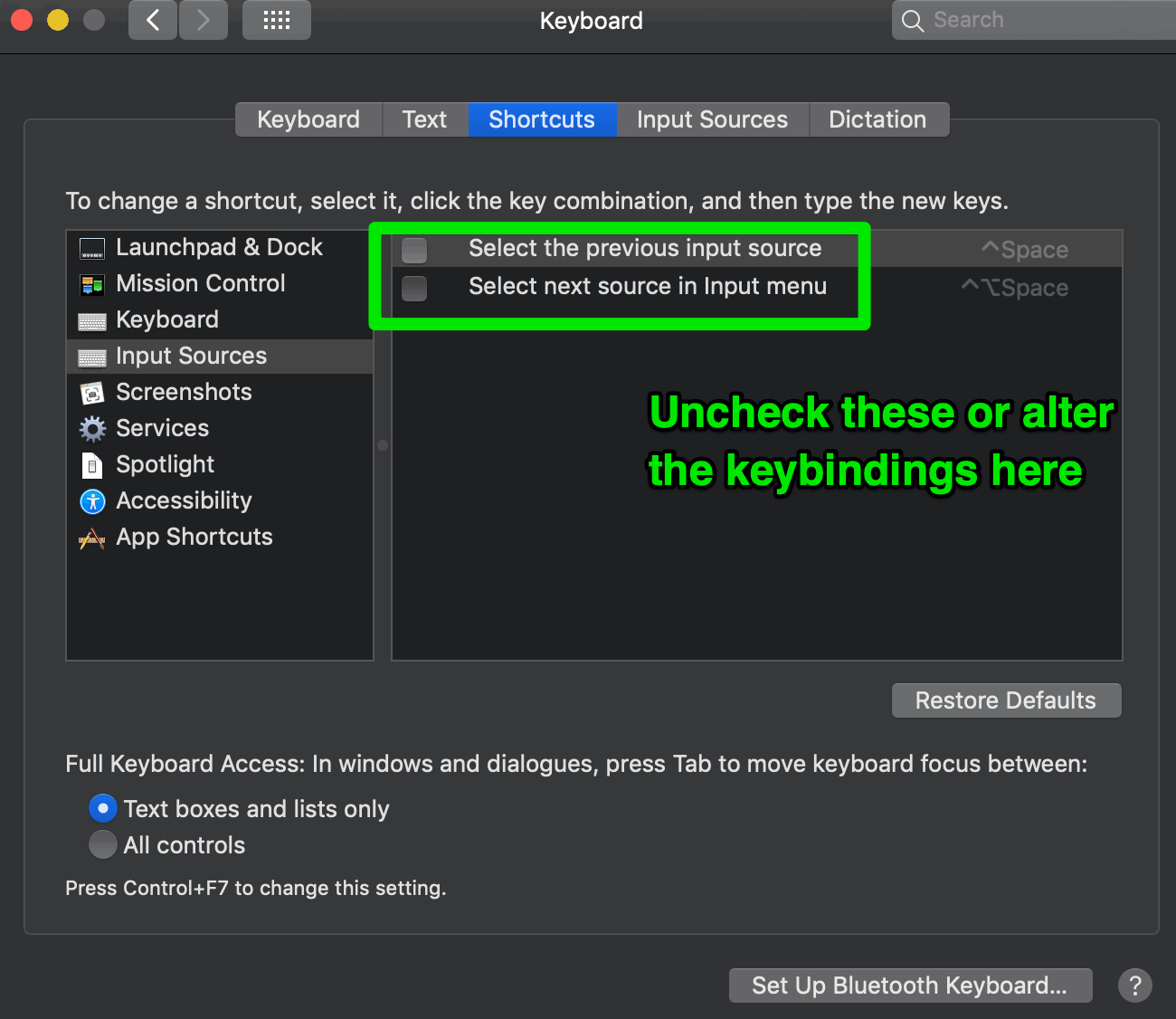
Quick update to say I found this issue helpful it diagnosing own problem. Running on MacOS I had Ctrl Space mapped in system settings. Unticking the binding freed it up for usage with autocompletions. You could also just change the keybinding set here if you really need that functionality.
Screenshot below (System Preferences -> Keyboard -> Shortcuts (tab):
 kinowarrior
on 10 May 2019
kinowarrior
on 10 May 2019
Thank you. The system shortcuts tab was the issue for me. The post saved me a lot of time. - E
 EdmundsEcho
on 19 May 2019
EdmundsEcho
on 19 May 2019
I am on Win 10 with WSL.
I can use bindkey ',' autosuggest-accept to reset the key, but I can't make bindkey '^ ' autosuggest-accept.
Later I figured out the reason: ctrl+space has been occupied by the system input method.
Setting bindkey '^j' autosuggest-accept works for me.
Hope this can help you, too.
 dilin-MS
on 20 Feb 2020
dilin-MS
on 20 Feb 2020
Related issues
 NikKovIos
·
4Comments
NikKovIos
·
4Comments
 metalmac
·
4Comments
metalmac
·
4Comments
 Kenmmm
·
4Comments
Kenmmm
·
4Comments
 sebw
·
6Comments
sebw
·
6Comments
 dragonxlwang
·
3Comments
dragonxlwang
·
3Comments
Most helpful comment
Quick update to say I found this issue helpful it diagnosing own problem. Running on MacOS I had Ctrl Space mapped in system settings. Unticking the binding freed it up for usage with autocompletions. You could also just change the keybinding set here if you really need that functionality.
Screenshot below (System Preferences -> Keyboard -> Shortcuts (tab):