Zsh-autocomplete: Some issues on latest pull
Environment
zsh-autocompleteversion: 2ed55ecf0c927479e4023395a763da01b13f94ab- Zsh version: 5.8-5
- Framework: No framework
~/.zshrcfile:
# Greeting
echo "Welcome to Parrot OS"

# Prompt
PROMPT="%F{red}┌[%f%F{cyan}%m%f%F{red}]─[%f%F{yellow}%D{%H:%M-%d/%m}%f%F{red}]─[%f%F{magenta}%d%f%F{red}]%f"$'\n'"%F{red}└╼%f%F{green}$USER%f%F{yellow}$%f"
# Export PATH$
export PATH=~/.local/bin:/snap/bin:/usr/sandbox/:/usr/local/bin:/usr/bin:/bin:/usr/local/games:/usr/games:/usr/share/games:/usr/local/sbin:/usr/sbin:/sbin:$PATH

# alias
alias ls='ls -lh --color=auto'
alias dir='dir --color=auto'
alias vdir='vdir --color=auto'
alias grep='grep --color=auto'
alias fgrep='fgrep --color=auto'
alias egrep='egrep --color=auto'
#####################################################
# Auto completion / suggestion
# Mixing zsh-autocomplete and zsh-autosuggestions
# Requires: zsh-autocomplete (custom packaging by Parrot Team)
# Jobs: suggest files / foldername / histsory bellow the prompt
# Requires: zsh-autosuggestions (packaging by Debian Team)
# Jobs: Fish-like suggestion for command history
source /usr/share/zsh-autosuggestions/zsh-autosuggestions.zsh
source /usr/share/zsh-autocomplete/zsh-autocomplete.plugin.zsh
# Select all suggestion instead of top on result only
zstyle ':autocomplete:tab:*' insert-unambiguous yes
zstyle ':autocomplete:tab:*' widget-style menu-select
zstyle ':autocomplete:*' max-lines 100%
zstyle ':autocomplete:*' min-input 2
# Set a bash-like history
bindkey $key[Up] up-line-or-history
bindkey $key[Down] down-line-or-history

##################################################
# Fish like syntax highlighting
# Requires "zsh-syntax-highlighting" from apt
source /usr/share/zsh-syntax-highlighting/zsh-syntax-highlighting.zsh

# Save type history for completion and easier life
HISTFILE=~/.zsh_history
HISTSIZE=10000
SAVEHIST=10000
setopt appendhistory

alias time="/usr/bin/time -f '\t%E real,\t%U user,\t%S sys,\t%K amem,\t%M mmem'"
I don't feel like my issues (not really bugs, just small issues) fit the bug report so i don't follow the guideline.
1. insert-unambiguous yes add space problem.
- If i'm having 2 files like this fooA.c and fooB.c, and i use this setting, press Tab gives me foo and suggest 2 files fooA.c and fooB.c.
- If i press A, I expected plugin give me fooA.c or at least fooA. I want the same idea for fooB when i press B
- By now the script gives me foo A when i press A (a space between character).
So i suggest you remove space character for this setting.
2. Auto correct issue
- Doesnt work with vscode. Somehow characters are removed. For example, if i type python, it gives me yhon instead.
- Performance is a little slow
- Sometime suggest or replace by wrong text.
- Missing suggestions sometime.
 dmknght
All 53 comments
I'm able to reproduce both issues. Thanks for reporting.
Regarding problem number 1
This indeed seems to be a mistake on my part. It shouldn't be too hard to correct, though. I will push in a fix soon.
Regarding problem number 2
I cannot reproduce this reliably. The problem seems to be that VS Code sometimes does not report the correct terminal height to Zsh, which causes Zsh's completion menu to go into "scroll mode", which then eats one of the characters you type. Would you be able to put together a test case for this with which we can reliably reproduce it?
 marlonrichert
on 17 Nov 2020
marlonrichert
on 17 Nov 2020
I cannot reproduce this reliably. The problem seems to be that VS Code sometimes does not report the correct terminal height to Zsh, which causes Zsh's completion menu to go into "scroll mode", which then eats one of the characters you type. Would you be able to put together a test case for this with which we can reliably reproduce it?
Well it is a little hard but i can try. Can I do it in next few hours? i'm a little busy with my deadline :|
P/s: vscode is just 1 of issues in number 2. The other issue is false positive in mate terminal: if i run sudo dpkg -i the -i gives me no space after the -i flag. I will try again and collect some results about it.
dmknght
on 17 Nov 2020

And other problem: the number 1 doesn't allow me to use right arrow to autocomplete the history
dmknght
on 17 Nov 2020

An new issue of auto completion. I typed git clone + ctrl + shift + v (paste). Last result was removed first h in url.
dmknght
on 18 Nov 2020
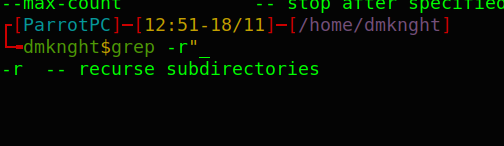
The grep -r has no space after flag. It is as same as dpkg -i
dmknght
on 18 Nov 2020
Well it is a little hard but i can try. Can I do it in next few hours? i'm a little busy with my deadline :|
No rush! Just do it when you have time. 🙂
marlonrichert
on 18 Nov 2020
the number 1 doesn't allow me to use right arrow to autocomplete the history
I’m not sure what you mean. Can you please explain that in more detail?
Update: I think I get it now. You’re talking about zsh-autosuggestions.
If you want ➡️ to accept the next suggested character, add this to your ~/.zshrc file _after_ sourcing zsh-autosuggestions:
ZSH_AUTOSUGGEST_ACCEPT_WIDGETS=( "${ZSH_AUTOSUGGEST_ACCEPT_WIDGETS[@]:#*forward-char}" )
ZSH_AUTOSUGGEST_PARTIAL_ACCEPT_WIDGETS+=( forward-char vi-forward-char )
If you want ➡️ to accept the _whole_ suggestion, then you shouldn’t need to change anything. That’s the default.
In any case, that’s a feature of zsh-autosuggestions, not zsh-autocomplete.
marlonrichert
on 18 Nov 2020
the number 1 doesn't allow me to use right arrow to autocomplete the history
I’m not sure what you mean. Can you please explain that in more detail?
oh sorry i meant with the unambiguous, when it stops at the poisition, i can't use arrow key to auto fill result from history. This problem is a little strange because it is normal right now.
dmknght
on 18 Nov 2020
Aha, OK. Thanks for clarifying. I’ll have to see if I can reproduce it.
Update: Actually, I just realized why this happens. You are using widget-style menu-select. So, after pressing Tab, the focus is moved from the command line to the menu. I will have to test it, but I think this should be fixed with the patch I’m working on.
marlonrichert
on 18 Nov 2020
if i run
sudo dpkg -ithe-igives me no space after the-iflag. I will try again and collect some results about it.
What do you mean with this and how is this a problem?
marlonrichert
on 18 Nov 2020
What do you mean with this and how is this a problem?
I'm very sorry if i didn't make it be clear. If you check the screenshot of grep you can see what i meant: after type -i, it should be a space after this flag. And as i remember, the plugin auto deletes the space after -i
P/s: i can't not reprocedure it right now because plugin always gives me "completion timeout"
dmknght
on 18 Nov 2020
i can't not reprocedure it right now because plugin always gives me "completion timeout"
Hm, well, that’s not good either. That likely means that an error occurs during the asynchronous completion. I’m seeing some of this myself, too. I will have to investigate. It can often be very tricky to find out what is the cause of these kind of things.
marlonrichert
on 18 Nov 2020
It can often be very tricky to find out what is the cause of these kind of things.
Yes i totally agree with you. Because the completion here has the data from bash completion too and it has huge different cases based on package, history and system platform.
P/s: At very first version of zsh-autocomplete, the suggestion was very fast. I hope you can optimize the speed and improve performance in next release :D
dmknght
on 18 Nov 2020
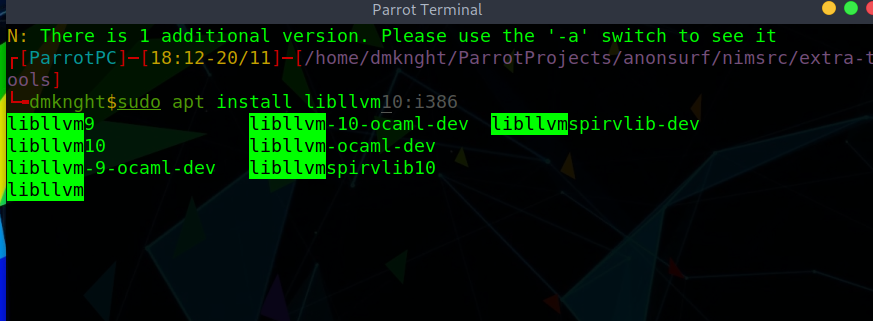
@marlonrichert i'm able to reprocedure the "cant use arrow key" error.
- First, the command
sudo apt install libllvm10:i386must be in history. - When type
sudo apt install libllvthenTab, i getsudo apt install libllvm - I want to use
right allowto use history completion and it doesn't work
P/s: the arrow key doesn'tselectthe suggested text either so it is conflict between 2 plugin i believe
dmknght
on 20 Nov 2020
Thanks, but that problem was already clear to me. I have a fix here waiting to be pushed in. 🙂
marlonrichert
on 20 Nov 2020
@dmknght I pushed in some improvements. Please git pull and try them out. 🙂
marlonrichert
on 21 Nov 2020
@dmknght I pushed in some improvements. Please
git pulland try them out. slightly_smiling_face
Hi i've cloned the latest changes and try it out.
- Performance is likely improved. I think i have to try it more to really feel it and detect some bottlenecks
- The character removal is still happening. For example: i am typing
sudo dpkg -i parrot-(i'm having some files starts withparrot-in current folder) and it gives mesudo dpkg -i prrot. 1 character was removed
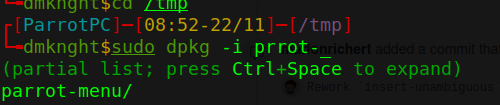
So i think maybe you should trigger the auto complete when user pressestaborspaceonly? In my opinion, it will improve performance a bit (don't check and replace everything on every keystroke) and less annoying bugs which is a little hard to trace. - (Update) the problem of right arrow key is fixed with command
sudo apt install libllvm10example. - (Update2)
the error of usingThe error doesn't appear after i remove the whole plugin and install new version (fresh install instead of upgrade) into system.grepis fixed. The error of clone https url goes to new issue

I typedgit clonethen paste url using combo keyctrl + shift + vto paste. Same problem for right click -> paste. - Moreeee update: when i type
cp -ri have onlycp -. After some test, i found out
5a. If i type very slow, there is a chance that my type won't be messed up
5b. This notification appears so any keystroke becamePress anykey to continuelike behavior.

dmknght
on 22 Nov 2020
This notification appears so any keystroke became Press anykey to continue like behavior.
Thanks, that is definitely what is eating up your other keystrokes, too. I am unable to reproduce it on my end, though, with the latest changes. I'm not sure how or why you are still seeing this behavior. Can you please test with the following steps?
$ cd $(mktemp -d)  # Create a temp dir and enter it.
$ ZDOTDIR=$PWD HOME=$PWD zsh -f  # Start a subshell in it without config files.
% source path/to/zsh-autocomplete.plugin.zsh  # Source the plugin.
% # Insert here the steps you take to reproduce your bug.
Does the bug occur in this environment, too?
Also, what size is your terminal exactly? How many characters wide & how many lines tall? And what output do you get from print $COLUMNS $LINES?
Have you yet tried deleting ~/.zcompdump?
marlonrichert
on 22 Nov 2020
This notification appears so any keystroke became Press anykey to continue like behavior.
Thanks, that is definitely what is eating up your other keystrokes, too. I am unable to reproduce it on my end, though, with the latest changes. I'm not sure how or why you are still seeing this behavior. Can you please test with the following steps?
$ cd $(mktemp -d)  # Create a temp dir and enter it.
$ ZDOTDIR=$PWD HOME=$PWD zsh -f  # Start a subshell in it without config files.
% source path/to/zsh-autocomplete.plugin.zsh  # Source the plugin.
% # Insert here the steps you take to reproduce your bug.
Does the bug occur in this environment, too?
Also, what size is your terminal exactly? How many characters wide & how many lines tall? And what output do you get from
print $COLUMNS $LINES?Have you yet tried deleting
~/.zcompdump?
oh my bad! remove the .zcompdump actually fixed the problem. And now the zsh runs very very fast. I think i should try the whole zsh completion in 1 or 2 days to make sure there is no odd bugs :D
dmknght
on 22 Nov 2020
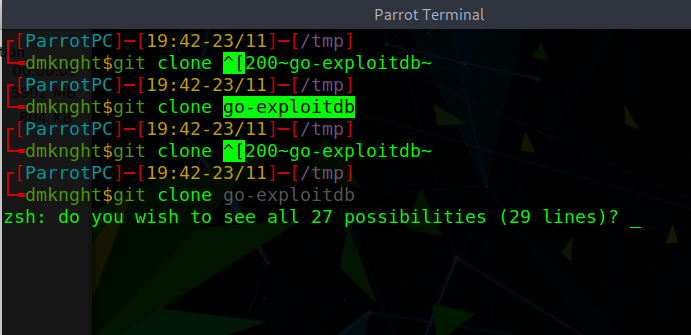
@marlonrichert there is a not very new bug. When the plugin shows zsh: do you wish to see all 27 possibilities (29 lines)?, paste gives the "weird" characters
For example if type rm and plugin suggests me history + the question. I type right arrow key and it gives me rm ^[C
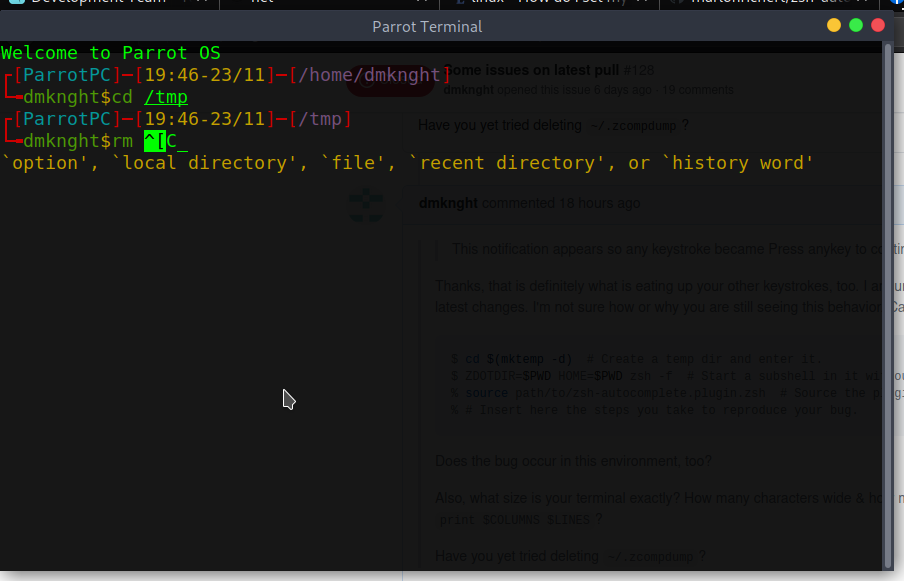
So in this case, that "ask for display long line" is the problem. Can you reopen this issue please?
p/s: package names in apt repository likely no longer display by sugestions
dmknght
on 23 Nov 2020
When the plugin shows
zsh: do you wish to see all 27 possibilities (29 lines)?, paste gives the "weird" characters
You should currently _never_ get to see that message. I'm unable to reproduce it on my end. Can you put together a test case for it, please? I will reopen the issue once I can reproduce it.
marlonrichert
on 23 Nov 2020
When the plugin shows
zsh: do you wish to see all 27 possibilities (29 lines)?, paste gives the "weird" charactersYou should currently _never_ get to see that message. I'm unable to reproduce it on my end. Can you put together a test case for it, please? I will reopen the issue once I can reproduce it.
Fixed by commenting zstyle ':autocomplete:*' max-lines 100%.
Well it is like issues detected during normal use (not test cases) so it is a little hard to do it at 1.
dmknght
on 24 Nov 2020
Fixed by commenting
zstyle ':autocomplete:*' max-lines 100%.
Thanks, that really helps me. I’ll see what I can do.
marlonrichert
on 24 Nov 2020
Fixed by commenting
zstyle ':autocomplete:*' max-lines 100%.Thanks, that really helps me. I’ll see what I can do.
So i think the max-lines of autocomplete makes this issue?
dmknght
on 24 Nov 2020
Yeah, because Zsh pops that message whenever the completion list would overflow the screen. zsh-autocomplete measures how many lines the full completion list would take and then tries to trim it to fit max-lines. For any other value than 100%, it doesn't matter if the end result is not entirely accurate, but for this case, it does. I'll see what I can do to improve this.
marlonrichert
on 24 Nov 2020
Can you try adding the following to your ~/.zshrc and see if that fixes the problem for you?
zstyle ':completion:*' list-rows-first yes
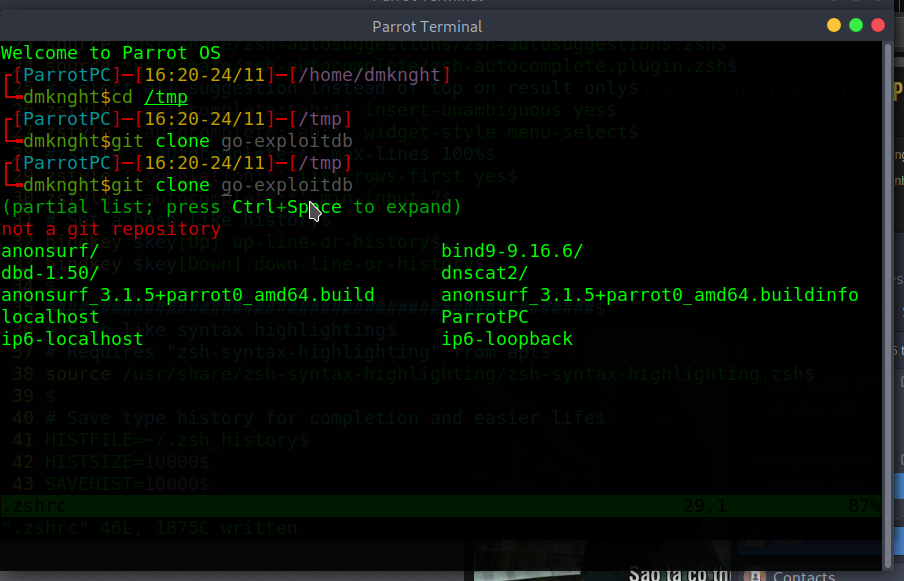
Can you try adding the following to your
~/.zshrcand see if that fixes the problem for you?zstyle ':completion:*' list-rows-first yes
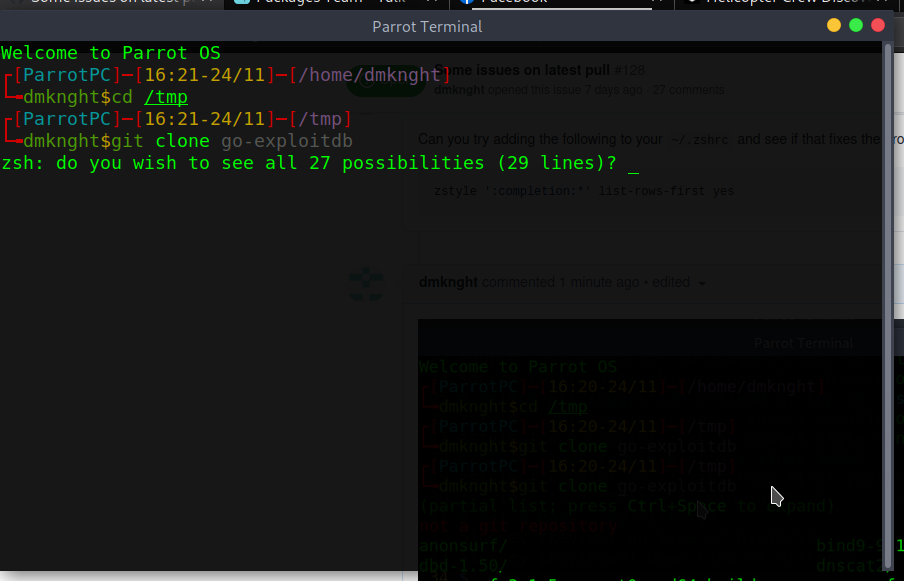
Here is my output. It seems normal.
P/s: use both your suggestion and the max-lines 100%
dmknght
on 24 Nov 2020
So, judging from your second image, it does not make the problem go away?
marlonrichert
on 24 Nov 2020
So, judging from your second image, it does not make the problem go away?
Well i think no.
dmknght
on 24 Nov 2020
Exactly how big is your terminal? How many columns and lines? Does the actual number of columns and lines match what you get from print $COLUMNS $LINES?
marlonrichert
on 24 Nov 2020
Exactly how big is your terminal? How many columns and lines? Does the actual number of columns and lines match what you get from
print $COLUMNS $LINES?
It is 80x24. Very default size.
┌[ParrotPC]─[16:27-24/11]─[/home/dmknght]
└╼dmknght$print $COLUMNS $LINES
80 24
Wait, when do you get to see that "do you wish to see all" message? Only after you press ControlSpace? Or already while still typing?
marlonrichert
on 24 Nov 2020
Wait, when do you get to see that "do you wish to see all" message? Only after you press ControlSpace? Or already while still typing?
It is already while typing. I meant like a part of suggestions.
dmknght
on 24 Nov 2020
OK, weird. I really cannot reproduce it. When you answer y to the question, what is the ouput you get to see? I would like to know what kind of values are in the list that causes this behavior.
marlonrichert
on 24 Nov 2020
OK, weird. I really cannot reproduce it. When you answer
yto the question, what is the ouput you get to see?
Well it is a list of files and folders like output of ls but in 1 column only. And it is a little weird because it doesn't list everything but only some files and folders. And well 4 values of hostname i suppose (i got surprised by this).
p/s: more information: i'm having 317 files and folders (files + folders = 317) inside /tmp/ and it only shows 29 which includes 4 values of hostname? It is very weird
dmknght
on 24 Nov 2020
Can you paste it here, please?
marlonrichert
on 24 Nov 2020
Can you paste it here, please?
yeah sure the list is here
anonsurf/
bind9-9.16.6/
dbd-1.50/
dnscat2/
DownTest/
dumps/
gimp/
goofileN/
greenbone-nvt-sync.VFi1r09TFd/
hsperfdata_dmknght/
hsperfdata_root/
libgksu-eJARzu/
libgksu-i34pV7/
mozilla_dmknght0/
nimblecache-2129341435/
nvimwmn3Ed/
anonsurf_3.1.5+parrot0_amd64.build
anonsurf_3.1.5+parrot0_amd64.buildinfo
anonsurf_3.1.5+parrot0_amd64.changes
anonsurf_3.1.5+parrot0_amd64.deb
anonsurf-cli_3.1.5+parrot0_amd64.deb
anonsurf-cli-dbgsym_3.1.5+parrot0_amd64.deb
AnonSurfCli.json
localhost
ParrotPC
ip6-localhost
ip6-loopback
Thanks. Does the list have any headers or footers? If so, can you paste those, too?
marlonrichert
on 24 Nov 2020
Does it make any difference if you add zstyle ':completion:*' group-name '' to your ~/.zshrc file?
marlonrichert
on 24 Nov 2020
Thanks. Does the list have any headers or footers? If so, can you paste those, too?
I think this might be header? idk. here is it
(partial list; press Ctrl+Space to expand)
not a git repository
Full output of whole command:
┌[ParrotPC]─[16:33-24/11]─[/tmp]
└╼dmknght$git clone go-exploitdb
(partial list; press Ctrl+Space to expand)
not a git repository
anonsurf/
bind9-9.16.6/
dbd-1.50/
dnscat2/
DownTest/
dumps/
gimp/
goofileN/
greenbone-nvt-sync.VFi1r09TFd/
hsperfdata_dmknght/
hsperfdata_root/
libgksu-eJARzu/
libgksu-i34pV7/
mozilla_dmknght0/
nimblecache-2129341435/
nvimwmn3Ed/
anonsurf_3.1.5+parrot0_amd64.build
anonsurf_3.1.5+parrot0_amd64.buildinfo
anonsurf_3.1.5+parrot0_amd64.changes
anonsurf_3.1.5+parrot0_amd64.deb
anonsurf-cli_3.1.5+parrot0_amd64.deb
anonsurf-cli-dbgsym_3.1.5+parrot0_amd64.deb
AnonSurfCli.json
localhost
ParrotPC
ip6-localhost
ip6-loopback
The go-exploitdb in command is the history suggestion and i think it belongs to the plugin zsh-autosuggestions
dmknght
on 24 Nov 2020
not a git repository
I think this might be what throws it off. Thanks, I'll have a look.
marlonrichert
on 24 Nov 2020
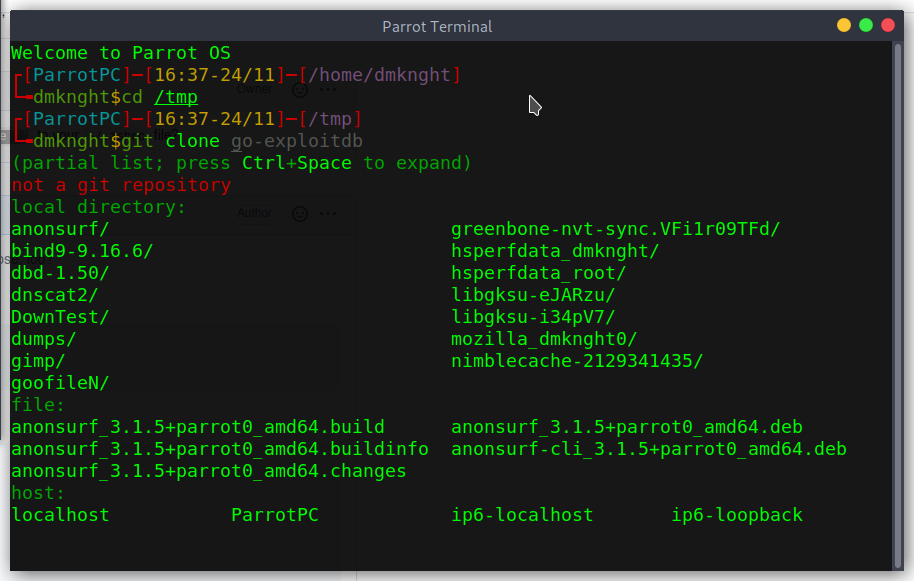
Does it make any difference if you add
zstyle ':completion:*' group-name ''to your~/.zshrcfile?
Here is the screenshot. It is good. But judge by the output, seems like the suggestion list is missing something.
dmknght
on 24 Nov 2020
Well, of course there's something missing. It's only a partial list. 🙂
marlonrichert
on 24 Nov 2020
Anyway, thanks: I have a test case now with which I can reproduce it.
marlonrichert
on 24 Nov 2020
Well, of course there's something missing. It's only a partial list. slightly_smiling_face
Hmm this is a little not very good. So do you know how can i get the full list. Well at least for suggestions of packages in apt list? i remember it showed before and now it won't and idk which option should i use (it could be 1 issue i think).
dmknght
on 24 Nov 2020
As it says right below your prompt, you can get the full list by pressing ControlSpace
marlonrichert
on 24 Nov 2020
As it says right below your prompt, you can get the full list by pressing ControlSpace
Oh you are right. Hm i wish somehow it could display like bash completion, at least for list of apt packages. But in this case, i think I should do how to use and mention about Control + Space. Thank you :D
dmknght
on 24 Nov 2020
@marlonrichert the zstyle ':completion:*' group-name '' caused memory CPU leak in my machine.
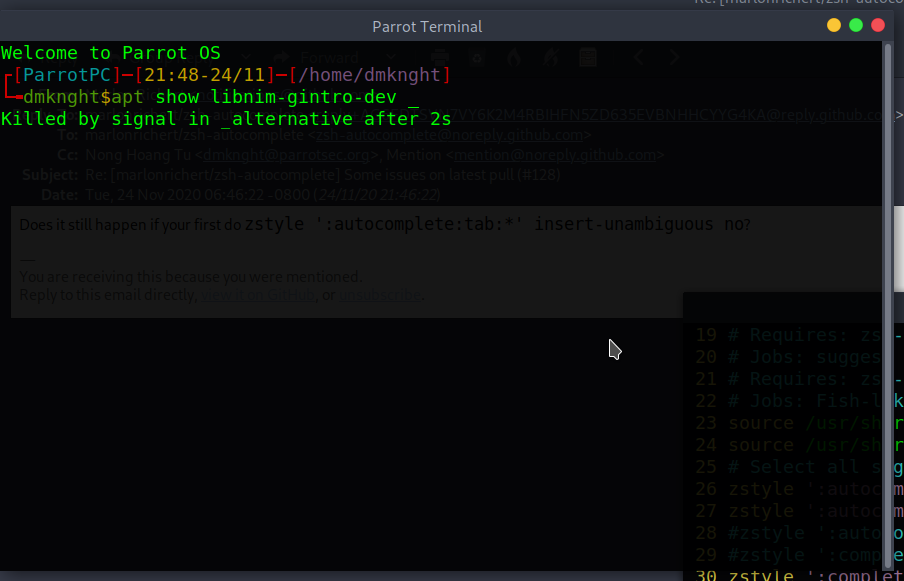
Which i did was apt show <package name>. I did apt show libnimg then use tab to select package name. Then i got terminal hangs (can't type anything). Then cpu raised to 100%. I think i didnt use zstyle ':autocomplete:*' max-lines 100%.
dmknght
on 24 Nov 2020
Does it still happen if your first do zstyle ':autocomplete:tab:*' insert-unambiguous no?
marlonrichert
on 24 Nov 2020
I think no yes it still happens. Judge by quick test cpu still raised and this showed by ctrl + c
dmknght
on 24 Nov 2020
@dmknght I pushed in several fixes. Please update.
Note, though, that apt completion and completion for package managers in general is just very slow. There's nothing zsh-autocomplete can do about it.
marlonrichert
on 25 Nov 2020
@dmknght I pushed in several fixes. Please update.
Note, though, that
aptcompletion and completion for package managers in general is just very slow. There's nothingzsh-autocompletecan do about it.
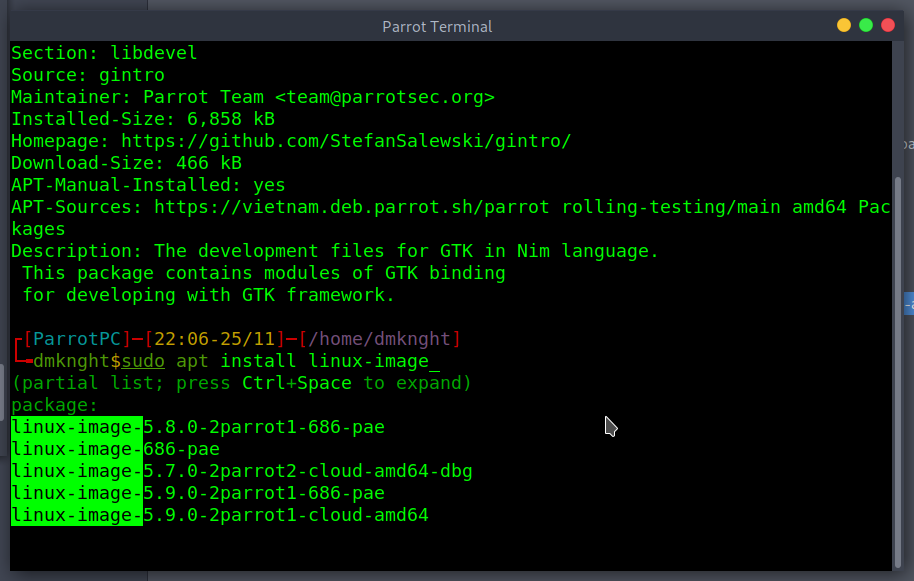
Thank you man i've tested quickly. No more CPU leak issue. the completion shows like a charm. The apt package suggestion is very fast and it is exactly how i want it to be :D
Well the most impressed thing is i am using these settings
zstyle ':autocomplete:tab:*' insert-unambiguous yes
zstyle ':autocomplete:tab:*' widget-style menu-select
zstyle ':autocomplete:*' min-input 2
There is no group name but the suggestions still show it in group name. IDK if it is showed as purpose but i really like it. This update is perfect. Thank you man you are awesome!
I think this issue could be closed. And well just to announcement i'm packaging for Parrot OS 4.11 and your plugin will be a standard of our zsh customization <3
Great work man!
dmknght
on 25 Nov 2020
There is no group name but the suggestions still show it in group name. IDK if it is showed as purpose but i really like it.
Yeah, that's intentional. Group names are no longer optional, because without grouping completions, it's virtually impossible to estimate how many will fit on one screen. 😅
marlonrichert
on 25 Nov 2020
Related issues
 pcjmfranken
·
5Comments
pcjmfranken
·
5Comments
 jcassee
·
7Comments
jcassee
·
7Comments
 weilbith
·
8Comments
weilbith
·
8Comments
 paw-lu
·
4Comments
paw-lu
·
4Comments
 daxmc99
·
3Comments
daxmc99
·
3Comments