Zsh-autocomplete: Show part of the completions list instead of "Too long list" message
Is your feature request related to a problem? Please describe.
Currently if there is not enough space on the terminal, then the message "Too long list" is displayed, which is not very informative.
Describe the solution you'd like
It would be great if at least part of the list was displayed, up to max-lines with the message "Not all lines are shown. Down Arrow to expand" or something like that.
Describe alternatives you've considered
May be this feature should be optional, although it seems to me it would not bother anyone.
 mehanoid
All 31 comments
I would love to have that myself, but Zsh’s completion unfortunately makes it really hard to do. I’ll keep this issue open, as it’s on my own wishlist, too, but please don’t expect an implementation any time soon. 🙂
 marlonrichert
on 15 Oct 2020
marlonrichert
on 15 Oct 2020
Yes, I understand, and it's a great plugin anyway :smiley: Thank you!
mehanoid
on 15 Oct 2020
@mehanoid @wolfo @Abhishek12345679 I got inspired while reading some code, the solution popped into my head, and then I implemented it. Enjoy!
marlonrichert
on 30 Oct 2020
Wow, it works! :star_struck: Really cool, thank you! :smiley:
mehanoid
on 31 Oct 2020
Doesn't quite work for me. The menu shows up, but is cut off after 9 items or rows. When I go past the last item, it goes straight back to the first one.
And there's no color highlighting in this case, though it's not that important.
Ex. 1
$ ls Library/
Accessibility         Autosave Information  ContainerManager      Favorites             HomeKit
Accounts              Caches                Containers            FontCollections       IdentityServices
Application Scripts   Calendars             Cookies               Fonts                 Input Methods
Application Support   CallServices          CoreFollowUp          FrontBoard            Internet Plug-Ins
ApplicationSupport    ColorPickers          DES                   GameKit
Assistant             ColorSync             DataDeliveryServices  Google
Assistants            Colors                Developer             Group Containers
Audio                 Compositions          Dictionaries          HTTPStorages
Ex. 2
$ antigen update
apply       Load all bundle completions
bundle      Install and load the given plugin
bundles     Bulk define bundles
cache-gen   Generate cache
cleanup     Clean up the clones of repos which are not used by any bundles currently loaded
init        Load Antigen configuration from file
list        List out the currently loaded bundles
purge       Remove a cloned bundle from filesystem
reset       Clears cache
These are my only zsh-autocomplete options:
zstyle ':autocomplete:list-choices:*' min-input 3
zstyle ':autocomplete:tab:*' insert-unambiguous yes
zstyle ':autocomplete:tab:*' widget-style menu-select
zstyle ':completion:*' tag-order '! history-words' '-'
 wolfo
on 31 Oct 2020
wolfo
on 31 Oct 2020
@wolfo Yeah, it doesn’t work that way. Try adding this to your ~/.zshrc:
zstyle ':completion:*' group-name ''
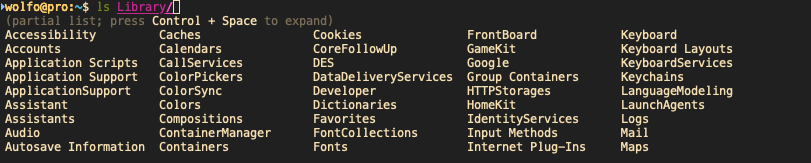
This enables completion group headers, which now includes a helpful shortcut hint when the list is truncated:
(partial list; press Control + Space for more)
But thanks for the feedback. I’ll see if I can somehow show that hint when group headers are not in use, too.
marlonrichert
on 31 Oct 2020
@wolfo
And there's no color highlighting in this case, though it's not that important.
That is odd. How have configured your color highlighting? Can you please add screenshots here, one with the problem and one without?
marlonrichert
on 31 Oct 2020
@wolfo It now shows a hint to press ControlSpace, even when completion group headers would otherwise not be shown.
Let me know if you're still experiencing the color issue and if you do, please add screenshots here of before and after, so I can get an idea of what the problem might be.
marlonrichert
on 31 Oct 2020
Yes, it does show the hint now. Control+Space works for me, as long as I reduce my zshrc to this:
source ~/.antigen/bundles/marlonrichert/zsh-autocomplete/zsh-autocomplete.plugin.zsh
zstyle ':autocomplete:list-choices:*' min-input 3
zstyle ':autocomplete:tab:*' insert-unambiguous yes
zstyle ':autocomplete:tab:*' widget-style menu-select
zstyle ':completion:*' tag-order '! history-words' '-'
So I'll have to hunt down my .zshrc further.
However, the colors are like this:

wolfo
on 31 Oct 2020
@wolfo What happens when you press ControlSpace in that last screenshot? Do the colors return?
marlonrichert
on 31 Oct 2020
Control+Space works for me, as long as I reduce my zshrc to this
In the situation where Control+Space doesn’t work for you, what output do you get from bindkey '^@'?
marlonrichert
on 31 Oct 2020
Control+Space works for me, as long as I reduce my zshrc to this
In the situation where Control+Space doesn’t work for you, what output do you get from
bindkey '^@'?
I get "undefined-key". I see that if I source zsh-autocomplete at the end of .zshrc, it is instead list-expand, and it works now. I think I activated vi-keys or something before, which overwrote the binding. My bad!
So with that out of the way, Ctrl+Space does expand the list and brings back the colors.
Now it would only be nice if the unexpanded list also showed colors :-) Or maybe it's just me. But anyway, I know it's a very fresh feature, thank you for that.
wolfo
on 31 Oct 2020
Kind of related, I don't notice zstyle ':autocomplete:list-choices:*' max-lines 100% in zshrc making any difference. Whatever the value (I even tried >100%), it's always the hint (one line) and the first part of the results (9 lines). It seems like this should be the deciding factor whether the output gets abridged, right?
wolfo
on 31 Oct 2020
I know this might not be quite the right place to mention this, but I was just setting this plugin up and also could not get zstyle ':autocomplete:list-choices:*' max-lines or zstyle ':autocomplete:list-choices:*' min-input to have any effect. I can see the options are set in zstyle, but suggestions still pop up after just 1 character and take up more lines than I specify.
Also, the fact that this plugin eats inputs with its "do you wish to see all n possibilities" query makes it really hard to use in my tmux setup, wish that could be disabled as well.
 leoddd
on 31 Oct 2020
leoddd
on 31 Oct 2020
Actually, I can confirm everything leo says, including the input eating.
wolfo
on 31 Oct 2020
Also, the fact that this plugin eats inputs with its "do you wish to see all n possibilities" query makes it really hard to use in my tmux setup, wish that could be disabled as well
@leoddd @wolfo I don't know exactly what causes that message to show, but Update: See below.zsh-autocomplete itself never does that. Similar issues were reported earlier in issue #5, on Reddit and on Stack Exchange. If a full restart doesn't work, then hopefully those posts can help you resolve the problem. Please let me know if any of this helps.
marlonrichert
on 31 Oct 2020
I know this might not be quite the right place to mention this, but I was just setting this plugin up and also could not get
zstyle ':autocomplete:list-choices:*' max-linesorzstyle ':autocomplete:list-choices:*' min-inputto have any effect.
Ah, you are right about that. I'll have to fix that. Thanks for reporting this.
marlonrichert
on 31 Oct 2020
@leoddd @wolfo I think I figured out what was causing these problems. I pushed in some changes that should fix them. Please git pull to update, restart your terminal, and try again.
marlonrichert
on 31 Oct 2020
Now it would only be nice if the unexpanded list also showed colors :-) Or maybe it's just me. But anyway, I know it's a very fresh feature, thank you for that.
@wolfo If you add the following line to your ~/.zshrc, does that help?
zstyle ':completion:*' group-name ''
zstyle ':completion:*' group-name ''
Doesn't help with the colors in the unexpanded result list, unfortunately. It just separates results in the expanded list.
What I've noticed is that after the latest git pull, the unexpanded listing is restricted to 6 lines of results (plus hint header), instead of 9.
zstyle ':autocomplete:list-choices:*' max-lines 100% (200%, 10%) doesn't change that behavior.
wolfo
on 1 Nov 2020
Doesn't help with the colors in the unexpanded result list, unfortunately. It just separates results in the expanded list.
Then you have another zstyle somewhere that’s overriding this. Are you using any Zsh framework, like Oh My Zh, Prezto or Zimfw?
marlonrichert
on 1 Nov 2020
What I've noticed is that after the latest git pull, the unexpanded listing is restricted to 6 lines of results (plus hint header), instead of 9.
That might happen if your terminal has very few lines. Are you using tmux?
Update: Actually, the bottom two lines of the total 10 lines might also be empty when, for example, you do not have any lines in your history. zsh-autocomplete reserves the bottom two lines for the special completion it adds there, which can be an alias expansion, alternative quoting for parameter expansions, a substring that is common to all completions listed, or the most recent matching line from your history.
marlonrichert
on 1 Nov 2020
zstyle ':autocomplete:list-choices:*' max-lines 100% (200%, 10%) doesn't change that behavior.
What happens if you try zstyle ':autocomplete:*' max-lines 100% instead?
marlonrichert
on 1 Nov 2020
@wolfo I pushed in another update. Please git pull and try again.
marlonrichert
on 1 Nov 2020
Mh, something now really clashes with something in my config after the last pull.
When typed while in ~
$ ls
argument-rest  matches        r:|/=* r:|=*
When specifying "~/", even if it's already the working directory, it shows only files, not folders:
$ ls ~/
file:
BasiliskII_Prefs      include_antigen.zsh   qemu-monitor-socket=
While for the Applications folder, it shows the invisible files and nothing else:
$ ls /Applications/
file:
.DS_Store   .localized
The above results probably won't happen with a less convoluted .zshrc, so maybe this is the wrong place to post it. I just noticed that weird behavior particularly since the latest commit 1da6623.
Edit: I still had this in my config:
zstyle ':autocomplete:*' max-lines 10%
That's too short, apparently.
wolfo
on 1 Nov 2020
Anyway, when I use a very lean .zshrc with some color settings:
zstyle ':completion:*:processes' command 'ps -ax'
zstyle ':completion:*:processes-names' command 'ps -aeo comm='
zstyle ':completion:*' menu select
zstyle ':completion:*:builtins' list-colors '=*=1;38;5;142'
zstyle ':completion:*' list-colors "${(@s.:.)LS_COLORS}"
zstyle ':completion:*:*:kill:*:processes' list-colors '=(#b) #([0-9]#)*=0=01;31'
zstyle ':completion:*:*:kill:*' menu yes select
zstyle ':completion:*:*:killall:*:processes-names' list-colors '=(#b) #([0-9]#)*=0=01;31'
zstyle ':completion:*:*:killall:*' menu yes select
zstyle ':completion:*:descriptions' format '%U%B%d%b%u'
autoload -Uz compinit
compinit

zmodload zsh/terminfo

source ~/.antigen/bundles/marlonrichert/zsh-autocomplete/zsh-autocomplete.plugin.zsh
zstyle ':autocomplete:tab:*' insert-unambiguous yes
zstyle ':autocomplete:tab:*' widget-style menu-select
zstyle ':completion:*' tag-order '! history-words' '-'
zstyle ':autocomplete:*' min-input 3
zstyle ':autocomplete:*' max-lines 100%
and run it with ZDOTDIR=/Users/wolfo/zshrc-test zsh
The min-input and max-lines do have an effect now!
When the list would be longer - and gets shortened - it is still without colors. The complete list with colors returns with Control+Space, as before.
wolfo
on 1 Nov 2020
@wolfo Thanks, I'm able to reproduce it now with the config you posted when I delete zstyle ':autocomplete:*' max-lines 100%. I'll investigate.
marlonrichert
on 2 Nov 2020
By the way: You don't need to run compinit yourself when using zsh-autocomplete. It already does it for you.
marlonrichert
on 2 Nov 2020
I recently git pulled master and discovered that zsh-autocomplete has become significantly slower and less responsive. I tracked down the commits and it seems that it started at this commit: c6f9b91b658b7ae1d674d97f95bea2248cc6fdf1
 balta2ar
on 2 Nov 2020
balta2ar
on 2 Nov 2020
@balta2ar Funny, it's actually faster for me now. 🤔 Please open a separate issue for this with the bug report template and include a test case with which I can reproduce the problem.
marlonrichert
on 2 Nov 2020
@wolfo It should be fixed now.
marlonrichert
on 2 Nov 2020
Related issues
 g4cm4n
·
6Comments
g4cm4n
·
6Comments
 weilbith
·
7Comments
weilbith
·
7Comments
 mimoo
·
5Comments
mimoo
·
5Comments
 cenk1cenk2
·
3Comments
weilbith
·
8Comments
cenk1cenk2
·
3Comments
weilbith
·
8Comments
Most helpful comment
Yes, I understand, and it's a great plugin anyway :smiley: Thank you!