Zsh-autocomplete: Autocomplete not working after minimizing and restoring terminal window
Based on the following conversation:
https://www.reddit.com/r/zsh/comments/iizw2q/new_zshautocomplete_features_history_menu/g3e7g57/
Describe the bug
I have a hotkey with which I open iTerm2 as the top half of my screen.
If I first launch iTerm2, autocomplete works fine. I can even complete commands, close the window, reopen the window, and it still works.
As soon as I type something and remove it, autocomplete stops working when I close and reopen the iTerm window.
If I (re)source the plugin it closes my iTerm window, when I reopen it (with the hotkey) it works again, until I enter a command and delete it without executing.
I've done some troubleshooting by commenting out all my other plugins (oh-my-zsh) and enabling them one at a time.
It seems to be an issue with https://github.com/zdharma/fast-syntax-highlighting.
So I also tried it with https://github.com/zsh-users/zsh-syntax-highlighting, same issue.
Autocomplete works fine with the syntax-hightlighting plugin disabled.
 GuyKlaassen
All 11 comments
Thanks for narrowing it down!
What do you mean with "close the window, reopen the window"? I am not familiar with iTerm 2. I just downloaded it and I can't seem to find any way to reopen closed windows. Do you perhaps mean minimize and restore? Or do you mean you hide the app and show it again?
 marlonrichert
on 31 Aug 2020
marlonrichert
on 31 Aug 2020
I have a (dedicated) hotkey window (https://www.iterm2.com/documentation-hotkey.html) that, according to that documentation, "opens and closes the window". I would say it is more a show/hide, as it doesn't close the session or application.
EDIT: I've created a gif of the behaviour. Every time you see the terminal window (dis)appear I press my hotkey.
https://gfycat.com/emotionalcontentcrayfish
GuyKlaassen
on 31 Aug 2020
After looking into it a bit more, this is not behaviour specific to iTerm2.
If I use the regular macOS terminal it shows the same behaviour when I minimize and restore the terminal to my dock.
GuyKlaassen
on 1 Sep 2020
@GuyKlaassen Can you please git checkout dev and see if it solves the problem? I pushed in a potential fix on the dev branch.
marlonrichert
on 1 Sep 2020
It does solve the problem!
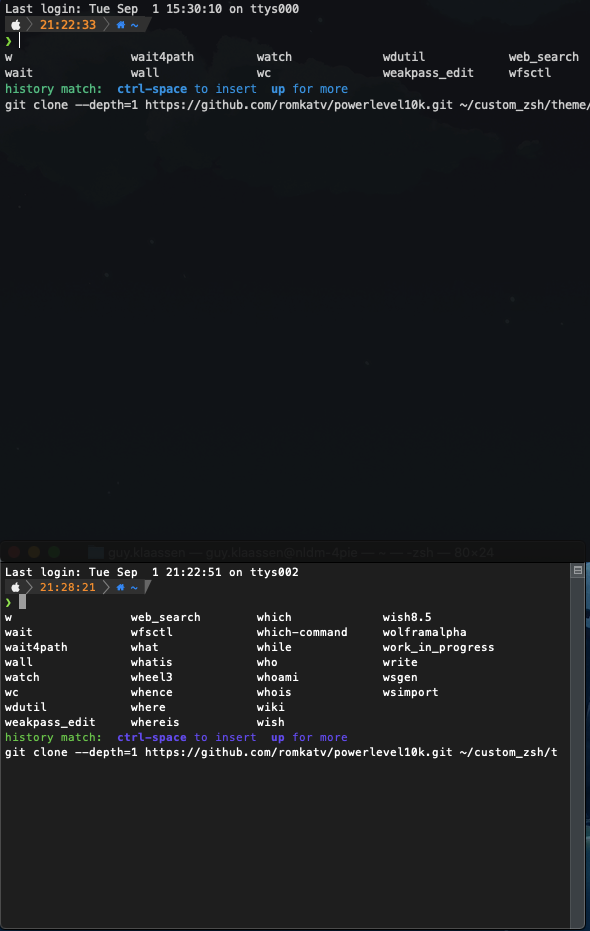
Only thing is that it now "remembers" all the autocomplete suggestions of the last character you removed.
In this case the "w" (top half is iTerm2, bottom half is regular macOS terminal:
GuyKlaassen
on 1 Sep 2020
@GuyKlaassen That is really strange and I honestly don’t know what to do about it. Might it be a bug in iTerm2?
Does the problem go away when you start typing again? Or does it persist?
marlonrichert
on 2 Sep 2020
Actually, I think what might be happening is that it doesn’t redraw the completions until you start typing again. So, the completion finishes, but it’s not shown until you type the next character.
marlonrichert
on 2 Sep 2020
As I showed in the screenshot it also happens in the regular macOS terminal, so it's not related to iTerm2.
And it does go away if I start typing again, it's just that before the change all the suggestions would go away when the prompt was empty. So the bug seems to be fixed (I also got some other errors/bugs while testing, but that might be related to other changes in the dev branch), but this (minor) visual glitch is new behaviour. I suppose it's up to you if you want to do anything about that or not :)
GuyKlaassen
on 2 Sep 2020
I cannot reproduce this new problem, not in iTerm nor in Terminal. So, it's kind of impossible for me to fix. :)
I will merge the commit to master and then close this issue, since the original problem was solved. If you can find some way for me to reproduce the new problem locally, feel free to open a new issue for it.
marlonrichert
on 2 Sep 2020
That's completely fair!
Thanks for the fix 👍
GuyKlaassen
on 2 Sep 2020
Fix merged to master.
marlonrichert
on 7 Sep 2020
Related issues
 cenk1cenk2
·
3Comments
cenk1cenk2
·
3Comments
 Dwight-D
·
5Comments
Dwight-D
·
5Comments
 paw-lu
·
3Comments
paw-lu
·
3Comments
 windowswithoutborders
·
6Comments
windowswithoutborders
·
6Comments
 PSalant726
·
8Comments
PSalant726
·
8Comments