Zsh-autocomplete: Unable to execute command first time if I type too fast.
I'm not 100% certain this is a bug with this plugin, however, even though I'm not able to reproduce it by running zsh -df, however, I am able to reproduce it with zsh-autocomplete being the only thing that is being sourced in my .zshrc.
EDIT: Done some more testing, pretty convinced this is an zsh-autocomplete issue, I think the reason I can't reproduce it with zsh -df is because the plugin unhindered by memory usage issues that don't exist when running zsh with zsh -df, so the delay is small enough that I can't type fast enough to reproduce the issue.
EDIT: One discovery I've just made is that if I press option-enter/ ⌥↩ instead of just enter, the issue never occurs.
Describe the bug
There is a period of time, perhaps 300ms, where hitting enter on a command results in iTerm2 emitting an alert and failing to execute the command. Certain commands that I tend to type quickly like g co master often require me to hit enter twice to execute them. This occurs regardless of whether aliases are being used.
The autocomplete suggestions are visible when this occurs.
I will continue to try to debug this.
To Reproduce
Find a command that you can type fast, type the command and hit enter fast enough to receive an error.
I'm not able to reproduce it by running zsh -df, however, I am able to reproduce it with zsh-autocomplete being the only thing that is being sourced in my .zshrc.
Expected behavior
Hit enter on command and it executes
Actual behavior
Hit enter on a command and it _sometimes_ doesn't execute
Desktop
- OS + distribution: macOS Catalina
- Zsh version: 5.8
- Plugin version: 3c7e78daf32f19d3091c088d041942c545d208f1
Additional context

 benwoodward
All 32 comments
@benwoodward Thanks for reporting. What happens when the command doesn't execute? It's not clear to me from your video.
 marlonrichert
on 11 Aug 2020
marlonrichert
on 11 Aug 2020
Also, which prompt/theme are you using? Does the problem occur when you don't use it?
marlonrichert
on 11 Aug 2020
When it doesn't execute iTerms makes an alert noise and flashes the bell icon (I think this signifies bad input).
I'm using powerlevel10k, however, I have tried disabling it and that didn't resolve the issue.
benwoodward
on 11 Aug 2020
What do you mean with "doesn't execute"? Do you stay on the same prompt? Do you get a new prompt but without the output of the command? In your video, the command seems to execute successfully before time, but now and then, there's a short delay before seeing output. It would help if your video would show when exactly you are pressing enter and how many times.
Having said that, I cannot reproduce this in any way. It would help if you could narrow it down somehow.
marlonrichert
on 11 Aug 2020
Does #62 look to you like it's the same issue?
marlonrichert
on 11 Aug 2020
By _not executing_, I mean that I can't submit the prompt so to speak, so yes I am on the same prompt.
When you see the bell on screen, that's when I press enter the first time, and iTerm is not executing the command and making an error sound. Then I press enter again and the command executes creating a new prompt.

benwoodward
on 11 Aug 2020
It really seems like what's happening is that because the plugin overrides _enter_, there's a period of time where the plugin hasn't completed loading the suggestions but it is also listening for the _enter_ keypress.
benwoodward
on 11 Aug 2020
Thanks for the clarification. 👍🏽 That's interesting. zsh-autocomplete does not explicitly listen to enter.
Does this same problem occur for you when you use macOS's built-in Terminal app?
marlonrichert
on 11 Aug 2020
Does this same problem occur for you when you use macOS's built-in Terminal app?
Just tested it, yes it does.
benwoodward
on 11 Aug 2020
Can you check out the dev branch? Does it happen there?
If so, can you try the following?
add-zsh-hook -d preexec .autocomplete.async.stop-pending-request
Does it make a difference?
marlonrichert
on 11 Aug 2020
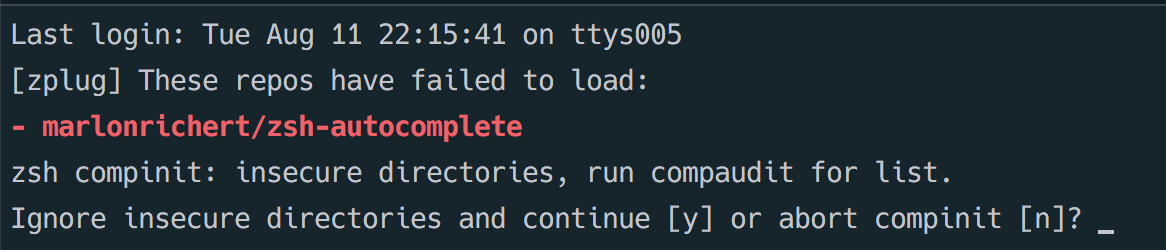
Have tried the dev branch and couldn't get it work
benwoodward
on 11 Aug 2020
benwoodward
on 11 Aug 2020
I am able to reproduce it with zsh-autocomplete being the only thing that is being sourced in my .zshrc.
@benwoodward Can you please show me that version of your .zshrc, where zsh-autocomplete is the only thing being sourced?
marlonrichert
on 11 Aug 2020
@benwoodward I fixed the problem on the dev branch. Please update and try again.
marlonrichert
on 11 Aug 2020
I was able to install the dev branch, thanks. I had to entirely remove the plugin with zplug clean before the suggestions worked.
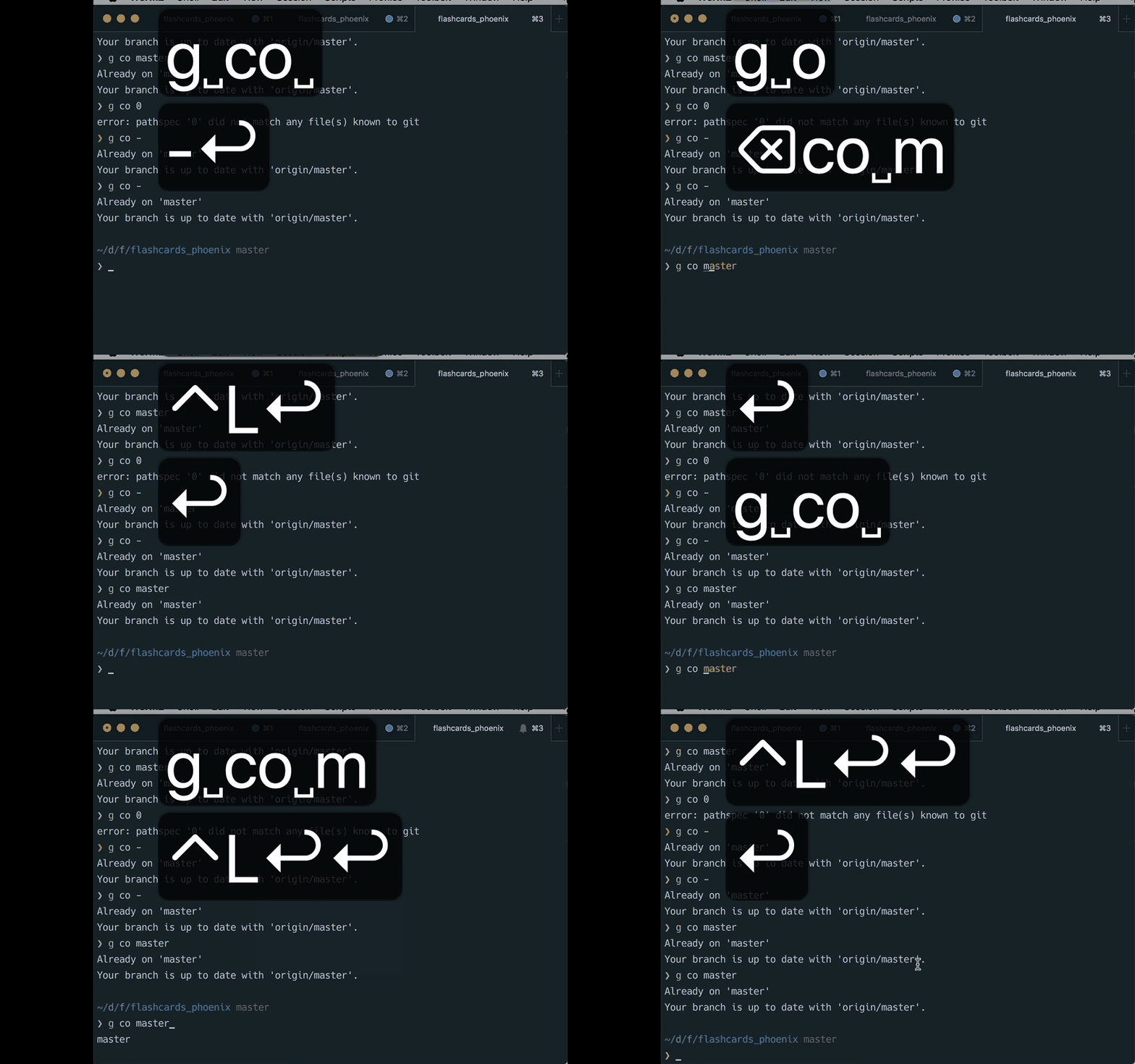
Unfortunately I'm still experiencing the issue. I've made a new gif and slowed it down so it's easier to analyse. I managed to hit enter twice before successfully executing the prompt command on one attempt, meaning I had to press enter three times to execute the prompt.
benwoodward
on 12 Aug 2020
@benwoodward After your shell has started (so, not in your .zshrc), can you do the following and see if that helps?
add-zsh-hook -d preexec .autocomplete.async.stop-pending-request
I pasted that into the shell and I'm still experiencing the issue.
benwoodward
on 13 Aug 2020
However.. it could be my imagination, but the behaviour does seem slightly different. The plugin renders a list of suggestions based on what's been typed, as you type the suggestion list is updated. What seems to happen now is that the issue doesn't occur on the first list, but if I keep typing a second list is rendered and if I hit enter _juust_ after this second list is rendered then I experience the issue.
benwoodward
on 13 Aug 2020
Just been typing commands for a few minutes trying to reproduce and can no longer reproduce, kinda seems like the issue maybe goes away after stuff is cached?
benwoodward
on 13 Aug 2020
Actually experiencing it again, but only on g d, I'm guessing because this is the only command I can type fast enough to trigger the issue
benwoodward
on 13 Aug 2020
Experienced it again, but on a longer command. Seems that the issue occurs on commands that haven't already been typed. 🤔
benwoodward
on 13 Aug 2020
@benwoodward I just noticed in your vid that you’re using aliases. Does it happen only when you use aliases?
And does it happen, too, if you type only last letter or two quickly and press enter? Or do you need to type the whole command quickly?
marlonrichert
on 13 Aug 2020
I just noticed in your vid that you’re using aliases. Does it happen only when you use aliases?
I have tested that and it is not limited to aliases
And does it happen, too, if you type only last letter or two quickly and press enter? Or do you need to type the whole command quickly?
I have tested this, and it seems to occur when a new list of suggestions is loaded, if I press enter within a short enough time of a new list of suggestions being shown I encounter the issue. So for example, if I type git checkout fix/ I'll see a list of suggestions that consists of all my branches beginning with fix/, if I delete fix/ and type chore/ (meaning that the command has changed from git checkout fix/ to git checkout chore/ the list will be repopulated with a list of suggestions that includes all my branches that start with chore/ .. there's a short period of time during and just after the new list has been populated where hitting enter causes the issue.
The issue doesn't occur if entering an erroneous command, only if entering a command that matches one of the suggestions in the list.
benwoodward
on 13 Aug 2020
Just tried again, and it seems like it only occurs if I hit enter just _before_ a new list of suggestions appears. It happens so quickly that it's difficult to feel certain about how this happens. If you want we could do a screenshare so you can see what's happening.
benwoodward
on 13 Aug 2020
@benwoodward I just noticed that you're using zsh-autosuggestions. Does the problem also occur without it? It seems to me that it happens whenever you press ⌃L to accept an autosuggestion.
marlonrichert
on 13 Aug 2020
For what it's worth, I tried it now with zsh-autosuggestions enabled, but I still cannot reproduce it.
marlonrichert
on 13 Aug 2020
Just removed zsh-autosuggestions with zplug clean, reloaded the shell and tested, error still occurs. It seems to happen when there's an existing list of suggestions and I hit enter just as the new one is loaded.
benwoodward
on 14 Aug 2020
I just recreated my .zshrc from scratch one config at a time but this time I used zinit instead of zplug and the issue has completely gone away.
My shell is noticeably snappier after switching to zinit, so I'm putting this down to my previous shell config leading to too much stuff being stored in memory which caused delays between functions. Or something to that effect.
Thanks for looking into this. I'm not gonna keep this issue open because getting rid of zplug seems to have fixed it.
Sent with GitHawk
benwoodward
on 14 Aug 2020
Great to hear you managed to solve it! 👏🏽🥳
marlonrichert
on 14 Aug 2020
Thanks for this awesome plugin!
benwoodward
on 14 Aug 2020
@benwoodward But by the way, I could look into making zsh-autocomplete faster with zplug. I’ve done the same for zinit.
marlonrichert
on 14 Aug 2020
Thanks, however, I'm not attached to using zplug, but if someone else runs into this issue, hopefully this gives you an idea of what's causing the issue.
benwoodward
on 14 Aug 2020
Related issues
 cenk1cenk2
·
3Comments
cenk1cenk2
·
3Comments
 paw-lu
·
4Comments
paw-lu
·
4Comments
 jcassee
·
7Comments
jcassee
·
7Comments
 pcjmfranken
·
5Comments
pcjmfranken
·
5Comments
 Dwight-D
·
5Comments
Dwight-D
·
5Comments